Windows Update patch failed

SevenOfNine

New member
Member
Local time
3:13 PM
Messages
83
A Windows Update patch just failed on a friend's Win7 SP1 system. I'm trying to help out.

This patch Tuesday, they had 10 important security updates. On their system, 9 of the 10 installed fine, but 1 of them failed during installation. It is listed as "Failed" in the list of updates.

Clearing the IE cache, rebooting, and checking for new updates does not show the update in the list of available updates within Windows Update.

Now what should I tell them to do?
 

My Computer

Computer type
PC/Desktop
OS
Windows 7 64-bit
Please follow the Windows Update Posting Instructions and post the requested data

If the file is too large (8MB compressed), remove the older CBSPersist cab files until the final file is below the limit - you can always post them separately after zipping them. (the forum doesn't allow the upload of bare CAB files, for a number of reasons)

Please also post the C:\Windows\windowsudpate.log file
 

My Computer

Computer type
Laptop
Computer Manufacturer/Model Number
Asus K52F or Lenovo B51-80
OS
Win 7 x64 Home Premium (and x86 VirtualBox VM)/Win10
CPU
i3 370M/i7 6500U
Motherboard
Asus/Lenovo
Memory
8GB - finally :)/8GB
Graphics Card(s)
it's an i3, dude!/dual Intel&nVidia
Sound Card
onboard
Monitor(s) Displays
15.6" built-in
Screen Resolution
1366x768/1920x1080
Hard Drives
750GB Seagate internal
Sundry external drives attached to other computers on the local network
1TB SSD on the Lenovo
PSU
n/a
Internet Speed
as much as I can get - usually on a dongle/phone, so <1MB/s
Antivirus
MSE/Defender
Browser
IE11/12/Edge/Chrome/FF(if I must)
Thanks. I'll provide info as I get it.

I had them run sfc from an elevated command prompt, and it found no problems.

The error code is 80070020. It only happened one time when they tried to install KB3067505 as part of the patch Tuesday updates. After that failure, the update no longer appears in the list of available updates, so further errors are not possible (the update is not shown, so it cannot be selected, so there can be no new error).

As for the logs, what private information is in them, and what needs to be removed before uploading them?

Regarding SURT, the current version is from October 2014, correct? Is it still safe to run?
 

My Computer

Computer type
PC/Desktop
OS
Windows 7 64-bit
There is no private information in any of the logs in the CBS folder.

Yep, the SURT only gets updated occasionally, but that's the latest version, and will still function as well as it ever did (and will still find problems with later updates, but will be unable to fix them.
 

My Computer

Computer type
Laptop
Computer Manufacturer/Model Number
Asus K52F or Lenovo B51-80
OS
Win 7 x64 Home Premium (and x86 VirtualBox VM)/Win10
CPU
i3 370M/i7 6500U
Motherboard
Asus/Lenovo
Memory
8GB - finally :)/8GB
Graphics Card(s)
it's an i3, dude!/dual Intel&nVidia
Sound Card
onboard
Monitor(s) Displays
15.6" built-in
Screen Resolution
1366x768/1920x1080
Hard Drives
750GB Seagate internal
Sundry external drives attached to other computers on the local network
1TB SSD on the Lenovo
PSU
n/a
Internet Speed
as much as I can get - usually on a dongle/phone, so <1MB/s
Antivirus
MSE/Defender
Browser
IE11/12/Edge/Chrome/FF(if I must)
Thanks again for helping. :)

I've attached the requested files. They are in a zip archive attached to this post (technically a 7z file renamed to zip to accommodate this forum). The pw is 'sevenforums-upd'.

SURT created a log file that concludes: "No errors detected"

Besides that, SURT did not do anything visible. Is there any cleanup required after running it?

When it finished running, SURT said it was "installed"; what does that really mean? Was anything actually installed by it?

Nothing has changed when running Windows Update on his system. It acts like KB3067505 no longer exists, and does not offer it for installation.

It would be good to have Windows Update fixed so that it installs it directly. I'm tempted to just manually install that patch for him, but something seems to be amiss with his Windows Update.

Hopefully someone here can figure it out and explain what went wrong with his Windows Update and how to fix it.
 

My Computer

Computer type
PC/Desktop
OS
Windows 7 64-bit
If anyone needs anything else in order to help, just let me know!
 

My Computer

Computer type
PC/Desktop
OS
Windows 7 64-bit
The zip file you posted appears to have been encrypted with a password using 7zip.
As a result, there's no way I can open it :(

the SURT is a collection of files, and not an update. It doesn't actually install anything, but it uses the Windows Installer to scour the machine for errors in a number of places in the registry, and also for missing Update files. The reason it's so large is that it has a huge number of replacement files for the more common faults in Windows Update.
There is nothing to uninstall, and the tool can be run as often as you like. There is no cleanup necessary after using it.
 

My Computer

Computer type
Laptop
Computer Manufacturer/Model Number
Asus K52F or Lenovo B51-80
OS
Win 7 x64 Home Premium (and x86 VirtualBox VM)/Win10
CPU
i3 370M/i7 6500U
Motherboard
Asus/Lenovo
Memory
8GB - finally :)/8GB
Graphics Card(s)
it's an i3, dude!/dual Intel&nVidia
Sound Card
onboard
Monitor(s) Displays
15.6" built-in
Screen Resolution
1366x768/1920x1080
Hard Drives
750GB Seagate internal
Sundry external drives attached to other computers on the local network
1TB SSD on the Lenovo
PSU
n/a
Internet Speed
as much as I can get - usually on a dongle/phone, so <1MB/s
Antivirus
MSE/Defender
Browser
IE11/12/Edge/Chrome/FF(if I must)
Thanks for the description of SURT... much appreciated!

The pw for the file is 'sevenforums-upd'.
 

My Computer

Computer type
PC/Desktop
OS
Windows 7 64-bit
I can't actually see any significant errors in any of the uploaded files.

Which update was it that 'disappeared'? - it may simply be that it was an older one that has been superceded and is now irrelevant.
 

My Computer

Computer type
Laptop
Computer Manufacturer/Model Number
Asus K52F or Lenovo B51-80
OS
Win 7 x64 Home Premium (and x86 VirtualBox VM)/Win10
CPU
i3 370M/i7 6500U
Motherboard
Asus/Lenovo
Memory
8GB - finally :)/8GB
Graphics Card(s)
it's an i3, dude!/dual Intel&nVidia
Sound Card
onboard
Monitor(s) Displays
15.6" built-in
Screen Resolution
1366x768/1920x1080
Hard Drives
750GB Seagate internal
Sundry external drives attached to other computers on the local network
1TB SSD on the Lenovo
PSU
n/a
Internet Speed
as much as I can get - usually on a dongle/phone, so <1MB/s
Antivirus
MSE/Defender
Browser
IE11/12/Edge/Chrome/FF(if I must)
Maybe open Installed Updates and do a search for that KB3067505.
It may have already installed.
The patch is for Remote access, were you remotely logged in when the patch was applied.
 

My Computer

Computer type
PC/Desktop
Computer Manufacturer/Model Number
Owner Builder
OS
Windows 7 Ultimate x64 SP1 OEM
CPU
Intel i7 3930K
Motherboard
Asus X79 Deluxe
Memory
Kingston Genesis KHX2133C11D3K4/32G
Graphics Card(s)
Asus RTX 2070 Ti Turbo fan series
Sound Card
Creative Sound Blaster ZXR
Monitor(s) Displays
Samsung U32J39 UHD
Screen Resolution
3840 x 2160
Hard Drives
Samsung 860 Pro 256 GB
OCZ Vertex 4 512GB
Western Digital Black 4TB
PSU
Corsair AX850
Case
Gigabyte
Cooling
Push - Pull 120 mm Noctua PWM, Scythe Big Shuriken 2 Rev. B
Keyboard
Logitech K800 Backlit
Mouse
Logitech MX2 Master
Internet Speed
NBN 25 Mbps
Antivirus
Kaspersky Internet Security
Browser
Mozilla FireFox
Other Info
TP-Link Archer VR600v
Sennheiser TR220 WiFi Head Phones.
I can't actually see any significant errors in any of the uploaded files.

Which update was it that 'disappeared'? - it may simply be that it was an older one that has been superceded and is now irrelevant.

It is KB3067505. It was part of patch Tuesday (2015/07), but it failed to install. Then it immediately disappeared from the list of available updates.

It's like Windows Update thinks it was installed, but it was not.
 

My Computer

Computer type
PC/Desktop
OS
Windows 7 64-bit
Maybe open Installed Updates and do a search for that KB3067505.
It may have already installed.

Good idea. It's definitely not installed according to a search of Installed Updates.

The patch is for Remote access, were you remotely logged in when the patch was applied.
Great question. The answer is "no".
 

My Computer

Computer type
PC/Desktop
OS
Windows 7 64-bit
Hmmm - it looks almost as if the download failed.

Please open an Elevated Command Prompt, and run the following command - post the results.

DIR C:\windows\SoftwareDistribution\Download\a608878bd782d0ad446d9f486cf0b5a9


Here are some instructions to make life easier :)
1) To open an Elevated Command Prompt Window (the ECP window), click on Start, All Programs, Accessories – then right-click on Command Prompt, and select Run as Administrator. Accept the UAC prompt.
2) To run the commands easier, highlight the block of commands, and right-click on the highlight – select Copy. In the CP Window, click on the black/white icon at top left – select Paste. The commands will run but may not complete the last command, so hit the Enter Key once.
3) To copy the results... click on the Black/White icon in the top left, and select Edit... 'Select All', and hit the Enter key - then use Ctrl+V or r-click+Paste to paste it into your response.
 

My Computer

Computer type
Laptop
Computer Manufacturer/Model Number
Asus K52F or Lenovo B51-80
OS
Win 7 x64 Home Premium (and x86 VirtualBox VM)/Win10
CPU
i3 370M/i7 6500U
Motherboard
Asus/Lenovo
Memory
8GB - finally :)/8GB
Graphics Card(s)
it's an i3, dude!/dual Intel&nVidia
Sound Card
onboard
Monitor(s) Displays
15.6" built-in
Screen Resolution
1366x768/1920x1080
Hard Drives
750GB Seagate internal
Sundry external drives attached to other computers on the local network
1TB SSD on the Lenovo
PSU
n/a
Internet Speed
as much as I can get - usually on a dongle/phone, so <1MB/s
Antivirus
MSE/Defender
Browser
IE11/12/Edge/Chrome/FF(if I must)
Hmmm - it looks almost as if the download failed.

Please open an Elevated Command Prompt, and run the following command - post the results.

DIR C:\windows\SoftwareDistribution\Download\a608878bd782d0ad446d9f486cf0b5a9

Thanks again for all your help! :)

Here's a dir and a dir /a/s of that folder:

C:\>DIR C:\windows\SoftwareDistribution\Download\a608878bd782d0ad446d9f486cf0b5a9

Directory of C:\windows\SoftwareDistribution\Download\a608878bd782d0ad446d9f486cf0b5a9

07/15/2015 12:11 AM <DIR> .
07/15/2015 12:11 AM <DIR> ..
07/15/2015 12:10 AM <DIR> amd64_microsoft-windows-smbminirdr_31bf38
56ad364e35_6.1.7601.18909_none_ddc734d267b06a63
0 File(s) 0 bytes
3 Dir(s)

C:\>DIR C:\windows\SoftwareDistribution\Download\a608878bd782d0ad446d9f486cf0b5a9 /a/s

Directory of C:\windows\SoftwareDistribution\Download\a608878bd782d0ad446d9f486cf0b5a9

07/15/2015 12:11 AM <DIR> .
07/15/2015 12:11 AM <DIR> ..
07/15/2015 12:10 AM <DIR> amd64_microsoft-windows-smbminirdr_31bf38
56ad364e35_6.1.7601.18909_none_ddc734d267b06a63
0 File(s) 0 bytes

Directory of C:\windows\SoftwareDistribution\Download\a608878bd782d0ad446d9f486
cf0b5a9\amd64_microsoft-windows-smbminirdr_31bf3856ad364e35_6.1.7601.18909_none_
ddc734d267b06a63

07/15/2015 12:10 AM <DIR> .
07/15/2015 12:10 AM <DIR> ..
06/27/2015 09:46 AM 159,232 mrxsmb.sys
1 File(s) 159,232 bytes

Total Files Listed:
1 File(s) 159,232 bytes
5 Dir(s)
 

My Computer

Computer type
PC/Desktop
OS
Windows 7 64-bit

My Computer

Computer type
Laptop
Computer Manufacturer/Model Number
Asus K52F or Lenovo B51-80
OS
Win 7 x64 Home Premium (and x86 VirtualBox VM)/Win10
CPU
i3 370M/i7 6500U
Motherboard
Asus/Lenovo
Memory
8GB - finally :)/8GB
Graphics Card(s)
it's an i3, dude!/dual Intel&nVidia
Sound Card
onboard
Monitor(s) Displays
15.6" built-in
Screen Resolution
1366x768/1920x1080
Hard Drives
750GB Seagate internal
Sundry external drives attached to other computers on the local network
1TB SSD on the Lenovo
PSU
n/a
Internet Speed
as much as I can get - usually on a dongle/phone, so <1MB/s
Antivirus
MSE/Defender
Browser
IE11/12/Edge/Chrome/FF(if I must)
Thanks for going the extra step!

You bet. Thanks for looking it over!

That looks normal to me - the file size is correct, at least, as are the folder and file names.

I don't really know what to recommend, apart from a full reset of WU.
http://www.sevenforums.com/tutorials/91738-windows-update-reset.html

I'd hate to do a full reset of WU, but it may be necessary.

The only thing that was unusual, is that when he was downloading/installing the Patch Tuesday updates, he would click the left shift key once every few minutes to keep the screen saver from coming on. At one point, the Sticky Keys notification came up (it comes up when you press the left shift keys a few times), and he dismissed that notification. I can't imagine that would cause a problem... what do you think?

I noticed in the uploaded log files that there were quite a few errors. Searching for 'fail' or 'error' in those logs comes up with plenty of hits. Is that normal?

BTW, what tool/editor did you use to view the logs?
 

My Computer

Computer type
PC/Desktop
OS
Windows 7 64-bit
I can't see that causing a problem either.
There's no real drawbacks to a full reset of Windows Update, apart from a lengthy period on the first Check for updates afterwards.
Yes, you lose the Update History, but you still have all updates installed, and listed in the Install Updates listing.
 

My Computer

Computer type
Laptop
Computer Manufacturer/Model Number
Asus K52F or Lenovo B51-80
OS
Win 7 x64 Home Premium (and x86 VirtualBox VM)/Win10
CPU
i3 370M/i7 6500U
Motherboard
Asus/Lenovo
Memory
8GB - finally :)/8GB
Graphics Card(s)
it's an i3, dude!/dual Intel&nVidia
Sound Card
onboard
Monitor(s) Displays
15.6" built-in
Screen Resolution
1366x768/1920x1080
Hard Drives
750GB Seagate internal
Sundry external drives attached to other computers on the local network
1TB SSD on the Lenovo
PSU
n/a
Internet Speed
as much as I can get - usually on a dongle/phone, so <1MB/s
Antivirus
MSE/Defender
Browser
IE11/12/Edge/Chrome/FF(if I must)
I can't actually see any significant errors in any of the uploaded files.

Which update was it that 'disappeared'? - it may simply be that it was an older one that has been superceded and is now irrelevant.

It is KB3067505. It was part of patch Tuesday (2015/07), but it failed to install. Then it immediately disappeared from the list of available updates.

It's like Windows Update thinks it was installed, but it was not.

You could have a look in C:\System32\drivers if those SMB .sys files exist

It is rated Important and i doubt Windows Update skip that security update that easily.

Also try as stand-alone installer HERE, it will tell you if it has already been installed.

It doesn't fix the Windows Update prob, though! But worth a try before a reset.
 

Attachments

  • Capture2.PNG
    Capture2.PNG
    5.4 KB · Views: 16

My Computer

Computer type
PC/Desktop
Computer Manufacturer/Model Number
Custom Build
OS
Windows 7 Professional SP1 - x64 [Non-UEFI Boot]
CPU
Ivy Bridge Core i5 3570K (Delidded)
Motherboard
Asus P8Z77-V LE PLUS
Memory
G.Skill "Ares" DDR3 PC3-12800 - 1600MHz (16Gb)
Graphics Card(s)
Asus Dual-RX480-O4G
Sound Card
Creative Sound Blaster Z w/5.1 sound system
Monitor(s) Displays
Asus IPS 23"
Screen Resolution
16/9
Hard Drives
Internal:
500Go Sata 6Gb/s (x2)
500Go Sata 3Gb/s (x2)
SSD 60Go Sata 6Gb/s
PSU
In Win C 900W Series 80+ Platinum
Case
Thermaltake Chaser A71
Cooling
Custom Water Cooling Loop
Keyboard
Cooler Master QuickFire XTi
Mouse
Razer Imperator 2012 (4G)
Antivirus
MSE
Browser
IE 11.0.xxx Rtm
Other Info
"Raid0" with Intel Smart Response Technology (HDD/SSD)
You could have a look in C:\System32\drivers if those SMB .sys files exist

It is rated Important and i doubt Windows Update skip that security update that easily.

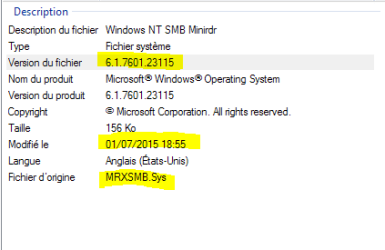
Thanks for posting the file details!

The version of the SMD Minirdr installed is 6.1.7601.18912, which appears to be an old version, based on the file details you provided.

The fact that Windows Update cannot figure this out and update the driver is most concerning.
 

My Computer

Computer type
PC/Desktop
OS
Windows 7 64-bit
You could have a look in C:\System32\drivers if those SMB .sys files exist

It is rated Important and i doubt Windows Update skip that security update that easily.

Thanks for posting the file details!

The version of the SMD Minirdr installed is 6.1.7601.18912, which appears to be an old version, based on the file details you provided.

The fact that Windows Update cannot figure this out and update the driver is most concerning.

I noticed that the timestamp of the driver is a bit curious.

If I'm converting international date formats correctly, your driver is version 6.1.7601.23115, dated July 1, 2015 at 6:55pm.

The driver on the system showing the problem is version 6.1.7601.18912, dated July 1 2015 at 12:27pm.

I can't imagine that Windows Update only looks at timestamps and ignores version numbers, but given that the dates are identical (albeit with different times), it makes me wonder.

If anyone else can post version info and date/timestamps for mrxsmb.sys, that would be most helpful.

The system with the problem is running Win7 SP1 64-bit. What is the system running from which you generated that screenshot?
 

My Computer

Computer type
PC/Desktop
OS
Windows 7 64-bit
Back
Top