

Windows Update Posting Instructions

Information
This is a set of posting instructions to use so that you can get better help here at SevenForums.com when you have a Windows Update issue.
Warning
Never, under any circumstances, follow the instructions posted to another user who appears to be having the same problem as you (unless specifically instructed to). Windows Update problems are very computer specific and following instructions made to another user will probably do more harm than good.
1. System Update Readiness Tool (SURT)
- Under Download the System Update Readiness Tool, download the appropriate version of the SURT for your version Windows, and save the file to your Desktop.
NOTE: It is likely that we will need to run this file multiple times, so make sure you keep it.
System Update Readiness Tool fixes Windows Update errors in Windows 8, Windows 7, Windows Vista, Windows Server 2008 R2, and Windows Server 2008 - Double-click on the file to install it.
- Leave it to run uninterrupted. It may appear to freeze or hang, but this is perfectly normal. If it still hasn't finished after a few hours, then notify us in your post.
- For how to run, see: sfc /scannow
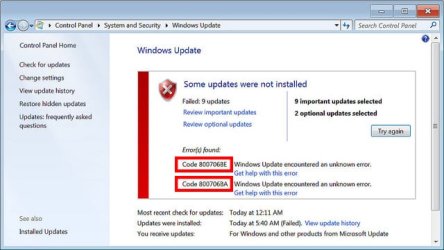
In your post, you need to specify what error codes/messages you are receiving when an update fails. The screenshot below shows where error codes are displayed:
The steps that we have done have limited automated fixing capabilities, however they are excellent diagnostic tools and generate very informative logs.
- Navigate to the following folder:C:\Windows\Logs
- Right-click and on the CBS folder and select Copy.
- Minimise all open windows and right-click on your Desktop, then select Paste.
- Right-click on the CBS folder on your Desktop and select Send to > Compressed (zipped) folder.
- A file, CBS.zip should appear on your Desktop.
Please do not post in another thread saying that you require assistance, it makes things very confusing. If you have a problem that you would like help with, please start a new thread of your own!
Your post should include the error codes from step #3 and the CBS.zip file created in step #4. Here's how to attach it to your post:
http://www.sevenforums.com/tutorials/9733-screenshots-files-upload-post-seven-forums.html
or upload them to a file sharing service such as dropbox, onedrive, google drive and post a link.
Now the rest is down to us!

Tom
Last edited by a moderator:
My Computer
At a glance
Windows 8.1 Pro x64Intel i7 3770K @4.5GHzCorsair Vengeance 2x4GB DDR3 1600MHz Low Prof...Gigabyte Radeon HD 7850 (2GB GDDR5)
- Computer type
- PC/Desktop
- Computer Manufacturer/Model Number
- Build #1
- OS
- Windows 8.1 Pro x64
- CPU
- Intel i7 3770K @4.5GHz
- Motherboard
- ASUS P8Z77-V PRO
- Memory
- Corsair Vengeance 2x4GB DDR3 1600MHz Low Profile (White)
- Graphics Card(s)
- Gigabyte Radeon HD 7850 (2GB GDDR5)
- Sound Card
- Integrated on motherboard
- Monitor(s) Displays
- 23" LG LCD/LED IPS
- Screen Resolution
- 1920*1080
- Hard Drives
- Samsung EVO 128GB SSD
Seagate Barracuda 2GB 7200rpm
2x Seagate FreeAgent [500gb]
- PSU
- Corsair TX650W V2 (80+ Bronze)
- Case
- NZXT Phantom 410 White
- Cooling
- Corsair H100 Water Cooler
- Keyboard
- Microsoft Desktop 2000 Wireless Keyboard
- Mouse
- Microsoft Desktop 2000 Wireless Mouse
- Internet Speed
- 95 Mb/s Download 70 Mb/s Upload
- Antivirus
- MSE + MBAM Pro
- Browser
- Firefox


