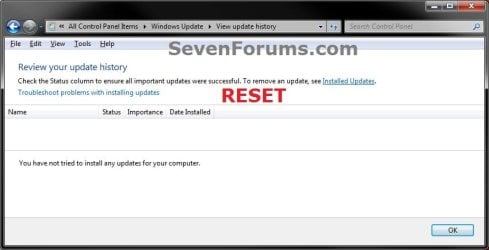
Windows Update - Reset

How to Reset Windows Update in Vista, Windows 7, and Windows 8


   Information
This will show you how to reset Windows Update view update history, and how to reset and re-register Windows Update Components if you are having a problem updating with Windows Update.


OPTION ONE

To Only Reset Windows Update History


   Note
Resetting Windows Update using this option will clear the view update history details list (cache).

This will not actually uninstall any of your currently installed Windows Update. They will just not be listed anymore. Any new Windows Update installed after the reset will show up in the view update history list as normal though.

1. Click/tap on the Download button below to download this file below.
Reset_Windows_Update_History.bat


Download


2. Save the .bat file to your Desktop.

3. Right click or press and hold on the downloaded .bat file, and click/tap on Run as administrator.

4. If prompted by UAC click/tap on Run, then Yes/Continue (if administrator) or type in administrator's password (if standard user).

5. You will now see an elevated command prompt open and run. When it's finished, it will close automatically.

6. If opened, close and reopen Windows Update to verify that it has been reset.
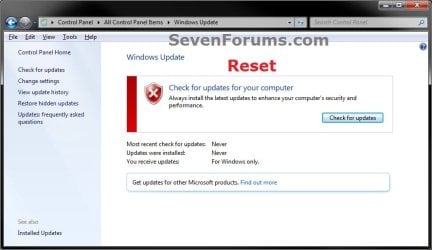
Reset.jpg

Update_History.jpg

7. Resetting the Windows Update history will also restore the default language packs being listed in Windows Upate again in the Windows 7 Ultimate and Enterprise editions after you check for updates next.
Language_Packs.jpg


OPTION TWO

To Reset and Re-register Windows Update Components


NOTE: This option is the Windows version of: How do I reset Windows Update components?. It will reset Windows Update Components and re-register the BITS files and the Windows Update files to help fix Windows Update errors. This option will not clear the view update history details list as it does in OPTION ONE above.
1. Click/tap on the Download button below to download this file below.
Reset_Reregister_Windows_Update_Components.bat


Download


2. Save the .bat file to your Desktop.

3. Right click or press and hold on the downloaded .bat file, and click/tap on Run as administrator.

4. If prompted by UAC click on Run, then Yes/Continue (if administrator) or type in administrator's password (if standard user).

5. You will now see an elevated command prompt open and run. When it's finished, it will close automatically.

6. Restart the computer afterwards to apply.

7. If this still does not help, then run the Microsoft Fix it tool here:
How do I reset Windows Update components?

See also: Unable to install updates in Windows Vista, Windows 7, Windows Server 2008 and Windows Server 2008 R2


OPTION THREE

To Reset and Re-register Windows Update Components AND Reset Update History in One Easy Click


   Note
This option combines OPTION ONE and OPTION TWO above in one .bat file.

1. Click/tap on the Download button below to download this file below.
Reset_Windows_Update_Full.bat


Download


2. Save the .bat file to your Desktop.

3. Right click or press and hold on the downloaded .bat file, and click/tap on Run as administrator.

4. If prompted by UAC click/tap on Run, then Yes/Continue (if administrator) or type in administrator's password (if standard user).

5. You will now see an elevated command prompt open and run. When it's finished, it will close automatically.

6. Restart the computer afterwards to apply.

7. If this still does not help, then run the Microsoft Fix it tool here:

Download


How do I reset Windows Update components?

See also: Unable to install updates in Windows Vista, Windows 7, Windows Server 2008 and Windows Server 2008 R2
That's it,
Shawn


Attachments

Last edited:
You're most welcome nrimawi. :)
 

My Computer

Computer type
PC/Desktop
Computer Manufacturer/Model Number
Self built custom
OS
64-bit Windows 11 Pro for Workstations
CPU
Intel i7-8700K OC'd to 5 GHz
Motherboard
ASUS ROG Maximus XI Formula Z390
Memory
64 GB (4x16GB) G.SKILL TridentZ RGB DDR4 3600 MHz
Graphics Card(s)
ASUS ROG-STRIX-GTX1080TI-O11G-GAMING
Sound Card
Integrated
Monitor(s) Displays
2 x Samsung Odyssey G7 27"
Screen Resolution
2560x1440
Hard Drives
1TB Samsung 990 PRO M.2,
4TB Samsung 990 PRO PRO M.2,
TerraMaster F8 SSD Plus NAS
PSU
Seasonic Prime Titanium 850W
Case
Thermaltake Core P3
Cooling
Corsair Hydro H115i
Keyboard
Logitech wireless K800
Mouse
Logitech MX Master 4
Internet Speed
2 Gb/s Download and 100 Mb/s Upload
Antivirus
Malwarebyte Anti-Malware Premium
Browser
Google Chrome
Other Info
Logitech Z625 speaker system,
Logitech BRIO 4K Pro webcam,
HP Color LaserJet Pro MFP M477fdn,
APC SMART-UPS RT 1000 XL - SURT1000XLI,
Galaxy S23 Plus phone
Thank U Mr Brink.
Thank u for your useful guide and bat file at option three has done magic to my seven32-HP630. NowI am able toupdate. This is a very useful file and i am preserving it for future incase ........ if not for me, my be my friends ??

Thank u again. Please keepup such good posts.
 

My Computer

Computer Manufacturer/Model Number
Assmbled
OS
XP-SP3
CPU
Core2Duo
Motherboard
Assus
Memory
2x 1 gb tascand
Graphics Card(s)
intel
Sound Card
inbuild
Monitor(s) Displays
hp TFT
Hard Drives
seagate- 500gb
PSU
Intex
Case
Iball
Cooling
Internal-Fan
You're most welcome Kalingaratna, and welcome to Seven Forums. :)
 

My Computer

Computer type
PC/Desktop
Computer Manufacturer/Model Number
Self built custom
OS
64-bit Windows 11 Pro for Workstations
CPU
Intel i7-8700K OC'd to 5 GHz
Motherboard
ASUS ROG Maximus XI Formula Z390
Memory
64 GB (4x16GB) G.SKILL TridentZ RGB DDR4 3600 MHz
Graphics Card(s)
ASUS ROG-STRIX-GTX1080TI-O11G-GAMING
Sound Card
Integrated
Monitor(s) Displays
2 x Samsung Odyssey G7 27"
Screen Resolution
2560x1440
Hard Drives
1TB Samsung 990 PRO M.2,
4TB Samsung 990 PRO PRO M.2,
TerraMaster F8 SSD Plus NAS
PSU
Seasonic Prime Titanium 850W
Case
Thermaltake Core P3
Cooling
Corsair Hydro H115i
Keyboard
Logitech wireless K800
Mouse
Logitech MX Master 4
Internet Speed
2 Gb/s Download and 100 Mb/s Upload
Antivirus
Malwarebyte Anti-Malware Premium
Browser
Google Chrome
Other Info
Logitech Z625 speaker system,
Logitech BRIO 4K Pro webcam,
HP Color LaserJet Pro MFP M477fdn,
APC SMART-UPS RT 1000 XL - SURT1000XLI,
Galaxy S23 Plus phone
Thank you for these bat files that helped me.
I lost the Windows Update Service and with .bat option two, my problem solved :D
 

My Computer

OS
Windows 7
You're most welcome Raya. I'm glad that it was able to help. :)
 

My Computer

Computer type
PC/Desktop
Computer Manufacturer/Model Number
Self built custom
OS
64-bit Windows 11 Pro for Workstations
CPU
Intel i7-8700K OC'd to 5 GHz
Motherboard
ASUS ROG Maximus XI Formula Z390
Memory
64 GB (4x16GB) G.SKILL TridentZ RGB DDR4 3600 MHz
Graphics Card(s)
ASUS ROG-STRIX-GTX1080TI-O11G-GAMING
Sound Card
Integrated
Monitor(s) Displays
2 x Samsung Odyssey G7 27"
Screen Resolution
2560x1440
Hard Drives
1TB Samsung 990 PRO M.2,
4TB Samsung 990 PRO PRO M.2,
TerraMaster F8 SSD Plus NAS
PSU
Seasonic Prime Titanium 850W
Case
Thermaltake Core P3
Cooling
Corsair Hydro H115i
Keyboard
Logitech wireless K800
Mouse
Logitech MX Master 4
Internet Speed
2 Gb/s Download and 100 Mb/s Upload
Antivirus
Malwarebyte Anti-Malware Premium
Browser
Google Chrome
Other Info
Logitech Z625 speaker system,
Logitech BRIO 4K Pro webcam,
HP Color LaserJet Pro MFP M477fdn,
APC SMART-UPS RT 1000 XL - SURT1000XLI,
Galaxy S23 Plus phone
Great tutorial!! Thanks Shawn
 

My Computer

Computer Manufacturer/Model Number
HP Pavilion p6140f / Modifications
OS
Windows 7 Ultimate x64-bit SP1
CPU
Intel Core 2 Quad Q9650 3.00GHz
Motherboard
ASUS IPIBL-LB
Memory
8GB PC2-6400 DDR2 Copper Heat Spreaders
Graphics Card(s)
XFX GeForce 9400GT 1GB DDR2 PCI Express 2.0
Sound Card
High Definition Audio
Monitor(s) Displays
Acer 22" x223w, Acer 19" G205H
Screen Resolution
1680 x 1050, 1600 x 900
Hard Drives
128 GB Crucial RealSSD C300 (OS)
750 GB WD Caviar Black 7200RPM Serial ATA HDD
2 TB WD Caviar Green Serial ATA HDD
2 X 1 TB WD Caviar Green Serial ATA HDD
2 X 1.5 TB Seagate FreeAgent USB 2.0 7200RPM
500 GB Seagate FreeAgent USB 2.0 7200RPM
PSU
Sunbeam 650W ATX12V V2.3
Case
HP Case
Keyboard
Microsoft SideWinder X6 Black Keyboard
Mouse
Microsoft SideWinder X8 Black 2.4GHz Wireless 4000
Internet Speed
http://www.speedtest.net/result/951887022.png
You're welcome Kevin. :)
 

My Computer

Computer type
PC/Desktop
Computer Manufacturer/Model Number
Self built custom
OS
64-bit Windows 11 Pro for Workstations
CPU
Intel i7-8700K OC'd to 5 GHz
Motherboard
ASUS ROG Maximus XI Formula Z390
Memory
64 GB (4x16GB) G.SKILL TridentZ RGB DDR4 3600 MHz
Graphics Card(s)
ASUS ROG-STRIX-GTX1080TI-O11G-GAMING
Sound Card
Integrated
Monitor(s) Displays
2 x Samsung Odyssey G7 27"
Screen Resolution
2560x1440
Hard Drives
1TB Samsung 990 PRO M.2,
4TB Samsung 990 PRO PRO M.2,
TerraMaster F8 SSD Plus NAS
PSU
Seasonic Prime Titanium 850W
Case
Thermaltake Core P3
Cooling
Corsair Hydro H115i
Keyboard
Logitech wireless K800
Mouse
Logitech MX Master 4
Internet Speed
2 Gb/s Download and 100 Mb/s Upload
Antivirus
Malwarebyte Anti-Malware Premium
Browser
Google Chrome
Other Info
Logitech Z625 speaker system,
Logitech BRIO 4K Pro webcam,
HP Color LaserJet Pro MFP M477fdn,
APC SMART-UPS RT 1000 XL - SURT1000XLI,
Galaxy S23 Plus phone
I have Windows Home Premium x64 OEM and im having error on windows update.. If i reset windows updates it means all the updates will be gone? And i can re-install all the updates again?
 

My Computer

OS
Windows 7 Home Premium x64
Hello Shinyjanjan,

Resetting Windows Updates will not uninstall any updates. It will only clear the history logs, and reset and reregister Windows Update. :)
 

My Computer

Computer type
PC/Desktop
Computer Manufacturer/Model Number
Self built custom
OS
64-bit Windows 11 Pro for Workstations
CPU
Intel i7-8700K OC'd to 5 GHz
Motherboard
ASUS ROG Maximus XI Formula Z390
Memory
64 GB (4x16GB) G.SKILL TridentZ RGB DDR4 3600 MHz
Graphics Card(s)
ASUS ROG-STRIX-GTX1080TI-O11G-GAMING
Sound Card
Integrated
Monitor(s) Displays
2 x Samsung Odyssey G7 27"
Screen Resolution
2560x1440
Hard Drives
1TB Samsung 990 PRO M.2,
4TB Samsung 990 PRO PRO M.2,
TerraMaster F8 SSD Plus NAS
PSU
Seasonic Prime Titanium 850W
Case
Thermaltake Core P3
Cooling
Corsair Hydro H115i
Keyboard
Logitech wireless K800
Mouse
Logitech MX Master 4
Internet Speed
2 Gb/s Download and 100 Mb/s Upload
Antivirus
Malwarebyte Anti-Malware Premium
Browser
Google Chrome
Other Info
Logitech Z625 speaker system,
Logitech BRIO 4K Pro webcam,
HP Color LaserJet Pro MFP M477fdn,
APC SMART-UPS RT 1000 XL - SURT1000XLI,
Galaxy S23 Plus phone
Resetting Windows Updates will not uninstall any updates. It will only clear the history logs, and reset and reregister Windows Update.

Thanks for your reply, im having problem with Windows Update since last month
2chl3jp.jpg


Everytime i turn on my computer, it says "Configuring Windows Update blah blah.. " then it will says "Failed configure updates" then it will reboot fine. So i decided to just turned off my windows update since then.

Does doing this tutorial will solve my problem?
 

My Computer

OS
Windows 7 Home Premium x64

My Computer

Computer type
Laptop
Computer Manufacturer/Model Number
Employer provided Dell Latitude
OS
W7 Pro SP1 64bit
CPU
i7
Memory
8GB
Graphics Card(s)
Intel HD Graphics
Hard Drives
crappy SSD
Antivirus
Employer mandated Symantec Endpoint Protection
Browser
Pale Moon 64bit, IE11 64bit & Chrome 64bit
Thank you

Hello guys
thank you for the batch files
Usually I just delete the download folder, if that fails I delete the whole software distribution folder....
But if that fails I will try these batch files
thank you very much

RNR
 

My Computer

Computer Manufacturer/Model Number
HP
OS
Windows 7 Ultimate x64
CPU
Many
Motherboard
Many
Memory
16 GB
Hello Jan,

What's the exact full error message it gives you when the update(s) fails?

Try only installing the ones selected by default, or only a few of them at a time.
 

My Computer

Computer type
PC/Desktop
Computer Manufacturer/Model Number
Self built custom
OS
64-bit Windows 11 Pro for Workstations
CPU
Intel i7-8700K OC'd to 5 GHz
Motherboard
ASUS ROG Maximus XI Formula Z390
Memory
64 GB (4x16GB) G.SKILL TridentZ RGB DDR4 3600 MHz
Graphics Card(s)
ASUS ROG-STRIX-GTX1080TI-O11G-GAMING
Sound Card
Integrated
Monitor(s) Displays
2 x Samsung Odyssey G7 27"
Screen Resolution
2560x1440
Hard Drives
1TB Samsung 990 PRO M.2,
4TB Samsung 990 PRO PRO M.2,
TerraMaster F8 SSD Plus NAS
PSU
Seasonic Prime Titanium 850W
Case
Thermaltake Core P3
Cooling
Corsair Hydro H115i
Keyboard
Logitech wireless K800
Mouse
Logitech MX Master 4
Internet Speed
2 Gb/s Download and 100 Mb/s Upload
Antivirus
Malwarebyte Anti-Malware Premium
Browser
Google Chrome
Other Info
Logitech Z625 speaker system,
Logitech BRIO 4K Pro webcam,
HP Color LaserJet Pro MFP M477fdn,
APC SMART-UPS RT 1000 XL - SURT1000XLI,
Galaxy S23 Plus phone
Latest 20 or so updates

Hello
the latest 20 or so updates seem to fail in some machines
I have found that if you look through them you will see some from September, one from the 25th, then the rest from October
Install them in date order and they will all go in...two reboots..
 

My Computer

Computer Manufacturer/Model Number
HP
OS
Windows 7 Ultimate x64
CPU
Many
Motherboard
Many
Memory
16 GB
Woops! Surprisingly today, all the updates were successfully installed on my computer. The Option #3 did it because that is the last option i ran.

First, it failed to update yesterday when i used all the options from the first page but early today when i turned on my computer and download all the updates again then reboot my computer, it installed successfuly.

Thanks you for making this thread.

Here is the SS
 
Last edited by a moderator:

My Computer

OS
Windows 7 Home Premium x64
That's great news Jan. I'm happy to hear that they are installed and Windows Update is working again for you. :)
 

My Computer

Computer type
PC/Desktop
Computer Manufacturer/Model Number
Self built custom
OS
64-bit Windows 11 Pro for Workstations
CPU
Intel i7-8700K OC'd to 5 GHz
Motherboard
ASUS ROG Maximus XI Formula Z390
Memory
64 GB (4x16GB) G.SKILL TridentZ RGB DDR4 3600 MHz
Graphics Card(s)
ASUS ROG-STRIX-GTX1080TI-O11G-GAMING
Sound Card
Integrated
Monitor(s) Displays
2 x Samsung Odyssey G7 27"
Screen Resolution
2560x1440
Hard Drives
1TB Samsung 990 PRO M.2,
4TB Samsung 990 PRO PRO M.2,
TerraMaster F8 SSD Plus NAS
PSU
Seasonic Prime Titanium 850W
Case
Thermaltake Core P3
Cooling
Corsair Hydro H115i
Keyboard
Logitech wireless K800
Mouse
Logitech MX Master 4
Internet Speed
2 Gb/s Download and 100 Mb/s Upload
Antivirus
Malwarebyte Anti-Malware Premium
Browser
Google Chrome
Other Info
Logitech Z625 speaker system,
Logitech BRIO 4K Pro webcam,
HP Color LaserJet Pro MFP M477fdn,
APC SMART-UPS RT 1000 XL - SURT1000XLI,
Galaxy S23 Plus phone
hi guys.
have tried all three methods and neither is working:shock:.
i had a new hdd installed and the mate that did it installed ms security essentials along with all the updates. i asked him about reinstalling my norton package and he told me i would have to uninstall that to reinstall norton, so i did.
thats when the updating problem started and still continues.
any suggestions/help greatly appreciated.
 

My Computer

OS
windows 7 pro 32bit
CPU
Dell Lattitude D620
Hello Scorzeze,

It sounds like an issue caused by Norton. Possibly Norton blocking Windows Updates. The tutorial will not be able to help with that.

As a test, uninstall Norton to see how your Windows Updates do afterwards.
 

My Computer

Computer type
PC/Desktop
Computer Manufacturer/Model Number
Self built custom
OS
64-bit Windows 11 Pro for Workstations
CPU
Intel i7-8700K OC'd to 5 GHz
Motherboard
ASUS ROG Maximus XI Formula Z390
Memory
64 GB (4x16GB) G.SKILL TridentZ RGB DDR4 3600 MHz
Graphics Card(s)
ASUS ROG-STRIX-GTX1080TI-O11G-GAMING
Sound Card
Integrated
Monitor(s) Displays
2 x Samsung Odyssey G7 27"
Screen Resolution
2560x1440
Hard Drives
1TB Samsung 990 PRO M.2,
4TB Samsung 990 PRO PRO M.2,
TerraMaster F8 SSD Plus NAS
PSU
Seasonic Prime Titanium 850W
Case
Thermaltake Core P3
Cooling
Corsair Hydro H115i
Keyboard
Logitech wireless K800
Mouse
Logitech MX Master 4
Internet Speed
2 Gb/s Download and 100 Mb/s Upload
Antivirus
Malwarebyte Anti-Malware Premium
Browser
Google Chrome
Other Info
Logitech Z625 speaker system,
Logitech BRIO 4K Pro webcam,
HP Color LaserJet Pro MFP M477fdn,
APC SMART-UPS RT 1000 XL - SURT1000XLI,
Galaxy S23 Plus phone
Back
Top