
I work for a library university. We have a couple hundred computers running Windows 7 Enterprise 64 bit and over the past month or two we have seen a handful of computers that get caught in a loop of requiring a reboot to install updates. There seems to be nothing related to the computers that have this problem. Screenshots follow:

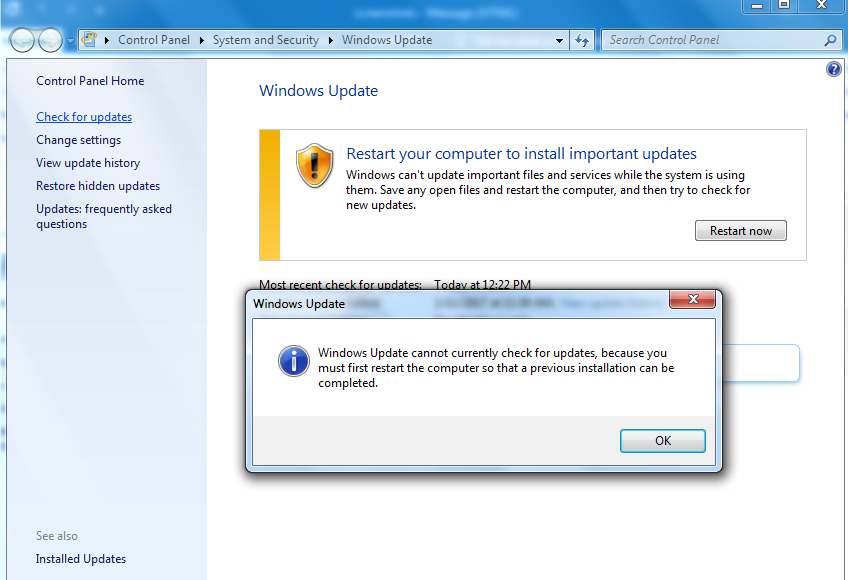
After a restart we get the same thing. It doesn't even seem to even try and process any updates as it boots up and we cannot search for new updates at all when this happens.
When we check the history of updates we see this weird one:
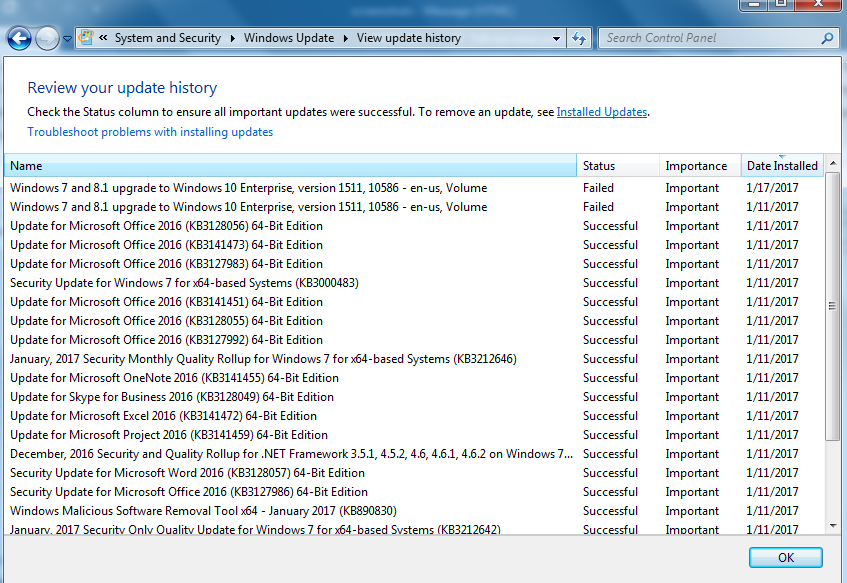
I don't know why Windows 7 is trying to download and process the November upgrade for Windows 10. I thought that Enterprise versions of Windows were unable to upgrade to 10 via Windows Update. (We don't want to do this anyway. When we move to 10 we will make a new image at that point.) There is no way that I can find to delete or disable this update. We only ever see this problem once this has already failed and none of the other computers that don't have this problem ever see this update.
On a number of these computers where we see this problem it seems to resolve itself. Within a couple of hours or the next day the computer is just fine and there is no listed record of this update even attempting to install. There are a handful of computers that did not just fix themselves. We re-image these and this fixes the problem, but I'd like to see if anyone else has seen this and possibly has an easier solution.
1. System Update Readiness Tool (SURT)
Ran System Update Readiness tool and rebooted. No change and no errors listed in CheckSUR.log or CheckSUR.persist.log files. I don't really know what I'm looking for in the CBS.log but I found this which might be relevant, not sure:
2017-01-19 13:15:20, Info CBS Session: 30569096_1620829713 initialized by client WindowsUpdateAgent.
2017-01-19 13:15:20, Info CBS Failed to internally open package. [HRESULT = 0x800f0805 - CBS_E_INVALID_PACKAGE]
2. SFC Scan
Ran System File Checker - no errors, nothing fixed
3. Windows Update Error Codes
This is the only error we get:
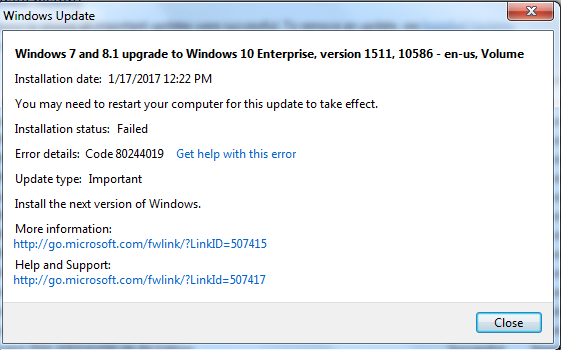
Related to the update, but I mean we don't want this update anyway so...
4. Log Collection
Attached is the CBS.zip as requested.
5. Other things I have tried
a. Stopped wuauserv, deleted software distribution folder, and restarted wuauserv. This completely wiped the list of updates of course, but the computer is still requesting a restart infinitely and will not check for new updates.
b. Data Execution Protection is already on. (another thread somewhere suggested turning this on so I checked up on it)
c. Ran Microsoft Fixit 50202 for Resetting Update Components using the "aggressive mode" option. No change.
After a restart we get the same thing. It doesn't even seem to even try and process any updates as it boots up and we cannot search for new updates at all when this happens.
When we check the history of updates we see this weird one:
I don't know why Windows 7 is trying to download and process the November upgrade for Windows 10. I thought that Enterprise versions of Windows were unable to upgrade to 10 via Windows Update. (We don't want to do this anyway. When we move to 10 we will make a new image at that point.) There is no way that I can find to delete or disable this update. We only ever see this problem once this has already failed and none of the other computers that don't have this problem ever see this update.
On a number of these computers where we see this problem it seems to resolve itself. Within a couple of hours or the next day the computer is just fine and there is no listed record of this update even attempting to install. There are a handful of computers that did not just fix themselves. We re-image these and this fixes the problem, but I'd like to see if anyone else has seen this and possibly has an easier solution.
1. System Update Readiness Tool (SURT)
Ran System Update Readiness tool and rebooted. No change and no errors listed in CheckSUR.log or CheckSUR.persist.log files. I don't really know what I'm looking for in the CBS.log but I found this which might be relevant, not sure:
2017-01-19 13:15:20, Info CBS Session: 30569096_1620829713 initialized by client WindowsUpdateAgent.
2017-01-19 13:15:20, Info CBS Failed to internally open package. [HRESULT = 0x800f0805 - CBS_E_INVALID_PACKAGE]
2. SFC Scan
Ran System File Checker - no errors, nothing fixed
3. Windows Update Error Codes
This is the only error we get:
Related to the update, but I mean we don't want this update anyway so...
4. Log Collection
Attached is the CBS.zip as requested.
5. Other things I have tried
a. Stopped wuauserv, deleted software distribution folder, and restarted wuauserv. This completely wiped the list of updates of course, but the computer is still requesting a restart infinitely and will not check for new updates.
b. Data Execution Protection is already on. (another thread somewhere suggested turning this on so I checked up on it)
c. Ran Microsoft Fixit 50202 for Resetting Update Components using the "aggressive mode" option. No change.
My Computer
- Computer type
- PC/Desktop
- OS
- Windows 10


