Solved Windows update service not running.

daynedelano

New member
Local time
1:30 PM
Messages
15
hi im trying to get windows update to work, I downloaded the SURT, & it wouldn't install ERROR 0X80080005. Then ran sfc /scannow 2 times & it didn't find any errors. when trying windows update, takes a while to come up once I click on it & then it tells me "windows update cannot currently check for updates, because the service is not running. you may need to restart your computer." I have restarted several times. I even had someone online walk me through a manual cmd windows update start in command prompt. this computer was victim to some viruses, malware, & spyware, most (if not all) has been removed. so im assuming I may have missing files the sfc isn't catching. I guess I also should note im getting BSOD and they restart my computer before I can jot down the number. I did download the log checker & I uploaded the bsod zip. thanks for your help!
 

Attachments

My Computer

Computer type
PC/Desktop
Computer Manufacturer/Model Number
hp
OS
windows 7 64 bit
CPU
amd vision
Antivirus
avast free, norton internet security
Browser
internet explorer
Press Start button
in the search box type
SERVICES.MSC and press enter
In the services control panel, look for the following
Background Intelligent Transfer Service - (BITS)
open and check the startup type and change to automatic (delayed start), and accept

In Windows Update service open and check the startup type change to (delayed start) and accept.

Now try start the Windows Update service and the service Background Intelligent Transfer Service - (BITS) if are started, the service now is working.

you can try too to check if 2 more services that windows update needs, are working, open windows update service and press in tab dependencies then press in + and you will see these 2 services that windows update needs, check that are running too.
 
Last edited:

My Computer

Computer type
PC/Desktop
Computer Manufacturer/Model Number
custom
OS
win 7 x64 utimate
CPU
I7 2700k
Motherboard
asus p8z68
Memory
8gb
Graphics Card(s)
evga 560 ti 2win SLI
Antivirus
avast
Browser
waterfox 64

My Computer

Computer type
Laptop
Computer Manufacturer/Model Number
ACER ASPIRE 5742G
OS
Microsoft Windows 7 Home Premium 64-bits 7601 Multiprocessor Free Service Pack 1
CPU
Intel(R) Core(TM) i3 CPU M 370 @ 2.40GHz
Motherboard
Acer Aspire 5742G
Memory
4,00 GB
Graphics Card(s)
ATI Mobility Radeon HD 5400 Series
Sound Card
(1) AMD High Definition Audio Device (2) Realtek High Defi
Screen Resolution
1366 x 768 x 32 bits (4294967296 colors) @ 60 Hz
Hard Drives
WDC WD5000BEVT-22ZAT0
Press Start button
in the search box type
SERVICES.MSC and press enter
In the services control panel, look for the following
Background Intelligent Transfer Service - (BITS)
open and check the startup type and change to automatic (delayed start), and accept

In Windows Update service open and check the startup type change to (delayed start) and accept.

Now try start the Windows Update service and the service Background Intelligent Transfer Service - (BITS) if are started, the service now is working.

you can try too to check if 2 more services that windows update needs, are working, open windows update service and press in tab dependencies then press in + and you will see these 2 services that windows update needs, check that are running too.

checked all the services as you requested. they were ALL in automatic (delayed start) as needed. and the dependencies were running as well.

I ran the "fix it" as Kaktussoft recommended. it did "fix" errors, and said it was successful in its attempt, it wanted a restart, so I restarted as requested. UNFORTUNATELY when I start windows update I still get the original error "windows update cannot currently check for updates, because the service is not running. you may need to restart your computer"

thanks for your attempt but whats the next step?
 

My Computer

Computer type
PC/Desktop
Computer Manufacturer/Model Number
hp
OS
windows 7 64 bit
CPU
amd vision
Antivirus
avast free, norton internet security
Browser
internet explorer
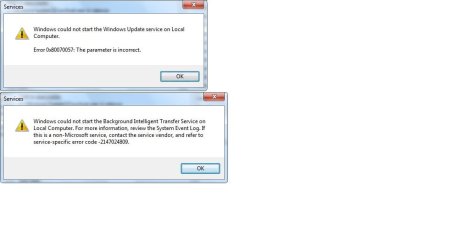
start service "windows update". What happens?
start service "Background Intelligent Transfer Service". What happens?
 

My Computer

Computer type
Laptop
Computer Manufacturer/Model Number
ACER ASPIRE 5742G
OS
Microsoft Windows 7 Home Premium 64-bits 7601 Multiprocessor Free Service Pack 1
CPU
Intel(R) Core(TM) i3 CPU M 370 @ 2.40GHz
Motherboard
Acer Aspire 5742G
Memory
4,00 GB
Graphics Card(s)
ATI Mobility Radeon HD 5400 Series
Sound Card
(1) AMD High Definition Audio Device (2) Realtek High Defi
Screen Resolution
1366 x 768 x 32 bits (4294967296 colors) @ 60 Hz
Hard Drives
WDC WD5000BEVT-22ZAT0
start service "windows update". What happens?
start service "Background Intelligent Transfer Service". What happens?


ive attached the two errors I get when starting both services.
 

Attachments

  • errors.jpg
    errors.jpg
    28.6 KB · Views: 11

My Computer

Computer type
PC/Desktop
Computer Manufacturer/Model Number
hp
OS
windows 7 64 bit
CPU
amd vision
Antivirus
avast free, norton internet security
Browser
internet explorer
Double click the regfile, reboot and start windows update service. Same problem? If it starts succesfully, try to start BITS service as well.
 

Attachments

My Computer

Computer type
Laptop
Computer Manufacturer/Model Number
ACER ASPIRE 5742G
OS
Microsoft Windows 7 Home Premium 64-bits 7601 Multiprocessor Free Service Pack 1
CPU
Intel(R) Core(TM) i3 CPU M 370 @ 2.40GHz
Motherboard
Acer Aspire 5742G
Memory
4,00 GB
Graphics Card(s)
ATI Mobility Radeon HD 5400 Series
Sound Card
(1) AMD High Definition Audio Device (2) Realtek High Defi
Screen Resolution
1366 x 768 x 32 bits (4294967296 colors) @ 60 Hz
Hard Drives
WDC WD5000BEVT-22ZAT0
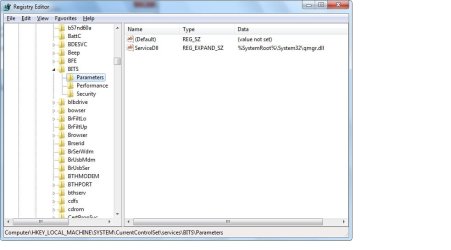
Try to import this as well. After that start REGEDIT and goto key HKEY_LOCAL_MACHINE\SYSTEM\CurrentControlSet\services\BITS\Parameters
Post screenshot
 

Attachments

My Computer

Computer type
Laptop
Computer Manufacturer/Model Number
ACER ASPIRE 5742G
OS
Microsoft Windows 7 Home Premium 64-bits 7601 Multiprocessor Free Service Pack 1
CPU
Intel(R) Core(TM) i3 CPU M 370 @ 2.40GHz
Motherboard
Acer Aspire 5742G
Memory
4,00 GB
Graphics Card(s)
ATI Mobility Radeon HD 5400 Series
Sound Card
(1) AMD High Definition Audio Device (2) Realtek High Defi
Screen Resolution
1366 x 768 x 32 bits (4294967296 colors) @ 60 Hz
Hard Drives
WDC WD5000BEVT-22ZAT0
Try to import this as well. After that start REGEDIT and goto key HKEY_LOCAL_MACHINE\SYSTEM\CurrentControlSet\services\BITS\Parameters
Post screenshot
heres the screen shot
 

Attachments

  • Untitled.jpg
    Untitled.jpg
    41.7 KB · Views: 14

My Computer

Computer type
PC/Desktop
Computer Manufacturer/Model Number
hp
OS
windows 7 64 bit
CPU
amd vision
Antivirus
avast free, norton internet security
Browser
internet explorer
Try to import this as well. After that start REGEDIT and goto key HKEY_LOCAL_MACHINE\SYSTEM\CurrentControlSet\services\BITS\Parameters
Post screenshot
heres the screen shot
screenshot shows good values...all fine. did you succesfully import both reg files? Did you reboot afterwards? What happens if you start service BITS now? What if you start service windows update?
 

My Computer

Computer type
Laptop
Computer Manufacturer/Model Number
ACER ASPIRE 5742G
OS
Microsoft Windows 7 Home Premium 64-bits 7601 Multiprocessor Free Service Pack 1
CPU
Intel(R) Core(TM) i3 CPU M 370 @ 2.40GHz
Motherboard
Acer Aspire 5742G
Memory
4,00 GB
Graphics Card(s)
ATI Mobility Radeon HD 5400 Series
Sound Card
(1) AMD High Definition Audio Device (2) Realtek High Defi
Screen Resolution
1366 x 768 x 32 bits (4294967296 colors) @ 60 Hz
Hard Drives
WDC WD5000BEVT-22ZAT0
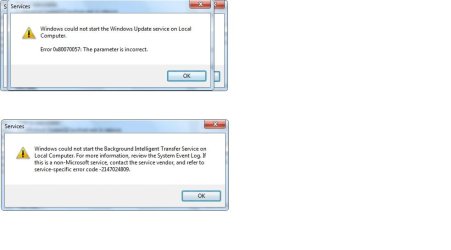
successfully imported them from the link u sent...(im assuming they import themselves because I didn't strategically place the file in regedit) and successfully restarted there after. I got these error messages attached
 

Attachments

  • windowsupdateerror.jpg
    windowsupdateerror.jpg
    29.2 KB · Views: 7

My Computer

Computer type
PC/Desktop
Computer Manufacturer/Model Number
hp
OS
windows 7 64 bit
CPU
amd vision
Antivirus
avast free, norton internet security
Browser
internet explorer
those were the errors I received when I tried to start service manually in services
 

My Computer

Computer type
PC/Desktop
Computer Manufacturer/Model Number
hp
OS
windows 7 64 bit
CPU
amd vision
Antivirus
avast free, norton internet security
Browser
internet explorer
successfully imported them from the link u sent...(im assuming they import themselves because I didn't strategically place the file in regedit) and successfully restarted there after. I got these error messages attached
Most of the time ServiceDll key is wrong. (parameter missing). But you imported, so refreshed the values.

From elevated command prompt http://www.sevenforums.com/tutorials/783-elevated-command-prompt.html
Code:
sfc/scannow

Integrity violations?

Check eventviewer... any relevant errors there?
 

My Computer

Computer type
Laptop
Computer Manufacturer/Model Number
ACER ASPIRE 5742G
OS
Microsoft Windows 7 Home Premium 64-bits 7601 Multiprocessor Free Service Pack 1
CPU
Intel(R) Core(TM) i3 CPU M 370 @ 2.40GHz
Motherboard
Acer Aspire 5742G
Memory
4,00 GB
Graphics Card(s)
ATI Mobility Radeon HD 5400 Series
Sound Card
(1) AMD High Definition Audio Device (2) Realtek High Defi
Screen Resolution
1366 x 768 x 32 bits (4294967296 colors) @ 60 Hz
Hard Drives
WDC WD5000BEVT-22ZAT0
Windows Repair (All In One)
Use it to repair "windows updates" . Boot afterwards and check the 2 services BITS and windows updates.
 

My Computer

Computer type
Laptop
Computer Manufacturer/Model Number
ACER ASPIRE 5742G
OS
Microsoft Windows 7 Home Premium 64-bits 7601 Multiprocessor Free Service Pack 1
CPU
Intel(R) Core(TM) i3 CPU M 370 @ 2.40GHz
Motherboard
Acer Aspire 5742G
Memory
4,00 GB
Graphics Card(s)
ATI Mobility Radeon HD 5400 Series
Sound Card
(1) AMD High Definition Audio Device (2) Realtek High Defi
Screen Resolution
1366 x 768 x 32 bits (4294967296 colors) @ 60 Hz
Hard Drives
WDC WD5000BEVT-22ZAT0
Try install this update manually:
Download System Update Readiness Tool for Windows 7 for x64-based Systems (KB947821) [May 2013] from Official Microsoft Download Center
Code:
0x80070002  ERROR_FILE_NOT_FOUND  The system cannot find the file specified.  
0x8007000D  ERROR_INVALID_DATA  The data is invalid.  
0x800F081F  CBS_E_SOURCE_MISSING  The source for the package or file not found.  
0x80073712  ERROR_SXS_COMPONENT_STORE_CORRUPT  The component store is in an inconsistent state.  
0x800736CC  ERROR_SXS_FILE_HASH_MISMATCH  A component's file does not match the verification information present in the component manifest.  
0x800705B9  ERROR_XML_PARSE_ERROR  Unable to parse the requested XML data.  
0x80070246  ERROR_ILLEGAL_CHARACTER  An invalid character was encountered.  
0x8007370D  ERROR_SXS_IDENTITY_PARSE_ERROR  An identity string is malformed.  
0x8007370B  ERROR_SXS_INVALID_IDENTITY_ATTRIBUTE_NAME  The name of an attribute in an identity is not within the valid range.  
0x8007370A  ERROR_SXS_INVALID_IDENTITY_ATTRIBUTE_VALUE  The value of an attribute in an identity is not within the valid range.  
0x80070057  ERROR_INVALID_PARAMETER  The parameter is incorrect.  
0x800B0100  TRUST_E_NOSIGNATURE  No signature was present in the subject.  
0x80092003  CRYPT_E_FILE_ERROR  An error occurred while Windows Update reads or writes to a file.  
0x800B0101  CERT_E_EXPIRED  A required certificate is not within its validity period when verifying against the current system clock or the time stamp in the signed file.  
0x8007371B  ERROR_SXS_TRANSACTION_CLOSURE_INCOMPLETE  One or more required members of the transaction are not present.  
0x80070490 ERROR_NOT_FOUND Windows could not search for new updates.
 

My Computer

Computer type
PC/Desktop
Computer Manufacturer/Model Number
custom
OS
win 7 x64 utimate
CPU
I7 2700k
Motherboard
asus p8z68
Memory
8gb
Graphics Card(s)
evga 560 ti 2win SLI
Antivirus
avast
Browser
waterfox 64
Windows Repair (All In One)
Use it to repair "windows updates" . Boot afterwards and check the 2 services BITS and windows updates.
what a great program! so far everything is running. thanks for the tip. I will keep this program for the future...I cant pinpoint what ultimately was the problem, unless theres a log somewhere, but the program seemed to have a proper clone registry that it compared mine to, and when it found something out of place, it fixed it. (maybe Microsoft should glorify sfc to be more like this)
thanks again
 

My Computer

Computer type
PC/Desktop
Computer Manufacturer/Model Number
hp
OS
windows 7 64 bit
CPU
amd vision
Antivirus
avast free, norton internet security
Browser
internet explorer

My Computer

Computer type
Laptop
Computer Manufacturer/Model Number
ACER ASPIRE 5742G
OS
Microsoft Windows 7 Home Premium 64-bits 7601 Multiprocessor Free Service Pack 1
CPU
Intel(R) Core(TM) i3 CPU M 370 @ 2.40GHz
Motherboard
Acer Aspire 5742G
Memory
4,00 GB
Graphics Card(s)
ATI Mobility Radeon HD 5400 Series
Sound Card
(1) AMD High Definition Audio Device (2) Realtek High Defi
Screen Resolution
1366 x 768 x 32 bits (4294967296 colors) @ 60 Hz
Hard Drives
WDC WD5000BEVT-22ZAT0

My Computer

Computer type
PC/Desktop
OS
Win 7 Ult 64
PLEASE BE AWARE - using certain of the repair functionality in the Tweaking.com tool lowers the security threshholds in windows beyond acceptable limits.
Be VERY careful how you use this tool - preferably only under experienced instruction!
 

My Computer

Computer type
Laptop
Computer Manufacturer/Model Number
Asus K52F or Lenovo B51-80
OS
Win 7 x64 Home Premium (and x86 VirtualBox VM)/Win10
CPU
i3 370M/i7 6500U
Motherboard
Asus/Lenovo
Memory
8GB - finally :)/8GB
Graphics Card(s)
it's an i3, dude!/dual Intel&nVidia
Sound Card
onboard
Monitor(s) Displays
15.6" built-in
Screen Resolution
1366x768/1920x1080
Hard Drives
750GB Seagate internal
Sundry external drives attached to other computers on the local network
1TB SSD on the Lenovo
PSU
n/a
Internet Speed
as much as I can get - usually on a dongle/phone, so <1MB/s
Antivirus
MSE/Defender
Browser
IE11/12/Edge/Chrome/FF(if I must)
Back
Top