Solved Windows update service not running

pari10

New member
Local time
12:11 AM
Messages
4
I am running windows 7 ultimate. Windows update says the service is not running, please restart. I have restarted and the problem has persisted.I have checked sevices to see if it is stopped. The windows update service doesn't even show up.... I even tried the command prompt commands but the following happens

Microsoft Windows [Version 6.1.7600]
Copyright (c) 2009 Microsoft Corporation. All rights reserved.
C:\Users\Princess>NET START BFE
The requested service has already been started.
More help is available by typing NET HELPMSG 2185.

C:\Users\Ryan>NET START BITS
The service name is invalid.
More help is available by typing NET HELPMSG 2185.

C:\Users\Ryan>NET START WUAUSERV
The service name is invalid.
More help is available by typing NET HELPMSG 2185.

C:\Users\Ryan>NET START TRUSTEDINSTALLER
The Windows Modules Installer service is starting.
The Windows Modules Installer service was started successfully.


Please help me....
 

My Computer

Computer type
PC/Desktop
Computer Manufacturer/Model Number
custom build
OS
Windows 7 ultimate x32
CPU
intel i3
Motherboard
intel chipset
Memory
4 gb
Antivirus
microsoft security essentials
Browser
mozilla firefox

My Computer

Computer type
PC/Desktop
Computer Manufacturer/Model Number
Packard Bell
OS
Windows 7 Home Premium 64bit
CPU
Intel(R) Core(TM) i3-2120 CPU @ 3.30GHz
Motherboard
Packard Bell IPISB-AG
Memory
3.00 GB
Graphics Card(s)
(1) Intel(R) HD Graphics (2) VNC Mirror Driver
Sound Card
Realtek High Definition Audio
Monitor(s) Displays
AIO LCD
Screen Resolution
1920 x 1080
Hard Drives
WDC WD10EADX-22TDHB0 ATA Device
Fixed hard disk media
4 partitions
931.51 GB
Keyboard
Wireless
Mouse
Wireless
Antivirus
Microsoft Security Essentials
Browser
IE; Firefox
Other Info
Also:
Samsung N220 Plus Netbook - Windows 7 Home
HP laptop
iPad 5
A good start - but we need a little more data before attempting a first-fix...

Please download the Farbar Service Scanner from

http://www.bleepingcomputer.com/download/farbar-service-scanner/

Right-click on the saved file and select 'Run as Administrator', and tick all the options, then click on the Scan button - copy and paste the report to your response.


My Computer

Computer type
Laptop
Computer Manufacturer/Model Number
Asus K52F or Lenovo B51-80
OS
Win 7 x64 Home Premium (and x86 VirtualBox VM)/Win10
CPU
i3 370M/i7 6500U
Motherboard
Asus/Lenovo
Memory
8GB - finally :)/8GB
Graphics Card(s)
it's an i3, dude!/dual Intel&nVidia
Sound Card
onboard
Monitor(s) Displays
15.6" built-in
Screen Resolution
1366x768/1920x1080
Hard Drives
750GB Seagate internal
Sundry external drives attached to other computers on the local network
1TB SSD on the Lenovo
PSU
n/a
Internet Speed
as much as I can get - usually on a dongle/phone, so <1MB/s
Antivirus
MSE/Defender
Browser
IE11/12/Edge/Chrome/FF(if I must)
Thanks Irene but I have already tried it out and it doesn't work...
 

My Computer

Computer type
PC/Desktop
Computer Manufacturer/Model Number
custom build
OS
Windows 7 ultimate x32
CPU
intel i3
Motherboard
intel chipset
Memory
4 gb
Antivirus
microsoft security essentials
Browser
mozilla firefox
Thanks NoelDP. I am posting the report here..

Farbar Service Scanner Version: 02-02-2014
Ran by Princess (administrator) on 02-02-2014 at 22:38:42
Running from "D:\Downloads"
Microsoft Windows 7 Ultimate (X86)
Boot Mode: Normal
****************************************************************

Internet Services:
============

Connection Status:
==============
Localhost is accessible.
LAN connected.
Google IP is accessible.
Google.com is accessible.
Yahoo.com is accessible.


Windows Firewall:
=============

Firewall Disabled Policy:
==================


System Restore:
============

System Restore Disabled Policy:
========================


Action Center:
============

wscsvc Service is not running. Checking service configuration:
The start type of wscsvc service is set to Disabled. The default start type is Auto.
The ImagePath of wscsvc service is OK.
The ServiceDll of wscsvc service is OK.

Action Center Notification Icon =====> Unable to open HKLM\...\ShellServiceObjects\{F56F6FDD-AA9D-4618-A949-C1B91AF43B1A} key. The key does not exist.


Windows Update:
============
wuauserv Service is not running. Checking service configuration:
The start type of wuauserv service is set to Disabled. The default start type is Auto.
The ImagePath of wuauserv service is OK.
The ServiceDll of wuauserv service is OK.

BITS Service is not running. Checking service configuration:
The start type of BITS service is OK.
The ImagePath of BITS service is OK.
The ServiceDll of BITS service is OK.


Windows Autoupdate Disabled Policy:
============================


Windows Defender:
==============

Other Services:
==============
Checking FirewallRules of SharedAccess: ATTENTION!=====> Unable to open "SharedAccess\Defaults\FirewallPolicy\FirewallRules" registry key. The key does not exist.


File Check:
========
C:\Windows\system32\nsisvc.dll => MD5 is legit
C:\Windows\system32\Drivers\nsiproxy.sys => MD5 is legit
C:\Windows\system32\dhcpcore.dll => MD5 is legit
C:\Windows\system32\Drivers\afd.sys => MD5 is legit
C:\Windows\system32\Drivers\tdx.sys => MD5 is legit
C:\Windows\system32\Drivers\tcpip.sys
[2013-01-20 11:28] - [2010-04-09 12:54] - 1285000 ____A (Microsoft Corporation) 63170B9EE1D0EF0032F0408605671D1A

C:\Windows\system32\dnsrslvr.dll => MD5 is legit
C:\Windows\system32\mpssvc.dll => MD5 is legit
C:\Windows\system32\bfe.dll => MD5 is legit
C:\Windows\system32\Drivers\mpsdrv.sys => MD5 is legit
C:\Windows\system32\SDRSVC.dll => MD5 is legit
C:\Windows\system32\vssvc.exe => MD5 is legit
C:\Windows\system32\wscsvc.dll => MD5 is legit
C:\Windows\system32\wbem\WMIsvc.dll => MD5 is legit
C:\Windows\system32\wuaueng.dll => MD5 is legit
C:\Windows\system32\qmgr.dll => MD5 is legit
C:\Windows\system32\es.dll => MD5 is legit
C:\Windows\system32\cryptsvc.dll => MD5 is legit
C:\Program Files\Windows Defender\MpSvc.dll => MD5 is legit
C:\Windows\system32\ipnathlp.dll => MD5 is legit
C:\Windows\system32\iphlpsvc.dll => MD5 is legit
C:\Windows\system32\svchost.exe => MD5 is legit
C:\Windows\system32\rpcss.dll => MD5 is legit


**** End of log ****
 

My Computer

Computer type
PC/Desktop
Computer Manufacturer/Model Number
custom build
OS
Windows 7 ultimate x32
CPU
intel i3
Motherboard
intel chipset
Memory
4 gb
Antivirus
microsoft security essentials
Browser
mozilla firefox
That's an unusual set of errors - it looks like you've had a partial infestation from some variant of the ZeroAccess worm/Trojan.

Before we even attempt to fix this, please check the system over for malware....


Please download and install Malwarebytes Anti-malware (free version) from http://www.malwarebytes.org/products/malwarebytes_free/ - UNtick 'Enable free trial of MBAM PRO' at the end of the installation - and update it, then run a full scan in your main account, and Quick scans in any other user accounts.

Delete everything it finds
 

My Computer

Computer type
Laptop
Computer Manufacturer/Model Number
Asus K52F or Lenovo B51-80
OS
Win 7 x64 Home Premium (and x86 VirtualBox VM)/Win10
CPU
i3 370M/i7 6500U
Motherboard
Asus/Lenovo
Memory
8GB - finally :)/8GB
Graphics Card(s)
it's an i3, dude!/dual Intel&nVidia
Sound Card
onboard
Monitor(s) Displays
15.6" built-in
Screen Resolution
1366x768/1920x1080
Hard Drives
750GB Seagate internal
Sundry external drives attached to other computers on the local network
1TB SSD on the Lenovo
PSU
n/a
Internet Speed
as much as I can get - usually on a dongle/phone, so <1MB/s
Antivirus
MSE/Defender
Browser
IE11/12/Edge/Chrome/FF(if I must)
Once you've run MBAM, we can start rebuilding the system.
First, let's see if we can get the two basic services running - WSCSVC and WUAUSERV
Please run the following commands in a Elevated Command Prompt, and post the results.

SC CONFIG WUAUSERV /start= auto
SC CONFIG WSCSVC /start= auto
NET START WUAUSERV
NET START WSCSVC

Here are some instructions to make life easier :)
1) To open an Elevated Command Prompt Window (the ECP window), click on Start, All Programs, Accessories – then right-click on Command Prompt, and select Run as Administrator. Accept the UAC prompt.
2) To run the commands easier, highlight the block of commands, and right-click on the highlight – select Copy. In the CP Window, click on the black/white icon at top left – select Paste. The commands will run but may not complete the last command, so hit the Enter Key once.
3) To copy the results... click on the Black/White icon in the top left, and select Edit... 'Select All', and hit the Enter key - then use Ctrl+V or r-click+Paste to paste it into your response.

I'll work up a patch for the remaining errors and post that in a few minutes.
 

My Computer

Computer type
Laptop
Computer Manufacturer/Model Number
Asus K52F or Lenovo B51-80
OS
Win 7 x64 Home Premium (and x86 VirtualBox VM)/Win10
CPU
i3 370M/i7 6500U
Motherboard
Asus/Lenovo
Memory
8GB - finally :)/8GB
Graphics Card(s)
it's an i3, dude!/dual Intel&nVidia
Sound Card
onboard
Monitor(s) Displays
15.6" built-in
Screen Resolution
1366x768/1920x1080
Hard Drives
750GB Seagate internal
Sundry external drives attached to other computers on the local network
1TB SSD on the Lenovo
PSU
n/a
Internet Speed
as much as I can get - usually on a dongle/phone, so <1MB/s
Antivirus
MSE/Defender
Browser
IE11/12/Edge/Chrome/FF(if I must)
There was another virus in my system... So i had to format the system and so the other problems were also solved.... thanks... and anti-malware helped a lot.....
 

My Computer

Computer type
PC/Desktop
Computer Manufacturer/Model Number
custom build
OS
Windows 7 ultimate x32
CPU
intel i3
Motherboard
intel chipset
Memory
4 gb
Antivirus
microsoft security essentials
Browser
mozilla firefox
Sorry for reviving an old thread, but I'm having the same issue with my Lenovo Yoga Tab 2 running Windows 10 32 bit.

I have run Malwarebytes, nothing detected. Another issue I'm noticing is that Chrome won't load (nothing happens when I click the icon).

Below is my Farbar log. Looks odd??


Farbar Service Scanner Version: 27-01-2016
Ran by User (administrator) on 06-10-2016 at 11:24:30
Running from "C:\Users\User\Downloads"
Microsoft Windows 10 Home (X86)
Boot Mode: Normal
****************************************************************
Internet Services:
============
Connection Status:
==============
Localhost is accessible.
LAN connected.
Google IP is accessible.
Google.com is accessible.
Yahoo.com is accessible.

Windows Firewall:
=============
Firewall Disabled Policy:
==================

System Restore:
============
System Restore Policy:
========================

Security Center:
============

Windows Update:
============
Windows Autoupdate Disabled Policy:
============================

Windows Defender:
==============
Other Services:
==============

File Check:
========
C:\Windows\system32\nsisvc.dll => File is digitally signed
C:\Windows\system32\Drivers\nsiproxy.sys => File is digitally signed
11:28 AM 10/6/2016
 

My Computer

Computer type
PC/Desktop
Computer Manufacturer/Model Number
Acer 5920G; Acer 3820T
OS
Windows 7 Home Premium 64 Bit
CPU
Intel Core T5250 / 1.5Gh; Intel Core i3 i3-380M / 2.53 GHz
BTW, reason I have been looking into this is that my windows update seems to be stuck at 0% download for weeks!
 

My Computer

Computer type
PC/Desktop
Computer Manufacturer/Model Number
Acer 5920G; Acer 3820T
OS
Windows 7 Home Premium 64 Bit
CPU
Intel Core T5250 / 1.5Gh; Intel Core i3 i3-380M / 2.53 GHz
This is what I get when I run the NET START WUAUSERV command:

The service is not responding to the control function.
More help is available by typing NET HELPMSG 2186.
 

My Computer

Computer type
PC/Desktop
Computer Manufacturer/Model Number
Acer 5920G; Acer 3820T
OS
Windows 7 Home Premium 64 Bit
CPU
Intel Core T5250 / 1.5Gh; Intel Core i3 i3-380M / 2.53 GHz
Hi pbc,
Have you tried option 3 here ?
Windows Update - Reset

Post which security you use and add it to your system spec's page too :)
 

My Computer

Computer type
PC/Desktop
Computer Manufacturer/Model Number
Custom assembled by me :}
OS
Win-7-Pro64bit 7-H-Prem-64bit
CPU
i7-5930K 2nd i9-9940x both water blocked VRM's too
Motherboard
ASUS SABERTOOTH X99 2nd ASUS x299 Apex
Memory
Trident-z 3200C14 2nd Trident-z 3600C16
Graphics Card(s)
EVGA 1080ti ftw3 2nd Titan Xp both water blocked
Sound Card
Built-in Realtek
Monitor(s) Displays
1-AOC G2460PG 24"G-Sync 144Hz/ 2nd 1-ASUS VG248QE 24" 144Hz
Screen Resolution
1920 x 1080 144Hz
Hard Drives
2-Samsung M.2 Evo & Evo Plus
2-Samsung 850 EVO 500GB SSD's/ 3-2.5 W.D. Black 1tb-&3-1tb/3-3.5 WD Black 1tb hdd's
PSU
EVGA SuperNOVA 1000-P2 2nd 1200-P2
Case
2-Corsair Obsidian Series 450D Black ATX Mid Tower
Cooling
Custom water loops
Keyboard
Logitech G710+/ 2nd Logitech G910
Mouse
2-RedDragon M901 Perdition 16400 dpi Gaming mouse = wired
Internet Speed
Comcast Ping 19ms 89.31mbps download speed 6.12mbps upload
Antivirus
Malwarebytes Pro/ Superantispyware Pro
Browser
FireFox & Pale moon
Other Info
2nd ASUS X299 Apex/Intel i9-9940x with Custom water loop/7H-Prem-x64/Corsair 450D case/Ram Trident-z 3600C16 4x8gb / Samsung970Evo plus 500gb SSD/Dual ssd EZ swap evo/PSU EVGA SuperNova 1200w-P2 80+Platinum/GPU Titan Xp /8-ML-140 on push-pull on 2-280GTX rads
This particular unit is running Windows 10 Home 32 bit. Will have a look at that post now..

CPU 1.33 GHz Intel Atom Z3745 RAM Included 2GB RAM UpgradeableStorage Drive Size 32GB Storage Drive Type eMMC Display Size 10.1 Display Resolution 1920 x 1200 Graphics Chip Intel HD Graphics Graphics Memory Shared Wi-Fi 802.11a/b/g/n Has Bluetooth Yes OS Windows 8.1 Camera Resolution 8MP Front-Facing Camera Resolution 1.6MP Ports microSD Ports microUSB Ports 3.5mm audio jack USB Ports 1 Card Readers microSD Card Reader Size 64GB
 

My Computer

Computer type
PC/Desktop
Computer Manufacturer/Model Number
Acer 5920G; Acer 3820T
OS
Windows 7 Home Premium 64 Bit
CPU
Intel Core T5250 / 1.5Gh; Intel Core i3 i3-380M / 2.53 GHz
Tried Option 3, get a similar error:

Failed to reset Windows Update due to bits service failing to stop.
Press any key to continue . . .
The service is not responding to the control function.
More help is available by typing NET HELPMSG 2186.
The service is not responding to the control function.
More help is available by typing NET HELPMSG 2186.
The Application Identity service is starting....
The Application Identity service was started successfully.
The requested service has already been started.
More help is available by typing NET HELPMSG 2182.

BITSADMIN version 3.0 [ 7.8.10586 ]
BITS administration utility.
(C) Copyright 2000-2006 Microsoft Corp.
 

My Computer

Computer type
PC/Desktop
Computer Manufacturer/Model Number
Acer 5920G; Acer 3820T
OS
Windows 7 Home Premium 64 Bit
CPU
Intel Core T5250 / 1.5Gh; Intel Core i3 i3-380M / 2.53 GHz
Going to try Avast, was only running Windows Defender.
 

My Computer

Computer type
PC/Desktop
Computer Manufacturer/Model Number
Acer 5920G; Acer 3820T
OS
Windows 7 Home Premium 64 Bit
CPU
Intel Core T5250 / 1.5Gh; Intel Core i3 i3-380M / 2.53 GHz
Hi,
Yep you might also try free malwarebytes seeing you used defender which is not a real antivirus program so indeed use avast/ panda free ... also :)
Malwarebytes | Malwarebytes Anti-Malware Premium

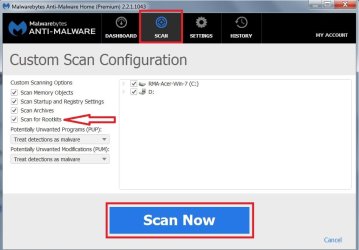
Also in mbam scan for root kits with Scan/ Custom scan/ Configure scan to do a full scan not the Threat scan
mbam scan for rootkits.jpg
 

My Computer

Computer type
PC/Desktop
Computer Manufacturer/Model Number
Custom assembled by me :}
OS
Win-7-Pro64bit 7-H-Prem-64bit
CPU
i7-5930K 2nd i9-9940x both water blocked VRM's too
Motherboard
ASUS SABERTOOTH X99 2nd ASUS x299 Apex
Memory
Trident-z 3200C14 2nd Trident-z 3600C16
Graphics Card(s)
EVGA 1080ti ftw3 2nd Titan Xp both water blocked
Sound Card
Built-in Realtek
Monitor(s) Displays
1-AOC G2460PG 24"G-Sync 144Hz/ 2nd 1-ASUS VG248QE 24" 144Hz
Screen Resolution
1920 x 1080 144Hz
Hard Drives
2-Samsung M.2 Evo & Evo Plus
2-Samsung 850 EVO 500GB SSD's/ 3-2.5 W.D. Black 1tb-&3-1tb/3-3.5 WD Black 1tb hdd's
PSU
EVGA SuperNOVA 1000-P2 2nd 1200-P2
Case
2-Corsair Obsidian Series 450D Black ATX Mid Tower
Cooling
Custom water loops
Keyboard
Logitech G710+/ 2nd Logitech G910
Mouse
2-RedDragon M901 Perdition 16400 dpi Gaming mouse = wired
Internet Speed
Comcast Ping 19ms 89.31mbps download speed 6.12mbps upload
Antivirus
Malwarebytes Pro/ Superantispyware Pro
Browser
FireFox & Pale moon
Other Info
2nd ASUS X299 Apex/Intel i9-9940x with Custom water loop/7H-Prem-x64/Corsair 450D case/Ram Trident-z 3600C16 4x8gb / Samsung970Evo plus 500gb SSD/Dual ssd EZ swap evo/PSU EVGA SuperNova 1200w-P2 80+Platinum/GPU Titan Xp /8-ML-140 on push-pull on 2-280GTX rads
Running Malware Bytes and just ran Avast, no viruses or malware detected.
 

My Computer

Computer type
PC/Desktop
Computer Manufacturer/Model Number
Acer 5920G; Acer 3820T
OS
Windows 7 Home Premium 64 Bit
CPU
Intel Core T5250 / 1.5Gh; Intel Core i3 i3-380M / 2.53 GHz
Hi PBC,
Im totally confused.
The Farbar report was incomplete, yes?, according to it you only had 2 file check services.

You are contradicting yourself, your quoting 2 OS's win10 and 8.1 in the same post.

IF you are running W10,
HOW did you you get it, not sure looking at those specs, dont believe it would have passed the W10system check...

Roy .
 

My Computer

Computer type
PC/Desktop
Computer Manufacturer/Model Number
medionl/Aspire 6930G/acer x55a
OS
W7 home premium 32bit/W7HP 64bit/w10 tp insider ring
CPU
E5300 dual core
Motherboard
medion MS7366
Memory
3gb
Graphics Card(s)
Nvidia Geforce 7100 Nforce 630i
Monitor(s) Displays
avixc
Internet Speed
n (isp resticted to 72)
Antivirus
mse/pands
Browser
palemoon
Other Info
Belkin Fd7050 n USB using Railink RT2870 drivers, more upto date
Hi,
Yep you might also try free malwarebytes seeing you used defender which is not a real antivirus program so indeed use avast/ panda free ... also :)

Since this is a Win10 system, Defender is a true AV and not just the anti-malware of Vista/7/8
 

My Computer

Computer type
Laptop
Computer Manufacturer/Model Number
Asus K52F or Lenovo B51-80
OS
Win 7 x64 Home Premium (and x86 VirtualBox VM)/Win10
CPU
i3 370M/i7 6500U
Motherboard
Asus/Lenovo
Memory
8GB - finally :)/8GB
Graphics Card(s)
it's an i3, dude!/dual Intel&nVidia
Sound Card
onboard
Monitor(s) Displays
15.6" built-in
Screen Resolution
1366x768/1920x1080
Hard Drives
750GB Seagate internal
Sundry external drives attached to other computers on the local network
1TB SSD on the Lenovo
PSU
n/a
Internet Speed
as much as I can get - usually on a dongle/phone, so <1MB/s
Antivirus
MSE/Defender
Browser
IE11/12/Edge/Chrome/FF(if I must)
Hi Noel
This is SevenForums so we must assume pbc is asking about win-7 and defender :)
Otherwise
Windows 10 Forums
 

My Computer

Computer type
PC/Desktop
Computer Manufacturer/Model Number
Custom assembled by me :}
OS
Win-7-Pro64bit 7-H-Prem-64bit
CPU
i7-5930K 2nd i9-9940x both water blocked VRM's too
Motherboard
ASUS SABERTOOTH X99 2nd ASUS x299 Apex
Memory
Trident-z 3200C14 2nd Trident-z 3600C16
Graphics Card(s)
EVGA 1080ti ftw3 2nd Titan Xp both water blocked
Sound Card
Built-in Realtek
Monitor(s) Displays
1-AOC G2460PG 24"G-Sync 144Hz/ 2nd 1-ASUS VG248QE 24" 144Hz
Screen Resolution
1920 x 1080 144Hz
Hard Drives
2-Samsung M.2 Evo & Evo Plus
2-Samsung 850 EVO 500GB SSD's/ 3-2.5 W.D. Black 1tb-&3-1tb/3-3.5 WD Black 1tb hdd's
PSU
EVGA SuperNOVA 1000-P2 2nd 1200-P2
Case
2-Corsair Obsidian Series 450D Black ATX Mid Tower
Cooling
Custom water loops
Keyboard
Logitech G710+/ 2nd Logitech G910
Mouse
2-RedDragon M901 Perdition 16400 dpi Gaming mouse = wired
Internet Speed
Comcast Ping 19ms 89.31mbps download speed 6.12mbps upload
Antivirus
Malwarebytes Pro/ Superantispyware Pro
Browser
FireFox & Pale moon
Other Info
2nd ASUS X299 Apex/Intel i9-9940x with Custom water loop/7H-Prem-x64/Corsair 450D case/Ram Trident-z 3600C16 4x8gb / Samsung970Evo plus 500gb SSD/Dual ssd EZ swap evo/PSU EVGA SuperNova 1200w-P2 80+Platinum/GPU Titan Xp /8-ML-140 on push-pull on 2-280GTX rads
Back
Top