Windows Update service not running

EdPell

New member
Local time
8:04 AM
Messages
26
Using Win 7 Home Premium 64-bit SP1 on Dell XPS 8700, Intel i7-4770 cpu 3.4GHz

Received message: Windows cannot currently check for updates ... service is not running ... may need to restart

Restarting did not help. Services indicates that Windows Update was started and so was Remote Procedure Call (RPC). Since the last time I used Update (11/17/17), I have not added, altered, or removed any hardware.

Searching the 'net shows me that this problem is not uncommon and that there doesn't seem to be a "one-size-fits-all" solution.

Can anyone help me out with this?
Thanks
EdP
 

My Computer

Computer type
PC/Desktop
Computer Manufacturer/Model Number
Dell
OS
win 7 Home Premium
CPU
3.4GhZ
Motherboard
Dell 0KWVT8
Memory
8GB
Graphics Card(s)
NVIDIA GeForce GT 635
Monitor(s) Displays
Dell 2407
Hard Drives
ST1000DM003
Antivirus
Windows/SAS/MBAM
Browser
Firefox

My Computer

Computer type
PC/Desktop
Computer Manufacturer/Model Number
Self built using existing case
OS
Windows 7 Home Premium 64 bit sp1
CPU
Intel i5 3570 3.4Ghz Ivy Bridge SKT 1155 quad core
Motherboard
Gigabyte Z77-HD3 SKT 1155 2xSata 3, 4x USB 3.0
Memory
G-Skill Rip Jaws 16Gb (8x2) DDR3 -1600 PC3 12800 CL 10 red
Graphics Card(s)
Gigabyte NVIDIA GT610 1Gb DDR3 810/1200 PCI-E 2.0 Silent
Sound Card
NVIDIA High Definition & Realtech High Definition Audio
Monitor(s) Displays
2 x Philips 226V4L 16:9 aspect ratio
Screen Resolution
1920 x 1080 HD
Hard Drives
Samsung 840 Pro 256gb SSD, SATA 3.
Hitachi Touro Portable 1tb, USB 3.0 HDD used for image b/ups.
PSU
Corsair VS450
Case
Codeng
Cooling
PSU fan & CPU fan
Keyboard
Logitech
Mouse
Logitech Wireless trackball M570
Internet Speed
Wireless 3G. 3mg down & 550kb up.
Antivirus
Bitdefender Internet Security 2020
Browser
Opera (Current Version) & Firefox
Other Info
MS Office 2013 Pro. Davis weather station software. MGE Nova 600 avr UPS.
Evidently, MS forgot to reset an expiration date for a certain file - it expired yesterday. None of the typical 'fix your update problem' fixes will fix this - just gotta wait until MS gets on the ball. No official word from them yet.

There is a new article on neowin.net that addresses this:

Windows Update broken for some Windows 7 users - Neowin
 

My Computer

Computer type
PC/Desktop
OS
Windows 7 Home Premium x64
CPU
Intel Dual Pentium E2180 2 GHz
Memory
4 GB
Graphics Card(s)
Integrated Intel G33
Thanks for the incredibly quick response to my question.
Much appreciated

EdP
 

My Computer

Computer type
PC/Desktop
Computer Manufacturer/Model Number
Dell
OS
win 7 Home Premium
CPU
3.4GhZ
Motherboard
Dell 0KWVT8
Memory
8GB
Graphics Card(s)
NVIDIA GeForce GT 635
Monitor(s) Displays
Dell 2407
Hard Drives
ST1000DM003
Antivirus
Windows/SAS/MBAM
Browser
Firefox
I have a similar problem. Every night before I shut down my Windows 7 32bit laptop I click on a Windows short-cut on my desktop. I know it shows Windows Update in the task bar but I like to check.

I've Googled Windows 7 won't check for updates

https://answers.microsoft.com/en-us...s/ad6cfeef-232a-49b4-a57b-39978eea6630?auth=1

I downloaded and extracted all files and ran wizard.bat and watched the screen prompts. It did a restart and carried on installing Windows Update Loop Fix

Update for Windows 7 (KB3172605) which was already installed Installation date: 24/09/2016 15:00
Update for Windows 7 (KB3102810) Installation date: 05/11/2015 03:25
Update for Windows 7 (KB3020369) Installation date: 01/05/2015 13:14

After another restart I checked Windows updates and the message says:

Windows update cannot currently check for updates, because the service is not running. You may need to restart your computer.

Another restart and it still shows the same message. I looked at the registry setting in the link above. I couldn't find a couple.

HKEY_LOCAL_MACHINE\Software\Policies\Microsoft\Windows\WindowsUpdate

There was no \WindowsUpdate so I added WindowsUpdate and DisableWindowsUpdateAccess which showed a value 0 - Enables access to Windows Update

Another restart and the same message shows.

I looked in
HKEY_CURRENT_USER\Software\Microsoft\Windows\CurrentVersion\Policies\Explorer

There was \WindowsUpdate so I added the same one as before. Another restart and the same message still shows.

I searched for this problem on here, there are a few threads. A lot say post the CBS.log these are big text files that won't upload.

Any suggestions I can try will be appreciated.
 

My Computer

Computer type
Laptop
Computer Manufacturer/Model Number
Samsung won't charge Now Dell Inspiron 17 3793
OS
Windows 7 Professional 32bit SP1, Windows 10 Home 64-bit at the moment
CPU
Intel Pentium B970 @ 2.30GHz, DELL DELL Intel 3793 Core i5 1
Motherboard
DELL 0C9WH2
Memory
8GB
Graphics Card(s)
NVIDIA GeForce MX230 (Dell)
Sound Card
Realtek High Definition Audio
Monitor(s) Displays
17.3" HD+ LED Display
Screen Resolution
1920x1040
Hard Drives
99GB (RAID SHIT SSD), Seagate 1TB SATA III DATA

Seagate ST1000LM048-2E7172 (SATA III)
Mouse
USB remote
Antivirus
Avast Free Antivirus 20.10.2442
Browser
Internet Explorer 11, FireFox
Other Info
DELL shit Its the worst laptop design ever made the laptop battery is inbuilt who the hell makes a laptop battery inbuilt DELL shit does, can't wait until the 1TB HDD is replaced and RAID shit is removed
Hi KeithUK,

The link you followed is INCORRECT, not the same problem.

Please roll back your system to before you made the registry changes REBOOT

then read this thread for more info,
Windows Update is broken for some Windows 7 users - Windows 7 Help Forums

Fix is as follows,

To repair the situation, untick the Auto Time setting Function, in Time & Date, then reset the date to before 3 Dec 2017. Reboot the computer. Run Windows Update & it may update if there any not included before 3 Dec. When it has finished Updating, reset the Auto Time function & reset the date to today. Reboot the computer & re run Windows Update, which should now work & install Updates to the current time.


Roy

PS Updates only occur once a month now. (second Tuesday of it
 

My Computer

Computer type
PC/Desktop
Computer Manufacturer/Model Number
medionl/Aspire 6930G/acer x55a
OS
W7 home premium 32bit/W7HP 64bit/w10 tp insider ring
CPU
E5300 dual core
Motherboard
medion MS7366
Memory
3gb
Graphics Card(s)
Nvidia Geforce 7100 Nforce 630i
Monitor(s) Displays
avixc
Internet Speed
n (isp resticted to 72)
Antivirus
mse/pands
Browser
palemoon
Other Info
Belkin Fd7050 n USB using Railink RT2870 drivers, more upto date
Hi KeithUK,

The link you followed is INCORRECT, not the same problem.

Please roll back your system to before you made the registry changes REBOOT

then read this thread for more info,
Windows Update is broken for some Windows 7 users - Windows 7 Help Forums

Fix is as follows,

To repair the situation, untick the Auto Time setting Function, in Time & Date, then reset the date to before 3 Dec 2017. Reboot the computer. Run Windows Update & it may update if there any not included before 3 Dec. When it has finished Updating, reset the Auto Time function & reset the date to today. Reboot the computer & re run Windows Update, which should now work & install Updates to the current time.


Roy

PS Updates only occur once a month now. (second Tuesday of it

Thanks for your input Roy.

That link which I read when I searched for this problem on here, isn't exactly the same. As mine doesn't show 80248015 error number only the message I've posted before:

Windows update cannot currently check for updates, because the service is not running, You my need to restart your computer.

I know what changes to the registry I made so I can easily deleted them. I have done a system restore just to make sure.

As for changing the time on Windows 7 the time settings are total crap you can't set it to a previous date 02/12/17 even if you untick Notify me when the clock changes. Once you change to 02/03/17 there is no Apply or OK button.

I keep a text files of all updates installed for reference. The last updates installed was:

Windows Malicious Software Removal Tool - October 2017 (KB890830) Installation date: 11/10/2017 13:30

2017-10 Security and Quality Rollup for .NET Framework 3.5.1, 4.5.2, 4.6, 4.6.1, 4.6.2, 4.7 on Windows 7 (KB4043766) Installation date: 11/10/2017 13:32

2017-10 Security Monthly Quality Rollup for Windows 7 for x86-based Systems (KB4041681) Installation date: 11/10/2017 13:32

The previous update was 13/09/17, so your right when you say updates come out once a month.

I forgot to say in my first post I've done sfc /scannow and Malwarebytes Anti-Malware scan all clear.
 

My Computer

Computer type
Laptop
Computer Manufacturer/Model Number
Samsung won't charge Now Dell Inspiron 17 3793
OS
Windows 7 Professional 32bit SP1, Windows 10 Home 64-bit at the moment
CPU
Intel Pentium B970 @ 2.30GHz, DELL DELL Intel 3793 Core i5 1
Motherboard
DELL 0C9WH2
Memory
8GB
Graphics Card(s)
NVIDIA GeForce MX230 (Dell)
Sound Card
Realtek High Definition Audio
Monitor(s) Displays
17.3" HD+ LED Display
Screen Resolution
1920x1040
Hard Drives
99GB (RAID SHIT SSD), Seagate 1TB SATA III DATA

Seagate ST1000LM048-2E7172 (SATA III)
Mouse
USB remote
Antivirus
Avast Free Antivirus 20.10.2442
Browser
Internet Explorer 11, FireFox
Other Info
DELL shit Its the worst laptop design ever made the laptop battery is inbuilt who the hell makes a laptop battery inbuilt DELL shit does, can't wait until the 1TB HDD is replaced and RAID shit is removed
Hi KeithUK,

You also have to turn OFF the Windows Time service.

Anyway as you stated its not exactly the same problem, please run the system repair tool
KB947821
https://www.google.co.uk/url?sa=t&rct=j&q=&esrc=s&source=web&cd=1&cad=rja&uact=8&ved=0ahUKEwix5ePt8PrXAhVjB8AKHSDrAZ4QFggnMAA&url=https%3A%2F%2Fwww.microsoft.com%2Fen-gb%2Fdownload%2Fdetails.aspx%3Fid%3D3132&usg=AOvVaw37L0snNUykOwvoLaaEBcoV

please select the correct 32/64 bit download

It could take a while, results are in the CBS folder... SURT
copy/paste the log please.

would you mind running this tool as well, it might give me a bit more info
http://go.microsoft.com/fwlink/?LinkID=52012


Roy
 

My Computer

Computer type
PC/Desktop
Computer Manufacturer/Model Number
medionl/Aspire 6930G/acer x55a
OS
W7 home premium 32bit/W7HP 64bit/w10 tp insider ring
CPU
E5300 dual core
Motherboard
medion MS7366
Memory
3gb
Graphics Card(s)
Nvidia Geforce 7100 Nforce 630i
Monitor(s) Displays
avixc
Internet Speed
n (isp resticted to 72)
Antivirus
mse/pands
Browser
palemoon
Other Info
Belkin Fd7050 n USB using Railink RT2870 drivers, more upto date
As for changing the time on Windows 7 the time settings are total crap you can't set it to a previous date 02/12/17 even if you untick Notify me when the clock changes. Once you change to 02/03/17 there is no Apply or OK button.

To reset the date on the computer Right Click on the Clock at bottom RH corner of the screen, select Change Date & Time Settings, when that opens click on the Internet Time tab, Then select Change Settings, then untick Synchronise with Internet Time Server, be sure to tick OK, then select the Date & Time tab, Then select Change Date & Time & set the date back to about Dec 2.

Then then reboot & run Windows Update, it should update to the date you have used. In your case you may need to try an earlier date if the 2nd does't work.

Then reboot, reset internet time synch, change computer date to today's date, re run Windows Update & it should check for Updates & came back with Windows is up to date, with the time check also being current.

This method should retain all your Update History as well.
 

My Computer

Computer type
PC/Desktop
Computer Manufacturer/Model Number
Self built using existing case
OS
Windows 7 Home Premium 64 bit sp1
CPU
Intel i5 3570 3.4Ghz Ivy Bridge SKT 1155 quad core
Motherboard
Gigabyte Z77-HD3 SKT 1155 2xSata 3, 4x USB 3.0
Memory
G-Skill Rip Jaws 16Gb (8x2) DDR3 -1600 PC3 12800 CL 10 red
Graphics Card(s)
Gigabyte NVIDIA GT610 1Gb DDR3 810/1200 PCI-E 2.0 Silent
Sound Card
NVIDIA High Definition & Realtech High Definition Audio
Monitor(s) Displays
2 x Philips 226V4L 16:9 aspect ratio
Screen Resolution
1920 x 1080 HD
Hard Drives
Samsung 840 Pro 256gb SSD, SATA 3.
Hitachi Touro Portable 1tb, USB 3.0 HDD used for image b/ups.
PSU
Corsair VS450
Case
Codeng
Cooling
PSU fan & CPU fan
Keyboard
Logitech
Mouse
Logitech Wireless trackball M570
Internet Speed
Wireless 3G. 3mg down & 550kb up.
Antivirus
Bitdefender Internet Security 2020
Browser
Opera (Current Version) & Firefox
Other Info
MS Office 2013 Pro. Davis weather station software. MGE Nova 600 avr UPS.
Hi KeithUK,

You also have to turn OFF the Windows Time service.

Anyway as you stated its not exactly the same problem, please run the system repair tool
KB947821
https://www.google.co.uk/url?sa=t&rct=j&q=&esrc=s&source=web&cd=1&cad=rja&uact=8&ved=0ahUKEwix5ePt8PrXAhVjB8AKHSDrAZ4QFggnMAA&url=https%3A%2F%2Fwww.microsoft.com%2Fen-gb%2Fdownload%2Fdetails.aspx%3Fid%3D3132&usg=AOvVaw37L0snNUykOwvoLaaEBcoV

please select the correct 32/64 bit download

It could take a while, results are in the CBS folder... SURT
copy/paste the log please.

would you mind running this tool as well, it might give me a bit more info
http://go.microsoft.com/fwlink/?LinkID=52012


Roy

Ok Roy as I've said I have a text files listing all the Windows updates install going back to 05/04/2014

I search for KB947821 and nothing showed so I downloaded System Update Readiness Tool for Windows 7 (KB947821) [October 2014] from your link.

When I ran System Update Readiness Tool for Windows 7 (KB947821) [October 2014]

Downloading and Installing Updates
Initializing installation... the text icon is still showing
Installing: progress bar gets to 90% then stops. After 20 minutes I clicked cancel which did nothing for ages.

I cancelled it in Task Manager and did a restart and installed it again, the progress bar never moved.

This time nothing showed in the progress bar showed nothing then it says installation complete.

Stupid Windows Install.

Cancelling updates... takes another 10 minutes then it says installation complete.

It didn't say I need to restart but I did.

I clicked Windows Update and as before it takes 10 minutes before anything happens then the message says:

Check for updates on your computer.

Always install the latest updates to enhance your computer's security and performance. With a Check for updates button. Click the button does the same thing again with the original message.

Windows update cannot currently check for updates, because the service is not running, You my need to restart your computer.

So how do you get this service running?

Oh I've notice today when I search for something on this forum nothing from the forum shows but the message says:

Unauthorized access to internal API. Please refer to https://support.google.com/customsearch/answer/4542055

Why as that suddenly appeared?
 

My Computer

Computer type
Laptop
Computer Manufacturer/Model Number
Samsung won't charge Now Dell Inspiron 17 3793
OS
Windows 7 Professional 32bit SP1, Windows 10 Home 64-bit at the moment
CPU
Intel Pentium B970 @ 2.30GHz, DELL DELL Intel 3793 Core i5 1
Motherboard
DELL 0C9WH2
Memory
8GB
Graphics Card(s)
NVIDIA GeForce MX230 (Dell)
Sound Card
Realtek High Definition Audio
Monitor(s) Displays
17.3" HD+ LED Display
Screen Resolution
1920x1040
Hard Drives
99GB (RAID SHIT SSD), Seagate 1TB SATA III DATA

Seagate ST1000LM048-2E7172 (SATA III)
Mouse
USB remote
Antivirus
Avast Free Antivirus 20.10.2442
Browser
Internet Explorer 11, FireFox
Other Info
DELL shit Its the worst laptop design ever made the laptop battery is inbuilt who the hell makes a laptop battery inbuilt DELL shit does, can't wait until the 1TB HDD is replaced and RAID shit is removed
"Windows update cannot currently check for updates, because the service is not running, You my need to restart your computer".

This is exactly the message you get when the AuthCab has expired, which is what has been causing a lot of trouble lately.

I did explain how to fix this problem in my Post #9, but you seem to have overlooked trying it.
 

My Computer

Computer type
PC/Desktop
Computer Manufacturer/Model Number
Self built using existing case
OS
Windows 7 Home Premium 64 bit sp1
CPU
Intel i5 3570 3.4Ghz Ivy Bridge SKT 1155 quad core
Motherboard
Gigabyte Z77-HD3 SKT 1155 2xSata 3, 4x USB 3.0
Memory
G-Skill Rip Jaws 16Gb (8x2) DDR3 -1600 PC3 12800 CL 10 red
Graphics Card(s)
Gigabyte NVIDIA GT610 1Gb DDR3 810/1200 PCI-E 2.0 Silent
Sound Card
NVIDIA High Definition & Realtech High Definition Audio
Monitor(s) Displays
2 x Philips 226V4L 16:9 aspect ratio
Screen Resolution
1920 x 1080 HD
Hard Drives
Samsung 840 Pro 256gb SSD, SATA 3.
Hitachi Touro Portable 1tb, USB 3.0 HDD used for image b/ups.
PSU
Corsair VS450
Case
Codeng
Cooling
PSU fan & CPU fan
Keyboard
Logitech
Mouse
Logitech Wireless trackball M570
Internet Speed
Wireless 3G. 3mg down & 550kb up.
Antivirus
Bitdefender Internet Security 2020
Browser
Opera (Current Version) & Firefox
Other Info
MS Office 2013 Pro. Davis weather station software. MGE Nova 600 avr UPS.
Hi KeithUK,

PS Updates only occur once a month now. (second Tuesday of it

Roy

Ok guys I haven't had time to fix this problem. If Roy says the updates on come out once a month on the second Tuesday. Could someone please post the KB numbers that would be a big help of what you install I can search for these numbers on https://www.catalog.update.microsoft.com

After you have installed any updates and maybe done a restart Open Windows Updates and history and right-click on each update that's been installed and copy and post it in here.
 

My Computer

Computer type
Laptop
Computer Manufacturer/Model Number
Samsung won't charge Now Dell Inspiron 17 3793
OS
Windows 7 Professional 32bit SP1, Windows 10 Home 64-bit at the moment
CPU
Intel Pentium B970 @ 2.30GHz, DELL DELL Intel 3793 Core i5 1
Motherboard
DELL 0C9WH2
Memory
8GB
Graphics Card(s)
NVIDIA GeForce MX230 (Dell)
Sound Card
Realtek High Definition Audio
Monitor(s) Displays
17.3" HD+ LED Display
Screen Resolution
1920x1040
Hard Drives
99GB (RAID SHIT SSD), Seagate 1TB SATA III DATA

Seagate ST1000LM048-2E7172 (SATA III)
Mouse
USB remote
Antivirus
Avast Free Antivirus 20.10.2442
Browser
Internet Explorer 11, FireFox
Other Info
DELL shit Its the worst laptop design ever made the laptop battery is inbuilt who the hell makes a laptop battery inbuilt DELL shit does, can't wait until the 1TB HDD is replaced and RAID shit is removed
Hi Keith

Brink references them every month in the News subforum.

Roy
 

My Computer

Computer type
PC/Desktop
Computer Manufacturer/Model Number
medionl/Aspire 6930G/acer x55a
OS
W7 home premium 32bit/W7HP 64bit/w10 tp insider ring
CPU
E5300 dual core
Motherboard
medion MS7366
Memory
3gb
Graphics Card(s)
Nvidia Geforce 7100 Nforce 630i
Monitor(s) Displays
avixc
Internet Speed
n (isp resticted to 72)
Antivirus
mse/pands
Browser
palemoon
Other Info
Belkin Fd7050 n USB using Railink RT2870 drivers, more upto date
To reset the date on the computer Right Click on the Clock at bottom RH corner of the screen, select Change Date & Time Settings, when that opens click on the Internet Time tab, Then select Change Settings, then untick Synchronise with Internet Time Server, be sure to tick OK, then select the Date & Time tab, Then select Change Date & Time & set the date back to about Dec 2.

Then then reboot & run Windows Update, it should update to the date you have used. In your case you may need to try an earlier date if the 2nd does't work.

Then reboot, reset internet time synch, change computer date to today's date, re run Windows Update & it should check for Updates & came back with Windows is up to date, with the time check also being current.

This method should retain all your Update History as well.

Hi Ranger4. Your solution worked for me but only if I do not reboot between changing the time and checking for updates. If I reboot before I check for updates the system clock gets updated and the update services error message is displayed again.
Thanks again for the solution.
 

My Computer

Computer type
PC/Desktop
Computer Manufacturer/Model Number
Dell XPS 8700
OS
Win7 Pro 64-bit
Hi Ranger4. Your solution worked for me but only if I do not reboot between changing the time and checking for updates. If I reboot before I check for updates the system clock gets updated and the update services error message is displayed again.
Thanks again for the solution.

The area in bold above is the reason & that's because you did not untick the Synchronise with Internet Time Server, that I mentioned in how to fix it.

Anyway glad it has been fixed & thanks for getting back.
 

My Computer

Computer type
PC/Desktop
Computer Manufacturer/Model Number
Self built using existing case
OS
Windows 7 Home Premium 64 bit sp1
CPU
Intel i5 3570 3.4Ghz Ivy Bridge SKT 1155 quad core
Motherboard
Gigabyte Z77-HD3 SKT 1155 2xSata 3, 4x USB 3.0
Memory
G-Skill Rip Jaws 16Gb (8x2) DDR3 -1600 PC3 12800 CL 10 red
Graphics Card(s)
Gigabyte NVIDIA GT610 1Gb DDR3 810/1200 PCI-E 2.0 Silent
Sound Card
NVIDIA High Definition & Realtech High Definition Audio
Monitor(s) Displays
2 x Philips 226V4L 16:9 aspect ratio
Screen Resolution
1920 x 1080 HD
Hard Drives
Samsung 840 Pro 256gb SSD, SATA 3.
Hitachi Touro Portable 1tb, USB 3.0 HDD used for image b/ups.
PSU
Corsair VS450
Case
Codeng
Cooling
PSU fan & CPU fan
Keyboard
Logitech
Mouse
Logitech Wireless trackball M570
Internet Speed
Wireless 3G. 3mg down & 550kb up.
Antivirus
Bitdefender Internet Security 2020
Browser
Opera (Current Version) & Firefox
Other Info
MS Office 2013 Pro. Davis weather station software. MGE Nova 600 avr UPS.
The area in bold above is the reason & that's because you did not untick the Synchronise with Internet Time Server, that I mentioned in how to fix it.

Anyway glad it has been fixed & thanks for getting back.

Dang I missed that!
FYI, I wasted about 2 hours restoring previous images until it finally dawned on me that it wasn't and update nor a driver that caused it.
Merry Christmas.
 

My Computer

Computer type
PC/Desktop
Computer Manufacturer/Model Number
Dell XPS 8700
OS
Win7 Pro 64-bit
A Merry Christmas to as you as well & thanks you.
 

My Computer

Computer type
PC/Desktop
Computer Manufacturer/Model Number
Self built using existing case
OS
Windows 7 Home Premium 64 bit sp1
CPU
Intel i5 3570 3.4Ghz Ivy Bridge SKT 1155 quad core
Motherboard
Gigabyte Z77-HD3 SKT 1155 2xSata 3, 4x USB 3.0
Memory
G-Skill Rip Jaws 16Gb (8x2) DDR3 -1600 PC3 12800 CL 10 red
Graphics Card(s)
Gigabyte NVIDIA GT610 1Gb DDR3 810/1200 PCI-E 2.0 Silent
Sound Card
NVIDIA High Definition & Realtech High Definition Audio
Monitor(s) Displays
2 x Philips 226V4L 16:9 aspect ratio
Screen Resolution
1920 x 1080 HD
Hard Drives
Samsung 840 Pro 256gb SSD, SATA 3.
Hitachi Touro Portable 1tb, USB 3.0 HDD used for image b/ups.
PSU
Corsair VS450
Case
Codeng
Cooling
PSU fan & CPU fan
Keyboard
Logitech
Mouse
Logitech Wireless trackball M570
Internet Speed
Wireless 3G. 3mg down & 550kb up.
Antivirus
Bitdefender Internet Security 2020
Browser
Opera (Current Version) & Firefox
Other Info
MS Office 2013 Pro. Davis weather station software. MGE Nova 600 avr UPS.
I don't know how you guys deal with reported problems. I have a short-cut on my desktop from GodMode - View all problem reports. Which shows all errors and if they have been reported.

Everyday it shows this error 2 or 3 times.

Windows update installation problem

A Windows update did not install properly. Sending the following information to Microsoft can help improve the software.

Description


A Windows update did not install properly. Sending the following information to Microsoft can help improve the software.

Problem signature


Problem Event Name: WindowsUpdateFailure3

ClientVersion: 7.6.7601.23806

Win32HResult: 80248015

UpdateId: 00000000-0000-0000-0000-000000000000

Scenario: Scan

RevisionID: 0

IsManaged: 0

LastError: 0

CallerAppID: <<PROCESS>>: CompatTelRunner.ex

ServiceUsed: {7971F918-A847-4430-9279-4A52D1EFE18D}

MiscField2: 0

OS Version: 6.1.7601.2.1.0.256.48

Locale ID: 2057

Extra information about the problem


Bucket ID: 3375961386

You can report this error but the Windows reporting system is total crap as it never does anything.

I get problems with Internet Explorer 11 which are always get reported and nothing comes back. M$ have make IE for many years so they must know the bugs. It will generally work fine but then it will stop responding you have to close it and restart it even if you click find a solution.


It looks like I'm going to have to do a format and re-install in the new year. This is a slow process to install all the software and settings I use. This can take a couple of days to install everything and have the settings how I like them.

If you don't hear anything more before the new year, Happy New Year guys. ;)
 

My Computer

Computer type
Laptop
Computer Manufacturer/Model Number
Samsung won't charge Now Dell Inspiron 17 3793
OS
Windows 7 Professional 32bit SP1, Windows 10 Home 64-bit at the moment
CPU
Intel Pentium B970 @ 2.30GHz, DELL DELL Intel 3793 Core i5 1
Motherboard
DELL 0C9WH2
Memory
8GB
Graphics Card(s)
NVIDIA GeForce MX230 (Dell)
Sound Card
Realtek High Definition Audio
Monitor(s) Displays
17.3" HD+ LED Display
Screen Resolution
1920x1040
Hard Drives
99GB (RAID SHIT SSD), Seagate 1TB SATA III DATA

Seagate ST1000LM048-2E7172 (SATA III)
Mouse
USB remote
Antivirus
Avast Free Antivirus 20.10.2442
Browser
Internet Explorer 11, FireFox
Other Info
DELL shit Its the worst laptop design ever made the laptop battery is inbuilt who the hell makes a laptop battery inbuilt DELL shit does, can't wait until the 1TB HDD is replaced and RAID shit is removed
Hi Keith,

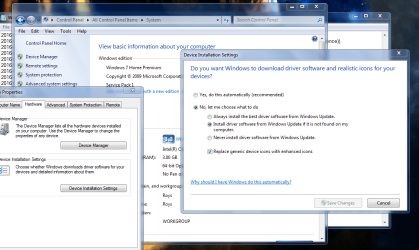
Compatel is the driver download option within W7, and can be STOPPED, i dont use that option myself prefer the Genuine sites for them
see screenshot

Windows error reporting can also be dissabled, via services

As for IE errors do you use another browser, if so turn it OFF within
Control Panel >> Programs & Features .. top left .. features another window will open UNCHECK IE11(reboot)

As for any general system problems run the repair tool, kb947821, and sfc /scannow

Roy
 

Attachments

  • nodrive.PNG
    nodrive.PNG
    85.4 KB · Views: 0

My Computer

Computer type
PC/Desktop
Computer Manufacturer/Model Number
medionl/Aspire 6930G/acer x55a
OS
W7 home premium 32bit/W7HP 64bit/w10 tp insider ring
CPU
E5300 dual core
Motherboard
medion MS7366
Memory
3gb
Graphics Card(s)
Nvidia Geforce 7100 Nforce 630i
Monitor(s) Displays
avixc
Internet Speed
n (isp resticted to 72)
Antivirus
mse/pands
Browser
palemoon
Other Info
Belkin Fd7050 n USB using Railink RT2870 drivers, more upto date
Back
Top