Solved Windows Update Service Not Running

Wixi

New member
Member
VIP
Local time
2:58 AM
Messages
107
Hi,

Today the Windows Update service wasn't running on boot-up and didn't appear in Task Manager. I have no idea why as everything was fine last night and have never had this issue with WU before.
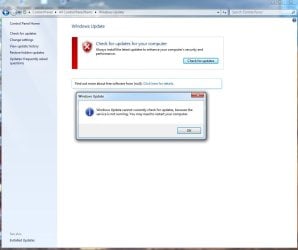
If I click "Check for Updates" I get a message saying "Window Updates could not check for updates because the service isn't running. You may need to restart you computer". I've tried restarting several times but WU still isn't running. I'm using a Dell Studio laptop with Windows 7 64 bit. Please help.
 

My Computer

Computer type
Laptop
Computer Manufacturer/Model Number
Cell
OS
Windows 7 Home Premium
Antivirus
McAfee SecurityCenter 2014
Browser
Google Chrome
A lot of us had issues today, whereas it worked yesterday. I think some crypto certificate may have expired, either on Microsoft server end and/or they need to push an update to clients.

P.S. - a similar issue happened on my XP PCs as well. Changing the date back to Dec 2nd worked around the issue temporarily.
 

My Computer

Computer Manufacturer/Model Number
Too many to list.
OS
XP, Seven, 2008R2
CPU
AMD, Intel, VIA
Motherboard
Various
Memory
Corsair, Kingston, etc.
Graphics Card(s)
ATI, NVIDIA
Monitor(s) Displays
Samsung
Hard Drives
Maxtor, Western Digital
Keyboard
qwerty
Internet Speed
22 Mb/s @ home, 1 Gb/s @ server
Other Info
All of my systems still run fastest on XP 32-bit for the most part. Win7 is fun to play with, but I still prefer XP for raw speed, security, and functionality.
A lot of us had issues today, whereas it worked yesterday. I think some crypto certificate may have expired, either on Microsoft server end and/or they need to push an update to clients.

Indeed that's the issue, there is a file called authcab.cab on a folder called AuthCabs in the SoftwareDistribution folder. That file inside has a file called authorization.xml and has a line that has an expiration date of December 3, 2017. The line on that file is as follows:

<ExpiryDate>2017-12-03T11:59:25.5067616-08:00</ExpiryDate>

That caused all this mess with Windows Update or more like with Microsoft Update because if you uncheck getting updates for other Microsoft Products, Windows Update will search updates for Windows normally.

I guess that's the only workaround till Microsoft fixes the mess they have with Microsoft Update.
 

My Computer

Computer type
PC/Desktop
Computer Manufacturer/Model Number
Generic PC built by me
OS
Windows 7 Ultimate 32 bits
CPU
3 Ghz Core i5 4 Cores/4 Threads
Motherboard
Asus P8B75-M/CSM
Memory
4 GB Kingston
Graphics Card(s)
2 GB Radeon R7 240
Sound Card
Via High Definition Audio
Monitor(s) Displays
15" LG 505G and a 19" LG 19LG30 LCD TV/Monitor
Screen Resolution
1366x768
Hard Drives
7200 RPM Seagate Barracude 1TB SATA Disk (Main disk)
7200 RPM Seagate Barracude 500 GB SATA Disk (Backup disk)
PSU
Cable Management TR2 600 Watts
Case
Active Cool Black Case
Cooling
CPU's included fan
Keyboard
Microsoft Keyboard
Mouse
Arteck RX5 Laser Mouse
Internet Speed
20mbps download and 3mbps upload
Antivirus
AVG Free 2015
Browser
Firefox and Chrome
Nice research and find =)

Indeed I only had issues with "Microsoft Update". Once I disabled Microsoft Update, Windows Update worked.

I guess with Windows 10 their priority... who knows if this'll ever get fixed.

In any event, I often use the Windows Update Catalog to download patches manually. At least until Microsoft kills that too :p
 

My Computer

Computer Manufacturer/Model Number
Too many to list.
OS
XP, Seven, 2008R2
CPU
AMD, Intel, VIA
Motherboard
Various
Memory
Corsair, Kingston, etc.
Graphics Card(s)
ATI, NVIDIA
Monitor(s) Displays
Samsung
Hard Drives
Maxtor, Western Digital
Keyboard
qwerty
Internet Speed
22 Mb/s @ home, 1 Gb/s @ server
Other Info
All of my systems still run fastest on XP 32-bit for the most part. Win7 is fun to play with, but I still prefer XP for raw speed, security, and functionality.
Nice research and find =)

Indeed I only had issues with "Microsoft Update". Once I disabled Microsoft Update, Windows Update worked.

I guess with Windows 10 their priority... who knows if this'll ever get fixed.

In any event, I often use the Windows Update Catalog to download patches manually. At least until Microsoft kills that too :p

Thanks, but I can't take the credit for that investigation since I found it on another website. All the credit for the investigation goes to the owner of that site :)

Hey, I have to be fair and give the credit to the person who deserves it n.n
 

My Computer

Computer type
PC/Desktop
Computer Manufacturer/Model Number
Generic PC built by me
OS
Windows 7 Ultimate 32 bits
CPU
3 Ghz Core i5 4 Cores/4 Threads
Motherboard
Asus P8B75-M/CSM
Memory
4 GB Kingston
Graphics Card(s)
2 GB Radeon R7 240
Sound Card
Via High Definition Audio
Monitor(s) Displays
15" LG 505G and a 19" LG 19LG30 LCD TV/Monitor
Screen Resolution
1366x768
Hard Drives
7200 RPM Seagate Barracude 1TB SATA Disk (Main disk)
7200 RPM Seagate Barracude 500 GB SATA Disk (Backup disk)
PSU
Cable Management TR2 600 Watts
Case
Active Cool Black Case
Cooling
CPU's included fan
Keyboard
Microsoft Keyboard
Mouse
Arteck RX5 Laser Mouse
Internet Speed
20mbps download and 3mbps upload
Antivirus
AVG Free 2015
Browser
Firefox and Chrome
Easy solution.
1. Stop Windows update service
2. Delete Softwaredistribution folder
3. Start Windows update service

This fix this problem but you lose your update history.
 

My Computer

Computer type
PC/Desktop
OS
Windows 7 Home Premium 64bit
CPU
Intel Core i5-4690k
Motherboard
Asus Maximus VII Ranger
Memory
8 GB
Graphics Card(s)
Nvidia GTX 770
Monitor(s) Displays
Dell P2414H
Screen Resolution
1920x1080
Hard Drives
Crucial M550 128 GB
WD EZEX 1TB
PSU
Seasonic SS-660XP2 F3 Platinum 660W
Case
Fractal Design Define R4
Cooling
3x 140mm fans at 5V
Mouse
Logitech G5 Laser mouse
Antivirus
Avast Free Antivirus
Browser
Google Chrome
Hi Nancy,

Unfortunately Yes. and thats why the scan is taking so long.

There is another fix posted on this forum, that didnt clear the SD folder.

Roy
 

My Computer

Computer type
PC/Desktop
Computer Manufacturer/Model Number
medionl/Aspire 6930G/acer x55a
OS
W7 home premium 32bit/W7HP 64bit/w10 tp insider ring
CPU
E5300 dual core
Motherboard
medion MS7366
Memory
3gb
Graphics Card(s)
Nvidia Geforce 7100 Nforce 630i
Monitor(s) Displays
avixc
Internet Speed
n (isp resticted to 72)
Antivirus
mse/pands
Browser
palemoon
Other Info
Belkin Fd7050 n USB using Railink RT2870 drivers, more upto date
Sorry, I guess I deleted my post after you read it....

Apparently the other updates were applied and just the history of what updates were done are gone, because it finally came back with current updates...same ones that my desktop say are available.

Thanks
 

My Computer

Computer type
PC/Desktop
Computer Manufacturer/Model Number
Toshiba Satellite C650
OS
Windows 7 Home Premium x64
CPU
2350M @ 2.30GHz
Motherboard
Intel Core i3
Memory
4G
I also have (had) the same problem. After reading all the above posts, I tried all suggestions and only one worked. I tried the "date change" and "disabling the Update for Other Microsoft Products" but none worked. I have to give credit where it's due. I found it on the Dell Support website at

Windows Update Cannot Currently Check for Updates Because the Service is Not Running | Dell US


Part of the solution is listed in TheOwner's post.

The solution from Dell's Support website has only 4 steps:
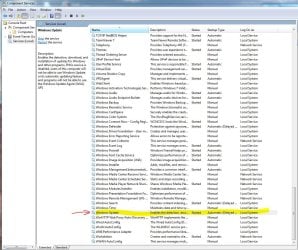
1. Go to Administrative Tools/Services, and stop the Windows Update service.
2. Then go to the folder c: /Windows/SoftwareDistribution and delete all of the files and folders.
3. Then go back to Services and restart the Windows Update service which will recreate all of those folders again.
4. Then manually run the Update Service and everything should work.

I actually rebooted before proceeding with Step 4. But When I started Windows Update it still showed that the service is not working. I changed the settings on the Windows Update screen and disabled (unchecked) the Update for Other Microsoft Products. Then I just clicked the Check for Updates button even if it had the X and a message saying the message (paraphrasing here) that the Windows Update service is not running. And the update started... well ... updating :-)

It took several minutes and I only had 3 updates. After the restart, I checked what was updated and it showed only the 3 new updates. I then clicked the View All Installed Updates (I think) and it took several minutes but it showed all updates all the way back to 2012 including non-Windows/non-Microsoft software.

Then I went to the C:\Windows\SoftwareDistribution\AuthCabs and viewed the authorization.xml inside authcab.cab and now the expiry date has been updated

<ExpiryDate>2025-07-01T00:00:00.0000000-00:00</ExpiryDate>

I opened the Window Update and tried to Change the Setting because I wanted to re-enable "to include other Microsoft Updates" but the option is not there anymore. However on the Windows Update screen there is a message "Get updates for other Microsoft Products" and a link.

Thanks.

Cmaker3
 
Last edited:

My Computer

Computer Manufacturer/Model Number
Dell Precision M6500
OS
Windows 7 Professional 64-bit SP1
CPU
Intel Core i7 Q740 @1.73GHz
Memory
12 GB
Graphics Card(s)
ATI FirePro M7820
Monitor(s) Displays
17" UltraSharp WXGA+ (1440x900) LED Display
Hard Drives
500GB Hard Drive 9.5MM 7200RPM
The solution from Dell's Support website has only 4 steps:
1. Go to Administrative Tools/Services, and stop the Windows Update service.
2. Then go to the folder c: /Windows/SoftwareDistribution and delete all of the files and folders.
3. Then go back to Services and restart the Windows Update service which will recreate all of those folders again.
4. Then manually run the Update Service and everything should work.

Thanks! You are my hero!
 

My Computer

Computer type
PC/Desktop
OS
Windows 7 Professional x64 SP1
thank you,cmaker3.
 

My Computer

Computer type
PC/Desktop
Computer Manufacturer/Model Number
HP Z800
OS
Windows 7 Professional 64 bit
One of my Win-7 Computers has had this problem for about 6 months. Tried the info in this thread and it worked just fine.
Updated 19 updates I was missing.

Thanks everybody ;)
 

Attachments

  • Cant update.JPG
    Cant update.JPG
    60 KB · Views: 0
  • Windows Update Services.JPG
    Windows Update Services.JPG
    192.6 KB · Views: 0

My Computer

Computer type
PC/Desktop
Computer Manufacturer/Model Number
Built them myself, Science Experiments !
OS
Win7 Enterprise, Win7 x86 (Ult 7600), Win7 x64 Ult 7600, TechNet RTM on AMD x64 (2.8Ghz)
CPU
AMD fx8350 4ghz, AMD-32 2400mhz, AMD-64 3200mhz, AMDx64 2.8G
Motherboard
SIS 755, ECS-K8M890M-M (Ult 7600), GigaByte & others
Memory
2gb, 4gb on the Ult 7600, 4gb on Technet RTM, 32gb on FX8350
Graphics Card(s)
Draw my own Graphics, several nVidia cards
Sound Card
on motherboard
Monitor(s) Displays
19" flat scr, 28" I-Inc widescr,22" Emprex Widescr, 23" Acer
Screen Resolution
1280 x 1024, 1440 x 900, 1920 x 1080
Hard Drives
6 pata Ide HD's & 2 Sata HD's
added 80gb external on Ult 7600 computer,
numerous extra 1tb, 2TB, 3Tb SATA HD's
A collection of ext HD Docks w/ HDs
PSU
430w, 550w, 600w, 700, 800, etc
Case
All Generic Full Towers
Cooling
Open Air & a few fans, some w/ colored LEDs
Keyboard
Compaq & Dell recycled from GoodWill
Mouse
Made in China Optical Wired Mouse
Internet Speed
Fast Cable InterNet
Antivirus
AVG Free on 24 different Desktops, NO Problems!
Browser
IE 8 is preferred, but use FireFox sometimes
Other Info
Linksys Routers, switches, & Hubs
Too Many USB Flash Drives to count, Biggest is 64GB !
Eight computers in my home network.
Sixteen computers at my business network.
Linked via TeamViewer !
Lots of old used spare computer parts everywhere!
Back
Top