
Windows Update stuck at "Checking for updates'

xerdew

New member
Local time
6:19 PM
Messages
2
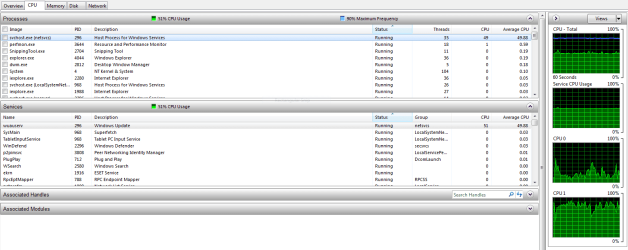
Hi, i'm having a hard time with Windows Update. When i check for for updates it gets stuck and even if i dont check for updates, the Windows Update service starts anyway. In both cases it is accompanied by high CPU usage as shown here:
Capture.PNG

List of things i did:
1. Anti-virus scan (nothing)
2. Windows Update Troubleshooter (didnt fix it)
3.Check Disk for Errors (no problems were detected)
I eventually tried Resetting Windows Update Componets Manually (following step 4)using the proccess described here:
https://support.microsoft.com/en-us/kb/971058
I ran into trouble Reregistering files (step 6).
Many .dlls were NOT successful, such as regsvr32.exe shdocvw.dll (pop-up message said something along the lines of "Connected but failed to register, check if .dll is vaild and try again later'')and some more which i cant remember. That said, i completed all steps because i didnt know what else to do.
The results were the same as before apart from having my Update history whiped and new folders in Windows (don't know if i need the two them in each file):

1.PNG 2.PNG

No solution to this has been found yet. Please help.
 

My Computer

Computer type
Laptop
OS
Windows 7 Home Premium 64bit
This is a common problem now with many many people that started here over a year ago and has gotten progressively worse. There are threads on various forums (Wilders, DSLR) about it and so on. It took 4 hours and 15 minutes of "checking for updates" on my Win 7 system yesterday, but eventually they did show up and I then had no trouble installing them. All I can suggest is patience, just let it run until it shows the list. I hope MS will fix this issue at some point, because a lot of people are getting very very frustrated with all this. And yes, the entire time mine was checking, the cpu usage was at a constant 50% more or less. However, I was still able to use the machine during this time, so not too much of a hardship. This issue needs fixing though, for sure!

PS: Various people have posted various temporary fixes, but nothing sticks. The next month the same problem occurs on the next update check. So at this time, there is no real solution. Don't bother looking for one, in other words...
 

My Computer

OS
Windows 7 Ultimate x64
Same thing here, maybe MS wants to frustrate us by this hanging matter, and just go to Win10
 

My Computer

Computer type
PC/Desktop
Computer Manufacturer/Model Number
custom build
OS
WinXP / Win 7 / Win 8.1 64bit Dual Boot
CPU
i7-4770K
Motherboard
Asus Z87-A
Memory
16 gb G.Skill Ripjaws
Graphics Card(s)
on board 4600
Sound Card
On Board Soundmax HD
Monitor(s) Displays
Dell 19" Flat Panel
Screen Resolution
1280x1024
Hard Drives
Samsung 840 Pro 512gb SSD
WD1001 Caviar Win 7 Boot
WD500 Caviar Win XP Boot
2xWD500 Caviar (Raid 0)
WD750 Caviar (Backup)
PSU
Aerocool StrikeX 800w x2
Case
Aerocool Strike X
Cooling
Air
Keyboard
Microsoft Wireless
Mouse
Microsoft Wireless
Internet Speed
Cable
Other Info
Asus 12x Blu-ray writer
Same thing here, maybe MS wants to frustrate us by this hanging matter, and just go to Win10
I would not be surprised by this at all. Given that Microsoft's GWX app behaves like a malware, Windows 10 ads being included in IE security update and 'Important' updates to GWX app.
Looks like MS is determined to increase Windows 10 'popularity' one way or the other.
 

My Computer

Computer type
Laptop
OS
Windows 7 Home Premium 64bit
SOLVED:

Windows 7 SP1 64

Extremely frustrated for many days trying every solution posted on the Internet. Then finally I found this comment on Softpedia's website and it absolutely works (very easy - but why should we have to do this?):

To resolve this issue: first install KB3145739 manually. Go to Microsoft website to download and then install, even if your Installed History already shows this update.
Next you should restart and finally you can check for updates in manual mode.
It takes between 5 or 10 minutes.
Comment posted by: Chooky
14 Apr 2016 13:00 CMT

Windows Update Hanging When Downloading April 12 Patches (Scroll down the Comments section until you find a posting by Chooky.)

Hopefully it will help some people avoid hours or days of frustration or drastic, complicated but unnecessary troubleshooting steps.
 

My Computer

Computer type
Laptop
Computer Manufacturer/Model Number
Sony Vaio VGN-FW465J
OS
Windows 7 Home Premium, SP 1 64bit
CPU
Intel Core 2 Duo P8700 @2.53 GHz
Memory
RAM 4GB
Graphics Card(s)
ATI Radeon
Hard Drives
Crucial MX200 SSD 256 GB
Antivirus
MSE
Browser
Firefox
This has worked for me every time:

The solution:

Stop the Windows Update Service (wuauserv).
Download and install KB3050265
reboot
Download and install KB3102810
Reboot and check for updates again. All of our machines found their required updates in less than 5 minutes.
 

My Computer

Computer type
PC/Desktop
Computer Manufacturer/Model Number
hp
OS
windows 7 64-bit
Hi,

I have just recently installed windows 7 from a usb stick where I put an iso file onto.

I am stuck on checking for updates and have tried the suggestions above but I am stuck with the "windows standalone installer". Seems to be forever "searching for updates on this computer".

Any suggestions?
 

My Computer

Computer type
Laptop
Computer Manufacturer/Model Number
Sony Vaio FZ38M
OS
Windows 7 Ultimate x64
This has worked for me every time:

The solution:

Stop the Windows Update Service (wuauserv).
Download and install KB3050265
reboot
Download and install KB3102810
Reboot and check for updates again. All of our machines found their required updates in less than 5 minutes.
:DWorked OK for me - thanks VickyV
 

My Computer

Computer type
PC/Desktop
Computer Manufacturer/Model Number
custom build
OS
Windows 7
CPU
AMD Phenom II
Motherboard
Gigabyte
Memory
4gb DDR3 [PC3-10700H]
Graphics Card(s)
ATI Radeon HD 4250
Hard Drives
Kingston 120gb SSD
Seagate 320gb
Antivirus
McAfee
Browser
Firefox
This has worked for me every time:

The solution:

Stop the Windows Update Service (wuauserv).
Download and install KB3050265
reboot
Download and install KB3102810
Reboot and check for updates again. All of our machines found their required updates in less than 5 minutes.

Worked for me just now (18 June 2016), Thank You!!

The stand-alone installation of each of those two KB patches got hung up -- BUT -- launching Services, selecting Windows Update, and clicking the Restart icon in the menu bar (stops Windows Update and then starts it again), let the update patches run perfectly. Less than 5 minutes each.

After the 2nd reboot, the check for new updates completed in less than 30 minutes, and found 14 updates. Problem solved. Thank you vickyv!
 

My Computer

Computer type
PC/Desktop
Computer Manufacturer/Model Number
Dell
OS
Windows 7 Ultimate x64
This has worked for me every time:

The solution:

Stop the Windows Update Service (wuauserv).
Download and install KB3050265
reboot
Download and install KB3102810
Reboot and check for updates again. All of our machines found their required updates in less than 5 minutes.

Hello mate,
Thanks for your solution. I almost tried everything over the past week and this method worked for me.
I suggest others to follow these steps and solve this mess.
Thanks again
 

My Computer

Computer type
Laptop
Computer Manufacturer/Model Number
HP
OS
Windows 7 Ultimate x64
CPU
Core i7-4702MQ
Memory
8GB
Graphics Card(s)
AMD Radeon HD 8750M
Antivirus
BitDefender
Browser
Firefox
install KB3050265

install KB3102810
How do you install them? If I double click them, the program starts.

If I run wusa.exe \Users\pc\Downloads\windows6.1-KB3050265-x64.msu a window displays.
Windows update standalone installer. Searching for updates on this computer. Cancel.
It gets stuck.
 
Last edited:

My Computer

OS
windows 7 home premium
install KB3050265

install KB3102810


Except those two updates are showing up on lists of updates to avoid if you don't want Win10. Seems Microsoft is making it harder and harder to avoid.
 

My Computer

Computer type
PC/Desktop
Computer Manufacturer/Model Number
Dell XPS Studio 8000
OS
Windows 7 Home Premium 64-bit
CPU
Intel Core i5 [email protected]
Memory
8GB
Hard Drives
Hitachi HDT721064SLA360 ATA
Antivirus
AVG
Browser
Mozilla Firefox
after more than a day of doing more plumbing than any OS should require (including an incredibly laborious MS solution that still didn't solve the problem) 15 minutes and VickyV's solution had Updates downloading and installing like they should have when i did the clean install of Win7 3 days ago. Shame on Microsoft (if they have any) and many thanks to VickyV... who may drop by for a bottle of wine anytime....
 

My Computer

Computer type
PC/Desktop
Computer Manufacturer/Model Number
Dell
OS
Windows 7 Pro 64 bit
CPU
Intel Core 2 Quad CPU Q9550
Motherboard
Dell
Memory
6 GB
Graphics Card(s)
none
Hard Drives
1.5 TB
500 GB
multiple USB
ReadyNAS NV+ v2
Antivirus
Norton
Browser
Chrome
This has worked for me every time:

The solution:

Stop the Windows Update Service (wuauserv).
Download and install KB3050265
reboot
Download and install KB3102810
Reboot and check for updates again. All of our machines found their required updates in less than 5 minutes.

What can I say? I've been looking unsuccessfully for a solution for this Windows update problem for a very long time a here comes vickyv, just like that, like hitting a lottery jackpot.

I don't like the choice I have for presidential candidates vickyv. Do you think you can run?
 

My Computer

Computer type
Tablet
OS
Windows Home 10 64-bit
This has worked for me every time:

The solution:

Stop the Windows Update Service (wuauserv).
Download and install KB3050265
reboot
Download and install KB3102810
Reboot and check for updates again. All of our machines found their required updates in less than 5 minutes.

I just signed up for the forum in order to thank you for posting the solution to this maddening problem. Brand new pc, and it's had me in fits trying to sort out how to update it. I was close to boxing the thing up and sending it back until finding this forum and your post in a Google search.

I followed your instructions as listed, and the first download was accepted, but the second one produced the endless updating screen. I tried again, this time stopping Windows Update Service, and it went through.

Windows Update found 128 updates and I left it alone to finish. 5 hours later and it still had not finished installing the updates. This was again worrying. as a Win 7 laptop I bought last year didn't take that long to update. I assumed it had frozen up again and I reluctantly decided to power off and try and reach Safe mode to do a system Restore.

Rebooting, and attempting to get into Safe Mode strangely didn't work, as the pc ''undid the attempted installation'' of whatever updates did take. But afterwards, I was brought back to the desktop. Going back to Windows Update, I initiated another search for updates, and it found them. This time, I selected only 5 and tried to see if they would install. And they did, in the normal amount of time an update takes. It's slow going, but performing them in small batches has thus far worked. I wish the listed updates could be sorted in order of the date they were released I've tried going thru them and picking the oldest first, but...it's tedious.

In summary,
1) Vickiv's solution succeeded in allowing updates to be found and installed.
2) Add stopping Windows Update Service to the 2nd step.
3) To be on the safe side, try updating in small batches in order to prevent it from choking on doing them all at the same time.

Once again, many thanks! :thumbsup:
 

My Computer

Computer type
PC/Desktop
Computer Manufacturer/Model Number
Asus
OS
Windows 7 Ultimate x64
Memory
8GB
Graphics Card(s)
Intel
Antivirus
ZoneAlarm
Browser
Firefox
Still No Luck

Successfully installed both KB's suggested by Vickiv but still no updates.

M/S level 2 support have yet to solve it either. Today they called to advise they found a solution which was the need to install the Intel Rapid Storage Driver (my drive is an SSD) which they claim fixed the update issue for others but doing so hasn't helped.

Any other suggestions?
 

My Computer

Computer type
Laptop
Computer Manufacturer/Model Number
HP
OS
Win 7 SP1 64bit
CPU
Intel Core i3
Hard Drives
Samsung EVO 850 500GB
Antivirus
Avast
Browser
Chrome
One more thing. . . . .

Just thought I'd add. . . . . . . .after a few hours on a remote with M/S level 2 tech today with them again trying various fixes, they have decided it best to download an ISO of Win 7 SP1 in order to repair my version. They have indicated that for some reason my current installer service is going off over and over again suggesting my original disk is somehow corrupt.

But what's interesting is they are downloading it from a site called getintopc.com. I would have thought it would come from a M/S site.
 

My Computer

Computer type
Laptop
Computer Manufacturer/Model Number
HP
OS
Win 7 SP1 64bit
CPU
Intel Core i3
Hard Drives
Samsung EVO 850 500GB
Antivirus
Avast
Browser
Chrome
Diamonds,
Sorry cant believe thats a legit MS site, thier own is still up and running, although OEM's like yours dont qualify, unless they upgrade you to a Retail licence
Are they charging you for Advice and the download

Roy
 

My Computer

Computer type
PC/Desktop
Computer Manufacturer/Model Number
medionl/Aspire 6930G/acer x55a
OS
W7 home premium 32bit/W7HP 64bit/w10 tp insider ring
CPU
E5300 dual core
Motherboard
medion MS7366
Memory
3gb
Graphics Card(s)
Nvidia Geforce 7100 Nforce 630i
Monitor(s) Displays
avixc
Internet Speed
n (isp resticted to 72)
Antivirus
mse/pands
Browser
palemoon
Other Info
Belkin Fd7050 n USB using Railink RT2870 drivers, more upto date
That kind of threw me too.

Interestingly, the download from getintopc required my key and the status screen suggests it will take 10+ hours. That's using IE 11 which the M/S tech used. In the meantime, on a different PC, I'm downloading the ISO from M/S directly using Chrome which suggests it will take 7 hours.

Both devices share the same home network connection. Could this be an IE versus Chrome speed thing or does it suggest the getintopc file is a lot larger?

By the way,my original WIN7 licence is a retail version.

As for charging, this actually started with a problem relating to Office 2010 Home where I paid $99 for a one time support subscription. That outcome resulted in them not being able to resolve an Outlook account setup problem relating to my Outlook.com exchange account so they in turn gave me Office 2013 Professional Plus which fixed the issue but forced me to a newer and of course different look and feel and makes my unit different in that regard from others we have. Not a big deal though. The Windows update issue surfaced the next day and so my one time subscription covers it. Both problems started as a result of my doing a fresh install on my SSD, something I've done before without a hitch and just assumed would go well again. Man was I wrong! The time this has consumed so far is ridiculous. I'll be sure to report back when/how this finally gets resolved. I'm hoping unlike Office, I'm not told I'll have to move to WIN 10.

Thanks for your response.
 

My Computer

Computer type
Laptop
Computer Manufacturer/Model Number
HP
OS
Win 7 SP1 64bit
CPU
Intel Core i3
Hard Drives
Samsung EVO 850 500GB
Antivirus
Avast
Browser
Chrome
Back
Top
