Windows Update & System Restore points

martinlest

New member
Power User
VIP
Local time
10:18 PM
Messages
661
According to Microsoft:

https://msdn.microsoft.com/en-us/library/aa378910(v=vs.85).aspx

AutoUpdate provides an easy way for users to download critical Windows updates. After the update is downloaded, the user can install the update on the system. If the user chooses to install the update, System Restore creates a restore point before the installation of the update begins.
Oddly, I soon accumulate lots of System Restore points made by Windows Update, even though I have Update set just to inform me of updates ready to download. I am getting these Restore points, even though I haven't downloaded any updates, let alone install them. How could this be happening? Any way to stop these restore points being created unless I actually download and install an update?
 

My Computer

Computer type
PC/Desktop
Computer Manufacturer/Model Number
Custom Build
OS
Windows 7 Home Premium SP1 64-bit
CPU
Intel Core i7-4790K CPU @ 4.5GHz
Motherboard
Asus H97I-PLUS
Memory
16GB KINGSTON HYPER-X FURY DUAL-DDR3 1600MHz
Graphics Card(s)
8GB NVIDIA GEFORCE GTX 1070
Monitor(s) Displays
HannsG 28" & Dell 24"
Screen Resolution
1920x1200
Hard Drives
1 x 2TB Samsung Evo 860 SSD
2 x 500GB Samsung Evo 850 SSD
PSU
CORSAIR 650W CS SERIES
Case
Thermaltake Core V1 Mini ITX Cube
Cooling
NOCTUA NH-L12
Browser
Firefox
Other Info
Custom PC used for X-Plane 11
Hi, it is in my advice to use the practice of "Imageing" your computer.
This means that you can now turn System Restore pionts Off, saveing space.
Macrium Reflect free is recommended, here is a tutorial.
I Image a minimum of 1 times per month, just before updates.
Or if I wish to play with some software that I am not sure about.
This way no matter what problem I have I can always put my computer back to before the issue.

Wayne
 

My Computer

Computer type
PC/Desktop
Computer Manufacturer/Model Number
Owner Builder
OS
Windows 7 Ultimate x64 SP1 OEM
CPU
Intel i7 3930K
Motherboard
Asus X79 Deluxe
Memory
Kingston Genesis KHX2133C11D3K4/32G
Graphics Card(s)
Asus RTX 2070 Ti Turbo fan series
Sound Card
Creative Sound Blaster ZXR
Monitor(s) Displays
Samsung U32J39 UHD
Screen Resolution
3840 x 2160
Hard Drives
Samsung 860 Pro 256 GB
OCZ Vertex 4 512GB
Western Digital Black 4TB
PSU
Corsair AX850
Case
Gigabyte
Cooling
Push - Pull 120 mm Noctua PWM, Scythe Big Shuriken 2 Rev. B
Keyboard
Logitech K800 Backlit
Mouse
Logitech MX2 Master
Internet Speed
NBN 25 Mbps
Antivirus
Kaspersky Internet Security
Browser
Mozilla FireFox
Other Info
TP-Link Archer VR600v
Sennheiser TR220 WiFi Head Phones.
martinlest. The MS website you refer to mentions that automatic Restore Points are created every so often even if there are no new Updates.

You can prevent automatic Restore Points by opening Control Panel, select System. then Advanced System Settings (listed in LH margin), then select the System Protection tab, then click on the Configure button & you will a list of options, one being Turn Off System Protection. You can also Delete any saved Restore Point & you can set the disc space used for Restore Point to zero. Don't forget to click on the OK button to save any changes you made.

MeOnMine's advice on using back up images is worth it's weight in gold. I also do a weekly back up image every week using macrium Reflect.
 

My Computer

Computer type
PC/Desktop
Computer Manufacturer/Model Number
Self built using existing case
OS
Windows 7 Home Premium 64 bit sp1
CPU
Intel i5 3570 3.4Ghz Ivy Bridge SKT 1155 quad core
Motherboard
Gigabyte Z77-HD3 SKT 1155 2xSata 3, 4x USB 3.0
Memory
G-Skill Rip Jaws 16Gb (8x2) DDR3 -1600 PC3 12800 CL 10 red
Graphics Card(s)
Gigabyte NVIDIA GT610 1Gb DDR3 810/1200 PCI-E 2.0 Silent
Sound Card
NVIDIA High Definition & Realtech High Definition Audio
Monitor(s) Displays
2 x Philips 226V4L 16:9 aspect ratio
Screen Resolution
1920 x 1080 HD
Hard Drives
Samsung 840 Pro 256gb SSD, SATA 3.
Hitachi Touro Portable 1tb, USB 3.0 HDD used for image b/ups.
PSU
Corsair VS450
Case
Codeng
Cooling
PSU fan & CPU fan
Keyboard
Logitech
Mouse
Logitech Wireless trackball M570
Internet Speed
Wireless 3G. 3mg down & 550kb up.
Antivirus
Bitdefender Internet Security 2020
Browser
Opera (Current Version) & Firefox
Other Info
MS Office 2013 Pro. Davis weather station software. MGE Nova 600 avr UPS.
I certainly make a backup image every so often (I have stopped using Macrium though as it let me down too often with Image Not Valid or some such thing; last time was just a week ago, with an image I had only made a couple of weeks before). I've gone back to using Windows 7 native imager - not perfect, but as reliable as any I have tried (and I have tried many over the years). Each to his own, but I would never use a disc image instead of System Restore, restoring an image is a last resort for me.

The restore points in question are not automatic ones, they are made by Windows Update. I have a bit of software called System Restore Manager (I have used it for years), which allows you to delete specific Restore Points, and shows which software created them (user, automatic, update or whatever).

It's not a huge problem of course, I can just delete whichever restore points I don't want, as I say. But it does seem that Windows Update is making points at times that go against what Microsoft has written.
 

My Computer

Computer type
PC/Desktop
Computer Manufacturer/Model Number
Custom Build
OS
Windows 7 Home Premium SP1 64-bit
CPU
Intel Core i7-4790K CPU @ 4.5GHz
Motherboard
Asus H97I-PLUS
Memory
16GB KINGSTON HYPER-X FURY DUAL-DDR3 1600MHz
Graphics Card(s)
8GB NVIDIA GEFORCE GTX 1070
Monitor(s) Displays
HannsG 28" & Dell 24"
Screen Resolution
1920x1200
Hard Drives
1 x 2TB Samsung Evo 860 SSD
2 x 500GB Samsung Evo 850 SSD
PSU
CORSAIR 650W CS SERIES
Case
Thermaltake Core V1 Mini ITX Cube
Cooling
NOCTUA NH-L12
Browser
Firefox
Other Info
Custom PC used for X-Plane 11
Yes, ok, each to his own.
As said I don't use Restore so can't really help in that realm.
I would say that you need a little more practice with Macrium as it is highly regarded and stable.
I use paid version of Paragon for business and that to has never faulted.
I have had Restore and Windows Backup fail, so please keep a known good image just in case.
 

My Computer

Computer type
PC/Desktop
Computer Manufacturer/Model Number
Owner Builder
OS
Windows 7 Ultimate x64 SP1 OEM
CPU
Intel i7 3930K
Motherboard
Asus X79 Deluxe
Memory
Kingston Genesis KHX2133C11D3K4/32G
Graphics Card(s)
Asus RTX 2070 Ti Turbo fan series
Sound Card
Creative Sound Blaster ZXR
Monitor(s) Displays
Samsung U32J39 UHD
Screen Resolution
3840 x 2160
Hard Drives
Samsung 860 Pro 256 GB
OCZ Vertex 4 512GB
Western Digital Black 4TB
PSU
Corsair AX850
Case
Gigabyte
Cooling
Push - Pull 120 mm Noctua PWM, Scythe Big Shuriken 2 Rev. B
Keyboard
Logitech K800 Backlit
Mouse
Logitech MX2 Master
Internet Speed
NBN 25 Mbps
Antivirus
Kaspersky Internet Security
Browser
Mozilla FireFox
Other Info
TP-Link Archer VR600v
Sennheiser TR220 WiFi Head Phones.
Hi Martin,
just comments from me

The main reason utilites like Macrium fail - non standard set-up
(Dont use EUFI so purely Legacy.)
Standard set-up
100mb system reserved (the active partition) followed by all the rest.
BIG NOTE - Macrium makes use of the System reserved partition and DONT turn of Volume shadow copy

As for your imaging are you talking about the MS create system image or purely system restore
By the way YOU govern the size of this via the cofiguration setting

As MS now only issue Cumulative monthly updates, second Tuesday of the month, Turn Updating OFF and check a day or so afterwards, (dont go for the Previews)
If you dont use Hibernation turn it of to save space


Roy
 

My Computer

Computer type
PC/Desktop
Computer Manufacturer/Model Number
medionl/Aspire 6930G/acer x55a
OS
W7 home premium 32bit/W7HP 64bit/w10 tp insider ring
CPU
E5300 dual core
Motherboard
medion MS7366
Memory
3gb
Graphics Card(s)
Nvidia Geforce 7100 Nforce 630i
Monitor(s) Displays
avixc
Internet Speed
n (isp resticted to 72)
Antivirus
mse/pands
Browser
palemoon
Other Info
Belkin Fd7050 n USB using Railink RT2870 drivers, more upto date
I use both Restore points and Macrium Reflect.
Other than Windows 7 their are 3rd party programs that also make Restore points. One just has to look at their programs and see if they are making backups.
I keep my Restore Points to 10 % of disk space used and don't have a problem.
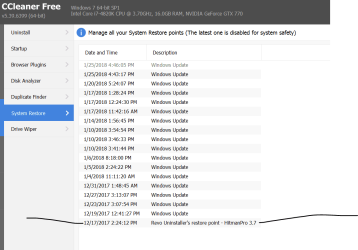
I use Ccleaner to check my Restore Points and remove the ones I don't want.
I also don't use hibernation.


Ccleaner restore points. Today..PNG


System Protection.PNG


Jack
 

My Computer

Computer type
PC/Desktop
Computer Manufacturer/Model Number
Home made Desktop
OS
Windows 10 Pro. 64/ version 1709 Windows 7 Pro/64
CPU
Intel i7-6800K @ 4.3
Motherboard
ASUS X-99 Deluxe II
Memory
Corsair Platinum 16 gig @2400
Graphics Card(s)
EVGA GTX 1070 OC
Monitor(s) Displays
Asus 27" LED LCD/VE278Q
Screen Resolution
1920-1080 or 1280-720 HDMI
Hard Drives
INTEL SSD 730-240 Gb Sata 3.0/
PSU
EVGA Platium 1200W
Case
Phanteks Luxe Tempered Glass 8 fans/ one radiator
Cooling
XSPC/ Water Cooled CPU
Keyboard
Das 4 Professional
Mouse
Logitech M705/MX Anywhere 2-S
Internet Speed
100 mbits
Antivirus
Microsoft Security Essentials/ Malwarebytes Premium 3.0/ SAS
Browser
I.E. 11 default/Firefox/ ISP Time Warner Cable/Spectrum
Other Info
LG BluRay Burner/
Sound system-KLipsch-THX/
Icy Dock ssd Hot Swap bays.
Back
Top