Windows Update using over a GB of RAM constantly

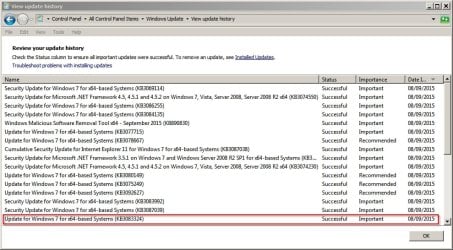
Very strange. I don't have 3083324. It's not in my hide list or my don't install list.
Plus it not offered.
 

My Computer My Computer

At a glance

Windows 10 Pro. 64/ version 1709 Windows 7 Pr...Intel i7-6800K @ 4.3Corsair Platinum 16 gig @2400EVGA GTX 1070 OC
Computer type
PC/Desktop
Computer Manufacturer/Model Number
Home made Desktop
OS
Windows 10 Pro. 64/ version 1709 Windows 7 Pro/64
CPU
Intel i7-6800K @ 4.3
Motherboard
ASUS X-99 Deluxe II
Memory
Corsair Platinum 16 gig @2400
Graphics Card(s)
EVGA GTX 1070 OC
Monitor(s) Displays
Asus 27" LED LCD/VE278Q
Screen Resolution
1920-1080 or 1280-720 HDMI
Hard Drives
INTEL SSD 730-240 Gb Sata 3.0/
PSU
EVGA Platium 1200W
Case
Phanteks Luxe Tempered Glass 8 fans/ one radiator
Cooling
XSPC/ Water Cooled CPU
Keyboard
Das 4 Professional
Mouse
Logitech M705/MX Anywhere 2-S
Internet Speed
100 mbits
Antivirus
Microsoft Security Essentials/ Malwarebytes Premium 3.0/ SAS
Browser
I.E. 11 default/Firefox/ ISP Time Warner Cable/Spectrum
Other Info
LG BluRay Burner/
Sound system-KLipsch-THX/
Icy Dock ssd Hot Swap bays.
https://support.microsoft.com/en-us/kb/3083324 is being offered again.
Sept. update to WU.

Yes. That's what it is. Just checked and 3083324 installed on my machine on 26 August then again today!
That probably means that the KB was reworked - that same KB number was used.

I installed that KB on 03 Sept. on a test computer. It was not offered again today for that test computer. It was probably just an error that MS put the current version out there on 03 Sept. It probably would have been better if MS had not pulled the update - especially if the same update was to be released today. Pulling the update just fed the tin foil hat crowd. That article has been quoted in many a forum - including this one.
 

My Computer My Computer

At a glance

W7 Pro SP1 64biti78GBIntel HD Graphics
Computer type
Laptop
Computer Manufacturer/Model Number
Employer provided Dell Latitude
OS
W7 Pro SP1 64bit
CPU
i7
Memory
8GB
Graphics Card(s)
Intel HD Graphics
Hard Drives
crappy SSD
Antivirus
Employer mandated Symantec Endpoint Protection
Browser
Pale Moon 64bit, IE11 64bit & Chrome 64bit
Very strange. I don't have 3083324. It's not in my hide list or my don't install list.
Plus it not offered.

It's not in my hidden list or list of updates to avoid either. It showed up as "important" - not sure why it's not offered to everyone.

3083324.jpg

EDIT: Okay it has now made it's way onto my list of updates to avoid and I've removed it.

Code:
kb:2660075
kb:2726535
kb:2876229
kb:2902907
kb:2923545
kb:2952664
kb:2970228
kb:2976978
kb:2990214
kb:2994023
kb:3021917
kb:3022345
kb:3035583
kb:3044374
kb:3050265
kb:3065987
kb:3068708
kb:3075249
kb:3075851
kb:3075853
kb:3080149
kb:3083324
kb:3083325
 
Last edited:

My Computer My Computer

At a glance

Microsoft Windows 7 Home Premium 64-bit 7601 ...AMD C-60 APU with Radeon(tm) HD Graphics4.00 GBAMD Radeon HD 6290 Graphics
Computer type
Laptop
Computer Manufacturer/Model Number
ASUS
OS
Microsoft Windows 7 Home Premium 64-bit 7601 Multiprocessor Free Service Pack 1
CPU
AMD C-60 APU with Radeon(tm) HD Graphics
Motherboard
ASUSTeK COMPUTER INC. X501U
Memory
4.00 GB
Graphics Card(s)
AMD Radeon HD 6290 Graphics
Sound Card
(1) AMD High Definition Audio Device (2) Realtek High Defi
Screen Resolution
1366 x 768 x 32 bits (4294967296 colors) @ 60 Hz
Hard Drives
Hitachi HTS545050A7E380 SATA Disk Device
Antivirus
Comodo CIS & FW, SecureAplus App Whitelisting, Threatfire
Browser
Cyberfox 64bit, Opera 64bit, Airfox
Other Info
Spy-The-Spy, HitmanPro.Alert, Norton Connect Safe, MJRegWatcher, BitDefender TrafficLight, Voodoo Shield, Zemana AntiMalware
I haven't seen KB3083324 yet not on 9/3... or today
Of course I haven't been offered any updates yet though :)
 

My Computer My Computer

At a glance

Win-7-Pro64bit 7-H-Prem-64biti7-5930K 2nd i9-9940x both water blocked VRM'...Trident-z 3200C14 2nd Trident-z 3600C16EVGA 1080ti ftw3 2nd Titan Xp both water blocked
Computer type
PC/Desktop
Computer Manufacturer/Model Number
Custom assembled by me :}
OS
Win-7-Pro64bit 7-H-Prem-64bit
CPU
i7-5930K 2nd i9-9940x both water blocked VRM's too
Motherboard
ASUS SABERTOOTH X99 2nd ASUS x299 Apex
Memory
Trident-z 3200C14 2nd Trident-z 3600C16
Graphics Card(s)
EVGA 1080ti ftw3 2nd Titan Xp both water blocked
Sound Card
Built-in Realtek
Monitor(s) Displays
1-AOC G2460PG 24"G-Sync 144Hz/ 2nd 1-ASUS VG248QE 24" 144Hz
Screen Resolution
1920 x 1080 144Hz
Hard Drives
2-Samsung M.2 Evo & Evo Plus
2-Samsung 850 EVO 500GB SSD's/ 3-2.5 W.D. Black 1tb-&3-1tb/3-3.5 WD Black 1tb hdd's
PSU
EVGA SuperNOVA 1000-P2 2nd 1200-P2
Case
2-Corsair Obsidian Series 450D Black ATX Mid Tower
Cooling
Custom water loops
Keyboard
Logitech G710+/ 2nd Logitech G910
Mouse
2-RedDragon M901 Perdition 16400 dpi Gaming mouse = wired
Internet Speed
Comcast Ping 19ms 89.31mbps download speed 6.12mbps upload
Antivirus
Malwarebytes Pro/ Superantispyware Pro
Browser
FireFox & Pale moon
Other Info
2nd ASUS X299 Apex/Intel i9-9940x with Custom water loop/7H-Prem-x64/Corsair 450D case/Ram Trident-z 3600C16 4x8gb / Samsung970Evo plus 500gb SSD/Dual ssd EZ swap evo/PSU EVGA SuperNova 1200w-P2 80+Platinum/GPU Titan Xp /8-ML-140 on push-pull on 2-280GTX rads
Manually Installed KB3075851

I have fixed this (two different PCs) by manually installing June 2015 Update Agent. As far as I can remember, I had to stop BITS in order to install it.
I downloaded KB3075851 using my browser.

My 1st attempt to install KB3075851 failed.

Once I stopped the BITS and WUA services, KB3075851 installed. :party:
It instantly fixed the RAM and CPU issues (mostly).
There is still a bit of CPU churn (25%) but RAM usage has dropped from 2GB+ to ~200MB.

It still (apparently) took over 2 hours to generate the update list.
When I tried to install a few updates my VM behaved normally.

After a few minutes it had downloaded them and after another few minutes they were installed. :party:
 
Last edited:

My Computer My Computer

At a glance

W7 Ultimate SP1, LM19.2 MATE, W10 Home 1703, ...AMD Phenom II x6 1100T, 3.3 GHz12GB DDR3 1333 G-Skill (4GB x 2), G-Skill (2G...NVIDIA GeForce GTX 660
Computer type
PC/Desktop
Computer Manufacturer/Model Number
n/a
OS
W7 Ultimate SP1, LM19.2 MATE, W10 Home 1703, W10 Pro 1703 VM, #All 64 bit
CPU
AMD Phenom II x6 1100T, 3.3 GHz
Motherboard
ASUS M4A88T-M/USB3 (AM3)
Memory
12GB DDR3 1333 G-Skill (4GB x 2), G-Skill (2GB x 2)
Graphics Card(s)
NVIDIA GeForce GTX 660
Sound Card
Realtek?
Monitor(s) Displays
Samsung S23B350
Screen Resolution
1920x1080
Hard Drives
WD Green 2TB (SATA), WD Green 3TB (SATA), WD Blue 4TB (SATA), WD Blue 6TB (SATA)
PSU
Cooler Master
Case
Antec GX300 Tower
Cooling
3x Antec TRICOOL 120mm Fans
Mouse
Wired Optical
Internet Speed
DSL
Antivirus
Avast
Browser
Pale Moon (64 bit)
Other Info
2018-12-27 Upgraded HDDs
2015-12-10 Upgraded case, graphics card, storage
2015-08-15 Upgraded motherboard & RAM
2015-07-15 Upgraded LM17.1 to LM17.2
There is still a bit of CPU churn (25%) but RAM usage has dropped from 2GB+ to ~200MB.

WU may be working now so a bit of CPU and mem is expected until updates are done for. On my machines CPU and mem dropped to normal values.

What I had noticed though, have seen this a couple of times, WU won't search for updates when set to notify (waits and waits with no action) and only starts to download and install if set to automatic. TrustedInstaller runs with 25% to 50% in this case until updates are finished.
 

My Computer My Computer

At a glance

Windows 7 Ultimate x64 SP1AMD Phenom 2 1090T2x8GB Kingston HyperX Fury Black 1600Mhz Unga...MSI GTX 970 Gaming 4G
Computer type
PC/Desktop
Computer Manufacturer/Model Number
Custom Build
OS
Windows 7 Ultimate x64 SP1
CPU
AMD Phenom 2 1090T
Motherboard
Gigabyte GA-890FXA-UD5
Memory
2x8GB Kingston HyperX Fury Black 1600Mhz Unganged
Graphics Card(s)
MSI GTX 970 Gaming 4G
Sound Card
Realtek On-Board HD 7.1 Audio / Logitech G35
Monitor(s) Displays
3xAcer GD245HQ
Screen Resolution
1920x1080
Hard Drives
Samsung 850 Pro 512GB SSD - OS /
WD Caviar Black SATA 3 - 1 TBx2 - Dynamic RAID 0 /
WD Caviar Green SATA 2 - 640GBx2 - Dynamic RAID 0 /
WD Caviar Green SATA 2 - 640GB - Internal Backup /
Seagate Barracude SATA 3 - 3TB - External Backup/ Sync
PSU
HighPower 1000W
Case
Cooler Master HAF 932
Cooling
Noctua NH-D14
Keyboard
Logitech G19
Mouse
Logitech G500
Internet Speed
100/4 Mbit Cable (100GB quota)
Antivirus
ZoneAlarm Extreme Security / MBAM Pro / MBAE Free / SAS Free
Browser
IE 11 - Firefox - Chrome
Other Info
Logitech F710/ G27/ G940/ Z5500 // TrackIR 5 // Nvidia 3D Surround Vision
There is still a bit of CPU churn (25%) but RAM usage has dropped from 2GB+ to ~200MB.
WU may be working now so a bit of CPU and mem is expected until updates are done for. On my machines CPU and mem dropped to normal values.
Agreed.
If there are still updates to be installed (not including Hidden or Optional) it will keep using CPU power. :)

Once all of the updates (not including Hidden or Optional) were installed, the CPU usage dropped to 0 and the RAM usage dropped to ~20 MB (a significant improvement on 2GB+).

A weird thing I've noticed is that once I click "Install updates", it takes a certain amount of time before it actually starts downloading them.
The time seems to be equal to ~0.8 minutes per update selected (on my PC). :confused:

I selected today's 11 updates and it took ~9 minutes before WU actually started downloading anything.
Last night, my VM took ~16 minutes to start downloading 20 updates.
The 3 updates before those took ~2 minutes to start.
 

My Computer My Computer

At a glance

W7 Ultimate SP1, LM19.2 MATE, W10 Home 1703, ...AMD Phenom II x6 1100T, 3.3 GHz12GB DDR3 1333 G-Skill (4GB x 2), G-Skill (2G...NVIDIA GeForce GTX 660
Computer type
PC/Desktop
Computer Manufacturer/Model Number
n/a
OS
W7 Ultimate SP1, LM19.2 MATE, W10 Home 1703, W10 Pro 1703 VM, #All 64 bit
CPU
AMD Phenom II x6 1100T, 3.3 GHz
Motherboard
ASUS M4A88T-M/USB3 (AM3)
Memory
12GB DDR3 1333 G-Skill (4GB x 2), G-Skill (2GB x 2)
Graphics Card(s)
NVIDIA GeForce GTX 660
Sound Card
Realtek?
Monitor(s) Displays
Samsung S23B350
Screen Resolution
1920x1080
Hard Drives
WD Green 2TB (SATA), WD Green 3TB (SATA), WD Blue 4TB (SATA), WD Blue 6TB (SATA)
PSU
Cooler Master
Case
Antec GX300 Tower
Cooling
3x Antec TRICOOL 120mm Fans
Mouse
Wired Optical
Internet Speed
DSL
Antivirus
Avast
Browser
Pale Moon (64 bit)
Other Info
2018-12-27 Upgraded HDDs
2015-12-10 Upgraded case, graphics card, storage
2015-08-15 Upgraded motherboard & RAM
2015-07-15 Upgraded LM17.1 to LM17.2
TrustedInstaller does an integrity check on all downloaded files, correlates results, and works out the order of install, before allowing the install of the first update.
 

My Computer My Computer

At a glance

Win 7 x64 Home Premium (and x86 VirtualBox VM...i3 370M/i7 6500U8GB - finally :)/8GBit's an i3, dude!/dual Intel&nVidia
Computer type
Laptop
Computer Manufacturer/Model Number
Asus K52F or Lenovo B51-80
OS
Win 7 x64 Home Premium (and x86 VirtualBox VM)/Win10
CPU
i3 370M/i7 6500U
Motherboard
Asus/Lenovo
Memory
8GB - finally :)/8GB
Graphics Card(s)
it's an i3, dude!/dual Intel&nVidia
Sound Card
onboard
Monitor(s) Displays
15.6" built-in
Screen Resolution
1366x768/1920x1080
Hard Drives
750GB Seagate internal
Sundry external drives attached to other computers on the local network
1TB SSD on the Lenovo
PSU
n/a
Internet Speed
as much as I can get - usually on a dongle/phone, so <1MB/s
Antivirus
MSE/Defender
Browser
IE11/12/Edge/Chrome/FF(if I must)
TrustedInstaller does an integrity check on all downloaded files, correlates results, and works out the order of install, before allowing the install of the first update.
Did you mean "... does an integrity check on all system files, ..."?

I meant before WU starts to download the chosen updates.
That is to say, no network activity is detected until after the mysterious delay.

After the update downloads have finished, there is almost no delay before the installation begins (on my PC).

It must be a VM "thing".
My "real" W7 install only suffers a delay of a few seconds per update (before downloading begins).

I don't believe my "real" W7 is 20x faster than my W7 VMs (since I notice no performance differences apart from boot time).
 

My Computer My Computer

At a glance

W7 Ultimate SP1, LM19.2 MATE, W10 Home 1703, ...AMD Phenom II x6 1100T, 3.3 GHz12GB DDR3 1333 G-Skill (4GB x 2), G-Skill (2G...NVIDIA GeForce GTX 660
Computer type
PC/Desktop
Computer Manufacturer/Model Number
n/a
OS
W7 Ultimate SP1, LM19.2 MATE, W10 Home 1703, W10 Pro 1703 VM, #All 64 bit
CPU
AMD Phenom II x6 1100T, 3.3 GHz
Motherboard
ASUS M4A88T-M/USB3 (AM3)
Memory
12GB DDR3 1333 G-Skill (4GB x 2), G-Skill (2GB x 2)
Graphics Card(s)
NVIDIA GeForce GTX 660
Sound Card
Realtek?
Monitor(s) Displays
Samsung S23B350
Screen Resolution
1920x1080
Hard Drives
WD Green 2TB (SATA), WD Green 3TB (SATA), WD Blue 4TB (SATA), WD Blue 6TB (SATA)
PSU
Cooler Master
Case
Antec GX300 Tower
Cooling
3x Antec TRICOOL 120mm Fans
Mouse
Wired Optical
Internet Speed
DSL
Antivirus
Avast
Browser
Pale Moon (64 bit)
Other Info
2018-12-27 Upgraded HDDs
2015-12-10 Upgraded case, graphics card, storage
2015-08-15 Upgraded motherboard & RAM
2015-07-15 Upgraded LM17.1 to LM17.2
I have to say I have never noticed this Note at the bottom of the settings page :/
View attachment 371050
 
Last edited:

My Computer My Computer

At a glance

Win-7-Pro64bit 7-H-Prem-64biti7-5930K 2nd i9-9940x both water blocked VRM'...Trident-z 3200C14 2nd Trident-z 3600C16EVGA 1080ti ftw3 2nd Titan Xp both water blocked
Computer type
PC/Desktop
Computer Manufacturer/Model Number
Custom assembled by me :}
OS
Win-7-Pro64bit 7-H-Prem-64bit
CPU
i7-5930K 2nd i9-9940x both water blocked VRM's too
Motherboard
ASUS SABERTOOTH X99 2nd ASUS x299 Apex
Memory
Trident-z 3200C14 2nd Trident-z 3600C16
Graphics Card(s)
EVGA 1080ti ftw3 2nd Titan Xp both water blocked
Sound Card
Built-in Realtek
Monitor(s) Displays
1-AOC G2460PG 24"G-Sync 144Hz/ 2nd 1-ASUS VG248QE 24" 144Hz
Screen Resolution
1920 x 1080 144Hz
Hard Drives
2-Samsung M.2 Evo & Evo Plus
2-Samsung 850 EVO 500GB SSD's/ 3-2.5 W.D. Black 1tb-&3-1tb/3-3.5 WD Black 1tb hdd's
PSU
EVGA SuperNOVA 1000-P2 2nd 1200-P2
Case
2-Corsair Obsidian Series 450D Black ATX Mid Tower
Cooling
Custom water loops
Keyboard
Logitech G710+/ 2nd Logitech G910
Mouse
2-RedDragon M901 Perdition 16400 dpi Gaming mouse = wired
Internet Speed
Comcast Ping 19ms 89.31mbps download speed 6.12mbps upload
Antivirus
Malwarebytes Pro/ Superantispyware Pro
Browser
FireFox & Pale moon
Other Info
2nd ASUS X299 Apex/Intel i9-9940x with Custom water loop/7H-Prem-x64/Corsair 450D case/Ram Trident-z 3600C16 4x8gb / Samsung970Evo plus 500gb SSD/Dual ssd EZ swap evo/PSU EVGA SuperNova 1200w-P2 80+Platinum/GPU Titan Xp /8-ML-140 on push-pull on 2-280GTX rads
I think that one's relatively new - but it's always been part of the Ts&Cs.
 

My Computer My Computer

At a glance

Win 7 x64 Home Premium (and x86 VirtualBox VM...i3 370M/i7 6500U8GB - finally :)/8GBit's an i3, dude!/dual Intel&nVidia
Computer type
Laptop
Computer Manufacturer/Model Number
Asus K52F or Lenovo B51-80
OS
Win 7 x64 Home Premium (and x86 VirtualBox VM)/Win10
CPU
i3 370M/i7 6500U
Motherboard
Asus/Lenovo
Memory
8GB - finally :)/8GB
Graphics Card(s)
it's an i3, dude!/dual Intel&nVidia
Sound Card
onboard
Monitor(s) Displays
15.6" built-in
Screen Resolution
1366x768/1920x1080
Hard Drives
750GB Seagate internal
Sundry external drives attached to other computers on the local network
1TB SSD on the Lenovo
PSU
n/a
Internet Speed
as much as I can get - usually on a dongle/phone, so <1MB/s
Antivirus
MSE/Defender
Browser
IE11/12/Edge/Chrome/FF(if I must)
I have to say I have never noticed this Note at the bottom of the settings page :/
View attachment 371050

Noticed that one and feels to me it had always been there at least for the past two years, this i am sure. Perhaps it came with SP1 too?
 

My Computer My Computer

At a glance

Windows 7 Professional SP1 - x64 [Non-UEFI Boot]Ivy Bridge Core i5 3570K (Delidded)G.Skill "Ares" DDR3 PC3-12800 - 1600MHz (16Gb)Asus Dual-RX480-O4G
Computer type
PC/Desktop
Computer Manufacturer/Model Number
Custom Build
OS
Windows 7 Professional SP1 - x64 [Non-UEFI Boot]
CPU
Ivy Bridge Core i5 3570K (Delidded)
Motherboard
Asus P8Z77-V LE PLUS
Memory
G.Skill "Ares" DDR3 PC3-12800 - 1600MHz (16Gb)
Graphics Card(s)
Asus Dual-RX480-O4G
Sound Card
Creative Sound Blaster Z w/5.1 sound system
Monitor(s) Displays
Asus IPS 23"
Screen Resolution
16/9
Hard Drives
Internal:
500Go Sata 6Gb/s (x2)
500Go Sata 3Gb/s (x2)
SSD 60Go Sata 6Gb/s
PSU
In Win C 900W Series 80+ Platinum
Case
Thermaltake Chaser A71
Cooling
Custom Water Cooling Loop
Keyboard
Cooler Master QuickFire XTi
Mouse
Razer Imperator 2012 (4G)
Antivirus
MSE
Browser
IE 11.0.xxx Rtm
Other Info
"Raid0" with Intel Smart Response Technology (HDD/SSD)
I have to say I have never noticed this Note at the bottom of the settings page :/
View attachment 371050

Noticed that one and feels to me it had always been there at least for the past two years, this i am sure. Perhaps it came with SP1 too?
This tut http://www.sevenforums.com/tutorials/2797-windows-update-settings-change.html has images with that info. I'm not sure if the images were updated since the 2009 publish date. However, post #6 shows the info and that post is from March 2013.
 

My Computer My Computer

At a glance

W7 Pro SP1 64biti78GBIntel HD Graphics
Computer type
Laptop
Computer Manufacturer/Model Number
Employer provided Dell Latitude
OS
W7 Pro SP1 64bit
CPU
i7
Memory
8GB
Graphics Card(s)
Intel HD Graphics
Hard Drives
crappy SSD
Antivirus
Employer mandated Symantec Endpoint Protection
Browser
Pale Moon 64bit, IE11 64bit & Chrome 64bit
.NET optimization service has to run after installation of .NET updates. This can take up a lot of time/memory usage. I try to install the .NET patches by themselves (Other important ones first), wait if safely possible, install .NET updates when I have a few hours.
 

My Computer My Computer

At a glance

Windows 7 Professional 64-bit SP1Intel Core i7 6600U @ 2.50GHz Skylake-U/YSamsung 4GB DDR3 Configured with 4GB DDR3 106...Intel HD Graphics 520
Computer type
Laptop
Computer Manufacturer/Model Number
ASUSTeK COMPUTER INC. X555UA (U3E1)
OS
Windows 7 Professional 64-bit SP1
CPU
Intel Core i7 6600U @ 2.50GHz Skylake-U/Y
Motherboard
X555UA (U3E1)
Memory
Samsung 4GB DDR3 Configured with 4GB DDR3 1066MHz (max 8GB)
Graphics Card(s)
Intel HD Graphics 520
Sound Card
Realtek High Definition Audio
Monitor(s) Displays
ASUS ASUS VS247 External Monitor
Screen Resolution
1920 x 1080
Hard Drives
Seagate ST1000LM024 1TB
PSU
65W (19V 3.42A) 100-240V/50-60Hz AC Adapter. Battery failing
Cooling
Unknown (Fan came with Laptop). It does run most of the time
Keyboard
Microsoft Sculpt Keyboard for Business
Mouse
Anker
Internet Speed
16 mbps
Browser
Mozilla Firefox, Google Chrome, IE 11
Other Info
Realtek Bluetooth 4.0 Adapter,
.NET optimization service has to run after installation of .NET updates.
Agreed.

My PC churns for ages after any .NET updates have been installed. :(
 

My Computer My Computer

At a glance

W7 Ultimate SP1, LM19.2 MATE, W10 Home 1703, ...AMD Phenom II x6 1100T, 3.3 GHz12GB DDR3 1333 G-Skill (4GB x 2), G-Skill (2G...NVIDIA GeForce GTX 660
Computer type
PC/Desktop
Computer Manufacturer/Model Number
n/a
OS
W7 Ultimate SP1, LM19.2 MATE, W10 Home 1703, W10 Pro 1703 VM, #All 64 bit
CPU
AMD Phenom II x6 1100T, 3.3 GHz
Motherboard
ASUS M4A88T-M/USB3 (AM3)
Memory
12GB DDR3 1333 G-Skill (4GB x 2), G-Skill (2GB x 2)
Graphics Card(s)
NVIDIA GeForce GTX 660
Sound Card
Realtek?
Monitor(s) Displays
Samsung S23B350
Screen Resolution
1920x1080
Hard Drives
WD Green 2TB (SATA), WD Green 3TB (SATA), WD Blue 4TB (SATA), WD Blue 6TB (SATA)
PSU
Cooler Master
Case
Antec GX300 Tower
Cooling
3x Antec TRICOOL 120mm Fans
Mouse
Wired Optical
Internet Speed
DSL
Antivirus
Avast
Browser
Pale Moon (64 bit)
Other Info
2018-12-27 Upgraded HDDs
2015-12-10 Upgraded case, graphics card, storage
2015-08-15 Upgraded motherboard & RAM
2015-07-15 Upgraded LM17.1 to LM17.2
I had 100% CPU and seemingly too much RAM being used. I noticed that the RAM usage went up to the max on my VM - 2GB and kind of bounced off of there.

BITS was disabled, so I reenabled.
I tried the updater troubleshooter with little success.
I removed the windows update files SoftwareUpdates.log and catroot2.log
I ran sfc, though no problem found.
Still was not updating and the symptoms did not change.

I think what really fixed my problem was downloading the June 2015 Update Agent. After installing it, though my CPU went to 100% at times, the disk was active and memory never went much above 1GB of use. It still took a long time to catchup with updates. As long as the disk, CPU, and network changed patterns occasionally I let it keep running. I monitored through Resource Manager. Finally Windows update told me I had 54 to install. It did all that and was finally successful. There is the possibility that I just never had waited long enough though I had let it go for six hours before without succeeding. This time it took about an hour to finish the verification / reconciliation.

Much happiness and rejoicing.
 

My Computer My Computer

At a glance

Windows 7
Computer type
PC/Desktop
Computer Manufacturer/Model Number
Fusion on iMac
OS
Windows 7
I agree with NoelDP's assessment.

Although nev didn't say how much RAM the machine has, it is probably 8 gig. If he has windows update set to Download updates but let me choose whether to install them, & then doesn't install them, windows update downloads them each & every time you start that computer. You can watch RAM load up with updates (task manager performance tab).

If you have clean install or repair install there are currently 200 updates & 13 optional updates that appear, win7x64 HP w/sp1. With 4 gig of RAM the updates will continue to download, the RAM will continue to fill & at about 160-170 updates you get out of memory error every time.

My suggestion would be to set windows update to Download updates but let me choose whether to install them, install the important updates (obvious security reason), pick & choose the optional, & hide the ones you don't want & they won't download any more. (concern regarding telemetry tracking?) Currently there are 19 optional updates that are telemetry related win7x64 HP.

If he sets windows update to Check for updates but let me choose whether to download & install them, windows update doesn't start downloading & filling RAM.

Telemetry tracking:

KB2506928
KB2545698
KB2592687
KB2660075
KB2726535
KB2876229
KB2923545
KB2952664
KB2970228
KB2990214
KB2994023
KB3021917
KB3022345
KB3035583
KB3050265
KB3065987
KB3068708
KB3075249
KB3080149

nev, if you want to uninstall any or all of the above KB's you can make a simple batch file (in notepad) just repeating this code & inserting different KB number in the save or save as dialog box Save as type choose>All files and add .bat. To run double-click or right-click choose>run, to edit, right-click choose>edit

wusa /uninstall /KB:2506928 /quiet /norestart

If update isn't installed, it simply continues.
 

My Computer My Computer

At a glance

Win 7 Home Premium x64/Linux Lite 2.6 x64
Computer type
Laptop
OS
Win 7 Home Premium x64/Linux Lite 2.6 x64
Back
Top