
How to View Windows Update History Details in Windows 7 and Windows 8
Information
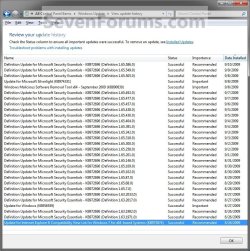
This tutorial will show you how to view the Windows Update history details of all successful or failed update installations with the update's importance type and date installed in Windows 7 and Windows 8.
The Windows Update log file is located at C:\Windows\WindowsUpdate.log.
The Windows Update log file is located at C:\Windows\WindowsUpdate.log.
Note
This tutorial assumes that you have already setup the Windows Update settings and installed updates before doing this tutorial.
Here's How:
1. Open the Control Panel (icons view) in Windows 7 or Windows 8, and click/tap on the Windows Update icon. (see screenshot below)
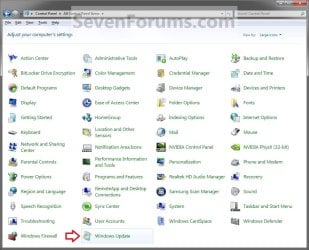
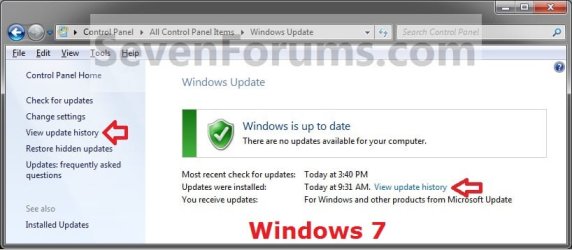
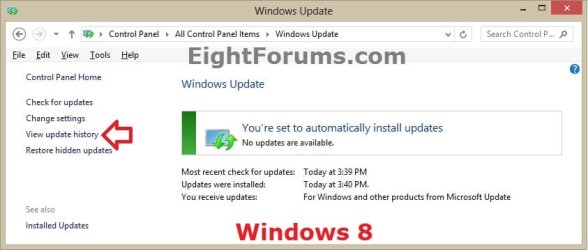
2. Click/tap on the View update history link. (see screenshots below)
3. To View Details of a Single Windows Update
A) Select and right click on a listed Windows Update, then click/tap on View details. (see screenshot below step 4)
B) Click/tap on the More information link to see more detailed information about the selected Windows Update. (see screenshot below)
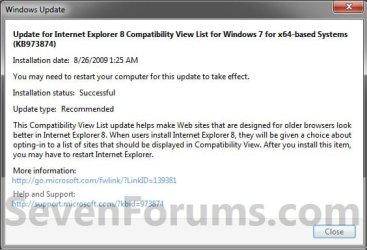
C) When finished, click/tap on Close. (see screenshot above)
4. To Copy Details of a Single Windows Update to Clipboard
A) Select and right click on a listed Windows Update, then click/tap on Copy details.
NOTE: This will be the same details in step 3, but in a text format instead.
B) You can now copy the contents of the clipboard (CTRL+V) into a program like Notepad or WordPad.
That's it,
Shawn
Related Tutorials
- How to Create a "Windows Update" Shortcut in Windows 7
- How to Change the Windows Update Settings in Windows 7
- How to Enable or Disable Windows Updates from Automatically Restarting the Computer
- How to Check for and Install Windows Updates in Windows 8
- How to Uninstall a Windows Update in Windows 7
- How to Hide or Restore Hidden Windows Updates in Windows 7 and Windows 8
- How to Create a Installed Windows Updates Shortcut in Windows 7
- How to Create a Windows Update Troubleshoot Shortcut in Windows 7
- How to Enable or Disable Uninstalling Windows Updates in Windows 7
- How to Enable or Disable Access to Windows Updates in Windows 7
- How to Reset Windows Update in Vista, Windows 7, and Windows 8
- How to Enable or Disable the Windows Update "Who can install updates" Setting
- How to Download the Standalone MSU Installer File of a Windows Update
Last edited:


