Windows update will not complete - constantly scanning for updates

Ok. Thanks for all of your help and for sticking with this. I did run CCleaner early on. Not sure if I need to run it again. I will try your latest list of instructions but I noticed earlier that there is no file named Pending.xml in the winsxs folder you mentioned, but there is a temp folder with a bunch of other .xml files. Is pending.xml a hidden file? I am logged in as administrator btw. Thanks again
 

My Computer My Computer

Computer type
PC/Desktop
Computer Manufacturer/Model Number
custom
OS
Windows 7 professional 64-bitn SP1
CPU
AMD Phenom 9500 Quad-Cor 2.2 ghz
Motherboard
ASUS M3N78 Pro
Memory
8gb
Graphics Card(s)
GeForce 210 (GV-N210D3-1GI)
Sound Card
integrated
Monitor(s) Displays
Dell 1701FP
Screen Resolution
1280 x 1024
Hard Drives
368 gb ST3500410AS ATA
PSU
Ultra 750 watt ATX
Case
ATX Mid-Tower
Cooling
case fan and cpu variable speed fan
Keyboard
HP Wireless Elite
Mouse
Logitech trackball
Internet Speed
25/25 mbps
Antivirus
Avast (free version) 11.11.2253
Browser
Firefox 44.0.2 and IE 11
Other Info
TPLink TG-3468 10/100/1000 network card
Hi Witchhazel,

That only works for W7 >> SP1<<, you need this one, scroll down till you see the big blue download button.
(read the instructions as well)
https://support.microsoft.com/en-us/kb/949104

Roy
It kind of escapes me what os you believe the op has installed ?
Not win-7 pro sp1 ?
Seems the only question is which download was attempted x64 or x86 ?
 

My Computer My Computer

Computer type
PC/Desktop
Computer Manufacturer/Model Number
Custom assembled by me :}
OS
Win-7-Pro64bit 7-H-Prem-64bit
CPU
i7-5930K 2nd i9-9940x both water blocked VRM's too
Motherboard
ASUS SABERTOOTH X99 2nd ASUS x299 Apex
Memory
Trident-z 3200C14 2nd Trident-z 3600C16
Graphics Card(s)
EVGA 1080ti ftw3 2nd Titan Xp both water blocked
Sound Card
Built-in Realtek
Monitor(s) Displays
1-AOC G2460PG 24"G-Sync 144Hz/ 2nd 1-ASUS VG248QE 24" 144Hz
Screen Resolution
1920 x 1080 144Hz
Hard Drives
2-Samsung M.2 Evo & Evo Plus
2-Samsung 850 EVO 500GB SSD's/ 3-2.5 W.D. Black 1tb-&3-1tb/3-3.5 WD Black 1tb hdd's
PSU
EVGA SuperNOVA 1000-P2 2nd 1200-P2
Case
2-Corsair Obsidian Series 450D Black ATX Mid Tower
Cooling
Custom water loops
Keyboard
Logitech G710+/ 2nd Logitech G910
Mouse
2-RedDragon M901 Perdition 16400 dpi Gaming mouse = wired
Internet Speed
Comcast Ping 19ms 89.31mbps download speed 6.12mbps upload
Antivirus
Malwarebytes Pro/ Superantispyware Pro
Browser
FireFox & Pale moon
Other Info
2nd ASUS X299 Apex/Intel i9-9940x with Custom water loop/7H-Prem-x64/Corsair 450D case/Ram Trident-z 3600C16 4x8gb / Samsung970Evo plus 500gb SSD/Dual ssd EZ swap evo/PSU EVGA SuperNova 1200w-P2 80+Platinum/GPU Titan Xp /8-ML-140 on push-pull on 2-280GTX rads
Ooops

@Thrashzone,
My bad, just went and had a look at the pre-requistes, ASSUMED:( the correct version had been run.

Roy
 

My Computer My Computer

Computer type
PC/Desktop
Computer Manufacturer/Model Number
medionl/Aspire 6930G/acer x55a
OS
W7 home premium 32bit/W7HP 64bit/w10 tp insider ring
CPU
E5300 dual core
Motherboard
medion MS7366
Memory
3gb
Graphics Card(s)
Nvidia Geforce 7100 Nforce 630i
Monitor(s) Displays
avixc
Internet Speed
n (isp resticted to 72)
Antivirus
mse/pands
Browser
palemoon
Other Info
Belkin Fd7050 n USB using Railink RT2870 drivers, more upto date
I attempted KB 3135445 originally then when KB3138612 came out, I attempted it. But both resulted in a message that said the update was not applicable. I do have windows 7 64bit SP1, according to my computer properties.
 

My Computer My Computer

Computer type
PC/Desktop
Computer Manufacturer/Model Number
custom
OS
Windows 7 professional 64-bitn SP1
CPU
AMD Phenom 9500 Quad-Cor 2.2 ghz
Motherboard
ASUS M3N78 Pro
Memory
8gb
Graphics Card(s)
GeForce 210 (GV-N210D3-1GI)
Sound Card
integrated
Monitor(s) Displays
Dell 1701FP
Screen Resolution
1280 x 1024
Hard Drives
368 gb ST3500410AS ATA
PSU
Ultra 750 watt ATX
Case
ATX Mid-Tower
Cooling
case fan and cpu variable speed fan
Keyboard
HP Wireless Elite
Mouse
Logitech trackball
Internet Speed
25/25 mbps
Antivirus
Avast (free version) 11.11.2253
Browser
Firefox 44.0.2 and IE 11
Other Info
TPLink TG-3468 10/100/1000 network card

My Computer My Computer

Computer type
PC/Desktop
Computer Manufacturer/Model Number
Custom assembled by me :}
OS
Win-7-Pro64bit 7-H-Prem-64bit
CPU
i7-5930K 2nd i9-9940x both water blocked VRM's too
Motherboard
ASUS SABERTOOTH X99 2nd ASUS x299 Apex
Memory
Trident-z 3200C14 2nd Trident-z 3600C16
Graphics Card(s)
EVGA 1080ti ftw3 2nd Titan Xp both water blocked
Sound Card
Built-in Realtek
Monitor(s) Displays
1-AOC G2460PG 24"G-Sync 144Hz/ 2nd 1-ASUS VG248QE 24" 144Hz
Screen Resolution
1920 x 1080 144Hz
Hard Drives
2-Samsung M.2 Evo & Evo Plus
2-Samsung 850 EVO 500GB SSD's/ 3-2.5 W.D. Black 1tb-&3-1tb/3-3.5 WD Black 1tb hdd's
PSU
EVGA SuperNOVA 1000-P2 2nd 1200-P2
Case
2-Corsair Obsidian Series 450D Black ATX Mid Tower
Cooling
Custom water loops
Keyboard
Logitech G710+/ 2nd Logitech G910
Mouse
2-RedDragon M901 Perdition 16400 dpi Gaming mouse = wired
Internet Speed
Comcast Ping 19ms 89.31mbps download speed 6.12mbps upload
Antivirus
Malwarebytes Pro/ Superantispyware Pro
Browser
FireFox & Pale moon
Other Info
2nd ASUS X299 Apex/Intel i9-9940x with Custom water loop/7H-Prem-x64/Corsair 450D case/Ram Trident-z 3600C16 4x8gb / Samsung970Evo plus 500gb SSD/Dual ssd EZ swap evo/PSU EVGA SuperNova 1200w-P2 80+Platinum/GPU Titan Xp /8-ML-140 on push-pull on 2-280GTX rads
I ran that fix-it early-on, but it didn't help.
 

My Computer My Computer

Computer type
PC/Desktop
Computer Manufacturer/Model Number
custom
OS
Windows 7 professional 64-bitn SP1
CPU
AMD Phenom 9500 Quad-Cor 2.2 ghz
Motherboard
ASUS M3N78 Pro
Memory
8gb
Graphics Card(s)
GeForce 210 (GV-N210D3-1GI)
Sound Card
integrated
Monitor(s) Displays
Dell 1701FP
Screen Resolution
1280 x 1024
Hard Drives
368 gb ST3500410AS ATA
PSU
Ultra 750 watt ATX
Case
ATX Mid-Tower
Cooling
case fan and cpu variable speed fan
Keyboard
HP Wireless Elite
Mouse
Logitech trackball
Internet Speed
25/25 mbps
Antivirus
Avast (free version) 11.11.2253
Browser
Firefox 44.0.2 and IE 11
Other Info
TPLink TG-3468 10/100/1000 network card
Hi,
Confirm your windows update setting are Excluding Recommended updates being installed the same way as Important updates.

Set to install automatically
This is the new client update or at least good enough to manually install if it does not exist already,
https://support.microsoft.com/en-us/kb/3135445

Click Start and type in the search box
services
Click on the suggestion or the enter key,
Make sure these services are running and on automatic,
Background intelligent transfer services
Cryptographic
Windows installer
Windows update


Actually here is the newest update client
https://support.microsoft.com/en-us/kb/3138612

All the services running and on auto.. that I show here ?
 

My Computer My Computer

Computer type
PC/Desktop
Computer Manufacturer/Model Number
Custom assembled by me :}
OS
Win-7-Pro64bit 7-H-Prem-64bit
CPU
i7-5930K 2nd i9-9940x both water blocked VRM's too
Motherboard
ASUS SABERTOOTH X99 2nd ASUS x299 Apex
Memory
Trident-z 3200C14 2nd Trident-z 3600C16
Graphics Card(s)
EVGA 1080ti ftw3 2nd Titan Xp both water blocked
Sound Card
Built-in Realtek
Monitor(s) Displays
1-AOC G2460PG 24"G-Sync 144Hz/ 2nd 1-ASUS VG248QE 24" 144Hz
Screen Resolution
1920 x 1080 144Hz
Hard Drives
2-Samsung M.2 Evo & Evo Plus
2-Samsung 850 EVO 500GB SSD's/ 3-2.5 W.D. Black 1tb-&3-1tb/3-3.5 WD Black 1tb hdd's
PSU
EVGA SuperNOVA 1000-P2 2nd 1200-P2
Case
2-Corsair Obsidian Series 450D Black ATX Mid Tower
Cooling
Custom water loops
Keyboard
Logitech G710+/ 2nd Logitech G910
Mouse
2-RedDragon M901 Perdition 16400 dpi Gaming mouse = wired
Internet Speed
Comcast Ping 19ms 89.31mbps download speed 6.12mbps upload
Antivirus
Malwarebytes Pro/ Superantispyware Pro
Browser
FireFox & Pale moon
Other Info
2nd ASUS X299 Apex/Intel i9-9940x with Custom water loop/7H-Prem-x64/Corsair 450D case/Ram Trident-z 3600C16 4x8gb / Samsung970Evo plus 500gb SSD/Dual ssd EZ swap evo/PSU EVGA SuperNova 1200w-P2 80+Platinum/GPU Titan Xp /8-ML-140 on push-pull on 2-280GTX rads
They were when I checked at one point, but it is probably worth checking again. I've tried so many things, some of them very late at night- I should make sure the services are running properly
 

My Computer My Computer

Computer type
PC/Desktop
Computer Manufacturer/Model Number
custom
OS
Windows 7 professional 64-bitn SP1
CPU
AMD Phenom 9500 Quad-Cor 2.2 ghz
Motherboard
ASUS M3N78 Pro
Memory
8gb
Graphics Card(s)
GeForce 210 (GV-N210D3-1GI)
Sound Card
integrated
Monitor(s) Displays
Dell 1701FP
Screen Resolution
1280 x 1024
Hard Drives
368 gb ST3500410AS ATA
PSU
Ultra 750 watt ATX
Case
ATX Mid-Tower
Cooling
case fan and cpu variable speed fan
Keyboard
HP Wireless Elite
Mouse
Logitech trackball
Internet Speed
25/25 mbps
Antivirus
Avast (free version) 11.11.2253
Browser
Firefox 44.0.2 and IE 11
Other Info
TPLink TG-3468 10/100/1000 network card
Yes most importantly on startup or restart.
 

My Computer My Computer

Computer type
PC/Desktop
Computer Manufacturer/Model Number
Custom assembled by me :}
OS
Win-7-Pro64bit 7-H-Prem-64bit
CPU
i7-5930K 2nd i9-9940x both water blocked VRM's too
Motherboard
ASUS SABERTOOTH X99 2nd ASUS x299 Apex
Memory
Trident-z 3200C14 2nd Trident-z 3600C16
Graphics Card(s)
EVGA 1080ti ftw3 2nd Titan Xp both water blocked
Sound Card
Built-in Realtek
Monitor(s) Displays
1-AOC G2460PG 24"G-Sync 144Hz/ 2nd 1-ASUS VG248QE 24" 144Hz
Screen Resolution
1920 x 1080 144Hz
Hard Drives
2-Samsung M.2 Evo & Evo Plus
2-Samsung 850 EVO 500GB SSD's/ 3-2.5 W.D. Black 1tb-&3-1tb/3-3.5 WD Black 1tb hdd's
PSU
EVGA SuperNOVA 1000-P2 2nd 1200-P2
Case
2-Corsair Obsidian Series 450D Black ATX Mid Tower
Cooling
Custom water loops
Keyboard
Logitech G710+/ 2nd Logitech G910
Mouse
2-RedDragon M901 Perdition 16400 dpi Gaming mouse = wired
Internet Speed
Comcast Ping 19ms 89.31mbps download speed 6.12mbps upload
Antivirus
Malwarebytes Pro/ Superantispyware Pro
Browser
FireFox & Pale moon
Other Info
2nd ASUS X299 Apex/Intel i9-9940x with Custom water loop/7H-Prem-x64/Corsair 450D case/Ram Trident-z 3600C16 4x8gb / Samsung970Evo plus 500gb SSD/Dual ssd EZ swap evo/PSU EVGA SuperNova 1200w-P2 80+Platinum/GPU Titan Xp /8-ML-140 on push-pull on 2-280GTX rads
Striking Out Again

I booted from the original Windows 7 Pro 64-bit dvd and did the following:
On the System Recovery Options page, click Command Prompt.
Type cd C:\windows\winsxs, and then press ENTER.
Type ren pending.xml pending.old, and then press ENTER.
Type regedit, and then press ENTER.
Select HKEY_LOCAL_MACHINE.
On the File menu, click Load Hive.
Locate the following folder:
C:\windows\system32\config\components
When you are prompted for a name, type Offline_Components.
In Registry Editor, locate and then delete the following registry
subkey:
HLKM\Offline Components\AdvancedInstallersNeedResolving
HKLM\Offline Components\PendingXmlIdentifier
Exit Registry Editor:
At the command prompt, type exit to exit Registry Editor.
Press ENTER.
Restart System
But unfortunately, it could not find any file named pending.xml and could not find any registry entries when searching on "Advanced Installer" or "PendingXML"
 

My Computer My Computer

Computer type
PC/Desktop
Computer Manufacturer/Model Number
custom
OS
Windows 7 professional 64-bitn SP1
CPU
AMD Phenom 9500 Quad-Cor 2.2 ghz
Motherboard
ASUS M3N78 Pro
Memory
8gb
Graphics Card(s)
GeForce 210 (GV-N210D3-1GI)
Sound Card
integrated
Monitor(s) Displays
Dell 1701FP
Screen Resolution
1280 x 1024
Hard Drives
368 gb ST3500410AS ATA
PSU
Ultra 750 watt ATX
Case
ATX Mid-Tower
Cooling
case fan and cpu variable speed fan
Keyboard
HP Wireless Elite
Mouse
Logitech trackball
Internet Speed
25/25 mbps
Antivirus
Avast (free version) 11.11.2253
Browser
Firefox 44.0.2 and IE 11
Other Info
TPLink TG-3468 10/100/1000 network card
Regarding this suggestion:

Confirm your windows update setting are Excluding Recommended updates being installed the same way as Important updates.

Set to install automatically
This is the new client update or at least good enough to manually install if it does not exist already,
https://support.microsoft.com/en-us/kb/3135445

Click Start and type in the search box
services
Click on the suggestion or the enter key,
Make sure these services are running and on automatic,
Background intelligent transfer services
Cryptographic
Windows installer
Windows update

Actually here is the newest update client
https://support.microsoft.com/en-us/kb/3138612
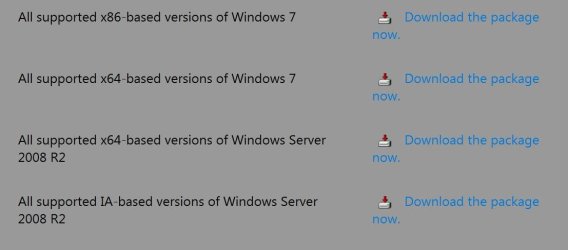
I checked the listed services and discovered that the Background intelligent transfer service was not running, so changed it to automatic and started it. I'm assuming I should be trying to install the 3135445 updater because that is the 64-bit version. it looks like 3138612 is for 32-bit.
 

My Computer My Computer

Computer type
PC/Desktop
Computer Manufacturer/Model Number
custom
OS
Windows 7 professional 64-bitn SP1
CPU
AMD Phenom 9500 Quad-Cor 2.2 ghz
Motherboard
ASUS M3N78 Pro
Memory
8gb
Graphics Card(s)
GeForce 210 (GV-N210D3-1GI)
Sound Card
integrated
Monitor(s) Displays
Dell 1701FP
Screen Resolution
1280 x 1024
Hard Drives
368 gb ST3500410AS ATA
PSU
Ultra 750 watt ATX
Case
ATX Mid-Tower
Cooling
case fan and cpu variable speed fan
Keyboard
HP Wireless Elite
Mouse
Logitech trackball
Internet Speed
25/25 mbps
Antivirus
Avast (free version) 11.11.2253
Browser
Firefox 44.0.2 and IE 11
Other Info
TPLink TG-3468 10/100/1000 network card
safe mode

Hi Witchhazel,

It wont work coz you used the CD.

Its not very clear on my part

The CD command tells the comp to move to the "c" directory, safe boot starts in "x".

Roy
 

My Computer My Computer

Computer type
PC/Desktop
Computer Manufacturer/Model Number
medionl/Aspire 6930G/acer x55a
OS
W7 home premium 32bit/W7HP 64bit/w10 tp insider ring
CPU
E5300 dual core
Motherboard
medion MS7366
Memory
3gb
Graphics Card(s)
Nvidia Geforce 7100 Nforce 630i
Monitor(s) Displays
avixc
Internet Speed
n (isp resticted to 72)
Antivirus
mse/pands
Browser
palemoon
Other Info
Belkin Fd7050 n USB using Railink RT2870 drivers, more upto date
I did change from x: to c: before proceeding.
How do I get to system recovery options without using DVD?
Even earlier when I had not booted from DVD I have never been able to find a pending.xml file anywhere on my hard drive
 

My Computer My Computer

Computer type
PC/Desktop
Computer Manufacturer/Model Number
custom
OS
Windows 7 professional 64-bitn SP1
CPU
AMD Phenom 9500 Quad-Cor 2.2 ghz
Motherboard
ASUS M3N78 Pro
Memory
8gb
Graphics Card(s)
GeForce 210 (GV-N210D3-1GI)
Sound Card
integrated
Monitor(s) Displays
Dell 1701FP
Screen Resolution
1280 x 1024
Hard Drives
368 gb ST3500410AS ATA
PSU
Ultra 750 watt ATX
Case
ATX Mid-Tower
Cooling
case fan and cpu variable speed fan
Keyboard
HP Wireless Elite
Mouse
Logitech trackball
Internet Speed
25/25 mbps
Antivirus
Avast (free version) 11.11.2253
Browser
Firefox 44.0.2 and IE 11
Other Info
TPLink TG-3468 10/100/1000 network card
All the update clients have both versions
Actually there is 4- all x86/ all x64 and a couple other ones
update cl.JPG
 

My Computer My Computer

Computer type
PC/Desktop
Computer Manufacturer/Model Number
Custom assembled by me :}
OS
Win-7-Pro64bit 7-H-Prem-64bit
CPU
i7-5930K 2nd i9-9940x both water blocked VRM's too
Motherboard
ASUS SABERTOOTH X99 2nd ASUS x299 Apex
Memory
Trident-z 3200C14 2nd Trident-z 3600C16
Graphics Card(s)
EVGA 1080ti ftw3 2nd Titan Xp both water blocked
Sound Card
Built-in Realtek
Monitor(s) Displays
1-AOC G2460PG 24"G-Sync 144Hz/ 2nd 1-ASUS VG248QE 24" 144Hz
Screen Resolution
1920 x 1080 144Hz
Hard Drives
2-Samsung M.2 Evo & Evo Plus
2-Samsung 850 EVO 500GB SSD's/ 3-2.5 W.D. Black 1tb-&3-1tb/3-3.5 WD Black 1tb hdd's
PSU
EVGA SuperNOVA 1000-P2 2nd 1200-P2
Case
2-Corsair Obsidian Series 450D Black ATX Mid Tower
Cooling
Custom water loops
Keyboard
Logitech G710+/ 2nd Logitech G910
Mouse
2-RedDragon M901 Perdition 16400 dpi Gaming mouse = wired
Internet Speed
Comcast Ping 19ms 89.31mbps download speed 6.12mbps upload
Antivirus
Malwarebytes Pro/ Superantispyware Pro
Browser
FireFox & Pale moon
Other Info
2nd ASUS X299 Apex/Intel i9-9940x with Custom water loop/7H-Prem-x64/Corsair 450D case/Ram Trident-z 3600C16 4x8gb / Samsung970Evo plus 500gb SSD/Dual ssd EZ swap evo/PSU EVGA SuperNova 1200w-P2 80+Platinum/GPU Titan Xp /8-ML-140 on push-pull on 2-280GTX rads
Since all suggestions have lead me to dead ends, I am finally giving up and doing a complete reinstall of Windows 7.
Thanks everyone for taking the time to try to help, but I've got to move on.
 

My Computer My Computer

Computer type
PC/Desktop
Computer Manufacturer/Model Number
custom
OS
Windows 7 professional 64-bitn SP1
CPU
AMD Phenom 9500 Quad-Cor 2.2 ghz
Motherboard
ASUS M3N78 Pro
Memory
8gb
Graphics Card(s)
GeForce 210 (GV-N210D3-1GI)
Sound Card
integrated
Monitor(s) Displays
Dell 1701FP
Screen Resolution
1280 x 1024
Hard Drives
368 gb ST3500410AS ATA
PSU
Ultra 750 watt ATX
Case
ATX Mid-Tower
Cooling
case fan and cpu variable speed fan
Keyboard
HP Wireless Elite
Mouse
Logitech trackball
Internet Speed
25/25 mbps
Antivirus
Avast (free version) 11.11.2253
Browser
Firefox 44.0.2 and IE 11
Other Info
TPLink TG-3468 10/100/1000 network card
Hi,
All I can say is make sure you have the latest Net framework 4.6.1 installed do it manually
https://www.microsoft.com/en-us/download/details.aspx?id=49982

And the most recent update client
https://support.microsoft.com/en-us/kb/3138612

If you do end up clean installing I'd read this it doesn't get better,
It is planned by M$
WINDOWS UPDATES ISSUES
Sticking with Windows 7? The forecast calls for pain | ZDNet

Although I did find a process that does work very well
Before you start download KB3083710 and KB3102810 in advance, and store them on a flash drive
Start and complete the install without an internet connection
Immediately after install is complete
Manually install KB3083710 and restart.
Manually install KB3102810 and restart.
Change your windows update settings I used Check for updates but let me decide when to download and install
Unchecked Give me recommended updates the same....

Restore the Internet connection and Activate windows
Then launch Windows Update search
After about 5-10 minutes you should have plenty of updates to download and install.

Another thing is if you see this update make sure it is not installed with any other updates
It needs to be installed all by it's self
It was not uncheck automatically which caused many others to fail to install
https://support.microsoft.com/en-us/kb/3020369

I would also install manually net framework 4.6.1
https://www.microsoft.com/en-us/down....aspx?id=49982
 

My Computer My Computer

Computer type
PC/Desktop
Computer Manufacturer/Model Number
Custom assembled by me :}
OS
Win-7-Pro64bit 7-H-Prem-64bit
CPU
i7-5930K 2nd i9-9940x both water blocked VRM's too
Motherboard
ASUS SABERTOOTH X99 2nd ASUS x299 Apex
Memory
Trident-z 3200C14 2nd Trident-z 3600C16
Graphics Card(s)
EVGA 1080ti ftw3 2nd Titan Xp both water blocked
Sound Card
Built-in Realtek
Monitor(s) Displays
1-AOC G2460PG 24"G-Sync 144Hz/ 2nd 1-ASUS VG248QE 24" 144Hz
Screen Resolution
1920 x 1080 144Hz
Hard Drives
2-Samsung M.2 Evo & Evo Plus
2-Samsung 850 EVO 500GB SSD's/ 3-2.5 W.D. Black 1tb-&3-1tb/3-3.5 WD Black 1tb hdd's
PSU
EVGA SuperNOVA 1000-P2 2nd 1200-P2
Case
2-Corsair Obsidian Series 450D Black ATX Mid Tower
Cooling
Custom water loops
Keyboard
Logitech G710+/ 2nd Logitech G910
Mouse
2-RedDragon M901 Perdition 16400 dpi Gaming mouse = wired
Internet Speed
Comcast Ping 19ms 89.31mbps download speed 6.12mbps upload
Antivirus
Malwarebytes Pro/ Superantispyware Pro
Browser
FireFox & Pale moon
Other Info
2nd ASUS X299 Apex/Intel i9-9940x with Custom water loop/7H-Prem-x64/Corsair 450D case/Ram Trident-z 3600C16 4x8gb / Samsung970Evo plus 500gb SSD/Dual ssd EZ swap evo/PSU EVGA SuperNova 1200w-P2 80+Platinum/GPU Titan Xp /8-ML-140 on push-pull on 2-280GTX rads
Back
Top