Windows Updates failing to install

Nightweb

New member
Local time
5:05 PM
Messages
20
Hello I just joined to ask you guys for help, over the many years I have had
windows problems I normally end up here and almost always find the solution to my
problem so when I found a problem I could find a solution this was my first choice
to see if I can get help fixing my problem.


I have a machine I have setup to just play games so I don't have many programs
installed but I've found in the last 3-4 weeks NO updates are installing, I was
playing games the other night and my system did a auto-reboot in the middle, it
shut my computer down the other night and it took over 9 hours to install, fail to
configure, revert, and restart, and this is not the first time :(
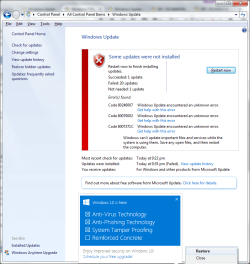
I ran the Update fix several times and even ran the permissions fix, but nothing seems to help, I've even had to turn off auto-install updates as when my computer restarted automatically it became unusable for hours.

I followed all the Posts from the Windows Update Posting Instructions post

1. The update wouldn't install, No error code given
2. I ran a scan, it found corrupted files but can't repair them.
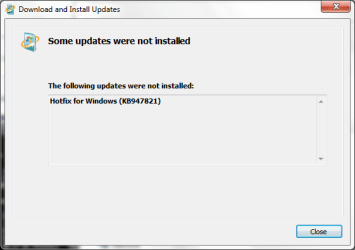
3. Most Updates are error's as 800703F9, a few 8007371C, the Windows itself gives
a different error, this time they are 80246007, 80070002 and 8007371C
4. As Above, ran scan, log's attached
5. Hopefully that's what I did here XD
 

Attachments
  • System Update Readiness Tool (SURT).png
    System Update Readiness Tool (SURT).png
    9.9 KB · Views: 63
  • WUpdate.png
    WUpdate.png
    57 KB · Views: 1

My Computer My Computer

At a glance

Windows 7 Professional x64AMD Phenom II x6 1055T16 GBASUS nVidia 970 GTX Strix
Computer type
PC/Desktop
Computer Manufacturer/Model Number
Dell
OS
Windows 7 Professional x64
CPU
AMD Phenom II x6 1055T
Motherboard
Unknown OEM Board
Memory
16 GB
Graphics Card(s)
ASUS nVidia 970 GTX Strix
Hard Drives
HDS725050KLA360 x2
Antivirus
Norton Internet Security 2011
Browser
Mozilla Firefox
Before you can worry about installing the updates, the system needs to be stable. You mentioned you were gaming and the machine spontaneously rebooted in the middle of that... then had problems after, and it wasn't the first time... Since you were gaming there is a chance the drive or chip(s) [graphic or CPU] overheated. I assume you are not overclocking (not that you have to be for it to overheat, but if you are OC'ing that is more likely the problem).

There is also a chance the drive is corrupting data from overheating, and/or simply from failing. A drive on its way out will start acting flakey... data errors, locking up, rebooting, etc.

JMO but I would download a utility program from the manuf of the hard disk to scan the disk and make sure it is healthy and operating correctly.

If so, I'd check the running temp, esp when gaming.

And if scf/ scannow found errors it can't fix, and the two prior things check out, then a restore is in order, either a system restore or restoring a backup image. But that won't do any good if the drive is going, or overheating, which is why you should check those two things first.

Good luck.
 

My Computer My Computer

At a glance

Win 7 Ultimate 64-bit
OS
Win 7 Ultimate 64-bit
Nah that's not a problem, I was in the middle of a Diablo 3 Rift run and the system rebooted due to Windows Update auto-install, the timer normally pop's up but if in game is doesn't. the system runs mostly at clock speed (apparently the 970 is factory OC'd but I'm not 100% on that) and I don't have any heating issue's (HDD on hot night might run as high as 43, cleaned out every few months too. I've done a full Chkdsk, surface scan included and it came up with no error's I also checked it with HD Tune Pro to read the Smart Data, all Clear. as for SFC, when it comes to Win7 I've actually never gotten it to work fine, I've also gotten found error's but was unable to repair them, Even on newish OEM's, to be honest since starting to work with Win7 I found it so flaky (on one system I had to replace a load of permissions for simple copy a proper file over that I consider it unreliable these days) and if I run it when the system is offline (from recovery) it says there's no problems.


That would be my last resort here, most of the stuff is MMO's Installed on C, few video files no big lost so format is possible option but I prefer to fix before destroy, these days all problems quick fix format reinstall, no knowing what the problem was or even how to fix, I do plan to upgrade to SSD next month budget allowing but as not corrupting of data (just refusal to install updates) just think its software not hardware as everything works perfect just Updates related to Windows won't install. Programs - no problem, Norton Updates - No problem, Microsoft security definitions (installed through windows update) - No Problem.
 
Last edited:

My Computer My Computer

At a glance

Windows 7 Professional x64AMD Phenom II x6 1055T16 GBASUS nVidia 970 GTX Strix
Computer type
PC/Desktop
Computer Manufacturer/Model Number
Dell
OS
Windows 7 Professional x64
CPU
AMD Phenom II x6 1055T
Motherboard
Unknown OEM Board
Memory
16 GB
Graphics Card(s)
ASUS nVidia 970 GTX Strix
Hard Drives
HDS725050KLA360 x2
Antivirus
Norton Internet Security 2011
Browser
Mozilla Firefox

My Computer My Computer

At a glance

W7 home premium 32bit/W7HP 64bit/w10 tp insid...E5300 dual core3gbNvidia Geforce 7100 Nforce 630i
Computer type
PC/Desktop
Computer Manufacturer/Model Number
medionl/Aspire 6930G/acer x55a
OS
W7 home premium 32bit/W7HP 64bit/w10 tp insider ring
CPU
E5300 dual core
Motherboard
medion MS7366
Memory
3gb
Graphics Card(s)
Nvidia Geforce 7100 Nforce 630i
Monitor(s) Displays
avixc
Internet Speed
n (isp resticted to 72)
Antivirus
mse/pands
Browser
palemoon
Other Info
Belkin Fd7050 n USB using Railink RT2870 drivers, more upto date
Hi Torchwood

here the info from MSDiag,

ps love the name

Code:
Diagnostic Report (1.9.0027.0):
-----------------------------------------
Windows Validation Data-->

Validation Code: 0
Cached Online Validation Code: 0x0
Windows Product Key: *****-*****-M3DJT-4J3WC-733WD
Windows Product Key Hash: xo+ajVSpae7/4VoZjS7m6JL0f3A=
Windows Product ID: 00371-OEM-8992671-00524
Windows Product ID Type: 2
Windows License Type: OEM SLP
Windows OS version: 6.1.7601.2.00010100.1.0.048
ID: {6B7DD81C-6C2E-419E-B09A-52D40335213E}(3)
Is Admin: Yes
TestCab: 0x0
LegitcheckControl ActiveX: N/A, hr = 0x80070002
Signed By: N/A, hr = 0x80070002
Product Name: Windows 7 Professional
Architecture: 0x00000009
Build lab: 7601.win7sp1_gdr.151019-1254
TTS Error: 
Validation Diagnostic: 
Resolution Status: N/A

Vista WgaER Data-->
ThreatID(s): N/A, hr = 0x80070002
Version: N/A, hr = 0x80070002

Windows XP Notifications Data-->
Cached Result: N/A, hr = 0x80070002
File Exists: No
Version: N/A, hr = 0x80070002
WgaTray.exe Signed By: N/A, hr = 0x80070002
WgaLogon.dll Signed By: N/A, hr = 0x80070002

OGA Notifications Data-->
Cached Result: N/A, hr = 0x80070002
Version: N/A, hr = 0x80070002
OGAExec.exe Signed By: N/A, hr = 0x80070002
OGAAddin.dll Signed By: N/A, hr = 0x80070002

OGA Data-->
Office Status: 100 Genuine
Microsoft Publisher 2002 - 100 Genuine
Microsoft Office XP Professional with FrontPage - 100 Genuine
OGA Version: N/A, 0x80070002
Signed By: N/A, hr = 0x80070002
Office Diagnostics: 025D1FF3-364-80041010_025D1FF3-229-80041010_025D1FF3-230-1_025D1FF3-517-80040154_025D1FF3-237-80040154_025D1FF3-238-2_025D1FF3-244-80070002_025D1FF3-258-3_E2AD56EA-765-d003_E2AD56EA-766-0_E2AD56EA-134-80004005_E2AD56EA-765-b01a_E2AD56EA-766-0_E2AD56EA-148-80004005_16E0B333-89-80004005_B4D0AA8B-1029-80004005

Browser Data-->
Proxy settings: N/A
User Agent: Mozilla/4.0 (compatible; MSIE 8.0; Win32)
Default Browser: C:\Program Files (x86)\Mozilla Firefox\firefox.exe
Download signed ActiveX controls: Prompt
Download unsigned ActiveX controls: Disabled
Run ActiveX controls and plug-ins: Allowed
Initialize and script ActiveX controls not marked as safe: Disabled
Allow scripting of Internet Explorer Webbrowser control: Disabled
Active scripting: Allowed
Script ActiveX controls marked as safe for scripting: Allowed

File Scan Data-->

Other data-->
Office Details: <GenuineResults><MachineData><UGUID>{6B7DD81C-6C2E-419E-B09A-52D40335213E}</UGUID><Version>1.9.0027.0</Version><OS>6.1.7601.2.00010100.1.0.048</OS><Architecture>x64</Architecture><PKey>*****-*****-*****-*****-733WD</PKey><PID>00371-OEM-8992671-00524</PID><PIDType>2</PIDType><SID>S-1-5-21-2833491091-2125282442-2741541524</SID><SYSTEM><Manufacturer>Dell Inc.</Manufacturer><Model>Studio XPS 7100</Model></SYSTEM><BIOS><Manufacturer>Dell Inc.</Manufacturer><Version>A06</Version><SMBIOSVersion major="2" minor="6"/><Date>20100910000000.000000+000</Date></BIOS><HWID>B3D73607018400F6</HWID><UserLCID>1809</UserLCID><SystemLCID>0409</SystemLCID><TimeZone>GMT Standard Time(GMT+00:00)</TimeZone><iJoin>0</iJoin><SBID><stat>3</stat><msppid></msppid><name></name><model></model></SBID><OEM><OEMID>DELL  </OEMID><OEMTableID>FX09   </OEMTableID></OEM><GANotification/></MachineData><Software><Office><Result>100</Result><Products><Product GUID="{90190409-6000-11D3-8CFE-0050048383C9}"><LegitResult>100</LegitResult><Name>Microsoft Publisher 2002</Name><Ver>10</Ver><Val>BABFAAD4C4D61B0</Val><Hash>SEishkJimZrBR/u8NT774CIf0yg=</Hash><Pid>54197-640-0698487-16062</Pid><PidType>14</PidType></Product><Product GUID="{90280409-6000-11D3-8CFE-0050048383C9}"><LegitResult>100</LegitResult><Name>Microsoft Office XP Professional with FrontPage</Name><Ver>10</Ver><Val>864F0FCCC4CD73E</Val><Hash>1kvzJLKmvg8iBHYevkHHBK9NEkk=</Hash><Pid>54185-640-0521274-17180</Pid><PidType>14</PidType></Product></Products><Applications><App Id="15" Version="10" Result="100"/><App Id="16" Version="10" Result="100"/><App Id="17" Version="10" Result="100"/><App Id="18" Version="10" Result="100"/><App Id="19" Version="10" Result="100"/><App Id="1A" Version="10" Result="100"/><App Id="1B" Version="10" Result="100"/></Applications></Office></Software></GenuineResults>  

Spsys.log Content: 0x80070002

Licensing Data-->
C:\Windows\system32\slmgr.vbs(22, 1) Microsoft VBScript runtime error: ActiveX component can't create object: 'Scripting.Dictionary'

Windows Activation Technologies-->
HrOffline: 0x00000000
HrOnline: 0x00000000
HealthStatus: 0x0000000000000000
Event Time Stamp: 11:29:2015 16:34
ActiveX: Registered, Version: 7.1.7600.16395
Admin Service: Registered, Version: 7.1.7600.16395
HealthStatus Bitmask Output:


HWID Data-->
HWID Hash Current: NgAAAAIABAABAAEAAQACAAAAAQABAAEAHKJMer3j8OnY+1TcVPkQMyzJ3sDx5UTRctAM1QLQ

OEM Activation 1.0 Data-->
N/A

OEM Activation 2.0 Data-->
BIOS valid for OA 2.0: yes
Windows marker version: 0x20001
OEMID and OEMTableID Consistent: yes
BIOS Information: 
  ACPI Table Name    OEMID Value    OEMTableID Value
  APIC            DELL          FX09    
  FACP            DELL          FX09    
  SRAT            AMD           FAM_F_10
  HPET            DELL          OEMHPET 
  MCFG            DELL          OEMMCFG 
  SLIC            DELL          FX09   
  OSFR            DELL          FX09    
  OEMB            DELL          FX09    
  SSDT            A M I         POWERNOW
 

My Computer My Computer

At a glance

Windows 7 Professional x64AMD Phenom II x6 1055T16 GBASUS nVidia 970 GTX Strix
Computer type
PC/Desktop
Computer Manufacturer/Model Number
Dell
OS
Windows 7 Professional x64
CPU
AMD Phenom II x6 1055T
Motherboard
Unknown OEM Board
Memory
16 GB
Graphics Card(s)
ASUS nVidia 970 GTX Strix
Hard Drives
HDS725050KLA360 x2
Antivirus
Norton Internet Security 2011
Browser
Mozilla Firefox
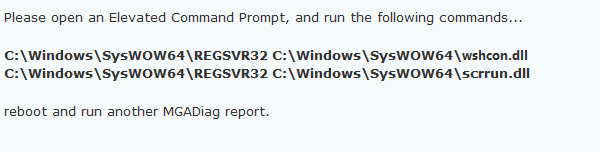
run please

Hi Nightweb,

Please run the following.
After the Reboot try updating, before you reply

Roy
 

Attachments

  • script error.PNG
    script error.PNG
    2.9 KB · Views: 47

My Computer My Computer

At a glance

W7 home premium 32bit/W7HP 64bit/w10 tp insid...E5300 dual core3gbNvidia Geforce 7100 Nforce 630i
Computer type
PC/Desktop
Computer Manufacturer/Model Number
medionl/Aspire 6930G/acer x55a
OS
W7 home premium 32bit/W7HP 64bit/w10 tp insider ring
CPU
E5300 dual core
Motherboard
medion MS7366
Memory
3gb
Graphics Card(s)
Nvidia Geforce 7100 Nforce 630i
Monitor(s) Displays
avixc
Internet Speed
n (isp resticted to 72)
Antivirus
mse/pands
Browser
palemoon
Other Info
Belkin Fd7050 n USB using Railink RT2870 drivers, more upto date
Hi Torchwood,

Sorry about this but for some reason I can't see your post, the picture just doesn't want to show up, any chance you could type the commands?


Just after I posted that the picture loaded XD, I ran those two commands and they both said succeeded
 

My Computer My Computer

At a glance

Windows 7 Professional x64AMD Phenom II x6 1055T16 GBASUS nVidia 970 GTX Strix
Computer type
PC/Desktop
Computer Manufacturer/Model Number
Dell
OS
Windows 7 Professional x64
CPU
AMD Phenom II x6 1055T
Motherboard
Unknown OEM Board
Memory
16 GB
Graphics Card(s)
ASUS nVidia 970 GTX Strix
Hard Drives
HDS725050KLA360 x2
Antivirus
Norton Internet Security 2011
Browser
Mozilla Firefox
Here's the Info from MGADiag Second run:

PS might I ask why? (curious)

Code:
Diagnostic Report (1.9.0027.0):
-----------------------------------------
Windows Validation Data-->

Validation Code: 0
Cached Online Validation Code: 0x0
Windows Product Key: *****-*****-M3DJT-4J3WC-733WD
Windows Product Key Hash: xo+ajVSpae7/4VoZjS7m6JL0f3A=
Windows Product ID: 00371-OEM-8992671-00524
Windows Product ID Type: 2
Windows License Type: OEM SLP
Windows OS version: 6.1.7601.2.00010100.1.0.048
ID: {6B7DD81C-6C2E-419E-B09A-52D40335213E}(3)
Is Admin: Yes
TestCab: 0x0
LegitcheckControl ActiveX: N/A, hr = 0x80070002
Signed By: N/A, hr = 0x80070002
Product Name: Windows 7 Professional
Architecture: 0x00000009
Build lab: 7601.win7sp1_gdr.151019-1254
TTS Error: 
Validation Diagnostic: 
Resolution Status: N/A

Vista WgaER Data-->
ThreatID(s): N/A, hr = 0x80070002
Version: N/A, hr = 0x80070002

Windows XP Notifications Data-->
Cached Result: N/A, hr = 0x80070002
File Exists: No
Version: N/A, hr = 0x80070002
WgaTray.exe Signed By: N/A, hr = 0x80070002
WgaLogon.dll Signed By: N/A, hr = 0x80070002

OGA Notifications Data-->
Cached Result: N/A, hr = 0x80070002
Version: N/A, hr = 0x80070002
OGAExec.exe Signed By: N/A, hr = 0x80070002
OGAAddin.dll Signed By: N/A, hr = 0x80070002

OGA Data-->
Office Status: 100 Genuine
Microsoft Publisher 2002 - 100 Genuine
Microsoft Office XP Professional with FrontPage - 100 Genuine
OGA Version: N/A, 0x80070002
Signed By: N/A, hr = 0x80070002
Office Diagnostics: 025D1FF3-364-80041010_025D1FF3-229-80041010_025D1FF3-230-1_025D1FF3-517-80040154_025D1FF3-237-80040154_025D1FF3-238-2_025D1FF3-244-80070002_025D1FF3-258-3_E2AD56EA-765-d003_E2AD56EA-766-0_E2AD56EA-134-80004005_E2AD56EA-765-b01a_E2AD56EA-766-0_E2AD56EA-148-80004005_16E0B333-89-80004005_B4D0AA8B-1029-80004005

Browser Data-->
Proxy settings: N/A
User Agent: Mozilla/4.0 (compatible; MSIE 8.0; Win32)
Default Browser: C:\Program Files (x86)\Mozilla Firefox\firefox.exe
Download signed ActiveX controls: Prompt
Download unsigned ActiveX controls: Disabled
Run ActiveX controls and plug-ins: Allowed
Initialize and script ActiveX controls not marked as safe: Disabled
Allow scripting of Internet Explorer Webbrowser control: Disabled
Active scripting: Allowed
Script ActiveX controls marked as safe for scripting: Allowed

File Scan Data-->

Other data-->
Office Details: <GenuineResults><MachineData><UGUID>{6B7DD81C-6C2E-419E-B09A-52D40335213E}</UGUID><Version>1.9.0027.0</Version><OS>6.1.7601.2.00010100.1.0.048</OS><Architecture>x64</Architecture><PKey>*****-*****-*****-*****-733WD</PKey><PID>00371-OEM-8992671-00524</PID><PIDType>2</PIDType><SID>S-1-5-21-2833491091-2125282442-2741541524</SID><SYSTEM><Manufacturer>Dell Inc.</Manufacturer><Model>Studio XPS 7100</Model></SYSTEM><BIOS><Manufacturer>Dell Inc.</Manufacturer><Version>A06</Version><SMBIOSVersion major="2" minor="6"/><Date>20100910000000.000000+000</Date></BIOS><HWID>B3EF3607018400F6</HWID><UserLCID>1809</UserLCID><SystemLCID>0409</SystemLCID><TimeZone>GMT Standard Time(GMT+00:00)</TimeZone><iJoin>0</iJoin><SBID><stat>3</stat><msppid></msppid><name></name><model></model></SBID><OEM><OEMID>DELL  </OEMID><OEMTableID>FX09   </OEMTableID></OEM><GANotification/></MachineData><Software><Office><Result>100</Result><Products><Product GUID="{90190409-6000-11D3-8CFE-0050048383C9}"><LegitResult>100</LegitResult><Name>Microsoft Publisher 2002</Name><Ver>10</Ver><Val>BABFAAD4C4D61B0</Val><Hash>SEishkJimZrBR/u8NT774CIf0yg=</Hash><Pid>54197-640-0698487-16062</Pid><PidType>14</PidType></Product><Product GUID="{90280409-6000-11D3-8CFE-0050048383C9}"><LegitResult>100</LegitResult><Name>Microsoft Office XP Professional with FrontPage</Name><Ver>10</Ver><Val>864F0FCCC4CD73E</Val><Hash>1kvzJLKmvg8iBHYevkHHBK9NEkk=</Hash><Pid>54185-640-0521274-17180</Pid><PidType>14</PidType></Product></Products><Applications><App Id="15" Version="10" Result="100"/><App Id="16" Version="10" Result="100"/><App Id="17" Version="10" Result="100"/><App Id="18" Version="10" Result="100"/><App Id="19" Version="10" Result="100"/><App Id="1A" Version="10" Result="100"/><App Id="1B" Version="10" Result="100"/></Applications></Office></Software></GenuineResults>  

Spsys.log Content: 0x80070002

Licensing Data-->
C:\Windows\system32\slmgr.vbs(22, 1) Microsoft VBScript runtime error: ActiveX component can't create object: 'Scripting.Dictionary'

Windows Activation Technologies-->
HrOffline: 0x00000000
HrOnline: 0x00000000
HealthStatus: 0x0000000000000000
Event Time Stamp: 11:29:2015 16:34
ActiveX: Registered, Version: 7.1.7600.16395
Admin Service: Registered, Version: 7.1.7600.16395
HealthStatus Bitmask Output:


HWID Data-->
HWID Hash Current: NgAAAAIABAABAAEAAQACAAAAAQABAAEAHKJMer3j8OnY+1TcVPkQMyzJ3sDx5UTRctAM1QLQ

OEM Activation 1.0 Data-->
N/A

OEM Activation 2.0 Data-->
BIOS valid for OA 2.0: yes
Windows marker version: 0x20001
OEMID and OEMTableID Consistent: yes
BIOS Information: 
  ACPI Table Name    OEMID Value    OEMTableID Value
  APIC            DELL          FX09    
  FACP            DELL          FX09    
  SRAT            AMD           FAM_F_10
  HPET            DELL          OEMHPET 
  MCFG            DELL          OEMMCFG 
  SLIC            DELL          FX09   
  OSFR            DELL          FX09    
  OEMB            DELL          FX09    
  SSDT            A M I         POWERNOW
 

My Computer My Computer

At a glance

Windows 7 Professional x64AMD Phenom II x6 1055T16 GBASUS nVidia 970 GTX Strix
Computer type
PC/Desktop
Computer Manufacturer/Model Number
Dell
OS
Windows 7 Professional x64
CPU
AMD Phenom II x6 1055T
Motherboard
Unknown OEM Board
Memory
16 GB
Graphics Card(s)
ASUS nVidia 970 GTX Strix
Hard Drives
HDS725050KLA360 x2
Antivirus
Norton Internet Security 2011
Browser
Mozilla Firefox
Directx

Hi Nightweb,

Theres a scripting error in the Directx part of vaidation.

Those commands should have repaired it.

Did you REBOOT.

Roy
 

My Computer My Computer

At a glance

W7 home premium 32bit/W7HP 64bit/w10 tp insid...E5300 dual core3gbNvidia Geforce 7100 Nforce 630i
Computer type
PC/Desktop
Computer Manufacturer/Model Number
medionl/Aspire 6930G/acer x55a
OS
W7 home premium 32bit/W7HP 64bit/w10 tp insider ring
CPU
E5300 dual core
Motherboard
medion MS7366
Memory
3gb
Graphics Card(s)
Nvidia Geforce 7100 Nforce 630i
Monitor(s) Displays
avixc
Internet Speed
n (isp resticted to 72)
Antivirus
mse/pands
Browser
palemoon
Other Info
Belkin Fd7050 n USB using Railink RT2870 drivers, more upto date
Yup, ran the command, it said DLL registered and then I rebooted, ran MGDiag again and reposted, shall I do it again?
 

My Computer My Computer

At a glance

Windows 7 Professional x64AMD Phenom II x6 1055T16 GBASUS nVidia 970 GTX Strix
Computer type
PC/Desktop
Computer Manufacturer/Model Number
Dell
OS
Windows 7 Professional x64
CPU
AMD Phenom II x6 1055T
Motherboard
Unknown OEM Board
Memory
16 GB
Graphics Card(s)
ASUS nVidia 970 GTX Strix
Hard Drives
HDS725050KLA360 x2
Antivirus
Norton Internet Security 2011
Browser
Mozilla Firefox
next set

OK Nightweb,
lets try these,
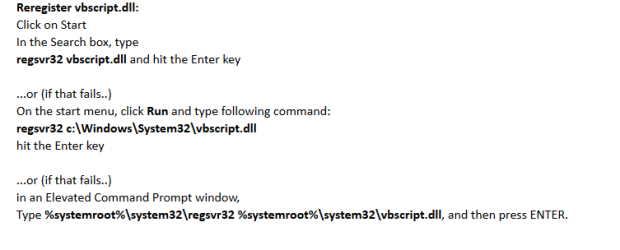
One at a time, then reboot run Mgadiag,
Look for this error
Licensing Data--> C:\Windows\system32\slmgr.vbs(22, 1) Microsoft VBScript runtime error: ActiveX component can't create object: 'Scripting.Dictionary' Windows Activation Technologies--> HrOffline: 0x00000000 HrOnline: 0x00000000 HealthStatus: 0x0000000000000000 Event Time Stamp: 11:29:2015 16:34
After operation 1, If its present try 2, etc.

If all 3 fail to remove the error, I'll have to try someting else.

Roy
 

Attachments

  • script2.PNG
    script2.PNG
    10.3 KB · Views: 1

My Computer My Computer

At a glance

W7 home premium 32bit/W7HP 64bit/w10 tp insid...E5300 dual core3gbNvidia Geforce 7100 Nforce 630i
Computer type
PC/Desktop
Computer Manufacturer/Model Number
medionl/Aspire 6930G/acer x55a
OS
W7 home premium 32bit/W7HP 64bit/w10 tp insider ring
CPU
E5300 dual core
Motherboard
medion MS7366
Memory
3gb
Graphics Card(s)
Nvidia Geforce 7100 Nforce 630i
Monitor(s) Displays
avixc
Internet Speed
n (isp resticted to 72)
Antivirus
mse/pands
Browser
palemoon
Other Info
Belkin Fd7050 n USB using Railink RT2870 drivers, more upto date
I couldn't do number 1 as I don't have a search bar, but I put 2 and 3 into the elevated run box, both gave me a DllServer registered successful message, however on reboot the last tab in MGADiag Still says " C:windows\system32\slmgr.vbs(22, 1) Microsoft VBScript runtime error: ActiveX component can't create object: 'Scripting.Dictionary'
 

My Computer My Computer

At a glance

Windows 7 Professional x64AMD Phenom II x6 1055T16 GBASUS nVidia 970 GTX Strix
Computer type
PC/Desktop
Computer Manufacturer/Model Number
Dell
OS
Windows 7 Professional x64
CPU
AMD Phenom II x6 1055T
Motherboard
Unknown OEM Board
Memory
16 GB
Graphics Card(s)
ASUS nVidia 970 GTX Strix
Hard Drives
HDS725050KLA360 x2
Antivirus
Norton Internet Security 2011
Browser
Mozilla Firefox
my first instruction

Hi Nightweb,
Lookin back, my first set of instrutions,
Badly formatted in my post
RUN these >>> 4 <<<,
You replied ran BOTH.
Can you run ALL 4 again individually, got a feeling only 2 took.

Roy
 

My Computer My Computer

At a glance

W7 home premium 32bit/W7HP 64bit/w10 tp insid...E5300 dual core3gbNvidia Geforce 7100 Nforce 630i
Computer type
PC/Desktop
Computer Manufacturer/Model Number
medionl/Aspire 6930G/acer x55a
OS
W7 home premium 32bit/W7HP 64bit/w10 tp insider ring
CPU
E5300 dual core
Motherboard
medion MS7366
Memory
3gb
Graphics Card(s)
Nvidia Geforce 7100 Nforce 630i
Monitor(s) Displays
avixc
Internet Speed
n (isp resticted to 72)
Antivirus
mse/pands
Browser
palemoon
Other Info
Belkin Fd7050 n USB using Railink RT2870 drivers, more upto date
O I ran these commands in a Elevated Command Prompt

Code:
c:\Windows\SysWOW64\REGSVR32 C:\Windows\SysWOW64\wshcon.dll
c:\Windows\SysWOW64\REGSVR32 C:\Windows\SysWOW64\scrrun.dll

regsvr32 vbscript.dll
regsvr32 c:\Windows\System32\vbscript.dll
%systemroot%\system32\regsvr32 %systemroot%\system32\vbscript.dll

Each time I got a message "DllRegisterServer in C:\Windows\*.dll Succeeded
however I fear it didn't work as the MGADiag report doesn't change I think :(

Code:
Diagnostic Report (1.9.0027.0):
-----------------------------------------
Windows Validation Data-->

Validation Code: 0
Cached Online Validation Code: 0x0
Windows Product Key: *****-*****-M3DJT-4J3WC-733WD
Windows Product Key Hash: xo+ajVSpae7/4VoZjS7m6JL0f3A=
Windows Product ID: 00371-OEM-8992671-00524
Windows Product ID Type: 2
Windows License Type: OEM SLP
Windows OS version: 6.1.7601.2.00010100.1.0.048
ID: {6B7DD81C-6C2E-419E-B09A-52D40335213E}(3)
Is Admin: Yes
TestCab: 0x0
LegitcheckControl ActiveX: N/A, hr = 0x80070002
Signed By: N/A, hr = 0x80070002
Product Name: Windows 7 Professional
Architecture: 0x00000009
Build lab: 7601.win7sp1_gdr.151019-1254
TTS Error: 
Validation Diagnostic: 
Resolution Status: N/A

Vista WgaER Data-->
ThreatID(s): N/A, hr = 0x80070002
Version: N/A, hr = 0x80070002

Windows XP Notifications Data-->
Cached Result: N/A, hr = 0x80070002
File Exists: No
Version: N/A, hr = 0x80070002
WgaTray.exe Signed By: N/A, hr = 0x80070002
WgaLogon.dll Signed By: N/A, hr = 0x80070002

OGA Notifications Data-->
Cached Result: N/A, hr = 0x80070002
Version: N/A, hr = 0x80070002
OGAExec.exe Signed By: N/A, hr = 0x80070002
OGAAddin.dll Signed By: N/A, hr = 0x80070002

OGA Data-->
Office Status: 100 Genuine
Microsoft Publisher 2002 - 100 Genuine
Microsoft Office XP Professional with FrontPage - 100 Genuine
OGA Version: N/A, 0x80070002
Signed By: N/A, hr = 0x80070002
Office Diagnostics: 025D1FF3-364-80041010_025D1FF3-229-80041010_025D1FF3-230-1_025D1FF3-517-80040154_025D1FF3-237-80040154_025D1FF3-238-2_025D1FF3-244-80070002_025D1FF3-258-3_E2AD56EA-765-d003_E2AD56EA-766-0_E2AD56EA-134-80004005_E2AD56EA-765-b01a_E2AD56EA-766-0_E2AD56EA-148-80004005_16E0B333-89-80004005_B4D0AA8B-1029-80004005

Browser Data-->
Proxy settings: N/A
User Agent: Mozilla/4.0 (compatible; MSIE 8.0; Win32)
Default Browser: C:\Program Files (x86)\Mozilla Firefox\firefox.exe
Download signed ActiveX controls: Prompt
Download unsigned ActiveX controls: Disabled
Run ActiveX controls and plug-ins: Allowed
Initialize and script ActiveX controls not marked as safe: Disabled
Allow scripting of Internet Explorer Webbrowser control: Disabled
Active scripting: Allowed
Script ActiveX controls marked as safe for scripting: Allowed

File Scan Data-->

Other data-->
Office Details: <GenuineResults><MachineData><UGUID>{6B7DD81C-6C2E-419E-B09A-52D40335213E}</UGUID><Version>1.9.0027.0</Version><OS>6.1.7601.2.00010100.1.0.048</OS><Architecture>x64</Architecture><PKey>*****-*****-*****-*****-733WD</PKey><PID>00371-OEM-8992671-00524</PID><PIDType>2</PIDType><SID>S-1-5-21-2833491091-2125282442-2741541524</SID><SYSTEM><Manufacturer>Dell Inc.</Manufacturer><Model>Studio XPS 7100</Model></SYSTEM><BIOS><Manufacturer>Dell Inc.</Manufacturer><Version>A06</Version><SMBIOSVersion major="2" minor="6"/><Date>20100910000000.000000+000</Date></BIOS><HWID>B3873507018400F6</HWID><UserLCID>1809</UserLCID><SystemLCID>0409</SystemLCID><TimeZone>GMT Standard Time(GMT+00:00)</TimeZone><iJoin>0</iJoin><SBID><stat>3</stat><msppid></msppid><name></name><model></model></SBID><OEM><OEMID>DELL  </OEMID><OEMTableID>FX09   </OEMTableID></OEM><GANotification/></MachineData><Software><Office><Result>100</Result><Products><Product GUID="{90190409-6000-11D3-8CFE-0050048383C9}"><LegitResult>100</LegitResult><Name>Microsoft Publisher 2002</Name><Ver>10</Ver><Val>BABFAAD4C4D61B0</Val><Hash>SEishkJimZrBR/u8NT774CIf0yg=</Hash><Pid>54197-640-0698487-16062</Pid><PidType>14</PidType></Product><Product GUID="{90280409-6000-11D3-8CFE-0050048383C9}"><LegitResult>100</LegitResult><Name>Microsoft Office XP Professional with FrontPage</Name><Ver>10</Ver><Val>864F0FCCC4CD73E</Val><Hash>1kvzJLKmvg8iBHYevkHHBK9NEkk=</Hash><Pid>54185-640-0521274-17180</Pid><PidType>14</PidType></Product></Products><Applications><App Id="15" Version="10" Result="100"/><App Id="16" Version="10" Result="100"/><App Id="17" Version="10" Result="100"/><App Id="18" Version="10" Result="100"/><App Id="19" Version="10" Result="100"/><App Id="1A" Version="10" Result="100"/><App Id="1B" Version="10" Result="100"/></Applications></Office></Software></GenuineResults>  

Spsys.log Content: 0x80070002

Licensing Data-->
C:\Windows\system32\slmgr.vbs(22, 1) Microsoft VBScript runtime error: ActiveX component can't create object: 'Scripting.Dictionary'

Windows Activation Technologies-->
HrOffline: 0x00000000
HrOnline: 0x00000000
HealthStatus: 0x0000000000000000
Event Time Stamp: 11:29:2015 16:34
ActiveX: Registered, Version: 7.1.7600.16395
Admin Service: Registered, Version: 7.1.7600.16395
HealthStatus Bitmask Output:


HWID Data-->
HWID Hash Current: NgAAAAIABAABAAEAAQACAAAAAQABAAEAHKJMer3j8OnY+1TcVPkQMyzJ3sDx5UTRctAM1QLQ

OEM Activation 1.0 Data-->
N/A

OEM Activation 2.0 Data-->
BIOS valid for OA 2.0: yes
Windows marker version: 0x20001
OEMID and OEMTableID Consistent: yes
BIOS Information: 
  ACPI Table Name    OEMID Value    OEMTableID Value
  APIC            DELL          FX09    
  FACP            DELL          FX09    
  SRAT            AMD           FAM_F_10
  HPET            DELL          OEMHPET 
  MCFG            DELL          OEMMCFG 
  SLIC            DELL          FX09   
  OSFR            DELL          FX09    
  OEMB            DELL          FX09    
  SSDT            A M I         POWERNOW
 

My Computer My Computer

At a glance

Windows 7 Professional x64AMD Phenom II x6 1055T16 GBASUS nVidia 970 GTX Strix
Computer type
PC/Desktop
Computer Manufacturer/Model Number
Dell
OS
Windows 7 Professional x64
CPU
AMD Phenom II x6 1055T
Motherboard
Unknown OEM Board
Memory
16 GB
Graphics Card(s)
ASUS nVidia 970 GTX Strix
Hard Drives
HDS725050KLA360 x2
Antivirus
Norton Internet Security 2011
Browser
Mozilla Firefox
Hi Nightweb,
Do you have KB971033 installed.

Roy
 

My Computer My Computer

At a glance

W7 home premium 32bit/W7HP 64bit/w10 tp insid...E5300 dual core3gbNvidia Geforce 7100 Nforce 630i
Computer type
PC/Desktop
Computer Manufacturer/Model Number
medionl/Aspire 6930G/acer x55a
OS
W7 home premium 32bit/W7HP 64bit/w10 tp insider ring
CPU
E5300 dual core
Motherboard
medion MS7366
Memory
3gb
Graphics Card(s)
Nvidia Geforce 7100 Nforce 630i
Monitor(s) Displays
avixc
Internet Speed
n (isp resticted to 72)
Antivirus
mse/pands
Browser
palemoon
Other Info
Belkin Fd7050 n USB using Railink RT2870 drivers, more upto date
After Lots and lots of searching I found that yes I have it installed, (i think I've all updates for Windows 7,Office XP,Silverlight and virtual PC up till 12 jan last month)
 

My Computer My Computer

At a glance

Windows 7 Professional x64AMD Phenom II x6 1055T16 GBASUS nVidia 970 GTX Strix
Computer type
PC/Desktop
Computer Manufacturer/Model Number
Dell
OS
Windows 7 Professional x64
CPU
AMD Phenom II x6 1055T
Motherboard
Unknown OEM Board
Memory
16 GB
Graphics Card(s)
ASUS nVidia 970 GTX Strix
Hard Drives
HDS725050KLA360 x2
Antivirus
Norton Internet Security 2011
Browser
Mozilla Firefox
more to try

Hi Nightweb,

Try the following in the order below please

Please Uninstall KB971033, reboot and reinstall, from here
http://support.microsoft.com/kb/971033.

Reset ActiveX components, follow this link
https://www.google.co.uk/url?sa=t&r...ctivex&usg=AFQjCNFnOnHfc_K_CgMRsRC-0VkmLQvDyA


Please check your Windows\System32 folder - is there a file (not a folder) called slmgr.vbs present?

Please run the following command from an elevated command prompt...
DIR C:\Windows\system32\slmgr.*
copy and paste the results to your reply.

Roy
 

My Computer My Computer

At a glance

W7 home premium 32bit/W7HP 64bit/w10 tp insid...E5300 dual core3gbNvidia Geforce 7100 Nforce 630i
Computer type
PC/Desktop
Computer Manufacturer/Model Number
medionl/Aspire 6930G/acer x55a
OS
W7 home premium 32bit/W7HP 64bit/w10 tp insider ring
CPU
E5300 dual core
Motherboard
medion MS7366
Memory
3gb
Graphics Card(s)
Nvidia Geforce 7100 Nforce 630i
Monitor(s) Displays
avixc
Internet Speed
n (isp resticted to 72)
Antivirus
mse/pands
Browser
palemoon
Other Info
Belkin Fd7050 n USB using Railink RT2870 drivers, more upto date
I've looked under the list of installed updates and I can't find that listed, could it be included in a service pack? or even slip-streamed into a Windows 7 SP1 install disc?

I have reset the activeX controls and I don't know how to copy and paste the Command response but I do have the slmgr.dll file it's 113,629 bytes
 

My Computer My Computer

At a glance

Windows 7 Professional x64AMD Phenom II x6 1055T16 GBASUS nVidia 970 GTX Strix
Computer type
PC/Desktop
Computer Manufacturer/Model Number
Dell
OS
Windows 7 Professional x64
CPU
AMD Phenom II x6 1055T
Motherboard
Unknown OEM Board
Memory
16 GB
Graphics Card(s)
ASUS nVidia 970 GTX Strix
Hard Drives
HDS725050KLA360 x2
Antivirus
Norton Internet Security 2011
Browser
Mozilla Firefox
Hi Nightweb,

OK can you check if these 2 lines are included in the Slmgr vbs report
L_MsgHelp_2="Usage: slmgr.vbs [MachineName [User Password]] [<Option>]"
L_MsgHelp_3="MachineName: Name of remote machine (default is local machine)"

You said you found that KB before???, but lets use this to uninstall

via elevated command mode
wusa /uninstall /KB:971033
Note: Include the colon and note the spaces.

In your last reply you said you had updates until about 12 Jan, did you install any other programs, or use a
Optimiser prog or any kind of registry cleaner just prior to that.

Roy
 

My Computer My Computer

At a glance

W7 home premium 32bit/W7HP 64bit/w10 tp insid...E5300 dual core3gbNvidia Geforce 7100 Nforce 630i
Computer type
PC/Desktop
Computer Manufacturer/Model Number
medionl/Aspire 6930G/acer x55a
OS
W7 home premium 32bit/W7HP 64bit/w10 tp insider ring
CPU
E5300 dual core
Motherboard
medion MS7366
Memory
3gb
Graphics Card(s)
Nvidia Geforce 7100 Nforce 630i
Monitor(s) Displays
avixc
Internet Speed
n (isp resticted to 72)
Antivirus
mse/pands
Browser
palemoon
Other Info
Belkin Fd7050 n USB using Railink RT2870 drivers, more upto date
Hey sorry not got back sooner was away from pc,

I searched the file slmgr.vbs in C:\Windows\slmgr.vbs and I found I have these lines:
Code:
private const L_MsgHelp_2                             = "Usage: slmgr.vbs [MachineName [User Password]] [<Option>]"
private const L_MsgHelp_3                             = "MachineName: Name of remote machine (default is local machine)""
Are these the right ones? I couldn't find exact matches to the ones you posted

I also notice I have a Slmgr folder too, in this is another folder (0409) which contains a single file slmgr.ini

I used the command in a elevated Command prompt by copy and pasting it in. As for January 12th, any programs installed could be hard one to answer as I don't install much if anything none gaming related on these machine, however I have Steam, Norton and Windows (Had I should say) auto updating so they the only things I can thing of except a couple (about 6 days ago) I installed 3DMark to score my new GPU, as for optimizer program the only one I use is defrag about once every two months (Norton has a built in one too) and of course Cleanrmgr. no reg cleaner installed.

That help?
 

My Computer My Computer

At a glance

Windows 7 Professional x64AMD Phenom II x6 1055T16 GBASUS nVidia 970 GTX Strix
Computer type
PC/Desktop
Computer Manufacturer/Model Number
Dell
OS
Windows 7 Professional x64
CPU
AMD Phenom II x6 1055T
Motherboard
Unknown OEM Board
Memory
16 GB
Graphics Card(s)
ASUS nVidia 970 GTX Strix
Hard Drives
HDS725050KLA360 x2
Antivirus
Norton Internet Security 2011
Browser
Mozilla Firefox
Back
Top