Windows Updates - Remove Outdated Updates in Windows 7

How to Remove Outdated Windows Updates Using Disk Cleanup in Windows 7

   Information
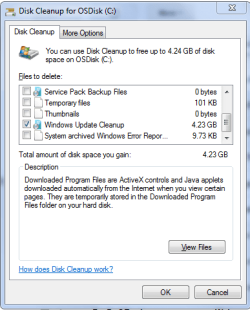
Microsoft released an update on October 8, 2013 that allows you to remove outdated Windows Updates using Disk Cleanup in Windows 7.

This update adds a new plugin to the Disk Cleanup wizard. After you install this update, you can use the Windows Update Cleanup option to delete Windows updates that you no longer need.

Notes

  • The Windows Update Cleanup option is available only when the Disk Cleanup wizard detects Windows updates that you do not need on the computer.
  • To enable you to roll back to previous updates, updates are stored in the WinSxS store even after they are superseded by later updates. Therefore, after you run the Disk Cleanup wizard, you may be unable to roll back to a superseded update. If you want to roll back to a superseded update that the Disk Cleanup wizard deletes, you can manually install the update.
Running Windows Update Cleanup will reduce the size of the WinSxS folder (component store) and gain more hard drive space.

Source: Update is available that enables you to delete outdated Windows updates by using a new option in the Disk Cleanup wizard in Windows 7 SP1

   Note
Be sure you are running Windows 7 Service Pack 1.


Instructions:

1. If you have not already, you will need to download and install the update from Windows Update or from the Microsoft Download Center links below.
32 Bit:

Download


64 Bit:

Download


2. Open Disk Cleanup.

   Note
You need to run Disk Cleanup as Administrator or select "Clean up system files" in Disk Cleanup.


3. Tick the "Windows Update Cleanup" box.
Windows_Update_Cleanup.png
4. Select OK.

5. Reboot your computer, so the changes will be applied.


That's it! You can run this every time you need to clean up old Windows Update files. Post down below if you have any questions or comments!


Last edited by a moderator:
still there is no WUC box run as administrator
 

My Computer

Computer type
PC/Desktop
Computer Manufacturer/Model Number
Custom Build
OS
MS Windows 7 Ultimate 64-bit SP1
CPU
AMD FX-8350
Motherboard
Gigabyte GA-970A-UD3
Memory
8 GB DDR3 1600
Graphics Card(s)
AMD Radeon HD 9750
Sound Card
n/a
Monitor(s) Displays
39" 4k
Screen Resolution
3840 X 2160
Hard Drives
AMD SSD 240 + 1TB WD + 2 500GB WD
PSU
Antec 620
Case
Apevia X-Trooper
Cooling
120" Corsair H50
Keyboard
Cooler Master Devastator
Mouse
Cooler Master Devastator
Internet Speed
108 Mbps down !0 Mbps up
Antivirus
Microsoft Security Essentials
Browser
IE11, Mozzilla firefox
Other Info
2 DVD players one with light scribe
Front panel with two 3.0 USB ports (add-on)
Happens to me all the time, Bear

No need to apologize, we're all here to help.
This might help.
When you use Cleanmgr right tick on it and select Run as Administrator.

Sorry Slartybart I was typing while you were posting.
 

My Computer

Computer type
Laptop
Computer Manufacturer/Model Number
HP Pavilion dv6-6c10us
OS
x64 (6.3.9600) Win8.1 Pro & soon dual boot x64 (6.1.7601) Win7_SP1 HomePrem
CPU
AMD A6-3420M APU with Radeon(tm) HD Graphics
Motherboard
Hewlett-Packard 1805
Memory
6.00 GB
Graphics Card(s)
AMD Radeon(TM) HD 6520G
Sound Card
(1) AMD High Definition Audio Device (2) IDT High Definiti
Monitor(s) Displays
HP W2072a 20" LCD (1600 x 900) @ 60 Hz
Screen Resolution
1366 x 768 x 32 bits (4294967296 colors) @ 60 Hz
Hard Drives
ST640LM0 00 HM641JI SATA Disk Device
Keyboard
Logitech k520 wireless KB
Mouse
Logitech m320 wireless mouse (bundled with KB)
Internet Speed
15/5 | 54 MB Wireless 'n'
Antivirus
Realtime: Defender or Avast | On-demand: Malwarebytes, ESET
Browser
IE 11 on Win8, IE 10 on win 7
Other Info
Media: [Gimp, Audacity, VLC] || Comm: [WEmail 2012, Skype] || Productivity: [OpenOffice,| Textpad] || Utils: [Sysinternals, cCleaner, Speccy, Defraggler]
also tried right click cleanmgr run as administrator no luck
 

My Computer

Computer type
PC/Desktop
Computer Manufacturer/Model Number
Custom Build
OS
MS Windows 7 Ultimate 64-bit SP1
CPU
AMD FX-8350
Motherboard
Gigabyte GA-970A-UD3
Memory
8 GB DDR3 1600
Graphics Card(s)
AMD Radeon HD 9750
Sound Card
n/a
Monitor(s) Displays
39" 4k
Screen Resolution
3840 X 2160
Hard Drives
AMD SSD 240 + 1TB WD + 2 500GB WD
PSU
Antec 620
Case
Apevia X-Trooper
Cooling
120" Corsair H50
Keyboard
Cooler Master Devastator
Mouse
Cooler Master Devastator
Internet Speed
108 Mbps down !0 Mbps up
Antivirus
Microsoft Security Essentials
Browser
IE11, Mozzilla firefox
Other Info
2 DVD players one with light scribe
Front panel with two 3.0 USB ports (add-on)
how can I know that I have full administrator control? that might be my problem
 

My Computer

Computer type
PC/Desktop
Computer Manufacturer/Model Number
Custom Build
OS
MS Windows 7 Ultimate 64-bit SP1
CPU
AMD FX-8350
Motherboard
Gigabyte GA-970A-UD3
Memory
8 GB DDR3 1600
Graphics Card(s)
AMD Radeon HD 9750
Sound Card
n/a
Monitor(s) Displays
39" 4k
Screen Resolution
3840 X 2160
Hard Drives
AMD SSD 240 + 1TB WD + 2 500GB WD
PSU
Antec 620
Case
Apevia X-Trooper
Cooling
120" Corsair H50
Keyboard
Cooler Master Devastator
Mouse
Cooler Master Devastator
Internet Speed
108 Mbps down !0 Mbps up
Antivirus
Microsoft Security Essentials
Browser
IE11, Mozzilla firefox
Other Info
2 DVD players one with light scribe
Front panel with two 3.0 USB ports (add-on)
go to Control Panel -> User Accounts [Control Panel\User Accounts and Family Safety\User Accounts]
If it says Administrator next to your login icon, then you are an administrator.

Please explain more clearly what you mean by: also tried right click cleanmgr run as administrator no luck
did you not see the option, or did it not allow you to run as....

If you're a standard user and try to run as an administrator, it should ask you for the admin password.
 

My Computer

Computer type
Laptop
Computer Manufacturer/Model Number
HP Pavilion dv6-6c10us
OS
x64 (6.3.9600) Win8.1 Pro & soon dual boot x64 (6.1.7601) Win7_SP1 HomePrem
CPU
AMD A6-3420M APU with Radeon(tm) HD Graphics
Motherboard
Hewlett-Packard 1805
Memory
6.00 GB
Graphics Card(s)
AMD Radeon(TM) HD 6520G
Sound Card
(1) AMD High Definition Audio Device (2) IDT High Definiti
Monitor(s) Displays
HP W2072a 20" LCD (1600 x 900) @ 60 Hz
Screen Resolution
1366 x 768 x 32 bits (4294967296 colors) @ 60 Hz
Hard Drives
ST640LM0 00 HM641JI SATA Disk Device
Keyboard
Logitech k520 wireless KB
Mouse
Logitech m320 wireless mouse (bundled with KB)
Internet Speed
15/5 | 54 MB Wireless 'n'
Antivirus
Realtime: Defender or Avast | On-demand: Malwarebytes, ESET
Browser
IE 11 on Win8, IE 10 on win 7
Other Info
Media: [Gimp, Audacity, VLC] || Comm: [WEmail 2012, Skype] || Productivity: [OpenOffice,| Textpad] || Utils: [Sysinternals, cCleaner, Speccy, Defraggler]
Confirmation needed: Disk Cleanup, Windows Update Cleanup

While doing some other maintenance, I ran Disk cleanup.
The run status shows "Scanning: Windows Update Cleanup", but the WUC checkbox was not displayed.

This leads me to believe that Disk Cleanup does not present the Windows Update option if there is nothing found during the scan for Windows Update cleanup.

Confirmation needed: run Disk Cleanup, clean Windows update files, run disk cleanup.
oops sorry I meant Disk Cleanup it doesn't not have a windows update box when it opens I hit disk cleanup all on C: I only have one drive C:
when disk cleanup starts running it shows reading Service Pack Backup Files then System error memory dump files then Windows Update Cleanup it has a box to check for SPBF and Semdf but none for WUC

... Did you already try manually installing the 64-bit update from step 1?
it shows it was already installed

still there is no WUC box run as administrator

how can I know that I have full administrator control? that might be my problem


My Computer

Computer type
Laptop
Computer Manufacturer/Model Number
HP Pavilion dv6-6c10us
OS
x64 (6.3.9600) Win8.1 Pro & soon dual boot x64 (6.1.7601) Win7_SP1 HomePrem
CPU
AMD A6-3420M APU with Radeon(tm) HD Graphics
Motherboard
Hewlett-Packard 1805
Memory
6.00 GB
Graphics Card(s)
AMD Radeon(TM) HD 6520G
Sound Card
(1) AMD High Definition Audio Device (2) IDT High Definiti
Monitor(s) Displays
HP W2072a 20" LCD (1600 x 900) @ 60 Hz
Screen Resolution
1366 x 768 x 32 bits (4294967296 colors) @ 60 Hz
Hard Drives
ST640LM0 00 HM641JI SATA Disk Device
Keyboard
Logitech k520 wireless KB
Mouse
Logitech m320 wireless mouse (bundled with KB)
Internet Speed
15/5 | 54 MB Wireless 'n'
Antivirus
Realtime: Defender or Avast | On-demand: Malwarebytes, ESET
Browser
IE 11 on Win8, IE 10 on win 7
Other Info
Media: [Gimp, Audacity, VLC] || Comm: [WEmail 2012, Skype] || Productivity: [OpenOffice,| Textpad] || Utils: [Sysinternals, cCleaner, Speccy, Defraggler]
yes I have full control
 

My Computer

Computer type
PC/Desktop
Computer Manufacturer/Model Number
Custom Build
OS
MS Windows 7 Ultimate 64-bit SP1
CPU
AMD FX-8350
Motherboard
Gigabyte GA-970A-UD3
Memory
8 GB DDR3 1600
Graphics Card(s)
AMD Radeon HD 9750
Sound Card
n/a
Monitor(s) Displays
39" 4k
Screen Resolution
3840 X 2160
Hard Drives
AMD SSD 240 + 1TB WD + 2 500GB WD
PSU
Antec 620
Case
Apevia X-Trooper
Cooling
120" Corsair H50
Keyboard
Cooler Master Devastator
Mouse
Cooler Master Devastator
Internet Speed
108 Mbps down !0 Mbps up
Antivirus
Microsoft Security Essentials
Browser
IE11, Mozzilla firefox
Other Info
2 DVD players one with light scribe
Front panel with two 3.0 USB ports (add-on)
Ok, that's good. My post above yours was to say that I am experiencing the same thing as you. The only difference is that I did see the checkbox at one time.

So I was asking other members to confirm my suspicion that if there are no WU to clean, then disk cleanup doesn't present the option to tick. In other words, this behavior might be by design.

Perhaps you can wait for a few Defender updates and then try Disk Cleanup and let us know if the WUC option is available.
yes I have full control
 

My Computer

Computer type
Laptop
Computer Manufacturer/Model Number
HP Pavilion dv6-6c10us
OS
x64 (6.3.9600) Win8.1 Pro & soon dual boot x64 (6.1.7601) Win7_SP1 HomePrem
CPU
AMD A6-3420M APU with Radeon(tm) HD Graphics
Motherboard
Hewlett-Packard 1805
Memory
6.00 GB
Graphics Card(s)
AMD Radeon(TM) HD 6520G
Sound Card
(1) AMD High Definition Audio Device (2) IDT High Definiti
Monitor(s) Displays
HP W2072a 20" LCD (1600 x 900) @ 60 Hz
Screen Resolution
1366 x 768 x 32 bits (4294967296 colors) @ 60 Hz
Hard Drives
ST640LM0 00 HM641JI SATA Disk Device
Keyboard
Logitech k520 wireless KB
Mouse
Logitech m320 wireless mouse (bundled with KB)
Internet Speed
15/5 | 54 MB Wireless 'n'
Antivirus
Realtime: Defender or Avast | On-demand: Malwarebytes, ESET
Browser
IE 11 on Win8, IE 10 on win 7
Other Info
Media: [Gimp, Audacity, VLC] || Comm: [WEmail 2012, Skype] || Productivity: [OpenOffice,| Textpad] || Utils: [Sysinternals, cCleaner, Speccy, Defraggler]
Very cool, just ran it...thanks!

Glad I found this site!
 

My Computer

Computer type
PC/Desktop
Computer Manufacturer/Model Number
Custom
OS
Microsoft Windows 7 Ultimate 64-bit Service Pack 1
CPU
Intel(R) Core(TM) i5-2500K CPU @ 3.30GHz
Motherboard
Gigabyte Technology Co., Ltd. Z68AP-D3
Memory
Kingston XMP HyperX 8GB DDR3 1600MHz CL9
Graphics Card(s)
(1) Intel(R) HD Graphics 3000 (2) ATI Radeon HD 5700 Series
Sound Card
(1) ATI HDMI Audio (2) Realtek High Definition Audio
Monitor(s) Displays
AcerS230HL / HP w2216
Screen Resolution
1920x1080 / 1680x1050
Hard Drives
(1) 111.79 GB SSD OCZ-VERTEX3 ATA Device
(2) 465.76 GB WDC WD5002AALX-00J37A0 ATA Device
(3) 596.17 GB WDC WD6400AAKS-00H2B0 ATA Device
(4) 1.82 TB Seagate FA GoFlex Desk USB Device
PSU
ULTRA LSP750 750W ATX POWER SUPPLY
Case
Thermaltake Spedo Advance Package VI90001W2Z
Cooling
Corsair Hydro H80 CPU Liquid Cooler
Keyboard
Logitech Cordless Desktop MX 5500 Revolution Bluetooth Mouse
Mouse
Logitech G700 Black 13 Buttons USB RF Wireless Laser Gaming
Internet Speed
30+ MB/s
Antivirus
AVG Anti-Virus plus Firewall 9.0.932
Browser
Firefox 24.0
Other Info
Bios:
Award Software International, Inc.
Award Modular BIOS v6.00PG
So I was asking other members to confirm my suspicion that if there are no WU to clean, then disk cleanup doesn't present the option to tick. In other words, this behavior might be by design.

Yes, I just checked it and there were none to cleanup so no option to tick.

This tutorial could use a couple screenshots in the first post.
 

My Computer

Computer type
PC/Desktop
Computer Manufacturer/Model Number
Self Built
OS
Win 10 Pro x64
CPU
Intel I5-2500K @3.3GHz
Motherboard
Asrock P67 Extreme4
Memory
16GB G.Skill Ripjaws X (4x4GB)
Graphics Card(s)
EVGA GeForce 750 Ti SC 2GB
Sound Card
ASUS Xonar DG 5.1 Channels 24-bit 96KHz PCI Interface Sound
Monitor(s) Displays
auria eq2367
Screen Resolution
1920 x 1080
Hard Drives
250GB Samsung 850 EVO SSD
1TB WD Blue
1TB Hitachi
PSU
SeaSonic X 650W 80 Plus Gold
Case
Corsair Obsidian 750D
Cooling
Corsair H60, Three 140mm case fans
Keyboard
Logitech Wireless Keyboard K520
Mouse
Logitech Wireless Mouse M310
Internet Speed
Wave Broadband ~ 100 dn 5 up
Antivirus
Windows Defender, Malwarebytes Premium
Browser
Edge, IE11, Chrome
Other Info
Laptop specs: HP g7-1365dx /
CPU: AMD A6-3420M APU with Radeon(tm) HD Graphics /
RAM: Crucial 8Gb (2x4Gb) /
SSD: Crucial M4-CT128M4SSD2 ATA Device/ FW 000F /
GFX: AMD Radeon HD 6520G /
OS: Windows 10 Pro x64
Thanks for the confirmation Derek: Disk Cleanup only offers a list item and checkbox for Windows Update Cleanup if the scan finds superseded Windows Updates.
So I was asking other members to confirm my suspicion that if there are no WU to clean, then disk cleanup doesn't present the option to tick. In other words, this behavior might be by design.
Yes, I just checked it and there were none to cleanup so no option to tick.

This tutorial could use a couple screenshots in the first post.


My Computer

Computer type
Laptop
Computer Manufacturer/Model Number
HP Pavilion dv6-6c10us
OS
x64 (6.3.9600) Win8.1 Pro & soon dual boot x64 (6.1.7601) Win7_SP1 HomePrem
CPU
AMD A6-3420M APU with Radeon(tm) HD Graphics
Motherboard
Hewlett-Packard 1805
Memory
6.00 GB
Graphics Card(s)
AMD Radeon(TM) HD 6520G
Sound Card
(1) AMD High Definition Audio Device (2) IDT High Definiti
Monitor(s) Displays
HP W2072a 20" LCD (1600 x 900) @ 60 Hz
Screen Resolution
1366 x 768 x 32 bits (4294967296 colors) @ 60 Hz
Hard Drives
ST640LM0 00 HM641JI SATA Disk Device
Keyboard
Logitech k520 wireless KB
Mouse
Logitech m320 wireless mouse (bundled with KB)
Internet Speed
15/5 | 54 MB Wireless 'n'
Antivirus
Realtime: Defender or Avast | On-demand: Malwarebytes, ESET
Browser
IE 11 on Win8, IE 10 on win 7
Other Info
Media: [Gimp, Audacity, VLC] || Comm: [WEmail 2012, Skype] || Productivity: [OpenOffice,| Textpad] || Utils: [Sysinternals, cCleaner, Speccy, Defraggler]
thanks for the help my system just out of the blue began to work on 11/17/13 and it removed windows updates it did not need and cleared out 5 Gb now when I open disk cleaner it is there now with windows updates check box...windows does tricks sometimes ever since I known it from win 3.1 :)
 

My Computer

Computer type
PC/Desktop
Computer Manufacturer/Model Number
Custom Build
OS
MS Windows 7 Ultimate 64-bit SP1
CPU
AMD FX-8350
Motherboard
Gigabyte GA-970A-UD3
Memory
8 GB DDR3 1600
Graphics Card(s)
AMD Radeon HD 9750
Sound Card
n/a
Monitor(s) Displays
39" 4k
Screen Resolution
3840 X 2160
Hard Drives
AMD SSD 240 + 1TB WD + 2 500GB WD
PSU
Antec 620
Case
Apevia X-Trooper
Cooling
120" Corsair H50
Keyboard
Cooler Master Devastator
Mouse
Cooler Master Devastator
Internet Speed
108 Mbps down !0 Mbps up
Antivirus
Microsoft Security Essentials
Browser
IE11, Mozzilla firefox
Other Info
2 DVD players one with light scribe
Front panel with two 3.0 USB ports (add-on)
no check box

Thanks for the confirmation Derek: Disk Cleanup only offers a list item and checkbox for Windows Update Cleanup if the scan finds superseded Windows Updates.
So I was asking other members to confirm my suspicion that if there are no WU to clean, then disk cleanup doesn't present the option to tick. In other words, this behavior might be by design.
Yes, I just checked it and there were none to cleanup so no option to tick.

This tutorial could use a couple screenshots in the first post.
yes it was the same for me and I just forgot about it for approx. 2-4 weeks yesterday I was cleaning up disk and a question popped up asking me if I wanted to remove windows updates not needed of course I checked ok well the check box is there now when or if I want to use it...it wasn't there before
 

My Computer

Computer type
PC/Desktop
Computer Manufacturer/Model Number
Custom Build
OS
MS Windows 7 Ultimate 64-bit SP1
CPU
AMD FX-8350
Motherboard
Gigabyte GA-970A-UD3
Memory
8 GB DDR3 1600
Graphics Card(s)
AMD Radeon HD 9750
Sound Card
n/a
Monitor(s) Displays
39" 4k
Screen Resolution
3840 X 2160
Hard Drives
AMD SSD 240 + 1TB WD + 2 500GB WD
PSU
Antec 620
Case
Apevia X-Trooper
Cooling
120" Corsair H50
Keyboard
Cooler Master Devastator
Mouse
Cooler Master Devastator
Internet Speed
108 Mbps down !0 Mbps up
Antivirus
Microsoft Security Essentials
Browser
IE11, Mozzilla firefox
Other Info
2 DVD players one with light scribe
Front panel with two 3.0 USB ports (add-on)
I tried the option "Windows Update Cleanup" multiple times, after clicking OK, it runs for a while and the window disappears. After reboot, I don't see any Windows Update Cleanup related messages on screen. Even after reboot, when I run disk cleanup, it shows the amount of space that can be cleaned up by Windows Update Cleanup same as earlier.

Any idea, what could be wrong with the Windows Update Cleaning.

Thanks
 

Attachments

  • Capture.PNG
    Capture.PNG
    15.3 KB · Views: 1,620

My Computer

Computer type
Laptop
Computer Manufacturer/Model Number
Lenovo
OS
Windows 7 Professional x64
Hello Shawn my 256GB SSD is filling up rapidly and I have cut the programs to the bone run CC done the disk clean up and looking for other stuff to clean came across old unwanted updates but I don't have an option in disk clean up for that. Is this because I have a corrupted install? I hope not because I am up to number five now because of problems of one sort or another:(

Sorry mate just found it under system clean up:o
 

Attachments

  • UPDATE CLEAN.PNG
    UPDATE CLEAN.PNG
    12.1 KB · Views: 1,290

My Computer

Computer type
PC/Desktop
Computer Manufacturer/Model Number
Own build (new) Desk1 / Asus ROG Win 7 / Desk2 1st build
OS
Desk1 7 Home Prem / Desk2 10 Pro / Main lap Asus ROG 10 Pro 2 laptop Toshiba 7 Pro Asus P2520 7 & 10
CPU
Desk1 i5 3750K / Laptop i7 GTX 860M / Desk2 i5 2500
Motherboard
Desk1 Asus P877-V / Desk2 Gigabyte H67 UD3H / Laptop ?
Memory
Desk1 8GB (1866) / Desk2 16GB (1333) / Laptop 8Gb DDR3
Graphics Card(s)
Desk 1& 2NVidia GTX 650 & Laptops on board Intel
Sound Card
Desk 1 & 2 -XONAR DG Realtek High Def audio Laptop
Monitor(s) Displays
Desk 1 Benq HD 2450 / Desk2 Philips 24" / Laptop 17.5"
Screen Resolution
1920x1080 D1 & D2 & Laptop 1
Hard Drives
Desk1 Samsung 120GB 830 SSD
Asus ROG 256GB 850 Pro SSD
Desk2 Samsung 840 256 SSD
Toshiba 120GB EVO
PSU
Desk 1 Corsair HX 1050/ Laptop ? / Desk 2 Corsair HX 650
Case
Desk 1 Cooler HAF XM ? Toshiba laptop / Desk2 Coolermaster
Cooling
Fans on all Desk1 -2 Desk2 - all Coolermasters 5 Laptop ?
Keyboard
Desk 1 MS Sidewinder X6 Desk 2 MS Sidewinder X 4
Mouse
Desk 1&2 - Gigabyte MS 900 gamer - laptop - Logitec wireless
Internet Speed
ADSL2+
Other Info
One other Desktop (tester) and spare Toshba laptop both with SSD's
Running Kaspersky 2016 ISS on all machines config'd identically
Logitec audio stereo systems on each machine (x3)
Canon MG5250MFC
Router/modem TP-Link running WPA2SK
Hey John,

If you haven't already, make sure that you did step 1 to install this option.

Next, it looks like you need to click on the Clean up system files button to elevate Disk Cleanup to have the option available. :)
 

My Computer

Computer type
PC/Desktop
Computer Manufacturer/Model Number
Self built custom
OS
64-bit Windows 11 Pro for Workstations
CPU
Intel i7-8700K OC'd to 5 GHz
Motherboard
ASUS ROG Maximus XI Formula Z390
Memory
64 GB (4x16GB) G.SKILL TridentZ RGB DDR4 3600 MHz
Graphics Card(s)
ASUS ROG-STRIX-GTX1080TI-O11G-GAMING
Sound Card
Integrated
Monitor(s) Displays
2 x Samsung Odyssey G7 27"
Screen Resolution
2560x1440
Hard Drives
1TB Samsung 990 PRO M.2,
4TB Samsung 990 PRO PRO M.2,
TerraMaster F8 SSD Plus NAS
PSU
Seasonic Prime Titanium 850W
Case
Thermaltake Core P3
Cooling
Corsair Hydro H115i
Keyboard
Logitech wireless K800
Mouse
Logitech MX Master 4
Internet Speed
2 Gb/s Download and 100 Mb/s Upload
Antivirus
Malwarebyte Anti-Malware Premium
Browser
Google Chrome
Other Info
Logitech Z625 speaker system,
Logitech BRIO 4K Pro webcam,
HP Color LaserJet Pro MFP M477fdn,
APC SMART-UPS RT 1000 XL - SURT1000XLI,
Galaxy S23 Plus phone
Ok Shawn I found that update stuff in Clean up system files and to be honest there was less than 3MB in there the majority of stuff seems to reside in program files and there really is only stuff I use.

Seems odd to me that the larger the drives get the quicker one fills them - remembering when we used to have 80MB drives and having a job to fill even a third of them. But I suppose the programs have got that much larger eh?

PS Meant to say I already had that update on the machine it is just that it seems to be chewing through disk space and really I have the same programs on all of the machines just it has been a problem child for a long time.
 

My Computer

Computer type
PC/Desktop
Computer Manufacturer/Model Number
Own build (new) Desk1 / Asus ROG Win 7 / Desk2 1st build
OS
Desk1 7 Home Prem / Desk2 10 Pro / Main lap Asus ROG 10 Pro 2 laptop Toshiba 7 Pro Asus P2520 7 & 10
CPU
Desk1 i5 3750K / Laptop i7 GTX 860M / Desk2 i5 2500
Motherboard
Desk1 Asus P877-V / Desk2 Gigabyte H67 UD3H / Laptop ?
Memory
Desk1 8GB (1866) / Desk2 16GB (1333) / Laptop 8Gb DDR3
Graphics Card(s)
Desk 1& 2NVidia GTX 650 & Laptops on board Intel
Sound Card
Desk 1 & 2 -XONAR DG Realtek High Def audio Laptop
Monitor(s) Displays
Desk 1 Benq HD 2450 / Desk2 Philips 24" / Laptop 17.5"
Screen Resolution
1920x1080 D1 & D2 & Laptop 1
Hard Drives
Desk1 Samsung 120GB 830 SSD
Asus ROG 256GB 850 Pro SSD
Desk2 Samsung 840 256 SSD
Toshiba 120GB EVO
PSU
Desk 1 Corsair HX 1050/ Laptop ? / Desk 2 Corsair HX 650
Case
Desk 1 Cooler HAF XM ? Toshiba laptop / Desk2 Coolermaster
Cooling
Fans on all Desk1 -2 Desk2 - all Coolermasters 5 Laptop ?
Keyboard
Desk 1 MS Sidewinder X6 Desk 2 MS Sidewinder X 4
Mouse
Desk 1&2 - Gigabyte MS 900 gamer - laptop - Logitec wireless
Internet Speed
ADSL2+
Other Info
One other Desktop (tester) and spare Toshba laptop both with SSD's
Running Kaspersky 2016 ISS on all machines config'd identically
Logitec audio stereo systems on each machine (x3)
Canon MG5250MFC
Router/modem TP-Link running WPA2SK
Yeah, it does seem like the bigger the drive, the faster they fill up. :)
 

My Computer

Computer type
PC/Desktop
Computer Manufacturer/Model Number
Self built custom
OS
64-bit Windows 11 Pro for Workstations
CPU
Intel i7-8700K OC'd to 5 GHz
Motherboard
ASUS ROG Maximus XI Formula Z390
Memory
64 GB (4x16GB) G.SKILL TridentZ RGB DDR4 3600 MHz
Graphics Card(s)
ASUS ROG-STRIX-GTX1080TI-O11G-GAMING
Sound Card
Integrated
Monitor(s) Displays
2 x Samsung Odyssey G7 27"
Screen Resolution
2560x1440
Hard Drives
1TB Samsung 990 PRO M.2,
4TB Samsung 990 PRO PRO M.2,
TerraMaster F8 SSD Plus NAS
PSU
Seasonic Prime Titanium 850W
Case
Thermaltake Core P3
Cooling
Corsair Hydro H115i
Keyboard
Logitech wireless K800
Mouse
Logitech MX Master 4
Internet Speed
2 Gb/s Download and 100 Mb/s Upload
Antivirus
Malwarebyte Anti-Malware Premium
Browser
Google Chrome
Other Info
Logitech Z625 speaker system,
Logitech BRIO 4K Pro webcam,
HP Color LaserJet Pro MFP M477fdn,
APC SMART-UPS RT 1000 XL - SURT1000XLI,
Galaxy S23 Plus phone
remove outdated updates

Hello Brink, I read through this tutorial that dates from 8 October 2013 ( Using disk clean-up to remove outdated updates ).

I have some questions about that. First, Who decides that a certain update is outdated? I think they are never outdated really.
When they find out that some update was wrong or had a mistake in it they don't say take it away, they send a new one to correct the old one.

Also if you remove old updates, you don't have you'r update history in tact anymore. Does that matter ?:confused:
 

My Computer

Computer type
Laptop
Computer Manufacturer/Model Number
HP Presario CQ70
OS
windows 7 professional 64 bit
CPU
CPU Genuine Intel (R) CPU [email protected]
Motherboard
APCI x 64 - based PC
Memory
RAM 3 GB
Graphics Card(s)
Toshiba MK2555 GSX ATA
Sound Card
Conexant High Def Smart Audio 221,
Monitor(s) Displays
monitor Generic PnP.
Screen Resolution
?
Hard Drives
HDAUDIO Soft Data Fax Modern with smart CP
PSU
?
Keyboard
Standard PS/2 keyboard
Mouse
PS/2 Compatible mouse
Antivirus
Hyjackthis and Superanti spyware, Mamb Ccleaner
Browser
Google Chrome
Actually Thelma and I stand to be corrected but updates install stuff that slightly corrects the existing file/s and the left over bits or overwritten files - whatever are cleared out by running the disk clean up anyway I think Brink will let you know in far greater detail than I can. My only worry with this is one loses restore points but I could be wrong on that too.

The other issue re that 10 update Brink can let you know which tutorials he referred me too or at least the one I couldn't remember.
 

My Computer

Computer type
PC/Desktop
Computer Manufacturer/Model Number
Own build (new) Desk1 / Asus ROG Win 7 / Desk2 1st build
OS
Desk1 7 Home Prem / Desk2 10 Pro / Main lap Asus ROG 10 Pro 2 laptop Toshiba 7 Pro Asus P2520 7 & 10
CPU
Desk1 i5 3750K / Laptop i7 GTX 860M / Desk2 i5 2500
Motherboard
Desk1 Asus P877-V / Desk2 Gigabyte H67 UD3H / Laptop ?
Memory
Desk1 8GB (1866) / Desk2 16GB (1333) / Laptop 8Gb DDR3
Graphics Card(s)
Desk 1& 2NVidia GTX 650 & Laptops on board Intel
Sound Card
Desk 1 & 2 -XONAR DG Realtek High Def audio Laptop
Monitor(s) Displays
Desk 1 Benq HD 2450 / Desk2 Philips 24" / Laptop 17.5"
Screen Resolution
1920x1080 D1 & D2 & Laptop 1
Hard Drives
Desk1 Samsung 120GB 830 SSD
Asus ROG 256GB 850 Pro SSD
Desk2 Samsung 840 256 SSD
Toshiba 120GB EVO
PSU
Desk 1 Corsair HX 1050/ Laptop ? / Desk 2 Corsair HX 650
Case
Desk 1 Cooler HAF XM ? Toshiba laptop / Desk2 Coolermaster
Cooling
Fans on all Desk1 -2 Desk2 - all Coolermasters 5 Laptop ?
Keyboard
Desk 1 MS Sidewinder X6 Desk 2 MS Sidewinder X 4
Mouse
Desk 1&2 - Gigabyte MS 900 gamer - laptop - Logitec wireless
Internet Speed
ADSL2+
Other Info
One other Desktop (tester) and spare Toshba laptop both with SSD's
Running Kaspersky 2016 ISS on all machines config'd identically
Logitec audio stereo systems on each machine (x3)
Canon MG5250MFC
Router/modem TP-Link running WPA2SK
Back
Top