
Solved Windows Updates (September 2016); Keeps checking for hours - Any help

spc3rd

New member
Member
VIP
Local time
5:01 AM
Messages
101
Location
Mid-Atlantic Region - U.S.A.
Once again, the never-ending saga of Windows Updates continuing to "Check for Updates" hour after hour after hour - with no results - is again plaguing me. :banghead:

(I've already run the program in Brink's article [i.e. Option # 3] and cleared/reset the WU cache). Also have run sfc /scannow - no issues reported. I've also changed the WU setting in the Control Panel to "Never check for updates", and restarted the computer.

Does anyone here have any step-by-step instructions for me to try and resolve this problem and get those blasted updates installed?

Thank you for your time and any assistance.
 

My Computer My Computer

Computer type
PC/Desktop
Computer Manufacturer/Model Number
Dell Inspiron Desktop (refurbished)
OS
Win 7 Home Premium x64 SP1
CPU
Intel Core i3, 3.07 gHz
Motherboard
Dell
Memory
6 GB
Graphics Card(s)
ASUS VH198 (1440x900@60Hz) Intel Q965/Q963 Express Chipset F
Monitor(s) Displays
Asus
Hard Drives
Western Digital 1 TB SATA HDD (Internal)

WD 1-TB "My Passport Ultra" (external drive used for system images)
Keyboard
Azio KB505U wired, standard, large print 3-color backlit
Mouse
Logitech (wired)
Internet Speed
Download: up to 50 Mbps | Upload: 5 Mbps
Antivirus
MSE
Browser
Firefox (default) and IE11
Other Info
MBAM 3xx (lifetime license) |
SAS (on-demand) | FF w/NoScript & IE11 | uBlock Origin | POP Peeper Pro | Aeris Calendar | GWX Control Panel Monitor | CPUID
Hi
Sure,
When manually installing updates you need to switch your update settings to Never check for updates and restart the machine first.
http://www.sevenforums.com/tutorials/2797-windows-update-settings-change.html
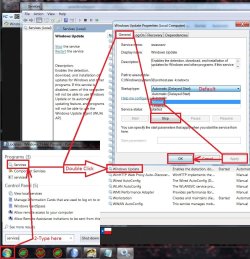
After restart verify that the windows update service is not running if it is Stop and switch to Manual apply and okay.
service stop windows update.jpg

Make sure KB3020369 is installed if not manually install it this is the main article page with all versions,
https://support.microsoft.com/en-us/kb/3020369
These other links do prompt you to download as soon as you click on them just to give you a heads up :)
KB3020369
Win-7 32 bit
https://download.microsoft.com/down...B0A-35769CBBE6B0/Windows6.1-KB3020369-x86.msu
Win-7 64 bit
https://download.microsoft.com/down...020-EC41D56B074F/Windows6.1-KB3020369-x64.msu

Then manually install KB3172605 main article page with all versions,
https://support.microsoft.com/en-us/kb/3172605
KB3172605
Win-7 32 bit
https://download.microsoft.com/down...A9C-6B30C3E1735A/Windows6.1-KB3172605-x86.msu

Win-7 64 bit
https://download.microsoft.com/down...67F-C713F7821374/Windows6.1-KB3172605-x64.msu

After switch your windows update and service settings back to what you had prior and manually check for updates and the rest should show up shortly.
 

My Computer My Computer

Computer type
PC/Desktop
Computer Manufacturer/Model Number
Custom assembled by me :}
OS
Win-7-Pro64bit 7-H-Prem-64bit
CPU
i7-5930K 2nd i9-9940x both water blocked VRM's too
Motherboard
ASUS SABERTOOTH X99 2nd ASUS x299 Apex
Memory
Trident-z 3200C14 2nd Trident-z 3600C16
Graphics Card(s)
EVGA 1080ti ftw3 2nd Titan Xp both water blocked
Sound Card
Built-in Realtek
Monitor(s) Displays
1-AOC G2460PG 24"G-Sync 144Hz/ 2nd 1-ASUS VG248QE 24" 144Hz
Screen Resolution
1920 x 1080 144Hz
Hard Drives
2-Samsung M.2 Evo & Evo Plus
2-Samsung 850 EVO 500GB SSD's/ 3-2.5 W.D. Black 1tb-&3-1tb/3-3.5 WD Black 1tb hdd's
PSU
EVGA SuperNOVA 1000-P2 2nd 1200-P2
Case
2-Corsair Obsidian Series 450D Black ATX Mid Tower
Cooling
Custom water loops
Keyboard
Logitech G710+/ 2nd Logitech G910
Mouse
2-RedDragon M901 Perdition 16400 dpi Gaming mouse = wired
Internet Speed
Comcast Ping 19ms 89.31mbps download speed 6.12mbps upload
Antivirus
Malwarebytes Pro/ Superantispyware Pro
Browser
FireFox & Pale moon
Other Info
2nd ASUS X299 Apex/Intel i9-9940x with Custom water loop/7H-Prem-x64/Corsair 450D case/Ram Trident-z 3600C16 4x8gb / Samsung970Evo plus 500gb SSD/Dual ssd EZ swap evo/PSU EVGA SuperNova 1200w-P2 80+Platinum/GPU Titan Xp /8-ML-140 on push-pull on 2-280GTX rads
I appreciate your reply, TZ.

Unfortunately, I have absolutely NO idea how to do what you are saying, or even how to find what you are showing in your screenshot.

As mentioned in my OP, I had already changed the WU settings to "Never check for updates", and restarted the computer. That's as far as I can get. I have no way to figure out if WU is still running. In Task Manager > Services, it still shows "wuauserv" as running.

Sorry...but I'm just not the techie-type at all.
 

My Computer My Computer

Computer type
PC/Desktop
Computer Manufacturer/Model Number
Dell Inspiron Desktop (refurbished)
OS
Win 7 Home Premium x64 SP1
CPU
Intel Core i3, 3.07 gHz
Motherboard
Dell
Memory
6 GB
Graphics Card(s)
ASUS VH198 (1440x900@60Hz) Intel Q965/Q963 Express Chipset F
Monitor(s) Displays
Asus
Hard Drives
Western Digital 1 TB SATA HDD (Internal)

WD 1-TB "My Passport Ultra" (external drive used for system images)
Keyboard
Azio KB505U wired, standard, large print 3-color backlit
Mouse
Logitech (wired)
Internet Speed
Download: up to 50 Mbps | Upload: 5 Mbps
Antivirus
MSE
Browser
Firefox (default) and IE11
Other Info
MBAM 3xx (lifetime license) |
SAS (on-demand) | FF w/NoScript & IE11 | uBlock Origin | POP Peeper Pro | Aeris Calendar | GWX Control Panel Monitor | CPUID
Hi,
Not sure how to say it more clearly :)
If in doubt download the 2 updates to where ever you can find them,
Then disconnect from the internet by removing the Ethernet cable from your computer or turning off the wifi switch if on a laptop.
Then click to run the first update KB3020369 if it's already installed it will say it is.

Then move on to the second and click to install KB3172605
Same deal if it's already installed it will say so.
 

My Computer My Computer

Computer type
PC/Desktop
Computer Manufacturer/Model Number
Custom assembled by me :}
OS
Win-7-Pro64bit 7-H-Prem-64bit
CPU
i7-5930K 2nd i9-9940x both water blocked VRM's too
Motherboard
ASUS SABERTOOTH X99 2nd ASUS x299 Apex
Memory
Trident-z 3200C14 2nd Trident-z 3600C16
Graphics Card(s)
EVGA 1080ti ftw3 2nd Titan Xp both water blocked
Sound Card
Built-in Realtek
Monitor(s) Displays
1-AOC G2460PG 24"G-Sync 144Hz/ 2nd 1-ASUS VG248QE 24" 144Hz
Screen Resolution
1920 x 1080 144Hz
Hard Drives
2-Samsung M.2 Evo & Evo Plus
2-Samsung 850 EVO 500GB SSD's/ 3-2.5 W.D. Black 1tb-&3-1tb/3-3.5 WD Black 1tb hdd's
PSU
EVGA SuperNOVA 1000-P2 2nd 1200-P2
Case
2-Corsair Obsidian Series 450D Black ATX Mid Tower
Cooling
Custom water loops
Keyboard
Logitech G710+/ 2nd Logitech G910
Mouse
2-RedDragon M901 Perdition 16400 dpi Gaming mouse = wired
Internet Speed
Comcast Ping 19ms 89.31mbps download speed 6.12mbps upload
Antivirus
Malwarebytes Pro/ Superantispyware Pro
Browser
FireFox & Pale moon
Other Info
2nd ASUS X299 Apex/Intel i9-9940x with Custom water loop/7H-Prem-x64/Corsair 450D case/Ram Trident-z 3600C16 4x8gb / Samsung970Evo plus 500gb SSD/Dual ssd EZ swap evo/PSU EVGA SuperNova 1200w-P2 80+Platinum/GPU Titan Xp /8-ML-140 on push-pull on 2-280GTX rads
Thanks again TZ,

The first update, KB3020369, you said to install is shown as having been already installed back in 2015. I finally managed to get KB3172605 installed. I'm now going back in the Control Panel > Windows Update and reset it to "Check for updates, but let me decide to download and install them".

Will let you know what happens.

Thanks again!
 

My Computer My Computer

Computer type
PC/Desktop
Computer Manufacturer/Model Number
Dell Inspiron Desktop (refurbished)
OS
Win 7 Home Premium x64 SP1
CPU
Intel Core i3, 3.07 gHz
Motherboard
Dell
Memory
6 GB
Graphics Card(s)
ASUS VH198 (1440x900@60Hz) Intel Q965/Q963 Express Chipset F
Monitor(s) Displays
Asus
Hard Drives
Western Digital 1 TB SATA HDD (Internal)

WD 1-TB "My Passport Ultra" (external drive used for system images)
Keyboard
Azio KB505U wired, standard, large print 3-color backlit
Mouse
Logitech (wired)
Internet Speed
Download: up to 50 Mbps | Upload: 5 Mbps
Antivirus
MSE
Browser
Firefox (default) and IE11
Other Info
MBAM 3xx (lifetime license) |
SAS (on-demand) | FF w/NoScript & IE11 | uBlock Origin | POP Peeper Pro | Aeris Calendar | GWX Control Panel Monitor | CPUID

My Computer My Computer

Computer type
PC/Desktop
Computer Manufacturer/Model Number
Custom assembled by me :}
OS
Win-7-Pro64bit 7-H-Prem-64bit
CPU
i7-5930K 2nd i9-9940x both water blocked VRM's too
Motherboard
ASUS SABERTOOTH X99 2nd ASUS x299 Apex
Memory
Trident-z 3200C14 2nd Trident-z 3600C16
Graphics Card(s)
EVGA 1080ti ftw3 2nd Titan Xp both water blocked
Sound Card
Built-in Realtek
Monitor(s) Displays
1-AOC G2460PG 24"G-Sync 144Hz/ 2nd 1-ASUS VG248QE 24" 144Hz
Screen Resolution
1920 x 1080 144Hz
Hard Drives
2-Samsung M.2 Evo & Evo Plus
2-Samsung 850 EVO 500GB SSD's/ 3-2.5 W.D. Black 1tb-&3-1tb/3-3.5 WD Black 1tb hdd's
PSU
EVGA SuperNOVA 1000-P2 2nd 1200-P2
Case
2-Corsair Obsidian Series 450D Black ATX Mid Tower
Cooling
Custom water loops
Keyboard
Logitech G710+/ 2nd Logitech G910
Mouse
2-RedDragon M901 Perdition 16400 dpi Gaming mouse = wired
Internet Speed
Comcast Ping 19ms 89.31mbps download speed 6.12mbps upload
Antivirus
Malwarebytes Pro/ Superantispyware Pro
Browser
FireFox & Pale moon
Other Info
2nd ASUS X299 Apex/Intel i9-9940x with Custom water loop/7H-Prem-x64/Corsair 450D case/Ram Trident-z 3600C16 4x8gb / Samsung970Evo plus 500gb SSD/Dual ssd EZ swap evo/PSU EVGA SuperNova 1200w-P2 80+Platinum/GPU Titan Xp /8-ML-140 on push-pull on 2-280GTX rads
Hi again TZ,

O.k....the updates finally downloaded and installed - took about 40 minutes for it all to complete.

The "reset" option you referred to is the very one I ran prior to creating my OP. Do you want me to run it again now? (When viewing the "Update history" in the Control Panel > Windows Update...it just lists the updates installed today).

Much obliged for all your time and help.....once again! :)
 
Last edited:

My Computer My Computer

Computer type
PC/Desktop
Computer Manufacturer/Model Number
Dell Inspiron Desktop (refurbished)
OS
Win 7 Home Premium x64 SP1
CPU
Intel Core i3, 3.07 gHz
Motherboard
Dell
Memory
6 GB
Graphics Card(s)
ASUS VH198 (1440x900@60Hz) Intel Q965/Q963 Express Chipset F
Monitor(s) Displays
Asus
Hard Drives
Western Digital 1 TB SATA HDD (Internal)

WD 1-TB "My Passport Ultra" (external drive used for system images)
Keyboard
Azio KB505U wired, standard, large print 3-color backlit
Mouse
Logitech (wired)
Internet Speed
Download: up to 50 Mbps | Upload: 5 Mbps
Antivirus
MSE
Browser
Firefox (default) and IE11
Other Info
MBAM 3xx (lifetime license) |
SAS (on-demand) | FF w/NoScript & IE11 | uBlock Origin | POP Peeper Pro | Aeris Calendar | GWX Control Panel Monitor | CPUID
HI,
No once you've ran it everything should be cleared now unless you want it to undo the windows update service for you :)
No problem glad to be of help
Cheers.
 

My Computer My Computer

Computer type
PC/Desktop
Computer Manufacturer/Model Number
Custom assembled by me :}
OS
Win-7-Pro64bit 7-H-Prem-64bit
CPU
i7-5930K 2nd i9-9940x both water blocked VRM's too
Motherboard
ASUS SABERTOOTH X99 2nd ASUS x299 Apex
Memory
Trident-z 3200C14 2nd Trident-z 3600C16
Graphics Card(s)
EVGA 1080ti ftw3 2nd Titan Xp both water blocked
Sound Card
Built-in Realtek
Monitor(s) Displays
1-AOC G2460PG 24"G-Sync 144Hz/ 2nd 1-ASUS VG248QE 24" 144Hz
Screen Resolution
1920 x 1080 144Hz
Hard Drives
2-Samsung M.2 Evo & Evo Plus
2-Samsung 850 EVO 500GB SSD's/ 3-2.5 W.D. Black 1tb-&3-1tb/3-3.5 WD Black 1tb hdd's
PSU
EVGA SuperNOVA 1000-P2 2nd 1200-P2
Case
2-Corsair Obsidian Series 450D Black ATX Mid Tower
Cooling
Custom water loops
Keyboard
Logitech G710+/ 2nd Logitech G910
Mouse
2-RedDragon M901 Perdition 16400 dpi Gaming mouse = wired
Internet Speed
Comcast Ping 19ms 89.31mbps download speed 6.12mbps upload
Antivirus
Malwarebytes Pro/ Superantispyware Pro
Browser
FireFox & Pale moon
Other Info
2nd ASUS X299 Apex/Intel i9-9940x with Custom water loop/7H-Prem-x64/Corsair 450D case/Ram Trident-z 3600C16 4x8gb / Samsung970Evo plus 500gb SSD/Dual ssd EZ swap evo/PSU EVGA SuperNova 1200w-P2 80+Platinum/GPU Titan Xp /8-ML-140 on push-pull on 2-280GTX rads
Back
Top