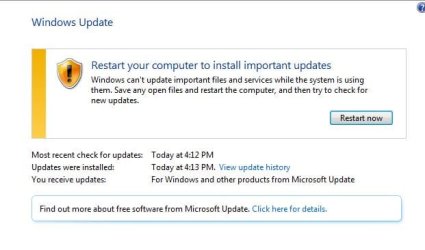
Windows Updates won't install. Computer keeps wanting to restart.

Hi torchwood

I ran the link. Was it supposed to do anything other than install? I rebooted but still have the same problem.

I don't see a CBS log from Feb 5th. I had noticed that it said it was run but couldn't find it and I still don't see it. I'm uploading today's log, if that helps.
 

My Computer My Computer

At a glance

Windows 7 x64 home premium with service pack 1
Computer type
PC/Desktop
Computer Manufacturer/Model Number
Dell
OS
Windows 7 x64 home premium with service pack 1
Antivirus
Kaspersky
Browser
IE11, Chrome
Hi Fornelli,
No you wont have seen any output, its all done in the background.

First can you go
controlpanel >> Administration tools >> services >> scroll to Windows Modular installer
right click select properties i would like you to change it to Automatic, from dropdown arrow.
reboot
are pending still there??
then back to Windows modular installer change it back to manual
reboot
are pending still there??

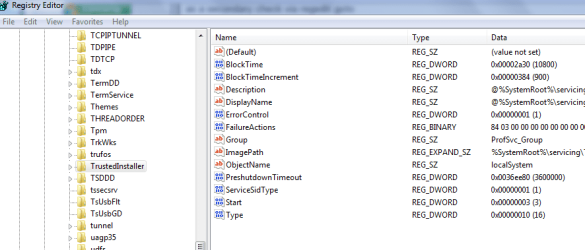
as a secondary check via regedit goto
HKEY local machine / system / current control set / services / trusted installer

see screenshot
is the start value the same as mine 3 ?? (right hand pane)

IF the above corrects the problem IGNORE THE FOLLOWING

would like to you to check something BEFORE we attempt the next fix,
ARE the only oustanding updates you have ALL pending??

Please navigate to these keys
They may not be present, but i hope they are,
Please copy/paste the values in the right hand window
something like this reg_dword:"UpdateExeVolatile" = 0x00000000

HKEY_LOCAL_MACHINE\SOFTWARE\Microsoft\Updates\UpdateExeVolatile

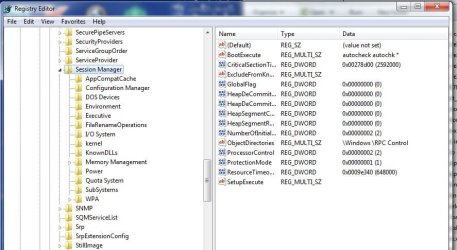
HKEY_LOCAL_MACHINE\SYSTEM\CurrentControlSet\Control\Session Manager\PendingFileRenameOperations

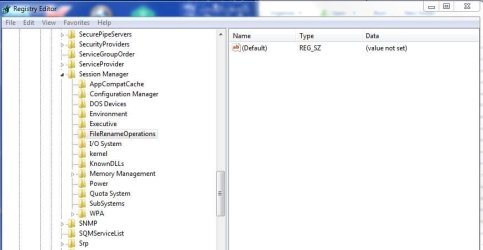
HKEY_LOCAL_MACHINE\SYSTEM\CurrentControlSet\Control\Session Manager\FileRenameOperations

Roy
 

Attachments

  • fornelliti.PNG
    fornelliti.PNG
    18.7 KB · Views: 2
Last edited:

My Computer My Computer

At a glance

W7 home premium 32bit/W7HP 64bit/w10 tp insid...E5300 dual core3gbNvidia Geforce 7100 Nforce 630i
Computer type
PC/Desktop
Computer Manufacturer/Model Number
medionl/Aspire 6930G/acer x55a
OS
W7 home premium 32bit/W7HP 64bit/w10 tp insider ring
CPU
E5300 dual core
Motherboard
medion MS7366
Memory
3gb
Graphics Card(s)
Nvidia Geforce 7100 Nforce 630i
Monitor(s) Displays
avixc
Internet Speed
n (isp resticted to 72)
Antivirus
mse/pands
Browser
palemoon
Other Info
Belkin Fd7050 n USB using Railink RT2870 drivers, more upto date
Hi torchwood

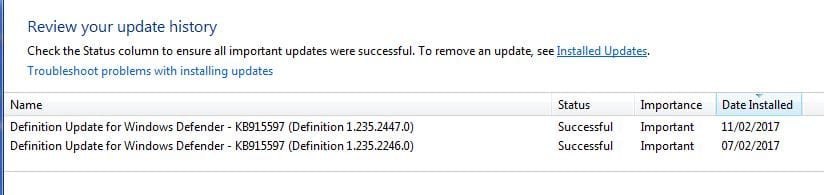
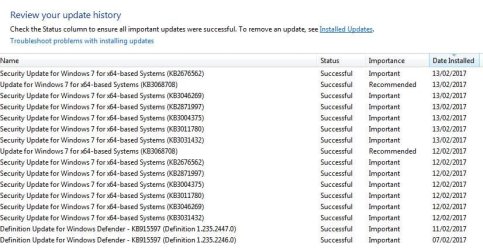
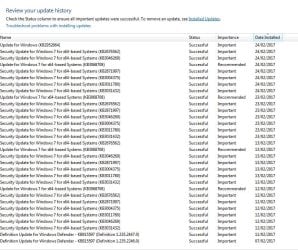
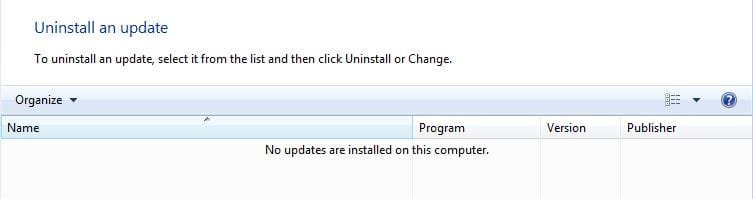
I no longer see any pending updates, not since we cleared the history a while back. I've attached a screenshot of what I see in the "view update history". But my windows update keep telling me I need to reboot to install updates. I can't view what those updates are because I need to reboot first. But rebooting doesn't do anything.

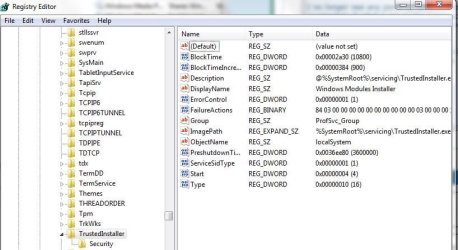
I tried doing your first step. I set the drop down to automatic and then rebooted. No change to windows update. However, when I went back to change the drop down to manual, it was set to "disabled".

No, my start value is 4, not 3.

I don't have any pending updates, so i didn't do the last set of instructions. To be honest, I'm not quite sure what you're asking me to do or how to do it. Sorry, I'm not that techy!

Thanks again for your help!
 

Attachments

  • Capture13.JPG
    Capture13.JPG
    28.1 KB · Views: 0
  • Capture14.JPG
    Capture14.JPG
    32.7 KB · Views: 24
  • Capture15.JPG
    Capture15.JPG
    62.2 KB · Views: 0

My Computer My Computer

At a glance

Windows 7 x64 home premium with service pack 1
Computer type
PC/Desktop
Computer Manufacturer/Model Number
Dell
OS
Windows 7 x64 home premium with service pack 1
Antivirus
Kaspersky
Browser
IE11, Chrome
Hi torchwood

Ok, I'm taking a second look at your last set of instructions and I think I know what you want. Sorry about that.
 

Attachments

  • Capture16.JPG
    Capture16.JPG
    44.7 KB · Views: 0
  • Capture17.JPG
    Capture17.JPG
    73.8 KB · Views: 0
  • Capture18.JPG
    Capture18.JPG
    42.7 KB · Views: 0

My Computer My Computer

At a glance

Windows 7 x64 home premium with service pack 1
Computer type
PC/Desktop
Computer Manufacturer/Model Number
Dell
OS
Windows 7 x64 home premium with service pack 1
Antivirus
Kaspersky
Browser
IE11, Chrome
Hi torchwood

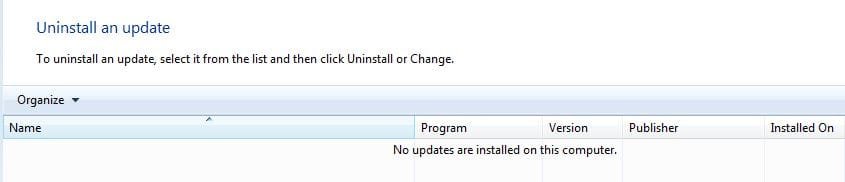
I logged into my computer tonight and found that a bunch of updates had downloaded. Unfortunately, none of these are the ones that were pending earlier. Also, still getting the message to reboot to install updates. And, I tried checking my installed updates and everything is blank. Oh, I just noticed that the some of the updates in the history show up twice - yesterday and today. :confused:
 

Attachments

  • Capture21.JPG
    Capture21.JPG
    19.5 KB · Views: 0
  • Capture20.JPG
    Capture20.JPG
    30.6 KB · Views: 20
  • Capture19.JPG
    Capture19.JPG
    78.6 KB · Views: 0

My Computer My Computer

At a glance

Windows 7 x64 home premium with service pack 1
Computer type
PC/Desktop
Computer Manufacturer/Model Number
Dell
OS
Windows 7 x64 home premium with service pack 1
Antivirus
Kaspersky
Browser
IE11, Chrome
Just wanted to post an update. It looks like the same set of updates are being installed every time I log in. I tried to install KB2952664 just to see if anything would change but no, still the same. Also, when I try to view the installed updates, it says I have none.
 

Attachments

  • Capture22.JPG
    Capture22.JPG
    135.4 KB · Views: 0
  • Capture23.JPG
    Capture23.JPG
    19 KB · Views: 0

My Computer My Computer

At a glance

Windows 7 x64 home premium with service pack 1
Computer type
PC/Desktop
Computer Manufacturer/Model Number
Dell
OS
Windows 7 x64 home premium with service pack 1
Antivirus
Kaspersky
Browser
IE11, Chrome
Hi Fornelli,

Need to clean up now --- the changed settings are causing the duplicates

Open regedit
Navigate to HKLM\SOFTWARE\Microsoft\Updates\
In the right navigation pane, double-click the UpdateExeVolatile key.
Configure the key with a value of 0
next
Navigate to HKLM\SYSTEM\CurrentControlSet\Control\Session Manager\
In the right navigation pane, right-click the PendingFileRenameOperations key and select Delete.


Finally go back to services

Control panel >> Admin tools >> services >> Windows module installer >> reset to manual.


REBOOT


Roy
 

My Computer My Computer

At a glance

W7 home premium 32bit/W7HP 64bit/w10 tp insid...E5300 dual core3gbNvidia Geforce 7100 Nforce 630i
Computer type
PC/Desktop
Computer Manufacturer/Model Number
medionl/Aspire 6930G/acer x55a
OS
W7 home premium 32bit/W7HP 64bit/w10 tp insider ring
CPU
E5300 dual core
Motherboard
medion MS7366
Memory
3gb
Graphics Card(s)
Nvidia Geforce 7100 Nforce 630i
Monitor(s) Displays
avixc
Internet Speed
n (isp resticted to 72)
Antivirus
mse/pands
Browser
palemoon
Other Info
Belkin Fd7050 n USB using Railink RT2870 drivers, more upto date
Hi torchwood

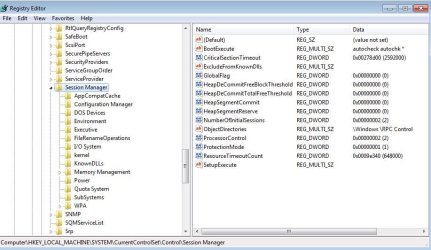
Slight problem. I don't have either of those items in the right navigation pane.
 

Attachments

  • Capture24.JPG
    Capture24.JPG
    45.1 KB · Views: 0
  • Capture25.JPG
    Capture25.JPG
    80.5 KB · Views: 0

My Computer My Computer

At a glance

Windows 7 x64 home premium with service pack 1
Computer type
PC/Desktop
Computer Manufacturer/Model Number
Dell
OS
Windows 7 x64 home premium with service pack 1
Antivirus
Kaspersky
Browser
IE11, Chrome
Hi

Sorry it's been a while. Life got a bit too busy.

I'm still having problems. I now appear to be getting Windows updates installed but I can't check for updates because my computer wants to restart. When I first log in to my computer, it restarts because it says there are updates to install. If I restart, I still get the same restart message.

Can someone help me please?

Thanks!
 

My Computer My Computer

At a glance

Windows 7 x64 home premium with service pack 1
Computer type
PC/Desktop
Computer Manufacturer/Model Number
Dell
OS
Windows 7 x64 home premium with service pack 1
Antivirus
Kaspersky
Browser
IE11, Chrome
Back
Top