Windows Virtual PC - Create Virtual Machine

How to Create a Virtual Machine in Windows Virtual PC

   Information
This will show you how to create a new virtual machine in Windows Virtual PC, and install the 32-bit guest operating system that you want to run in the virtual machine on your 32-bit or 64-bit Windows 7 as the host.


   Note
Windows Virtual PC is the latest Microsoft virtualization technology for Windows 7. It is the runtime engine for Windows XP Mode to provide a virtual Windows environment for Windows 7. With Windows Virtual PC, Windows XP mode applications can be seen and accessed from a Windows 7-based PC.

You will need to download and install the 32-bit (x86) or 64-bit (x64) version of Windows Virtual PC for your 32-bit or 64-bit Windows 7.


   Warning
Windows Virtual PC: Minimum Requirements
  • 1 GHz 32-bit / 64-bit processor that supports Intel® Virtualization Technology or AMD Virtualization.
  • Memory (RAM)
    • 1.25 GB required, 2 GB memory recommended
  • Recommended 15 GB hard disk space per virtual Windows environment
  • Supported host (your computer) operating systems:
    • Windows 7 Home Premium (32-bit or 64-bit)
    • Windows 7 Professional (32-bit or 64-bit)
    • Windows 7 Ultimate (32-bit or 64-bit)
    • Windows 7 Enterprise (32-bit or 64-bit)
      NOTE: Windows XP Mode can only be installed on Windows 7 Professional, Windows 7 Ultimate, and Windows 7 Enterprise.
  • Supported "guest" (virtual machine) 32-bit only operating systems:
    • Windows XP 32-bit only
      • Virtual Applications feature is supported only on Windows XP Service Pack 3 (SP3) Professional
    • Windows Vista 32-bit only
      • Virtual Applications feature is supported only on Windows Vista Enterprise and Windows Vista Ultimate
    • Windows 7 32-bit only
      • Virtual Applications feature is supported only on Windows 7 Enterprise and Windows 7 Ultimate


EXAMPLE: Create Virtual Machine
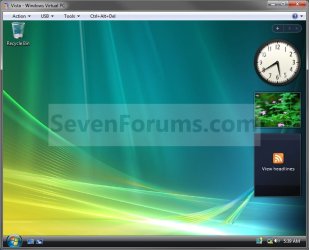
NOTE: For example, create a Vista virtual machine.Example.jpg
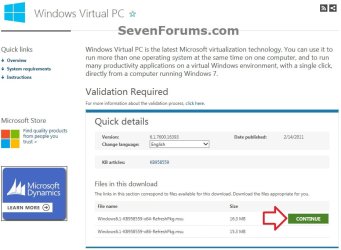
Here's How:1. If you have not already, then you will need to first download and install Windows Virtual PC. If you did, then go to step 2 below.A) At the Windows Virtual PC webpage, select your language, and click on the Continue button. (see screenshot below)Windows_Virtual-PC-1.jpg
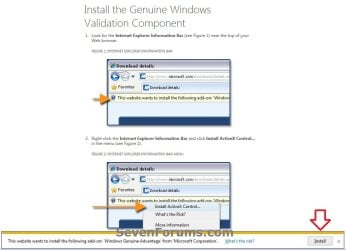
B) If you have not already, you will need to validate your Windows 7 first. Click on Install to install the Genuine Windows Validation Component, or follow on screen instructions. (see screenshot below)
NOTE: You will need to have Windows 7 activated and cookies enabled to be able to do this.Validate-1.jpg
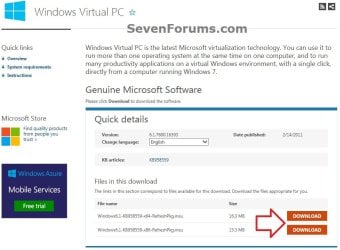
C) Select your language, and click on the Download button for either the Windows6.1-KB958559-x86-RefreshPkg.msu (32-bit) or Windows6.1-KB958559-x64-RefreshPkg.msu (64-bit) file for your same 32-bit or 64-bit Windows 7 version you have installed.Windows_Virtual-PC-2.jpg
D) Save the Windows6.1-KB958559-x86-RefreshPkg.msu or Windows6.1-KB958559-x64-RefreshPkg.msu file to your desktop.

E) Double click on the downloaded Windows6.1-KB958559-x86-RefreshPkg.msu or Windows6.1-KB958559-x64-RefreshPkg.msu file to start installing it.

F) If prompted by UAC, click on Yes.

G) Click on Yes.

H) Click on the I Accept button.

I) When it is finished, click on the Restart Now button.
WARNING: This will restart your computer immediately. Be sure to save and close anything that you have open first.

J) When the computer is finished restarting, continue on to step 2 below.
2. Do step 3 or 4 below for what you would like to do.

3. Open the Start Menu, type vpcwizard.exe in the search box, press Enter, and go to step 5 below.
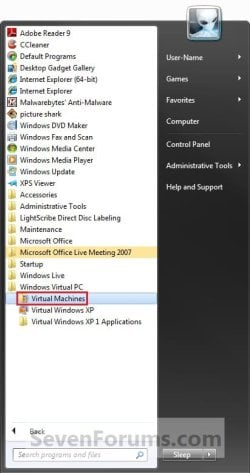
4. Open the Start Menu. Click on All Programs, expand Windows Virtual PC folder, double click on the Virtual Machines shortcut, and go to step 5 below. (See screenshot below)
NOTE: You can also open the Virtual Machines folder at C:\Users\(User Name)\Virtual Machines.Step1.jpg
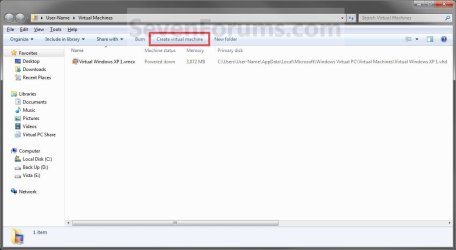
5. Click on the Create Virtual Machine button on the toolbar. (See screenshot below)Step2.jpg
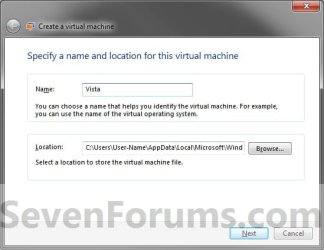
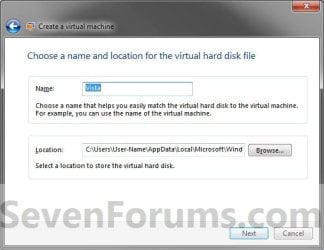
6. Type in a name (ex: Vista) you want for the new virtual machine, then select a location where you want the .vmcx and .vhd files saved at. Click on the Next button. (See screenshot below)
NOTE: You can save them anywhere you like, but the default location is the hidden
C:\Users\(user name)\AppData\Local\Microsoft\Windows Virtual PC\Virtual Machines
folder or the C:\Users\(user name)\Virtual Machines folder
.Step3.jpg
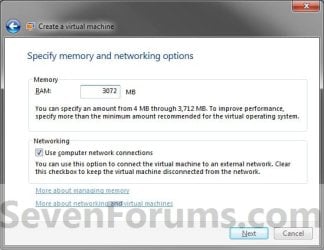
7. Enter how much of your RAM (1 GB = 1024 MB) you want to be used by the virtual machine. (See screenshot below)Step4.jpg
8. Check the Use computer on network connections box if you would like the virtual machine to have network or internet access, then click on the Next button. (See screenshot above)
9. To Create a Dynamically Expanding VHD
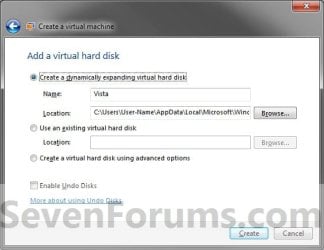
NOTE: This is the usual default option.A) Select (dot) Create a dynamically expanding virtual hard disk. (See screenshot below)Step5.jpg
B) Verify that the name and location is correct (from step 5), then click on the Create button. (See screenshot above)

C) Go to step 12.
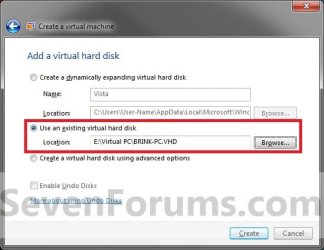
10. To Use an Existing VHD FileA) Select (dot) Use an existing virtual hard disk. (See screenshot below)VHD.jpg
B) Click on the Browse button and navigate to and select the VHD file that you want to use to create a virtual machine (VM) with, then click on the Create button. (See screenshot above)
WARNING: Windows Virtual PC only supports using a VHD up to 127 GB (130,048 MB) for a dynamic VHD, and up to 41 GB (42,023) for a fixed VHD. Any larger and you will not be able access the VM from within Windows Virtual PC.

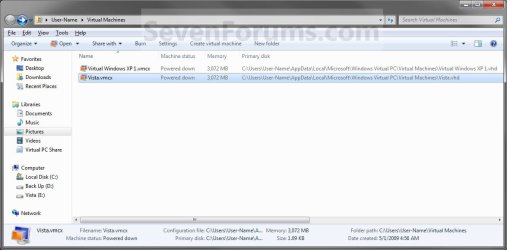
C) Right click on this new virtual machine (Ex: Vista.vmcx file), and click on Open. (See screenshot below)Step7.jpg
D) Go to step 17.
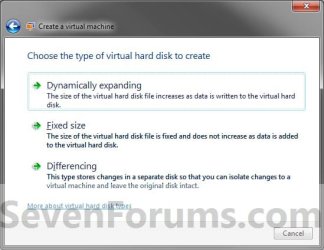
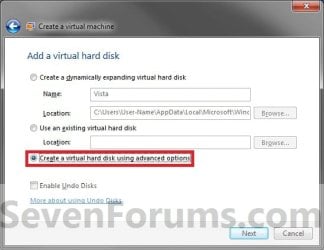
11. To Create a VHD with Advanced OptionsA) Select (dot) Create a virtual hard disk using advanced options, then click on the Next button. (See screenshot below)Step5A.jpg
B) Select the type of VHD to create. (See screenshot below)Step6.jpg
C) Verify that the name and location is correct (from step 5), then click on the Next button. (See screenshot above)Step6A.jpg
12. Right click on this new virtual machine (Ex: Vista.vmcx file), and click on Settings.Step7.jpg
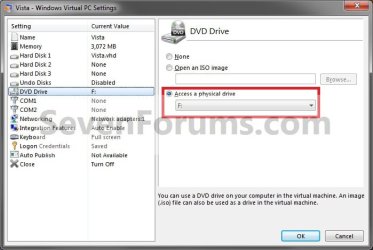
13. To Use a ISO File to Create the Virtual Machine FromA) In the left pane select DVD Drive, then select (dot) Open an ISO image in the right pane. (See screenshot below)Step8.jpg
B) Click on the Browse button and navigate to the location of the .ISO file of the operating system (ex: Vista) that you want to install in the VM, then select the ISO file and double click on it. Click on OK. (See screenshot above)
NOTE: If you do not have a ISO file of the operating system, then you can use a free program like ImgBurn to create a ISO file from the operating system's installation DVD.

C) Go to step 15.
14. To Use a DVD or Bootable USB to Create the Virtual Machine FromA) In the left pane select DVD Drive, select (dot) Access a physical drive in the right pane, then select the drive letter of the installation DVD or bootable USB. (See screenshot below step 13A)
15. Right click on this new virtual machine (Ex: Vista.vmcx file), and click on Open.Step7.jpg
16. Install the OS (Ex: Vista) in the virtual machine.
WARNING: Be sure to give the user account a password. Blank passwords are not supported, and can cause you to have problems with logging on to the VM. If you did leave the password field blank, then you should get a option after trying to log on without a password to continue to login without the password for now. You can then create a password for the user account in the VM.

17. To Install Integration ComponentsA) For how, see: http://www.sevenforums.com/tutorial...egration-features-install-enable-disable.html
18. Close or shutdown the new virtual machine.
NOTE: See yellow TIP box below for how to close the virtual machine.

19. Open the Windows 7 Start Menu in your computer (host).

20. Click on All Programs, expand Windows Virtual PC folder, then right click on this new virtual machine (Ex: Vista.vmcx file), and click on Settings.Step7.jpg
21. In the left pane select DVD Drive, then select (dot) Access a physical drive in the right pane. Select the DVD drive letter from the drop down menu that you would like to use in the virtual machine, and click on OK. (See screenshot below)
NOTE: If you do not want to use a DVD drive in the virtual machine, then select (dot) None instead.Drive.jpg
22. You now have a newly created virtual machine.


   Tip

  • You can close the virtual machine by shutting down the virtual machine from the Start menu inside the virtual machine, or by clicking on the close X at the top right corner of the virtual machine window. Afterwards, select the Turn Off option and click on OK. (See screenshot beow)
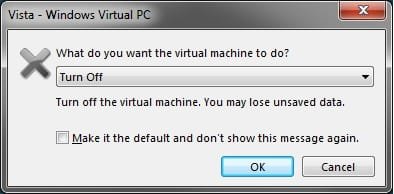
Close.jpg

  • You can open the virtual maching by opening the Start Menu, click on All Programs, expand Windows Virtual PC folder, and double click on the virtual maching shortcut.

That's it,
Shawn


Last edited:
Hello Tawa,

You might see if you may have a newer BIOS version available for your motherboard that may allow your computer to support "hardware virtualization". If not, then you will not be able to install Windows Virtual PC or XP Mode. :(

If this is the case, then you can still use other 3rd party vitrual programs like VMware, Virtualbox, Virtual PC 2007 w/SP1, etc.... You will not be able to install XP Mode, but you could still create a XP virtual machine using one of these programs instead.

Hope this helps,
Shawn
 

My Computer

Computer type
PC/Desktop
Computer Manufacturer/Model Number
Self built custom
OS
64-bit Windows 11 Pro for Workstations
CPU
Intel i7-8700K OC'd to 5 GHz
Motherboard
ASUS ROG Maximus XI Formula Z390
Memory
64 GB (4x16GB) G.SKILL TridentZ RGB DDR4 3600 MHz
Graphics Card(s)
ASUS ROG-STRIX-GTX1080TI-O11G-GAMING
Sound Card
Integrated
Monitor(s) Displays
2 x Samsung Odyssey G7 27"
Screen Resolution
2560x1440
Hard Drives
1TB Samsung 990 PRO M.2,
4TB Samsung 990 PRO PRO M.2,
TerraMaster F8 SSD Plus NAS
PSU
Seasonic Prime Titanium 850W
Case
Thermaltake Core P3
Cooling
Corsair Hydro H115i
Keyboard
Logitech wireless K800
Mouse
Logitech MX Master 4
Internet Speed
2 Gb/s Download and 100 Mb/s Upload
Antivirus
Malwarebyte Anti-Malware Premium
Browser
Google Chrome
Other Info
Logitech Z625 speaker system,
Logitech BRIO 4K Pro webcam,
HP Color LaserJet Pro MFP M477fdn,
APC SMART-UPS RT 1000 XL - SURT1000XLI,
Galaxy S23 Plus phone
Well, I am using VMWare player to run Backtrack4 for studying purposes.

Is it possible to install Windows XP from an installation CD to VMWare?
Do you have a guide to link me to it? Is it possible to take a couple minutes of your time to find me a good one?

Thanks in advance.
 

My Computer

Computer Manufacturer/Model Number
Toshiba Satellite
OS
Windows 7 Ultimate 64bit
CPU
Intel(R) Core(TM)2 Duo - 1.83 GHz - 2MB Cach
Memory
4 GB DDR2-RAM
Graphics Card(s)
Mobile Intel(R) 965 Express Family Chipset
Screen Resolution
1280x800
Nice tutorial; I run XP Pro & Ubuntu 9.10 using VPC, works like a charm.
 

My Computer

Computer type
Laptop
Computer Manufacturer/Model Number
Toshiba A500-ST6621
OS
7 Ultimate x64, Vista Ultimate x64, 7 Pro x64, XP Pro x86, Linux Mint Nadia Cinnamon
CPU
Intel Core 2 Duo T9600 2.80GHz x64
Motherboard
Intel GM45 chipset
Memory
8GB
Graphics Card(s)
ATI Mobility Radeon HD 4650
Sound Card
N/A
Monitor(s) Displays
single 16:9 widescreen (1366x768)
Hard Drives
Hitachi Travelstar 7K750 5400RPM 750GB
Keyboard
standard Toshiba backlit keyboard w/ numberpad
Internet Speed
N/A
Well, I am using VMWare player to run Backtrack4 for studying purposes.

Is it possible to install Windows XP from an installation CD to VMWare?
Do you have a guide to link me to it? Is it possible to take a couple minutes of your time to find me a good one?

Thanks in advance.

I believe you will need a XP ISO file instead. You can use the trial version of PowerISO to create a ISO file from the XP installation disc to use though. :)
 

My Computer

Computer type
PC/Desktop
Computer Manufacturer/Model Number
Self built custom
OS
64-bit Windows 11 Pro for Workstations
CPU
Intel i7-8700K OC'd to 5 GHz
Motherboard
ASUS ROG Maximus XI Formula Z390
Memory
64 GB (4x16GB) G.SKILL TridentZ RGB DDR4 3600 MHz
Graphics Card(s)
ASUS ROG-STRIX-GTX1080TI-O11G-GAMING
Sound Card
Integrated
Monitor(s) Displays
2 x Samsung Odyssey G7 27"
Screen Resolution
2560x1440
Hard Drives
1TB Samsung 990 PRO M.2,
4TB Samsung 990 PRO PRO M.2,
TerraMaster F8 SSD Plus NAS
PSU
Seasonic Prime Titanium 850W
Case
Thermaltake Core P3
Cooling
Corsair Hydro H115i
Keyboard
Logitech wireless K800
Mouse
Logitech MX Master 4
Internet Speed
2 Gb/s Download and 100 Mb/s Upload
Antivirus
Malwarebyte Anti-Malware Premium
Browser
Google Chrome
Other Info
Logitech Z625 speaker system,
Logitech BRIO 4K Pro webcam,
HP Color LaserJet Pro MFP M477fdn,
APC SMART-UPS RT 1000 XL - SURT1000XLI,
Galaxy S23 Plus phone
That should work with ease on the SUN Virtual Box. I had the 64bit 7 RC on the Portable VBox some time back and will likely see a go at XP on the latest release. You can run a few different distros there as well if your system lacks support for virtualization.

The preference here is still the VPC itself with the XP mode while the few older XP programs are being managed on the 32bit 7 there. For those you can't get on the 32bit 7 however then these are the options available.
 

My Computers

System One System Two

  • Computer type
    PC/Desktop
    Computer Manufacturer/Model Number
    Custom builds = 2
    OS
    W7 Ultimate x64/W10 Pro x64/W11 Pro Triple Boot - Main PC W7 Remote PC Micro ATX W7 Pro x64/W11 Pro
    CPU
    AMD Phenom II X4 975 Deneb 3.6ghz - 965 2nd remote pc
    Motherboard
    Gigabyte GA-790XTA-UD4-Gigabyte GA-880GM-D2H remote pc
    Memory
    Kingston Hyper X DDR3 1600 1.5v 16gb - Hyper X Fury 8gb 2nd
    Graphics Card(s)
    MSI HD Radeon 5750 1gb - MSI HD Radeon 6450 on mini tower
    Sound Card
    Creative Labs X-Fi Xtreme Audio P - Realtek onooard 2nd case
    Monitor(s) Displays
    ASUS VW199T-P 19" HP 2082a Main-HP 2082a 20" remote pc
    Screen Resolution
    Asus 1440x900 - HP 1600x900
    Hard Drives
    WD Black 1TB HD per OS W7, W10, and pending W11 presently on 500gb OS Drive - Pending Triple 1TB HDs for Spanned Storage/backup volume
    Single 2TB external USB enclosure, single 1TB System 7 Host/Boot drive, Pending 8TB external HD for system image b
    PSU
    Corsair 750TX - primary / Corsair CX600 - second
    Case
    Antec 900-2 - SSD compatible / NZXT Vulcan mini tower
    Cooling
    Zalman CNPS9900A
    Keyboard
    AZIO L70 Backlit Letters Gaming - ONN Cordless/USB
    Mouse
    MSI DS200 Programmable, Logitech Cordless
    Internet Speed
    30mbps upgrade - primary hard wired - mini tower usb WiFi
    Antivirus
    GFI VIPRE Internet Security 2014 on W7 2016 beta on W10,
    Browser
    Cyberfox, WaterFox 64bit FF variants, FireFox x64, Pale Moon
    Other Info
    Accomdata fan cooled usb 2.0 PIDE/Sata II, III external enclosure.
    Sambient usb/eSata PATA/Sata II, III external enclosure.
  • Computer type
    PC/Desktop
    System Manufacturer/Model Number
    CUSTOM ASSEMBLY
    OS
    W7 Pro x64/W11 Pro
    CPU
    AMD Deneb 3.6ghz - 965
    Motherboard
    Gigabyte GA-880GM-D2H remote pc
    Memory
    Kingston Hyper X Fury 8gb
    Graphics Card(s)
    MSI HD Radeon 6450 DVI Output
    Sound Card
    Realtek onooard Creative or Other separate PENDING
    Monitor(s) Displays
    VIZIO 32" LCD TV Separate LCD Pending
    Screen Resolution
    1600x1080
    Hard Drives
    WD 500GB OS Host/Boot WD Green 1TB Storage/Backup
    PSU
    Corsair 600W - THERMALTAKE 600W spare case
    Case
    NZXT Vulcan mini tower
    Cooling
    Twin 120mm Top Fans - 240mm Side Cover
    Keyboard
    ONN Cordless/USB Logitech Cordless
    Mouse
    ONN USB/Cordless - Logitech Cordless
    Internet Speed
    DSL 5G
    Browser
    MS Edge, FireFox, WaterFox x64, FireFox Nightly
    Other Info
    OS Testing-Remote Access to Main TeamViewer
hi guys i have installed to my windows 7 ultimate 32 bit the virtual pc 2007 and i have installed windows xp sp2 original to virtual pc .
My question is how can i use my graphics card(gigabyte hd 4650 pci 1gb) to virtual pc???
 

My Computer

OS
windows 7 ultimate rtm 7600
Memory
4gb ram ddr3
Graphics Card(s)
Gigabyte 4650 GVR465OC-1GI 1GB (PCI Express)
Internet Speed
24mbps
You don't! is the answer there. Unfortunately you can't take full advantage of any installed card but simply rely on the virtual video memory alloted once on a virtual machine. Most see a max of 128mb there not leaving much for any gaming or other things that chomp on the vpu power. :(

Video card, sound card, and other device drivers typically won't install on a VM. The new XP Mode final version does support printers and usb devices like flash drives however. But you are left with the 128mb limits.
 

My Computers

System One System Two

  • Computer type
    PC/Desktop
    Computer Manufacturer/Model Number
    Custom builds = 2
    OS
    W7 Ultimate x64/W10 Pro x64/W11 Pro Triple Boot - Main PC W7 Remote PC Micro ATX W7 Pro x64/W11 Pro
    CPU
    AMD Phenom II X4 975 Deneb 3.6ghz - 965 2nd remote pc
    Motherboard
    Gigabyte GA-790XTA-UD4-Gigabyte GA-880GM-D2H remote pc
    Memory
    Kingston Hyper X DDR3 1600 1.5v 16gb - Hyper X Fury 8gb 2nd
    Graphics Card(s)
    MSI HD Radeon 5750 1gb - MSI HD Radeon 6450 on mini tower
    Sound Card
    Creative Labs X-Fi Xtreme Audio P - Realtek onooard 2nd case
    Monitor(s) Displays
    ASUS VW199T-P 19" HP 2082a Main-HP 2082a 20" remote pc
    Screen Resolution
    Asus 1440x900 - HP 1600x900
    Hard Drives
    WD Black 1TB HD per OS W7, W10, and pending W11 presently on 500gb OS Drive - Pending Triple 1TB HDs for Spanned Storage/backup volume
    Single 2TB external USB enclosure, single 1TB System 7 Host/Boot drive, Pending 8TB external HD for system image b
    PSU
    Corsair 750TX - primary / Corsair CX600 - second
    Case
    Antec 900-2 - SSD compatible / NZXT Vulcan mini tower
    Cooling
    Zalman CNPS9900A
    Keyboard
    AZIO L70 Backlit Letters Gaming - ONN Cordless/USB
    Mouse
    MSI DS200 Programmable, Logitech Cordless
    Internet Speed
    30mbps upgrade - primary hard wired - mini tower usb WiFi
    Antivirus
    GFI VIPRE Internet Security 2014 on W7 2016 beta on W10,
    Browser
    Cyberfox, WaterFox 64bit FF variants, FireFox x64, Pale Moon
    Other Info
    Accomdata fan cooled usb 2.0 PIDE/Sata II, III external enclosure.
    Sambient usb/eSata PATA/Sata II, III external enclosure.
  • Computer type
    PC/Desktop
    System Manufacturer/Model Number
    CUSTOM ASSEMBLY
    OS
    W7 Pro x64/W11 Pro
    CPU
    AMD Deneb 3.6ghz - 965
    Motherboard
    Gigabyte GA-880GM-D2H remote pc
    Memory
    Kingston Hyper X Fury 8gb
    Graphics Card(s)
    MSI HD Radeon 6450 DVI Output
    Sound Card
    Realtek onooard Creative or Other separate PENDING
    Monitor(s) Displays
    VIZIO 32" LCD TV Separate LCD Pending
    Screen Resolution
    1600x1080
    Hard Drives
    WD 500GB OS Host/Boot WD Green 1TB Storage/Backup
    PSU
    Corsair 600W - THERMALTAKE 600W spare case
    Case
    NZXT Vulcan mini tower
    Cooling
    Twin 120mm Top Fans - 240mm Side Cover
    Keyboard
    ONN Cordless/USB Logitech Cordless
    Mouse
    ONN USB/Cordless - Logitech Cordless
    Internet Speed
    DSL 5G
    Browser
    MS Edge, FireFox, WaterFox x64, FireFox Nightly
    Other Info
    OS Testing-Remote Access to Main TeamViewer
:)

I bought Win 7 PRO 64bit because it says that it has XP VPC included... But it is not installed... does it come on the DVD, was it misrepresentation or do i have to download it and all they ment was that pro is recommended to run it as well as ultimate?
 

My Computer

Computer Manufacturer/Model Number
Self Built
OS
Windows 7 Professional 64bit + Ubuntu in Virtual Box
CPU
Intel Quad Core 9550
Motherboard
ASUS P5Q SE2
Memory
2048MB Transend
Graphics Card(s)
Powercolor Radeon HD4870
Sound Card
Onboard
Monitor(s) Displays
Fujitsu Siemens Scaleoview L17-7 TFT
Screen Resolution
1280x1024
Hard Drives
500GB Seagate Barracuda
1TB Segate Barracuda
PSU
Huntkey 600W
Case
Achielles
Cooling
3x Fans
Keyboard
Microsoft Reculsa
Mouse
Microsoft Sidewinder 3X
Internet Speed
4MB
Other Info
TEC 5.1 Surround Sound
Free Mouse Pad :P

My Computer

Computer type
PC/Desktop
Computer Manufacturer/Model Number
Self built custom
OS
64-bit Windows 11 Pro for Workstations
CPU
Intel i7-8700K OC'd to 5 GHz
Motherboard
ASUS ROG Maximus XI Formula Z390
Memory
64 GB (4x16GB) G.SKILL TridentZ RGB DDR4 3600 MHz
Graphics Card(s)
ASUS ROG-STRIX-GTX1080TI-O11G-GAMING
Sound Card
Integrated
Monitor(s) Displays
2 x Samsung Odyssey G7 27"
Screen Resolution
2560x1440
Hard Drives
1TB Samsung 990 PRO M.2,
4TB Samsung 990 PRO PRO M.2,
TerraMaster F8 SSD Plus NAS
PSU
Seasonic Prime Titanium 850W
Case
Thermaltake Core P3
Cooling
Corsair Hydro H115i
Keyboard
Logitech wireless K800
Mouse
Logitech MX Master 4
Internet Speed
2 Gb/s Download and 100 Mb/s Upload
Antivirus
Malwarebyte Anti-Malware Premium
Browser
Google Chrome
Other Info
Logitech Z625 speaker system,
Logitech BRIO 4K Pro webcam,
HP Color LaserJet Pro MFP M477fdn,
APC SMART-UPS RT 1000 XL - SURT1000XLI,
Galaxy S23 Plus phone
Hello Niz Welcome to SF!

To add a little further to that the 7 Pro supports the Virtual PC for 7 which needs to be installed first before you can run the XP Mode installer. The Pro, Ultimate, and Enterprise editions see support included for virtualization which these two rely on.

The guide there will point out the need to run the compatibily tool as well to see if your hardwares offer support. That will also be a requirement to look into. You should ok however since you are running newer hardwares you have listed in the system specs there but follow the guide closely.
 

My Computers

System One System Two

  • Computer type
    PC/Desktop
    Computer Manufacturer/Model Number
    Custom builds = 2
    OS
    W7 Ultimate x64/W10 Pro x64/W11 Pro Triple Boot - Main PC W7 Remote PC Micro ATX W7 Pro x64/W11 Pro
    CPU
    AMD Phenom II X4 975 Deneb 3.6ghz - 965 2nd remote pc
    Motherboard
    Gigabyte GA-790XTA-UD4-Gigabyte GA-880GM-D2H remote pc
    Memory
    Kingston Hyper X DDR3 1600 1.5v 16gb - Hyper X Fury 8gb 2nd
    Graphics Card(s)
    MSI HD Radeon 5750 1gb - MSI HD Radeon 6450 on mini tower
    Sound Card
    Creative Labs X-Fi Xtreme Audio P - Realtek onooard 2nd case
    Monitor(s) Displays
    ASUS VW199T-P 19" HP 2082a Main-HP 2082a 20" remote pc
    Screen Resolution
    Asus 1440x900 - HP 1600x900
    Hard Drives
    WD Black 1TB HD per OS W7, W10, and pending W11 presently on 500gb OS Drive - Pending Triple 1TB HDs for Spanned Storage/backup volume
    Single 2TB external USB enclosure, single 1TB System 7 Host/Boot drive, Pending 8TB external HD for system image b
    PSU
    Corsair 750TX - primary / Corsair CX600 - second
    Case
    Antec 900-2 - SSD compatible / NZXT Vulcan mini tower
    Cooling
    Zalman CNPS9900A
    Keyboard
    AZIO L70 Backlit Letters Gaming - ONN Cordless/USB
    Mouse
    MSI DS200 Programmable, Logitech Cordless
    Internet Speed
    30mbps upgrade - primary hard wired - mini tower usb WiFi
    Antivirus
    GFI VIPRE Internet Security 2014 on W7 2016 beta on W10,
    Browser
    Cyberfox, WaterFox 64bit FF variants, FireFox x64, Pale Moon
    Other Info
    Accomdata fan cooled usb 2.0 PIDE/Sata II, III external enclosure.
    Sambient usb/eSata PATA/Sata II, III external enclosure.
  • Computer type
    PC/Desktop
    System Manufacturer/Model Number
    CUSTOM ASSEMBLY
    OS
    W7 Pro x64/W11 Pro
    CPU
    AMD Deneb 3.6ghz - 965
    Motherboard
    Gigabyte GA-880GM-D2H remote pc
    Memory
    Kingston Hyper X Fury 8gb
    Graphics Card(s)
    MSI HD Radeon 6450 DVI Output
    Sound Card
    Realtek onooard Creative or Other separate PENDING
    Monitor(s) Displays
    VIZIO 32" LCD TV Separate LCD Pending
    Screen Resolution
    1600x1080
    Hard Drives
    WD 500GB OS Host/Boot WD Green 1TB Storage/Backup
    PSU
    Corsair 600W - THERMALTAKE 600W spare case
    Case
    NZXT Vulcan mini tower
    Cooling
    Twin 120mm Top Fans - 240mm Side Cover
    Keyboard
    ONN Cordless/USB Logitech Cordless
    Mouse
    ONN USB/Cordless - Logitech Cordless
    Internet Speed
    DSL 5G
    Browser
    MS Edge, FireFox, WaterFox x64, FireFox Nightly
    Other Info
    OS Testing-Remote Access to Main TeamViewer
Im still confused...

I says in the note that you need a compatible OS and then lists all of them but then later in the note it says that it is only supported on PRO, ENTERPRISE, ULITMATE...

HUH?
 

My Computer

Computer Manufacturer/Model Number
Self Built
OS
Windows 7 Professional 64bit + Ubuntu in Virtual Box
CPU
Intel Quad Core 9550
Motherboard
ASUS P5Q SE2
Memory
2048MB Transend
Graphics Card(s)
Powercolor Radeon HD4870
Sound Card
Onboard
Monitor(s) Displays
Fujitsu Siemens Scaleoview L17-7 TFT
Screen Resolution
1280x1024
Hard Drives
500GB Seagate Barracuda
1TB Segate Barracuda
PSU
Huntkey 600W
Case
Achielles
Cooling
3x Fans
Keyboard
Microsoft Reculsa
Mouse
Microsoft Sidewinder 3X
Internet Speed
4MB
Other Info
TEC 5.1 Surround Sound
Free Mouse Pad :P
Nix,

You must have Windows 7 Professional, Enterprise, or Ultimate to run Windows XP Mode


Supported Windows Virtual PC operating system:
  • Windows 7 Starter (32-bit only)
  • Windows 7 Home Basic (32-bit and 64-bit)
  • Windows 7 Home Premium (32-bit and 64-bit)
  • Windows 7 Enterprise (32-bit and 64-bit)
  • Windows 7 Professional (32-bit and 64-bit)
  • Windows 7 Ultimate (32-bit and 64-bit)
 

My Computer

Computer type
PC/Desktop
Computer Manufacturer/Model Number
Self built custom
OS
64-bit Windows 11 Pro for Workstations
CPU
Intel i7-8700K OC'd to 5 GHz
Motherboard
ASUS ROG Maximus XI Formula Z390
Memory
64 GB (4x16GB) G.SKILL TridentZ RGB DDR4 3600 MHz
Graphics Card(s)
ASUS ROG-STRIX-GTX1080TI-O11G-GAMING
Sound Card
Integrated
Monitor(s) Displays
2 x Samsung Odyssey G7 27"
Screen Resolution
2560x1440
Hard Drives
1TB Samsung 990 PRO M.2,
4TB Samsung 990 PRO PRO M.2,
TerraMaster F8 SSD Plus NAS
PSU
Seasonic Prime Titanium 850W
Case
Thermaltake Core P3
Cooling
Corsair Hydro H115i
Keyboard
Logitech wireless K800
Mouse
Logitech MX Master 4
Internet Speed
2 Gb/s Download and 100 Mb/s Upload
Antivirus
Malwarebyte Anti-Malware Premium
Browser
Google Chrome
Other Info
Logitech Z625 speaker system,
Logitech BRIO 4K Pro webcam,
HP Color LaserJet Pro MFP M477fdn,
APC SMART-UPS RT 1000 XL - SURT1000XLI,
Galaxy S23 Plus phone
Thanks for clearing that up...

How big is the download? Do i have to download something first before i can install XP mode? I was on the website and got a tad onfused wen it ask for compatibility and things like that.... :confused:

Thanks Brink...
 

My Computer

Computer Manufacturer/Model Number
Self Built
OS
Windows 7 Professional 64bit + Ubuntu in Virtual Box
CPU
Intel Quad Core 9550
Motherboard
ASUS P5Q SE2
Memory
2048MB Transend
Graphics Card(s)
Powercolor Radeon HD4870
Sound Card
Onboard
Monitor(s) Displays
Fujitsu Siemens Scaleoview L17-7 TFT
Screen Resolution
1280x1024
Hard Drives
500GB Seagate Barracuda
1TB Segate Barracuda
PSU
Huntkey 600W
Case
Achielles
Cooling
3x Fans
Keyboard
Microsoft Reculsa
Mouse
Microsoft Sidewinder 3X
Internet Speed
4MB
Other Info
TEC 5.1 Surround Sound
Free Mouse Pad :P
Last edited:

My Computer

Computer type
PC/Desktop
Computer Manufacturer/Model Number
Self built custom
OS
64-bit Windows 11 Pro for Workstations
CPU
Intel i7-8700K OC'd to 5 GHz
Motherboard
ASUS ROG Maximus XI Formula Z390
Memory
64 GB (4x16GB) G.SKILL TridentZ RGB DDR4 3600 MHz
Graphics Card(s)
ASUS ROG-STRIX-GTX1080TI-O11G-GAMING
Sound Card
Integrated
Monitor(s) Displays
2 x Samsung Odyssey G7 27"
Screen Resolution
2560x1440
Hard Drives
1TB Samsung 990 PRO M.2,
4TB Samsung 990 PRO PRO M.2,
TerraMaster F8 SSD Plus NAS
PSU
Seasonic Prime Titanium 850W
Case
Thermaltake Core P3
Cooling
Corsair Hydro H115i
Keyboard
Logitech wireless K800
Mouse
Logitech MX Master 4
Internet Speed
2 Gb/s Download and 100 Mb/s Upload
Antivirus
Malwarebyte Anti-Malware Premium
Browser
Google Chrome
Other Info
Logitech Z625 speaker system,
Logitech BRIO 4K Pro webcam,
HP Color LaserJet Pro MFP M477fdn,
APC SMART-UPS RT 1000 XL - SURT1000XLI,
Galaxy S23 Plus phone
Remember you will want to download and install the Windows Virtual PC first. Windows Virtual PC: Home Page

The first step and the one most advised before downloading that and the XP Mode file in the 32bit or 64bit flavor which would be you there running the 64bit 7 Pro would be the "Microsoft® Hardware-Assisted Virtualization Detection Tool". Download details: HAV Detection Tool

With Intel some of their cpu models won't support it. We'rve already gone over quite a bit of this in the guide there. With everything set once you have gone over that and have the VPC on which generally requires a full system restart you can then run the XP Mode installer. All this is covered in the guide there.

As far as sizes the 64bit Virtual PC is roughly 9.87mb while the XP Mode itself is quite a bit larger at 479mb for the 64bit flavor. It's almost the size of XP Pro on an original full install disk sizewise but runs on the VPC.
 

My Computers

System One System Two

  • Computer type
    PC/Desktop
    Computer Manufacturer/Model Number
    Custom builds = 2
    OS
    W7 Ultimate x64/W10 Pro x64/W11 Pro Triple Boot - Main PC W7 Remote PC Micro ATX W7 Pro x64/W11 Pro
    CPU
    AMD Phenom II X4 975 Deneb 3.6ghz - 965 2nd remote pc
    Motherboard
    Gigabyte GA-790XTA-UD4-Gigabyte GA-880GM-D2H remote pc
    Memory
    Kingston Hyper X DDR3 1600 1.5v 16gb - Hyper X Fury 8gb 2nd
    Graphics Card(s)
    MSI HD Radeon 5750 1gb - MSI HD Radeon 6450 on mini tower
    Sound Card
    Creative Labs X-Fi Xtreme Audio P - Realtek onooard 2nd case
    Monitor(s) Displays
    ASUS VW199T-P 19" HP 2082a Main-HP 2082a 20" remote pc
    Screen Resolution
    Asus 1440x900 - HP 1600x900
    Hard Drives
    WD Black 1TB HD per OS W7, W10, and pending W11 presently on 500gb OS Drive - Pending Triple 1TB HDs for Spanned Storage/backup volume
    Single 2TB external USB enclosure, single 1TB System 7 Host/Boot drive, Pending 8TB external HD for system image b
    PSU
    Corsair 750TX - primary / Corsair CX600 - second
    Case
    Antec 900-2 - SSD compatible / NZXT Vulcan mini tower
    Cooling
    Zalman CNPS9900A
    Keyboard
    AZIO L70 Backlit Letters Gaming - ONN Cordless/USB
    Mouse
    MSI DS200 Programmable, Logitech Cordless
    Internet Speed
    30mbps upgrade - primary hard wired - mini tower usb WiFi
    Antivirus
    GFI VIPRE Internet Security 2014 on W7 2016 beta on W10,
    Browser
    Cyberfox, WaterFox 64bit FF variants, FireFox x64, Pale Moon
    Other Info
    Accomdata fan cooled usb 2.0 PIDE/Sata II, III external enclosure.
    Sambient usb/eSata PATA/Sata II, III external enclosure.
  • Computer type
    PC/Desktop
    System Manufacturer/Model Number
    CUSTOM ASSEMBLY
    OS
    W7 Pro x64/W11 Pro
    CPU
    AMD Deneb 3.6ghz - 965
    Motherboard
    Gigabyte GA-880GM-D2H remote pc
    Memory
    Kingston Hyper X Fury 8gb
    Graphics Card(s)
    MSI HD Radeon 6450 DVI Output
    Sound Card
    Realtek onooard Creative or Other separate PENDING
    Monitor(s) Displays
    VIZIO 32" LCD TV Separate LCD Pending
    Screen Resolution
    1600x1080
    Hard Drives
    WD 500GB OS Host/Boot WD Green 1TB Storage/Backup
    PSU
    Corsair 600W - THERMALTAKE 600W spare case
    Case
    NZXT Vulcan mini tower
    Cooling
    Twin 120mm Top Fans - 240mm Side Cover
    Keyboard
    ONN Cordless/USB Logitech Cordless
    Mouse
    ONN USB/Cordless - Logitech Cordless
    Internet Speed
    DSL 5G
    Browser
    MS Edge, FireFox, WaterFox x64, FireFox Nightly
    Other Info
    OS Testing-Remote Access to Main TeamViewer
Thanks nighthawk...

Now i no how much cap to set aside...
 

My Computer

Computer Manufacturer/Model Number
Self Built
OS
Windows 7 Professional 64bit + Ubuntu in Virtual Box
CPU
Intel Quad Core 9550
Motherboard
ASUS P5Q SE2
Memory
2048MB Transend
Graphics Card(s)
Powercolor Radeon HD4870
Sound Card
Onboard
Monitor(s) Displays
Fujitsu Siemens Scaleoview L17-7 TFT
Screen Resolution
1280x1024
Hard Drives
500GB Seagate Barracuda
1TB Segate Barracuda
PSU
Huntkey 600W
Case
Achielles
Cooling
3x Fans
Keyboard
Microsoft Reculsa
Mouse
Microsoft Sidewinder 3X
Internet Speed
4MB
Other Info
TEC 5.1 Surround Sound
Free Mouse Pad :P
The download itself is a large self extracting archive with the exe extension on it. The one thing not mentioned in the guide is simply the need to see the Windows VPC go on first since that requires a restart and then you run the XP Mode setup as you follow the guide there. You'll be surprized how fast it goes on and loads upto the desktop! :D

For the guide here I've used this one quite often for custom installs of XP Home not Pro as seen with the XP Mode but right from the XP disk, Vista HP 32bit, even the 32bit RC upgrade over that with the VPC RC last summer, and lately the 32bit retail 7 has a place there on the 64bit host. Works every time!
 

My Computers

System One System Two

  • Computer type
    PC/Desktop
    Computer Manufacturer/Model Number
    Custom builds = 2
    OS
    W7 Ultimate x64/W10 Pro x64/W11 Pro Triple Boot - Main PC W7 Remote PC Micro ATX W7 Pro x64/W11 Pro
    CPU
    AMD Phenom II X4 975 Deneb 3.6ghz - 965 2nd remote pc
    Motherboard
    Gigabyte GA-790XTA-UD4-Gigabyte GA-880GM-D2H remote pc
    Memory
    Kingston Hyper X DDR3 1600 1.5v 16gb - Hyper X Fury 8gb 2nd
    Graphics Card(s)
    MSI HD Radeon 5750 1gb - MSI HD Radeon 6450 on mini tower
    Sound Card
    Creative Labs X-Fi Xtreme Audio P - Realtek onooard 2nd case
    Monitor(s) Displays
    ASUS VW199T-P 19" HP 2082a Main-HP 2082a 20" remote pc
    Screen Resolution
    Asus 1440x900 - HP 1600x900
    Hard Drives
    WD Black 1TB HD per OS W7, W10, and pending W11 presently on 500gb OS Drive - Pending Triple 1TB HDs for Spanned Storage/backup volume
    Single 2TB external USB enclosure, single 1TB System 7 Host/Boot drive, Pending 8TB external HD for system image b
    PSU
    Corsair 750TX - primary / Corsair CX600 - second
    Case
    Antec 900-2 - SSD compatible / NZXT Vulcan mini tower
    Cooling
    Zalman CNPS9900A
    Keyboard
    AZIO L70 Backlit Letters Gaming - ONN Cordless/USB
    Mouse
    MSI DS200 Programmable, Logitech Cordless
    Internet Speed
    30mbps upgrade - primary hard wired - mini tower usb WiFi
    Antivirus
    GFI VIPRE Internet Security 2014 on W7 2016 beta on W10,
    Browser
    Cyberfox, WaterFox 64bit FF variants, FireFox x64, Pale Moon
    Other Info
    Accomdata fan cooled usb 2.0 PIDE/Sata II, III external enclosure.
    Sambient usb/eSata PATA/Sata II, III external enclosure.
  • Computer type
    PC/Desktop
    System Manufacturer/Model Number
    CUSTOM ASSEMBLY
    OS
    W7 Pro x64/W11 Pro
    CPU
    AMD Deneb 3.6ghz - 965
    Motherboard
    Gigabyte GA-880GM-D2H remote pc
    Memory
    Kingston Hyper X Fury 8gb
    Graphics Card(s)
    MSI HD Radeon 6450 DVI Output
    Sound Card
    Realtek onooard Creative or Other separate PENDING
    Monitor(s) Displays
    VIZIO 32" LCD TV Separate LCD Pending
    Screen Resolution
    1600x1080
    Hard Drives
    WD 500GB OS Host/Boot WD Green 1TB Storage/Backup
    PSU
    Corsair 600W - THERMALTAKE 600W spare case
    Case
    NZXT Vulcan mini tower
    Cooling
    Twin 120mm Top Fans - 240mm Side Cover
    Keyboard
    ONN Cordless/USB Logitech Cordless
    Mouse
    ONN USB/Cordless - Logitech Cordless
    Internet Speed
    DSL 5G
    Browser
    MS Edge, FireFox, WaterFox x64, FireFox Nightly
    Other Info
    OS Testing-Remote Access to Main TeamViewer
Thank you Jav. Updated. :)
 

My Computer

Computer type
PC/Desktop
Computer Manufacturer/Model Number
Self built custom
OS
64-bit Windows 11 Pro for Workstations
CPU
Intel i7-8700K OC'd to 5 GHz
Motherboard
ASUS ROG Maximus XI Formula Z390
Memory
64 GB (4x16GB) G.SKILL TridentZ RGB DDR4 3600 MHz
Graphics Card(s)
ASUS ROG-STRIX-GTX1080TI-O11G-GAMING
Sound Card
Integrated
Monitor(s) Displays
2 x Samsung Odyssey G7 27"
Screen Resolution
2560x1440
Hard Drives
1TB Samsung 990 PRO M.2,
4TB Samsung 990 PRO PRO M.2,
TerraMaster F8 SSD Plus NAS
PSU
Seasonic Prime Titanium 850W
Case
Thermaltake Core P3
Cooling
Corsair Hydro H115i
Keyboard
Logitech wireless K800
Mouse
Logitech MX Master 4
Internet Speed
2 Gb/s Download and 100 Mb/s Upload
Antivirus
Malwarebyte Anti-Malware Premium
Browser
Google Chrome
Other Info
Logitech Z625 speaker system,
Logitech BRIO 4K Pro webcam,
HP Color LaserJet Pro MFP M477fdn,
APC SMART-UPS RT 1000 XL - SURT1000XLI,
Galaxy S23 Plus phone
RE

i have windows 7 64 bit (X86) and i need a virtual pc to put the windows xp but i dont have installer of win xp. i tried to do also the said 3 files in microsoft windows in virtual pc but it doesn't work.i don't have any virtual pc folder in my programs? what should i do????please help me.....TA :D
 
Last edited:

My Computer

OS
windows 7
Back
Top