Windows Vista/7 "Working In Background/"Busy" Cursor NO

Andresu

New member
Local time
1:20 AM
Messages
6
Title is supposed to say that it is NOT animated.

I recently purchased a Dell Studio 1737 direct from Dell.

Every time I turn on my laptop and log into my account, there would be a blue, animated circle cursor indicating that the laptop was just turned on and that it is working in the background.

Later on however, I noticed that whenever there were programs working in the background, my cursor shows a blue circle with a light in it, but it wouldn't be animated. This usually happens about 15 minutes after the laptop has turned on. I'm assuming that the cursor SHOULD be animated just like how it was during start-up.

I tried switching the pointers (eg. aero large to aero regular) and it seemed to solve the problem (i think), but after a while, the circle becomes frozen again; I am faced with the same issue. I tried downloading and installing different cursor sets (from DeviantART), and the ones that WERE animated in ANYWAY, were also frozen after a couple minutes.

I'm wondering if anybody else has had this problem and would greatly appreciated it if they provided a solution.

I'm using a 64-bit 7 Home Premium with ATI Radeon HD 3650.

Thanks in advance!
 
Last edited:

My Computer My Computer

At a glance

Windows 7 Home Premium x64
OS
Windows 7 Home Premium x64
I recently purchased a Dell Studio 1737 direct from Dell.

Every time I turn on my laptop and log into my account, there would be a blue, animated circle cursor indicating that the laptop was just turned on and that it is working in the background.

Later on however, I noticed that whenever there were programs working in the background, my cursor shows a blue circle with a light in it, but it wouldn't be animated. This usually happens about 15 minutes after the laptop has turned on. I'm assuming that the cursor SHOULD be animated just like how it was during start-up.

I tried switching the pointers (eg. aero large to aero regular) and it seemed to solve the problem (i think), but after a while, the circle becomes frozen again; I am faced with the same issue. I tried downloading and installing different cursor sets (from DeviantART), and the ones that WERE animated in ANYWAY, were also frozen after a couple minutes.

I'm wondering if anybody else has had this problem and would greatly appreciated it if they provided a solution.

I'm using a 64-bit 7 Home Premium with ATI Radeon HD 3650.

Thanks in advance!

Hi and welcome

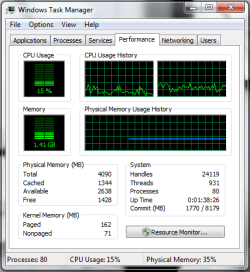
How much ram? can you take a screen shot of task manager (right click task bar) in teh performance tab. to get to task manager right click task bar

Thanks

Ken J+
 

My Computer My Computer

At a glance

Win 8 Release candidate 8400[email protected]4 gigsNvidia 9600M
Computer Manufacturer/Model Number
HP Pavillion dv-7 1005 Tx
OS
Win 8 Release candidate 8400
CPU
[email protected]
Memory
4 gigs
Graphics Card(s)
Nvidia 9600M
Sound Card
HD built-in
Monitor(s) Displays
17" Wxga
Screen Resolution
1440x900
Cooling
none
Internet Speed
45Mb down 5Mb up
I recently purchased a Dell Studio 1737 direct from Dell.

Every time I turn on my laptop and log into my account, there would be a blue, animated circle cursor indicating that the laptop was just turned on and that it is working in the background.

Later on however, I noticed that whenever there were programs working in the background, my cursor shows a blue circle with a light in it, but it wouldn't be animated. This usually happens about 15 minutes after the laptop has turned on. I'm assuming that the cursor SHOULD be animated just like how it was during start-up.

I tried switching the pointers (eg. aero large to aero regular) and it seemed to solve the problem (i think), but after a while, the circle becomes frozen again; I am faced with the same issue. I tried downloading and installing different cursor sets (from DeviantART), and the ones that WERE animated in ANYWAY, were also frozen after a couple minutes.

I'm wondering if anybody else has had this problem and would greatly appreciated it if they provided a solution.

I'm using a 64-bit 7 Home Premium with ATI Radeon HD 3650.

Thanks in advance!

Hi and welcome

How much ram? can you take a screen shot of task manager (right click task bar) in teh performance tab. to get to task manager right click task bar

Thanks

Ken J+

Thanks for replying :]

4gb RAM.
 

Attachments

  • task manager.png
    task manager.png
    17.9 KB · Views: 195

My Computer My Computer

At a glance

Windows 7 Home Premium x64
OS
Windows 7 Home Premium x64
bumpppp.
 

My Computer My Computer

At a glance

Windows 7 Home Premium x64
OS
Windows 7 Home Premium x64
bumppppp.
 

My Computer My Computer

At a glance

Windows 7 Home Premium x64
OS
Windows 7 Home Premium x64
bumpppp.
 

My Computer My Computer

At a glance

Windows 7 Home Premium x64
OS
Windows 7 Home Premium x64
bumpppp.
 

My Computer My Computer

At a glance

Windows 7 Home Premium x64
OS
Windows 7 Home Premium x64
I would call Dell tech support.

If you had done an in-place Upgrade from Vista, I would wonder if it was some bug transferred and suggest a clean install.

But since it is a new Win7 computer from Dell, they need to make it good for ya.
 
Back
Top