Solved Working in Background Symbol comes on ALL the time

jrjoeyg12

New member
Local time
2:45 PM
Messages
14
I had this problem on my last laptop from Dell and I was running Windows 7 on that also. There must be SOME program that I have installed that makes my computer run constantly in the background. I've contacted Dell but they are no help. They don't seem to understand the probem and tell me that it is normal. It is NOT normal. The working in the background symbol (the moving round circle any time the computer is thinking) comes on ALL THE TIME. I barely even do anything. Sometimes just moving my mouse activates it. Any ideas? Suggestions? I can't be the only one with this problem....
 

My Computer My Computer

At a glance

Windows 7 64 Bitcore i78gbNvidia
Computer Manufacturer/Model Number
Dell XPS 14
OS
Windows 7 64 Bit
CPU
core i7
Memory
8gb
Graphics Card(s)
Nvidia
Hard Drives
512 GB SSD
Use this tool and post the files here... i will have a look and advice....
 

My Computer My Computer

At a glance

Windows 7 ultimate x64
Computer Manufacturer/Model Number
Nothing specific....what ever the clients provide for Repair
OS
Windows 7 ultimate x64
Here is the data using that tool. I think I uploaded it correctly
 

Attachments

My Computer My Computer

At a glance

Windows 7 64 Bitcore i78gbNvidia
Computer Manufacturer/Model Number
Dell XPS 14
OS
Windows 7 64 Bit
CPU
core i7
Memory
8gb
Graphics Card(s)
Nvidia
Hard Drives
512 GB SSD
first of all why are you running 2 antivirus for ???? Mcafee and MSC..... Double protection ??? !!!!

Uninstall Mcafee and keep MSE

Uninstall Bing Desktop completely

Do these and let me know
 

My Computer My Computer

At a glance

Windows 7 ultimate x64
Computer Manufacturer/Model Number
Nothing specific....what ever the clients provide for Repair
OS
Windows 7 ultimate x64
I had uninstalled McAfee. It is still showing up as installed on my computer? How do I uninstall it if it doesn't show up in the control panel "uninstall a program"?

Why uninstall Bing Desktop? Too much resources? I just like the background changing every day.
 

My Computer My Computer

At a glance

Windows 7 64 Bitcore i78gbNvidia
Computer Manufacturer/Model Number
Dell XPS 14
OS
Windows 7 64 Bit
CPU
core i7
Memory
8gb
Graphics Card(s)
Nvidia
Hard Drives
512 GB SSD

My Computer My Computer

At a glance

Windows 10 Pro x64 ; Xubuntu x64Intel i7 860 @ 2.80 GHz O/C'ed to 4.0GHz16GB Corsair Vengance DDR3 @ 661 MHz Dual Cha...EVGA NVidia GTX 560 1024MB
Computer type
PC/Desktop
Computer Manufacturer/Model Number
Golden Mk. I.4
OS
Windows 10 Pro x64 ; Xubuntu x64
CPU
Intel i7 860 @ 2.80 GHz O/C'ed to 4.0GHz
Motherboard
Gigabyte P55A-UD3R Rev.1. Award BIOS F13
Memory
16GB Corsair Vengance DDR3 @ 661 MHz Dual Channel (9-9-9-24)
Graphics Card(s)
EVGA NVidia GTX 560 1024MB
Sound Card
Realtek Integrated
Monitor(s) Displays
Dual Samsung SyncMaster 2494HS
Screen Resolution
1920*1080 and 1920*1080
Hard Drives
1*Samsung 840 EVO 120GB SSD;
1*OCZ Vertex 2 60GB SSD;
2*Samsung F3 SpinPoint 1TB in RAID0;
1*Samsung F1 SpinPoint 1TB;
2*Western Digital 1TB External USB 3.0
1*Western Digital 500GB External USB 3.0
1*Seagate 500GB External USB 2.0
PSU
Thermaltake ToughPower QFan 750W
Case
Thermaltake Element S VK60001W2Z
Cooling
Corsair H60 Water Cooling, 2*230mm and 2*80mm case fans
Keyboard
Logitech G110
Mouse
Logitech MX518
I ran both 20a and 20b but 20b did not want to run on my computer (or it opened for a fraction then closed. Maybe that was runing). So far the spinning circle "working in the background" seems to be better, but it still randomly spins for no reason. How can I make sure McAfee is completely uninstalled? This tool definitely did the trick?
 

My Computer My Computer

At a glance

Windows 7 64 Bitcore i78gbNvidia
Computer Manufacturer/Model Number
Dell XPS 14
OS
Windows 7 64 Bit
CPU
core i7
Memory
8gb
Graphics Card(s)
Nvidia
Hard Drives
512 GB SSD
I'll hand over to centaur again, but if I'm correct you need to upload a new diagnostic file for him to look at to ensure it was removed.
 

My Computer My Computer

At a glance

Windows 10 Pro x64 ; Xubuntu x64Intel i7 860 @ 2.80 GHz O/C'ed to 4.0GHz16GB Corsair Vengance DDR3 @ 661 MHz Dual Cha...EVGA NVidia GTX 560 1024MB
Computer type
PC/Desktop
Computer Manufacturer/Model Number
Golden Mk. I.4
OS
Windows 10 Pro x64 ; Xubuntu x64
CPU
Intel i7 860 @ 2.80 GHz O/C'ed to 4.0GHz
Motherboard
Gigabyte P55A-UD3R Rev.1. Award BIOS F13
Memory
16GB Corsair Vengance DDR3 @ 661 MHz Dual Channel (9-9-9-24)
Graphics Card(s)
EVGA NVidia GTX 560 1024MB
Sound Card
Realtek Integrated
Monitor(s) Displays
Dual Samsung SyncMaster 2494HS
Screen Resolution
1920*1080 and 1920*1080
Hard Drives
1*Samsung 840 EVO 120GB SSD;
1*OCZ Vertex 2 60GB SSD;
2*Samsung F3 SpinPoint 1TB in RAID0;
1*Samsung F1 SpinPoint 1TB;
2*Western Digital 1TB External USB 3.0
1*Western Digital 500GB External USB 3.0
1*Seagate 500GB External USB 2.0
PSU
Thermaltake ToughPower QFan 750W
Case
Thermaltake Element S VK60001W2Z
Cooling
Corsair H60 Water Cooling, 2*230mm and 2*80mm case fans
Keyboard
Logitech G110
Mouse
Logitech MX518
Here is an updated file after running the McAfee uninstall tool. The spinning circle is still happening quite a bit.

I'm sure I can system restore to make it go away, but I'm worried it will just come back again. If I system restore it will be the second time I have done it in two weeks of ownership.
 

Attachments

My Computer My Computer

At a glance

Windows 7 64 Bitcore i78gbNvidia
Computer Manufacturer/Model Number
Dell XPS 14
OS
Windows 7 64 Bit
CPU
core i7
Memory
8gb
Graphics Card(s)
Nvidia
Hard Drives
512 GB SSD
Mcafee not there anymore

Well bing desktop is a search indexer... it runs in the background ... if you really want to automatically change the wallpaper.. then use the Windows 7 inbuilt one .... only thing is you need download the pics beforehand ,,,, if you need help with this thats for a later post....

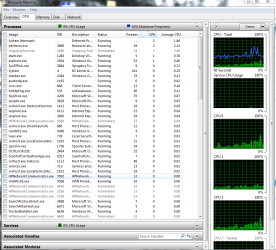
Now click on start > and type "resmon" in the search and then click on resmon.exe
Once there click CPU and sort by CPU percentage (descending order) ... take a snapshot and post it here

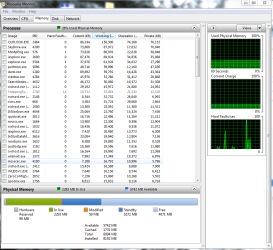
next select Memory and sort by Working set (descending order) ... take a snpshot

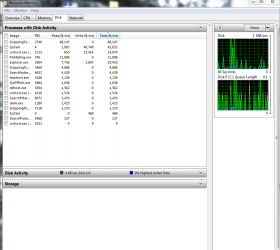
next select Disk and take a snapshot

post all here
 

My Computer My Computer

At a glance

Windows 7 ultimate x64
Computer Manufacturer/Model Number
Nothing specific....what ever the clients provide for Repair
OS
Windows 7 ultimate x64
Here are the snap shots I think I got enough for you. There are a lot of processes running though.

I don't need Bing Desktop I went ahead and took it off.
 

Attachments

  • CPU.PNG
    CPU.PNG
    51.7 KB · Views: 1
  • Memory.PNG
    Memory.PNG
    49.9 KB · Views: 1
  • Disk.PNG
    Disk.PNG
    34 KB · Views: 1

My Computer My Computer

At a glance

Windows 7 64 Bitcore i78gbNvidia
Computer Manufacturer/Model Number
Dell XPS 14
OS
Windows 7 64 Bit
CPU
core i7
Memory
8gb
Graphics Card(s)
Nvidia
Hard Drives
512 GB SSD
from the snapshot..... the most activity is by explorer....

but overall the system look fine at this snapshot......

If you still see the busy activity... check the highest CPU usage when this happens ....

if you wish ..... i can look at your system via teamviewer... Download the Quick Support and PM me the id and password of the teamviewer session
 

My Computer My Computer

At a glance

Windows 7 ultimate x64
Computer Manufacturer/Model Number
Nothing specific....what ever the clients provide for Repair
OS
Windows 7 ultimate x64
yes please. the icon is constantly going off lately
 

My Computer My Computer

At a glance

Windows 7 64 Bitcore i78gbNvidia
Computer Manufacturer/Model Number
Dell XPS 14
OS
Windows 7 64 Bit
CPU
core i7
Memory
8gb
Graphics Card(s)
Nvidia
Hard Drives
512 GB SSD
Thank you so much Centaur78 for solving my problem. He connected to me via TeamViewer and went right and diagnosed the problem. It was a printer drive from HP that just wouldn't stop searching for my printer and was causing the issue. He identified it quickly and figured I had to remove it to stop the problem. I did and everything is back to normal!

Fantastic job thank you again!
 

My Computer My Computer

At a glance

Windows 7 64 Bitcore i78gbNvidia
Computer Manufacturer/Model Number
Dell XPS 14
OS
Windows 7 64 Bit
CPU
core i7
Memory
8gb
Graphics Card(s)
Nvidia
Hard Drives
512 GB SSD
You are welcome

If the issue has be resolved, please mark this as solved

and do rep those helped . thanks
 

My Computer My Computer

At a glance

Windows 7 ultimate x64
Computer Manufacturer/Model Number
Nothing specific....what ever the clients provide for Repair
OS
Windows 7 ultimate x64
Back
Top