Solved Windows was unable to complete the format

lordgaspode

New member
Local time
10:05 AM
Messages
5
Hi there, I have had the message in the title when trying to format my E drive, I searched this on google and found your forum. I tried the option that was shown about changing the C drive to active, and doing startup repair 3 times, but this has not fixed the issue.

Please, any advice would be helpful, this is getting tiresome.

Thanks in advance
 
Last edited:

My Computer My Computer

Computer type
PC/Desktop
Computer Manufacturer/Model Number
custom build
OS
Windows 7 Ultimate x64
CPU
AMD 8320
Motherboard
Gigabyte GA-78LMT-USB3
Memory
DDR3 8GB
Graphics Card(s)
Nvidia GeForce GT 630
Hard Drives
Hitachi HCP725032GLA380
SeaGate ST3160815AS
Hitachi HDT721010SLA360
Antivirus
Avast Home Edition
Browser
Firefox 30

My Computer My Computer

Computer type
PC/Desktop
Computer Manufacturer/Model Number
Home made Desktop
OS
Windows 10 Pro. 64/ version 1709 Windows 7 Pro/64
CPU
Intel i7-6800K @ 4.3
Motherboard
ASUS X-99 Deluxe II
Memory
Corsair Platinum 16 gig @2400
Graphics Card(s)
EVGA GTX 1070 OC
Monitor(s) Displays
Asus 27" LED LCD/VE278Q
Screen Resolution
1920-1080 or 1280-720 HDMI
Hard Drives
INTEL SSD 730-240 Gb Sata 3.0/
PSU
EVGA Platium 1200W
Case
Phanteks Luxe Tempered Glass 8 fans/ one radiator
Cooling
XSPC/ Water Cooled CPU
Keyboard
Das 4 Professional
Mouse
Logitech M705/MX Anywhere 2-S
Internet Speed
100 mbits
Antivirus
Microsoft Security Essentials/ Malwarebytes Premium 3.0/ SAS
Browser
I.E. 11 default/Firefox/ ISP Time Warner Cable/Spectrum
Other Info
LG BluRay Burner/
Sound system-KLipsch-THX/
Icy Dock ssd Hot Swap bays.
w2exr9.png
 

My Computer My Computer

Computer type
PC/Desktop
Computer Manufacturer/Model Number
custom build
OS
Windows 7 Ultimate x64
CPU
AMD 8320
Motherboard
Gigabyte GA-78LMT-USB3
Memory
DDR3 8GB
Graphics Card(s)
Nvidia GeForce GT 630
Hard Drives
Hitachi HCP725032GLA380
SeaGate ST3160815AS
Hitachi HDT721010SLA360
Antivirus
Avast Home Edition
Browser
Firefox 30
We are having a communication problem.
Many of us do not want to go off site to see things.
That is one of the purpose of the tutorial.
Because I ticked on you picture now I have to leave the forum and do some security scans.

Use the paper clip like in the tutorial.

picture.php
 

My Computer My Computer

Computer type
PC/Desktop
Computer Manufacturer/Model Number
Home made Desktop
OS
Windows 10 Pro. 64/ version 1709 Windows 7 Pro/64
CPU
Intel i7-6800K @ 4.3
Motherboard
ASUS X-99 Deluxe II
Memory
Corsair Platinum 16 gig @2400
Graphics Card(s)
EVGA GTX 1070 OC
Monitor(s) Displays
Asus 27" LED LCD/VE278Q
Screen Resolution
1920-1080 or 1280-720 HDMI
Hard Drives
INTEL SSD 730-240 Gb Sata 3.0/
PSU
EVGA Platium 1200W
Case
Phanteks Luxe Tempered Glass 8 fans/ one radiator
Cooling
XSPC/ Water Cooled CPU
Keyboard
Das 4 Professional
Mouse
Logitech M705/MX Anywhere 2-S
Internet Speed
100 mbits
Antivirus
Microsoft Security Essentials/ Malwarebytes Premium 3.0/ SAS
Browser
I.E. 11 default/Firefox/ ISP Time Warner Cable/Spectrum
Other Info
LG BluRay Burner/
Sound system-KLipsch-THX/
Icy Dock ssd Hot Swap bays.
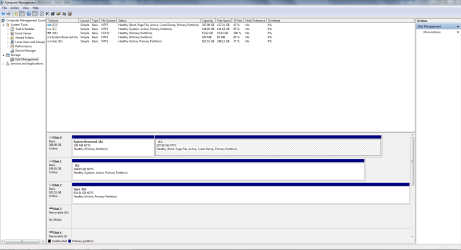
sorry, here you go
 

Attachments

  • Capture.PNG
    Capture.PNG
    42 KB · Views: 8

My Computer My Computer

Computer type
PC/Desktop
Computer Manufacturer/Model Number
custom build
OS
Windows 7 Ultimate x64
CPU
AMD 8320
Motherboard
Gigabyte GA-78LMT-USB3
Memory
DDR3 8GB
Graphics Card(s)
Nvidia GeForce GT 630
Hard Drives
Hitachi HCP725032GLA380
SeaGate ST3160815AS
Hitachi HDT721010SLA360
Antivirus
Avast Home Edition
Browser
Firefox 30
Hi,

You can use the following steps to de-active a active partition:

1. Open Command Prompt.
2. Type: diskpart
3. At the DISKPART prompt, type: list disk (This command will list all the disks that you have)
4. In the next prompt, type: select disk # ( # means the number of the disk which contain the wrong active partition )
5. At the DISKPART prompt, type: list partition
6. Use the command: select partition # (# means the number of the partition that you want to mark as active)
7. Inactive the active partition with command: inactive
Then format.
 

My Computer My Computer

Computer type
Laptop
Computer Manufacturer/Model Number
Dell XPS L502x
OS
Windows 7 Home Premium 64bit
CPU
Intel Core i7 2670QM
Motherboard
Intel HM67 Mobile Express Chipset
Memory
Samsung 8GB 1333Mhz
Graphics Card(s)
nVidia Geforce 540M GT 2GB
Sound Card
Realtek High Definition Audio
Monitor(s) Displays
15.6" Dell Standard RGB-LED Backlit Display
Screen Resolution
1366x768
Hard Drives
Seagate Momentus 2.5" 750GB HDD 5400rpm
Internet Speed
3.1 Mbits/s
Antivirus
AVG Free, Kaspersky
Browser
Google chrome
Hi,

You can use the following steps to de-active a active partition:

1. Open Command Prompt.
2. Type: diskpart
3. At the DISKPART prompt, type: list disk (This command will list all the disks that you have)
4. In the next prompt, type: select disk # ( # means the number of the disk which contain the wrong active partition )
5. At the DISKPART prompt, type: list partition
6. Use the command: select partition # (# means the number of the partition that you want to mark as active)
7. Inactive the active partition with command: inactive
Then format.


I tried this, and it still says windows was unable to complete the format
 

My Computer My Computer

Computer type
PC/Desktop
Computer Manufacturer/Model Number
custom build
OS
Windows 7 Ultimate x64
CPU
AMD 8320
Motherboard
Gigabyte GA-78LMT-USB3
Memory
DDR3 8GB
Graphics Card(s)
Nvidia GeForce GT 630
Hard Drives
Hitachi HCP725032GLA380
SeaGate ST3160815AS
Hitachi HDT721010SLA360
Antivirus
Avast Home Edition
Browser
Firefox 30
I see you now have a active/boot flag on partition C. That is good.

Lets have a little test first.

Disconnect Drive 1 and 2. Then see if it will boot.

That will verify that Disc 0 C partition will boot.
If it boots hook the drives back up and remove the active flags from Disc 1 and 2 partitions D and E.
Then check if partitions of your choice on Disc 1 and/or 2 will format.
 

My Computer My Computer

Computer type
PC/Desktop
Computer Manufacturer/Model Number
Home made Desktop
OS
Windows 10 Pro. 64/ version 1709 Windows 7 Pro/64
CPU
Intel i7-6800K @ 4.3
Motherboard
ASUS X-99 Deluxe II
Memory
Corsair Platinum 16 gig @2400
Graphics Card(s)
EVGA GTX 1070 OC
Monitor(s) Displays
Asus 27" LED LCD/VE278Q
Screen Resolution
1920-1080 or 1280-720 HDMI
Hard Drives
INTEL SSD 730-240 Gb Sata 3.0/
PSU
EVGA Platium 1200W
Case
Phanteks Luxe Tempered Glass 8 fans/ one radiator
Cooling
XSPC/ Water Cooled CPU
Keyboard
Das 4 Professional
Mouse
Logitech M705/MX Anywhere 2-S
Internet Speed
100 mbits
Antivirus
Microsoft Security Essentials/ Malwarebytes Premium 3.0/ SAS
Browser
I.E. 11 default/Firefox/ ISP Time Warner Cable/Spectrum
Other Info
LG BluRay Burner/
Sound system-KLipsch-THX/
Icy Dock ssd Hot Swap bays.
I restarted this evening as usual, and windows had me run a startup repair on E: drive, after the restart completed, I was able to format the drive, thanks for the help though, it was appreciated.
 

My Computer My Computer

Computer type
PC/Desktop
Computer Manufacturer/Model Number
custom build
OS
Windows 7 Ultimate x64
CPU
AMD 8320
Motherboard
Gigabyte GA-78LMT-USB3
Memory
DDR3 8GB
Graphics Card(s)
Nvidia GeForce GT 630
Hard Drives
Hitachi HCP725032GLA380
SeaGate ST3160815AS
Hitachi HDT721010SLA360
Antivirus
Avast Home Edition
Browser
Firefox 30
I'm trying to understand what happened.
Could you explain exactly the steps you took and tell us what was on partitions D & E on drives 1 & 2.

I'm trying to understand why Windows 7 would ask for a Startup Repair on E.

We need members to share how they fixed a problem so other could learn if they have the same problem.
 

My Computer My Computer

Computer type
PC/Desktop
Computer Manufacturer/Model Number
Home made Desktop
OS
Windows 10 Pro. 64/ version 1709 Windows 7 Pro/64
CPU
Intel i7-6800K @ 4.3
Motherboard
ASUS X-99 Deluxe II
Memory
Corsair Platinum 16 gig @2400
Graphics Card(s)
EVGA GTX 1070 OC
Monitor(s) Displays
Asus 27" LED LCD/VE278Q
Screen Resolution
1920-1080 or 1280-720 HDMI
Hard Drives
INTEL SSD 730-240 Gb Sata 3.0/
PSU
EVGA Platium 1200W
Case
Phanteks Luxe Tempered Glass 8 fans/ one radiator
Cooling
XSPC/ Water Cooled CPU
Keyboard
Das 4 Professional
Mouse
Logitech M705/MX Anywhere 2-S
Internet Speed
100 mbits
Antivirus
Microsoft Security Essentials/ Malwarebytes Premium 3.0/ SAS
Browser
I.E. 11 default/Firefox/ ISP Time Warner Cable/Spectrum
Other Info
LG BluRay Burner/
Sound system-KLipsch-THX/
Icy Dock ssd Hot Swap bays.
Back
Top