Windows won't fully start

I think I have what you want now bigmck.
I was holding the mouse at the MIDDLE of the name instead of the side.
I have them expanded now T think(hope).


thnx for your patience!
 

Attachments

  • 20180824_144807.jpg
    20180824_144807.jpg
    402.6 KB · Views: 0
  • 20180824_144820.jpg
    20180824_144820.jpg
    461 KB · Views: 0

My Computer

Computer type
PC/Desktop
Computer Manufacturer/Model Number
HP 6005 Pro
OS
Windows 7 Pro x64
CPU
Athlon II X2 B24 (3.00GHz)
Memory
8GB DDR3
Hard Drives
1TB HDD
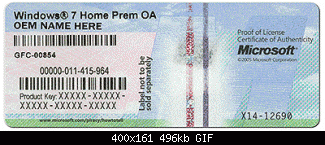
Cedar -- Thanks for stretching the columns. Unfortunately that did not help me determine anything. Maybe it helped V Garg. I think we are getting closer and closer to doing a Clean Install. You do have the COA Sticker on your PC I hope. You will need it to make your Windows 7 Legal. It looks like this. == V Garg -- What do you think about a Clean Install? Did you determine that he has the files in the Recovery Partition to do this? Thanks,
 

Attachments

  • coa-stickers.gif
    coa-stickers.gif
    30.4 KB · Views: 38

My Computer

Computer type
PC/Desktop
Computer Manufacturer/Model Number
Custom Build
OS
Windows 7 Home Premium 32-Bit - Build 7600 SP1
CPU
Intel Core i3-2120 3.30Ghz
Motherboard
Asus P8Z68-V LX Intel Z68 Socket H2 ATX
Memory
Kingston 4 GB DDR3 1333 mhz
Graphics Card(s)
AMD Radeon HD6670
Sound Card
Sound Blaster Audigy SE 24-Bit
Monitor(s) Displays
Asus VE228
Screen Resolution
1440 X 900
Hard Drives
OCZ Vertex 3 120 GB Sata 3 SSD ==
Kingston SH103/S3 120 G Hyper X 120 GB SSD ==
Western Digital 500 GB Caviar Green 7200 RPM ==
PSU
Corsair CX600M == 600 Watt
Case
NZXT Apollo - Silver with Clear Side Panel
Cooling
Three 120 mm Fans
Keyboard
Microsoft Natural 4000
Mouse
Microsoft Custom Optical 3000
Internet Speed
AT&T Fiber Optic Wireless Network
Antivirus
Microsoft Security Essentials
Browser
Chrome
Other Info
120 mm Blue LED Fan -- Three Blue LED Lazer Light Sticks
Hi,
Greets,
Sir(s),
Thanks for the responses. I am committed to Help/Contribute but major overhauling is taking place here. I am sorry that I will be very busy for the next few days and appear on forums occasionally & for short times. Please wait.

Thanks & Regards. ...
 

My Computer

Computer type
Laptop
Computer Manufacturer/Model Number
hp compaq presario c795VU notebook pc
OS
Windows 7 Ultimate x32 With Sp1 + Vista Ultimate x32 with Sp1 & Sp2 !!
CPU
Intel Mobile Core 2 Duo T5750 @ 2.00GHz Merom 65nm Technolog
Motherboard
Hewlett-Packard 30D9 (CPU)
Memory
2.00GB Dual-Channel DDR2 @ 332MHz (5-5-5-15)
Graphics Card(s)
Mobile Intel(R) 965 Express Chipset Family
Sound Card
High Definition Audio Device
Monitor(s) Displays
LP154WX4-TLCB on Mobile Intel 965 Express Chipset Family
Screen Resolution
1280x800 @ 60Hz
Hard Drives
149GB Western Digital WDC WD1600BEVS-60VAT0 ATA Device (SATA)
Keyboard
Standard 101/102-Key or Microsoft Natural PS/2 Key + HP QLB
Mouse
ALPS pointing device
Antivirus
Kaspersky AV 2017(Win 7) & AVG AntiVirus Free 2016 (VISTA)
Browser
google chrome
OK Vineet.
Good luck in whatever you're doing and we'll talk to you when you get done.
thnx!


You do have the COA Sticker on your PC I hope. You will need it to make your Windows 7 Legal. It looks like this. ==


Yes I have a sticker like that on my computer.
thnx!
 

My Computer

Computer type
PC/Desktop
Computer Manufacturer/Model Number
HP 6005 Pro
OS
Windows 7 Pro x64
CPU
Athlon II X2 B24 (3.00GHz)
Memory
8GB DDR3
Hard Drives
1TB HDD
You know bigmck I have been thinking about something you said about heat awhile back.
I have never seen my computer crash unless the hard drive temperature got up to at least 47° celsius.
It starts off at 32° or 33° and climbs steadily.
Never seen it crash under 47°.
Maybe it's a hardware/fan issue?


May have to make a chart.


thnx!
 

My Computer

Computer type
PC/Desktop
Computer Manufacturer/Model Number
HP 6005 Pro
OS
Windows 7 Pro x64
CPU
Athlon II X2 B24 (3.00GHz)
Memory
8GB DDR3
Hard Drives
1TB HDD
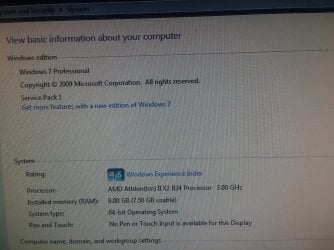
I did think it was heat, but under 50 is pretty normal. That is where my temps are. The CPU is normally what gets hot and yours is not hot at all. == We have worked on this quite a while and you started before I joined in. In message 157, V Garg agreed that we should do a Clean Install. I fully believe that will get you running. I have several questions, please make sure you answer all. == First, the Clean Install will wipe out what is on the C: drive and put in a fresh Windows 7, but will not touch the other drives. Make sure there is nothing you fear losing from C: == Let me have the brand and model of you PC. == Have you ever done a Restore from the Recovery Partition before? == I don't know if your Recovery Partition works or not. I had told you I am in Houston. By chance, are you close to me since you are in Texas? If the Recovery Partition doesn't work, I can get a Windows CD to you possibly. == I need to know several things about your Windows 7. Go to your Control Panel and click on System. A window opens and at the top part you will see Windows 7 Home Premium probably or it could say Windows 7 Professional. I need to know what it says. Also go down the page and you will see either 32 or 64 bit. I need to know which. == Get back to me and we will proceed. Thanks,
 
Last edited:

My Computer

Computer type
PC/Desktop
Computer Manufacturer/Model Number
Custom Build
OS
Windows 7 Home Premium 32-Bit - Build 7600 SP1
CPU
Intel Core i3-2120 3.30Ghz
Motherboard
Asus P8Z68-V LX Intel Z68 Socket H2 ATX
Memory
Kingston 4 GB DDR3 1333 mhz
Graphics Card(s)
AMD Radeon HD6670
Sound Card
Sound Blaster Audigy SE 24-Bit
Monitor(s) Displays
Asus VE228
Screen Resolution
1440 X 900
Hard Drives
OCZ Vertex 3 120 GB Sata 3 SSD ==
Kingston SH103/S3 120 G Hyper X 120 GB SSD ==
Western Digital 500 GB Caviar Green 7200 RPM ==
PSU
Corsair CX600M == 600 Watt
Case
NZXT Apollo - Silver with Clear Side Panel
Cooling
Three 120 mm Fans
Keyboard
Microsoft Natural 4000
Mouse
Microsoft Custom Optical 3000
Internet Speed
AT&T Fiber Optic Wireless Network
Antivirus
Microsoft Security Essentials
Browser
Chrome
Other Info
120 mm Blue LED Fan -- Three Blue LED Lazer Light Sticks
Let me have the brand and model of you PC. == Have you ever done a Restore from the Recovery Partition before? == I don't know if your Recovery Partition works or not. I had told you I am in Houston. By chance, are you close to me since you are in Texas? If the Recovery Partition doesn't work, I can get a Windows CD to you possibly. == I need to know several things about your Windows 7. Go to your Control Panel and click on System. A window opens and at the top part you will see Windows 7 Home Premium probably or it could say Windows 7 Professional. I need to know what it says. Also go down the page and you will see either 32 or 64 bit. I need to know which. == Get back to me and we will proceed. Thanks,


HP Compaq 6005 Pro - SmallFormFactor - Athlon II X2 B24 3 GHz

Windows 7 pro 64bit


Never done a Restore from the Recovery Partition before.


I am in Houston.
When you 1st replied in this thread I told you
"Go HT, Go DW"--The HT stands for Houston Texans and I better not need to tell you the meaning of the initials DW!!!


snaps below.
thnx!
 

Attachments

  • 20180827_005622.jpg
    20180827_005622.jpg
    750.7 KB · Views: 1
  • 20180827_012149.jpg
    20180827_012149.jpg
    356.8 KB · Views: 1

My Computer

Computer type
PC/Desktop
Computer Manufacturer/Model Number
HP 6005 Pro
OS
Windows 7 Pro x64
CPU
Athlon II X2 B24 (3.00GHz)
Memory
8GB DDR3
Hard Drives
1TB HDD
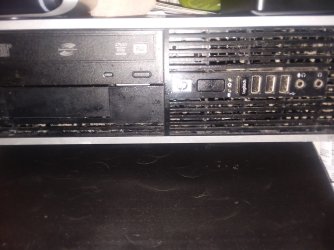
DW....Hummmm. That is Dallas...I give up :-) == I found a video by HP that will give you an idea of what will be happening. The video talks about removing things from the inside if you added anything. I wouldn't worry about that. == The only thing we need to worry about is will your computer stay running long enough to do this. It will take over an hour. Does it stay running that long? If it shuts down before we are through, that just creates more problems. Look at the video and see if there is anything we need to discuss before you start. You will be using the Recovery Partition method. If that does not work then I will get some Win 7 disks to you. The video is about half way down the page. Windows 7 Recovery == One more thing. In the pictures above there is a lot of dust showing on your PC. Get some compressed air and get that off the best you can. Search other places also for dust. Your PC needs to be clean. Thanks,
 

My Computer

Computer type
PC/Desktop
Computer Manufacturer/Model Number
Custom Build
OS
Windows 7 Home Premium 32-Bit - Build 7600 SP1
CPU
Intel Core i3-2120 3.30Ghz
Motherboard
Asus P8Z68-V LX Intel Z68 Socket H2 ATX
Memory
Kingston 4 GB DDR3 1333 mhz
Graphics Card(s)
AMD Radeon HD6670
Sound Card
Sound Blaster Audigy SE 24-Bit
Monitor(s) Displays
Asus VE228
Screen Resolution
1440 X 900
Hard Drives
OCZ Vertex 3 120 GB Sata 3 SSD ==
Kingston SH103/S3 120 G Hyper X 120 GB SSD ==
Western Digital 500 GB Caviar Green 7200 RPM ==
PSU
Corsair CX600M == 600 Watt
Case
NZXT Apollo - Silver with Clear Side Panel
Cooling
Three 120 mm Fans
Keyboard
Microsoft Natural 4000
Mouse
Microsoft Custom Optical 3000
Internet Speed
AT&T Fiber Optic Wireless Network
Antivirus
Microsoft Security Essentials
Browser
Chrome
Other Info
120 mm Blue LED Fan -- Three Blue LED Lazer Light Sticks
Hi All,
Greets,
Sir(s),
Thanks cedar for the good wishes. Brief sir the things. All the best.
Running short of time so a few quick things:
1) He never had/used an antivirus on his win 7 & made only important Windows Updates. So, i think he should consider running Bitdefender Rescue CD extensively.
Comprehensive List of 26 Bootable Antivirus Rescue CDs for Offline Scanning • Raymond.CC
2) He has a 25 digit product key but that's not a retail windows 7 key. He has checked it on Microsoft site.
3) His pc is a refurb.
4) Yes, he has the files for clean installation on the recovery partition. To say truly, i could only find/make out that recovery option out of the three.

Posts:

Windows won't fully start

Windows won't fully start

We have done it once but i doubt that the C: was formatted. Anyway, if he retry, he should make sure that he does not choose any backup/restore option during or after the process unless asked. As said by sir, he has to keep safely all the important stuff which is lying on the C: before the process. It would be better to sacrifice system files, settings and manually copy files of personal interest only. If he does not want to lose other partitions, he should be careful not to format other partitions or the whole disk in the process.
5) We tried a lot to press F11 and get to the recovery partition, but all in vain. But i always doubted that he failed to press the button at the right time. But on contrary, he pressed F8 well within time except for once or twice. I found an entry in my old pc's bios for increasing that time but its long back. The pc has stopped working & i am running short of time.

(If required i found this manual for his Bios Setup : http://h10032.www1.hp.com/ctg/Manual/c01870957)

6) It seems heat is not an issue but it will be always good to check the fan & keep the temperature down a little later!
7) It seems the pc always did/does well out of the main installation. But i also understand that if pc falls in the middle of the process, it would be problematic.

Let me know if i can do any help in short duration.

Thanks & Regards. ...
 
Last edited:

My Computer

Computer type
Laptop
Computer Manufacturer/Model Number
hp compaq presario c795VU notebook pc
OS
Windows 7 Ultimate x32 With Sp1 + Vista Ultimate x32 with Sp1 & Sp2 !!
CPU
Intel Mobile Core 2 Duo T5750 @ 2.00GHz Merom 65nm Technolog
Motherboard
Hewlett-Packard 30D9 (CPU)
Memory
2.00GB Dual-Channel DDR2 @ 332MHz (5-5-5-15)
Graphics Card(s)
Mobile Intel(R) 965 Express Chipset Family
Sound Card
High Definition Audio Device
Monitor(s) Displays
LP154WX4-TLCB on Mobile Intel 965 Express Chipset Family
Screen Resolution
1280x800 @ 60Hz
Hard Drives
149GB Western Digital WDC WD1600BEVS-60VAT0 ATA Device (SATA)
Keyboard
Standard 101/102-Key or Microsoft Natural PS/2 Key + HP QLB
Mouse
ALPS pointing device
Antivirus
Kaspersky AV 2017(Win 7) & AVG AntiVirus Free 2016 (VISTA)
Browser
google chrome
Hi Vineet Garg -- Thanks very much for the details in the last post. Check back when you can.
 

My Computer

Computer type
PC/Desktop
Computer Manufacturer/Model Number
Custom Build
OS
Windows 7 Home Premium 32-Bit - Build 7600 SP1
CPU
Intel Core i3-2120 3.30Ghz
Motherboard
Asus P8Z68-V LX Intel Z68 Socket H2 ATX
Memory
Kingston 4 GB DDR3 1333 mhz
Graphics Card(s)
AMD Radeon HD6670
Sound Card
Sound Blaster Audigy SE 24-Bit
Monitor(s) Displays
Asus VE228
Screen Resolution
1440 X 900
Hard Drives
OCZ Vertex 3 120 GB Sata 3 SSD ==
Kingston SH103/S3 120 G Hyper X 120 GB SSD ==
Western Digital 500 GB Caviar Green 7200 RPM ==
PSU
Corsair CX600M == 600 Watt
Case
NZXT Apollo - Silver with Clear Side Panel
Cooling
Three 120 mm Fans
Keyboard
Microsoft Natural 4000
Mouse
Microsoft Custom Optical 3000
Internet Speed
AT&T Fiber Optic Wireless Network
Antivirus
Microsoft Security Essentials
Browser
Chrome
Other Info
120 mm Blue LED Fan -- Three Blue LED Lazer Light Sticks
Hi Cedar -- Before we do a Clean Install, lets try running a Anti-Virus since you did not have one. Download https://www.microsoft.com/en-us/download/details.aspx?id=5201 Go down the page about half way and you will see Download. Click on that and Install it. After Installed click on the Home tab and it will give you three options for a Virus Scan, "Quick, Full and Custom". Click on the Quick and click Scan Now. It should not take more than five minutes if that long. Let me know if it finds anything. I hope you PC can stay working to do this. If not we may have to rethink doing a Clean Install. == I did not see a post from you today. I hope you and the PC are OK.
 

My Computer

Computer type
PC/Desktop
Computer Manufacturer/Model Number
Custom Build
OS
Windows 7 Home Premium 32-Bit - Build 7600 SP1
CPU
Intel Core i3-2120 3.30Ghz
Motherboard
Asus P8Z68-V LX Intel Z68 Socket H2 ATX
Memory
Kingston 4 GB DDR3 1333 mhz
Graphics Card(s)
AMD Radeon HD6670
Sound Card
Sound Blaster Audigy SE 24-Bit
Monitor(s) Displays
Asus VE228
Screen Resolution
1440 X 900
Hard Drives
OCZ Vertex 3 120 GB Sata 3 SSD ==
Kingston SH103/S3 120 G Hyper X 120 GB SSD ==
Western Digital 500 GB Caviar Green 7200 RPM ==
PSU
Corsair CX600M == 600 Watt
Case
NZXT Apollo - Silver with Clear Side Panel
Cooling
Three 120 mm Fans
Keyboard
Microsoft Natural 4000
Mouse
Microsoft Custom Optical 3000
Internet Speed
AT&T Fiber Optic Wireless Network
Antivirus
Microsoft Security Essentials
Browser
Chrome
Other Info
120 mm Blue LED Fan -- Three Blue LED Lazer Light Sticks
Hello Vineet!
Thanks for checking in!


Hello bigmck!
The picture of my desktop was actually right AFTER I blew the front out with canned air twice!
Vineet had me download bitdefender free amtivirus but haven't installed it yet.
Where/what drive am I supposed to install this antivirus on?
Won't it interfere with the re-installation of my os?


I don't know if my computer will stay on for an hour.
If so it won't be much more than that.


I seem to remember 4 years ago right after I purchased the computer making a recovery disc.
Of course being that old it would have none of my files/programs on it.
I'll have to see if I can find it.


thnx!
 

My Computer

Computer type
PC/Desktop
Computer Manufacturer/Model Number
HP 6005 Pro
OS
Windows 7 Pro x64
CPU
Athlon II X2 B24 (3.00GHz)
Memory
8GB DDR3
Hard Drives
1TB HDD
Hi -- Good to hear from you. Since you have not done a Virus Scan, let's try that and we will know how long your PC will stay on. The virus scan might do it some good. Put it on C: drive. Do you know how to install it? Do the scan and let me know if you find anything. == Before we try a Clean Install, let's just try the Virus Scan and it will give you a hint as to if the Computer can stay on long enough. == Read this it might help some.
HP Help Talk to you later.
 

My Computer

Computer type
PC/Desktop
Computer Manufacturer/Model Number
Custom Build
OS
Windows 7 Home Premium 32-Bit - Build 7600 SP1
CPU
Intel Core i3-2120 3.30Ghz
Motherboard
Asus P8Z68-V LX Intel Z68 Socket H2 ATX
Memory
Kingston 4 GB DDR3 1333 mhz
Graphics Card(s)
AMD Radeon HD6670
Sound Card
Sound Blaster Audigy SE 24-Bit
Monitor(s) Displays
Asus VE228
Screen Resolution
1440 X 900
Hard Drives
OCZ Vertex 3 120 GB Sata 3 SSD ==
Kingston SH103/S3 120 G Hyper X 120 GB SSD ==
Western Digital 500 GB Caviar Green 7200 RPM ==
PSU
Corsair CX600M == 600 Watt
Case
NZXT Apollo - Silver with Clear Side Panel
Cooling
Three 120 mm Fans
Keyboard
Microsoft Natural 4000
Mouse
Microsoft Custom Optical 3000
Internet Speed
AT&T Fiber Optic Wireless Network
Antivirus
Microsoft Security Essentials
Browser
Chrome
Other Info
120 mm Blue LED Fan -- Three Blue LED Lazer Light Sticks
Hi Sirs,
Greets,
cedar : Sir,
1.I would like to tell you that i am intending to backup your Bios Setup. The Bios Setup is the most critical part of any pc. So, it would be good to backup that in case anything goes wrong.
For that we will need a fully functional/good 4GB pen drive & be ready to dedicate it for the lifetime. Keep in mind that its a life line & very crucial. So, make sure the pen drive is working good.
I expect you to work as a guided missile for that. The good/easy part is that :
you can avoid any problems in Bios by simply pressing esc & choosing File>Ignore Changes and Exit whenever you want to come out/exit Bios Setup even in the slightest of doubt!
It may be you have to press esc more than once to come back to the main menu.
One should make sure that he turns off the pc only after exiting Bios setup!

So, Here we go :

1. Insert the 4 gb pen drive in the good pc ( Win 10 ). Format it & eject.
you will lose everything on the pen drive when you format it. Copy anything important before formatting !

2. Eject all the external media & Shut down the win 7 pc. Eject/disconnect all the external media & devices. Insert the 4 gb pen drive.

3. Turn on or restart the computer. As soon as the computer is turned on, press F10 when the monitor light turns green to enter Bios Setup. Select your language from the list and press Enter. You have done it earlier, cedar!

4. A choice of five headings appears in the Setup Utilities menu: File, Storage, Security,Power and Advanced.

5.Use the arrow (left and right) keys to select the File heading. Use the arrow (up and down) keys to select the option you want, then press Enter. You are supposed to navigate & execute :
File > Replicated Setup > Save to Removable Media
Some confirmation should appear after the Bios is written to the pen drive!

6.Once finished, press esc & finally make to File>Ignore Changes and Exit


7. Eject the pen drive once computer restarted/shut down.

To say again : Any hint of doubt, press esc & choose Ignore Changes and Exit to safely come out of the Bios setup.

It's done!

2. I would like to see what is there in the Bios backup but very carefully!

1. Insert the backup pen drive in win10 pc .

2. Don't try to access/open those files/folders directly. I fear it might damage the backup and/or your win10 pc.

3. What you have to do is : open the 'computer' folder, double click the pen drive, select & copy all the shown files/folders in one go!

4. I don't know whether/how those files/folders can be misused but for precautions, upload them & share link in PM.

3. Be ready with a pen drive of at least 8 GB for next steps!

4. Any doubts/queries ? Anything else ? Let us know.

Thanks & Regards. ...
 
Last edited:

My Computer

Computer type
Laptop
Computer Manufacturer/Model Number
hp compaq presario c795VU notebook pc
OS
Windows 7 Ultimate x32 With Sp1 + Vista Ultimate x32 with Sp1 & Sp2 !!
CPU
Intel Mobile Core 2 Duo T5750 @ 2.00GHz Merom 65nm Technolog
Motherboard
Hewlett-Packard 30D9 (CPU)
Memory
2.00GB Dual-Channel DDR2 @ 332MHz (5-5-5-15)
Graphics Card(s)
Mobile Intel(R) 965 Express Chipset Family
Sound Card
High Definition Audio Device
Monitor(s) Displays
LP154WX4-TLCB on Mobile Intel 965 Express Chipset Family
Screen Resolution
1280x800 @ 60Hz
Hard Drives
149GB Western Digital WDC WD1600BEVS-60VAT0 ATA Device (SATA)
Keyboard
Standard 101/102-Key or Microsoft Natural PS/2 Key + HP QLB
Mouse
ALPS pointing device
Antivirus
Kaspersky AV 2017(Win 7) & AVG AntiVirus Free 2016 (VISTA)
Browser
google chrome
Hi V. Garg == It has been four days since Cedar last posted so I am not sure what has happened. That is a good idea above. == Glad to see you back.
 

My Computer

Computer type
PC/Desktop
Computer Manufacturer/Model Number
Custom Build
OS
Windows 7 Home Premium 32-Bit - Build 7600 SP1
CPU
Intel Core i3-2120 3.30Ghz
Motherboard
Asus P8Z68-V LX Intel Z68 Socket H2 ATX
Memory
Kingston 4 GB DDR3 1333 mhz
Graphics Card(s)
AMD Radeon HD6670
Sound Card
Sound Blaster Audigy SE 24-Bit
Monitor(s) Displays
Asus VE228
Screen Resolution
1440 X 900
Hard Drives
OCZ Vertex 3 120 GB Sata 3 SSD ==
Kingston SH103/S3 120 G Hyper X 120 GB SSD ==
Western Digital 500 GB Caviar Green 7200 RPM ==
PSU
Corsair CX600M == 600 Watt
Case
NZXT Apollo - Silver with Clear Side Panel
Cooling
Three 120 mm Fans
Keyboard
Microsoft Natural 4000
Mouse
Microsoft Custom Optical 3000
Internet Speed
AT&T Fiber Optic Wireless Network
Antivirus
Microsoft Security Essentials
Browser
Chrome
Other Info
120 mm Blue LED Fan -- Three Blue LED Lazer Light Sticks
Hi bigmck & cedar,
Greets,
Sirs,
I did not want to say anything about it but i was not intending antivirus installation as system may crash in the middle. Anyway, i will be focusing on the task(s) and determine to make it sure that everything works fine if we need to make a clean install. Right now i am focusing on his BIOS & waiting for the responses.

Thanks & Regards. ...
 

My Computer

Computer type
Laptop
Computer Manufacturer/Model Number
hp compaq presario c795VU notebook pc
OS
Windows 7 Ultimate x32 With Sp1 + Vista Ultimate x32 with Sp1 & Sp2 !!
CPU
Intel Mobile Core 2 Duo T5750 @ 2.00GHz Merom 65nm Technolog
Motherboard
Hewlett-Packard 30D9 (CPU)
Memory
2.00GB Dual-Channel DDR2 @ 332MHz (5-5-5-15)
Graphics Card(s)
Mobile Intel(R) 965 Express Chipset Family
Sound Card
High Definition Audio Device
Monitor(s) Displays
LP154WX4-TLCB on Mobile Intel 965 Express Chipset Family
Screen Resolution
1280x800 @ 60Hz
Hard Drives
149GB Western Digital WDC WD1600BEVS-60VAT0 ATA Device (SATA)
Keyboard
Standard 101/102-Key or Microsoft Natural PS/2 Key + HP QLB
Mouse
ALPS pointing device
Antivirus
Kaspersky AV 2017(Win 7) & AVG AntiVirus Free 2016 (VISTA)
Browser
google chrome
Hey guys!
Sorry for the late response!


I recently broke (fractured) a finger playing volleyball at church.
Between doctors, x-rays and such I haven't been able to reply.
Will probably have to buy a new usb drive for this.
Have to go back to church but will read thoroughly and respond to posts tomorrow.


thanks sooooooo much for all your help you two!!!


Happy Labor Day! (to whom it applies)
 

My Computer

Computer type
PC/Desktop
Computer Manufacturer/Model Number
HP 6005 Pro
OS
Windows 7 Pro x64
CPU
Athlon II X2 B24 (3.00GHz)
Memory
8GB DDR3
Hard Drives
1TB HDD
Hi bigmck & cedar,
Greets,
cedar : Sir,
1. We would need 2 usb pen drives of 4gb & 8gb capacity.
2. Whenever one buys a new pen drive, he should check it, will tell a little later.

Thanks & Regards. ...
 

My Computer

Computer type
Laptop
Computer Manufacturer/Model Number
hp compaq presario c795VU notebook pc
OS
Windows 7 Ultimate x32 With Sp1 + Vista Ultimate x32 with Sp1 & Sp2 !!
CPU
Intel Mobile Core 2 Duo T5750 @ 2.00GHz Merom 65nm Technolog
Motherboard
Hewlett-Packard 30D9 (CPU)
Memory
2.00GB Dual-Channel DDR2 @ 332MHz (5-5-5-15)
Graphics Card(s)
Mobile Intel(R) 965 Express Chipset Family
Sound Card
High Definition Audio Device
Monitor(s) Displays
LP154WX4-TLCB on Mobile Intel 965 Express Chipset Family
Screen Resolution
1280x800 @ 60Hz
Hard Drives
149GB Western Digital WDC WD1600BEVS-60VAT0 ATA Device (SATA)
Keyboard
Standard 101/102-Key or Microsoft Natural PS/2 Key + HP QLB
Mouse
ALPS pointing device
Antivirus
Kaspersky AV 2017(Win 7) & AVG AntiVirus Free 2016 (VISTA)
Browser
google chrome
Hello Vineet!


Can I just buy 2 16gb flash drives?
They're as cheap as anything.
Is usb 2.0 okay or is usb 3.0 better?
Do I need to format the new drives?
NTFS or FAT32?


thnx!
 

My Computer

Computer type
PC/Desktop
Computer Manufacturer/Model Number
HP 6005 Pro
OS
Windows 7 Pro x64
CPU
Athlon II X2 B24 (3.00GHz)
Memory
8GB DDR3
Hard Drives
1TB HDD
Hi Sirs,
cedar : Sir,

1. You can go with two 16gb pen drives. I just asked for minimum capacity as 4gb & 8gb.

2. Win 7 does not support usb 3.0 out of the box. So, better go for both usb 2.0 pen drives.

3. Most of the pen drives are plug & play & come with some encryption, etc. softwares & user guides . As we would need to format them, it would be better to copy them to a safe place. So, what you have to do is :
(a) Stay connected to internet on win 10 pc, plug the pen drives one at a time in win 10 pc , it may try to install the latest drivers ( depends!). Let it install the driver & close the window that pops up saying something 'Autorun.exe'. Then open computer folder, double click the pen drive & copy all the things to a folder.
(b) To format the pen drives, just right click the pen drive in computer & click 'Format' & let it complete. That is all. You don't have to select between NTFS or FAT32. It will select format type according to the default structure. That's better.

4. Now you have to check the pen drives on win 10 pc. Go through these tutorials :

6 Tools to Test Read and Write Speed of USB Flash Drives • Raymond.CC

3 Tools to Check and Test USB Flash Drive • Raymond.CC

4 Tools to Test and Detect Fake or Counterfeit USB Flash Drives • Raymond.CC

CrystalDiskMark & H2testw are good enough! The portable downloads are here :

( They will automatically start downloading but take a long time because they are secure downloads )

Portable CrystalDiskMark download starting...

H2testw download starting...

5. If everything is well, go for Bios backup & sharing.

Let us know.

Thanks & Regards. ...
 
Last edited:

My Computer

Computer type
Laptop
Computer Manufacturer/Model Number
hp compaq presario c795VU notebook pc
OS
Windows 7 Ultimate x32 With Sp1 + Vista Ultimate x32 with Sp1 & Sp2 !!
CPU
Intel Mobile Core 2 Duo T5750 @ 2.00GHz Merom 65nm Technolog
Motherboard
Hewlett-Packard 30D9 (CPU)
Memory
2.00GB Dual-Channel DDR2 @ 332MHz (5-5-5-15)
Graphics Card(s)
Mobile Intel(R) 965 Express Chipset Family
Sound Card
High Definition Audio Device
Monitor(s) Displays
LP154WX4-TLCB on Mobile Intel 965 Express Chipset Family
Screen Resolution
1280x800 @ 60Hz
Hard Drives
149GB Western Digital WDC WD1600BEVS-60VAT0 ATA Device (SATA)
Keyboard
Standard 101/102-Key or Microsoft Natural PS/2 Key + HP QLB
Mouse
ALPS pointing device
Antivirus
Kaspersky AV 2017(Win 7) & AVG AntiVirus Free 2016 (VISTA)
Browser
google chrome
Back
Top