Windows Wont Load Up Properly!!!

But can you expect every user to have the mindset of doing this type of diagnostics? We should always try to fix things before a reformat is determined to be the best course of action...Now I am not trying to be mean but just because the OP doesn't want to drop his computer's OS in an instant to diagnose a problem that we haven't even determined is needed to reformat for...isn't that essentially shooting in the dark right there. We can't expect everyone be just as knowledgeable about problems as us...if that were so forums like this would be un-necessary. If you still feel that the OP's actions are not adequate for your help than others (like myself) will continue to assist him to the best of our ability.
I agree, re-installing everything sounds like a solution that would be considered when all else fails... first try safe mode, re-install drivers or repair install...
 

My Computer My Computer

Computer Manufacturer/Model Number
home made
OS
Windows 7 7264x64(main), 7260x86(secendary), XP SP3 Triple Boot
CPU
Intel Core 2 Duo E7400 2.8Mhz
Motherboard
Intel G33 express chipset
Memory
2GB DD2 667
Graphics Card(s)
Intel(R) 82G33 Graphics and Memory Controller Hub
Sound Card
Realtek Built into the G31
Monitor(s) Displays
19"
Screen Resolution
1280x1024
Hard Drives
320GB SATA (Main), 160GB IDE (Backup)
Case
Gigabyte SETTO
Keyboard
Genius
Mouse
Logitech
Internet Speed
1MB Download, 128k Upload
I had a power failure just yesterday. Crashed the computer with everything open.. mail, webpages, everything... Upon turning it back on, same thing as the OP.. Booted to the login, put in the password, and got the cute spinning water loop, I decided to walk away and let it spin. Came back some 1 hour later, and it was back at the login screen so I thought maybe it went into windows desktop and popped back out at the screen saver / blank screen / login prompt... well, put the password in and just the spinning water loop. Decided to do the power off and power on a few times, and same thing, hanging after the password... So, I happen to have beta 7100 still loaded on another drive, so I switch the drives and boot off the beta 7100 with the primary now slave 7127 ... well, it booted fine and I got the 7172 drive open, copied all my files I needed to the 7100 in case of a salvage operation of reinstall completely to the 7127 drive.. after about 20 gigs of copying data, I powered off, switched the drives again, and boom, the primary 7127 worked just fine.

Dont know what fixed with booting it as slave, but fixed the issue without having to reinstall at least, and I have my data backed up on a W7 7100 drive just in case.

 

My Computer My Computer

Computer Manufacturer/Model Number
Dell XPS 420
OS
WIN 7 Ultimate 7127 RC
CPU
Intel duo
Motherboard
Dell XPS 420
Memory
Dell 4 Gig
Graphics Card(s)
Nvidia 9800GT
Sound Card
Sigma on board
Monitor(s) Displays
Dell 24"
Screen Resolution
1920
Hard Drives
SATA
Other Info
Apple iMac 2.8 Intel Duo
OSX 10.5.6
4 GIG
1TB
I agree with you for the most part. However, when was it implied that you could run pre-release software as your primary OS? Should it matter that they have data they cannot manage to backup before reinstalling? I'm glad they're able to figure out how to burn an ISO and put it in their drive and set their BIOS to boot from DVD, but one should understand that data loss is a GIVEN when you decide you want to check out the latest and greatest before it's ready.
I agree with that also but people are people...terms such as Pre-Release or BETA or RC are often "loss in translation" and when problems due arise they often question why it doesn't work as they are thinking they are using the complete new Microsoft OS. Now the case for this OP is that he has a problem but would rather diagnose it without jumping through the hoops of a Format...and I don't blame him. If I can make a suggestion for this thread...lets try and fix this issue without going that far...reinstalls often fix everything but that should be a last resort.
 

My Computer My Computer

Computer Manufacturer/Model Number
Compal JFT02 (Custom Build Laptop)
OS
Windows 7 Home Premium x64 - Mac OS X 10.6.4 x64
CPU
Intel Core 2 Duo T9300 2.5 GHz
Motherboard
JFT02
Memory
4GB Kingston DDR2-800
Graphics Card(s)
NVIDIA Geforce 8600M GT (512MB Model)
Sound Card
Realtek HD Audio
Monitor(s) Displays
WUXGA Standard Laptop Display
Screen Resolution
1680*1050
Hard Drives
Toshiba 320GB 5400RPM Laptop HD
PSU
Standard Laptop Power Supply
Case
Standard Laptop Case
Cooling
Standard Laptop Cooling
Keyboard
Standard Laptop 105 Key-Keyboard
Mouse
Synaptics Touchpad
Internet Speed
Verizion Online DSL 3360/864 kbs (dl/up)
I had a power failure just yesterday. Crashed the computer with everything open.. mail, webpages, everything... Upon turning it back on, same thing as the OP.. Booted to the login, put in the password, and got the cute spinning water loop, I decided to walk away and let it spin. Came back some 1 hour later, and it was back at the login screen so I thought maybe it went into windows desktop and popped back out at the screen saver / blank screen / login prompt... well, put the password in and just the spinning water loop. Decided to do the power off and power on a few times, and same thing, hanging after the password... So, I happen to have beta 7100 still loaded on another drive, so I switch the drives and boot off the beta 7100 with the primary now slave 7127 ... well, it booted fine and I got the 7172 drive open, copied all my files I needed to the 7100 in case of a salvage operation of reinstall completely to the 7127 drive.. after about 20 gigs of copying data, I powered off, switched the drives again, and boom, the primary 7127 worked just fine.

Dont know what fixed with booting it as slave, but fixed the issue without having to reinstall at least, and I have my data backed up on a W7 7100 drive just in case.
Could be that the Power Failure affected something on the CMOS or the BIOS that affected how it accesses the HDs at startup...other than those suggestions (best thing I could think of), your solution was very pecuilar
 

My Computer My Computer

Computer Manufacturer/Model Number
Compal JFT02 (Custom Build Laptop)
OS
Windows 7 Home Premium x64 - Mac OS X 10.6.4 x64
CPU
Intel Core 2 Duo T9300 2.5 GHz
Motherboard
JFT02
Memory
4GB Kingston DDR2-800
Graphics Card(s)
NVIDIA Geforce 8600M GT (512MB Model)
Sound Card
Realtek HD Audio
Monitor(s) Displays
WUXGA Standard Laptop Display
Screen Resolution
1680*1050
Hard Drives
Toshiba 320GB 5400RPM Laptop HD
PSU
Standard Laptop Power Supply
Case
Standard Laptop Case
Cooling
Standard Laptop Cooling
Keyboard
Standard Laptop 105 Key-Keyboard
Mouse
Synaptics Touchpad
Internet Speed
Verizion Online DSL 3360/864 kbs (dl/up)
I agree, re-installing everything sounds like a solution that would be considered when all else fails... first try safe mode, re-install drivers or repair install...

So you would re-install every single driver etc. instead of looking in one place to see what died? Seems a long way around method of doing things IMO.

Beta testing isn't just testing Win7 itself, it's making sure other things work with it too. Formatting or just doing a system repair doesn't tell you what went iffy and you would be back to square one after doing so.
 

My Computer My Computer

Computer Manufacturer/Model Number
Self Built
OS
XP Pro SP3 x86/Vista SP2 x64/Win7 x64 Triple-boot
CPU
AMD64 X2 AM2 5000+
Motherboard
Asus MSN-X Plus
Memory
Corsair TWX 2Gb (2x1Gb) DDR2 800Mhz
Graphics Card(s)
PCI-X 2.0 Inno3D (NVidia) 9500GT 1Gb DDR2
Sound Card
Onboard Realtec ALC662-GR
Monitor(s) Displays
Relisys 17' CRT (model unknown)
Screen Resolution
1024x768
Hard Drives
750Gb Samsung 7200-3Gb/s 32Mb Cache SATA
PSU
500W
Cooling
Standard AMD CPU Fan, One side, front and rear case fan.
Keyboard
Microsoft Multimedia Keyboard
Mouse
Samsung Optical
Internet Speed
10M
You were trolling and therefore I ignored you.
 

My Computer My Computer

Computer Manufacturer/Model Number
Self Built
OS
XP Pro SP3 x86/Vista SP2 x64/Win7 x64 Triple-boot
CPU
AMD64 X2 AM2 5000+
Motherboard
Asus MSN-X Plus
Memory
Corsair TWX 2Gb (2x1Gb) DDR2 800Mhz
Graphics Card(s)
PCI-X 2.0 Inno3D (NVidia) 9500GT 1Gb DDR2
Sound Card
Onboard Realtec ALC662-GR
Monitor(s) Displays
Relisys 17' CRT (model unknown)
Screen Resolution
1024x768
Hard Drives
750Gb Samsung 7200-3Gb/s 32Mb Cache SATA
PSU
500W
Cooling
Standard AMD CPU Fan, One side, front and rear case fan.
Keyboard
Microsoft Multimedia Keyboard
Mouse
Samsung Optical
Internet Speed
10M
So you would re-install every single driver etc. instead of looking in one place to see what died? Seems a long way around method of doing things IMO.

Beta testing isn't just testing Win7 itself, it's making sure other things work with it too. Formatting or just doing a system repair doesn't tell you what went iffy and you would be back to square one after doing so.
That is what I am trying to get at...reformatting isn't a viable solution to everything...but an easy one at that:p
 

My Computer My Computer

Computer Manufacturer/Model Number
Compal JFT02 (Custom Build Laptop)
OS
Windows 7 Home Premium x64 - Mac OS X 10.6.4 x64
CPU
Intel Core 2 Duo T9300 2.5 GHz
Motherboard
JFT02
Memory
4GB Kingston DDR2-800
Graphics Card(s)
NVIDIA Geforce 8600M GT (512MB Model)
Sound Card
Realtek HD Audio
Monitor(s) Displays
WUXGA Standard Laptop Display
Screen Resolution
1680*1050
Hard Drives
Toshiba 320GB 5400RPM Laptop HD
PSU
Standard Laptop Power Supply
Case
Standard Laptop Case
Cooling
Standard Laptop Cooling
Keyboard
Standard Laptop 105 Key-Keyboard
Mouse
Synaptics Touchpad
Internet Speed
Verizion Online DSL 3360/864 kbs (dl/up)
We'll see when velcrohead confirms it's his nVidia drivers through it when he's @ home. :p

I'd put money on it if I was a gambler. :)
 

My Computer My Computer

Computer Manufacturer/Model Number
Self Built
OS
XP Pro SP3 x86/Vista SP2 x64/Win7 x64 Triple-boot
CPU
AMD64 X2 AM2 5000+
Motherboard
Asus MSN-X Plus
Memory
Corsair TWX 2Gb (2x1Gb) DDR2 800Mhz
Graphics Card(s)
PCI-X 2.0 Inno3D (NVidia) 9500GT 1Gb DDR2
Sound Card
Onboard Realtec ALC662-GR
Monitor(s) Displays
Relisys 17' CRT (model unknown)
Screen Resolution
1024x768
Hard Drives
750Gb Samsung 7200-3Gb/s 32Mb Cache SATA
PSU
500W
Cooling
Standard AMD CPU Fan, One side, front and rear case fan.
Keyboard
Microsoft Multimedia Keyboard
Mouse
Samsung Optical
Internet Speed
10M
We'll see when velcrohead confirms it's his nVidia drivers through it when he's @ home. :p

I'd put money on it if I was a gambler. :)
agreed...eventhough for me it was the exact opposite(Windows Update drivers sucked for me:p)
 

My Computer My Computer

Computer Manufacturer/Model Number
Compal JFT02 (Custom Build Laptop)
OS
Windows 7 Home Premium x64 - Mac OS X 10.6.4 x64
CPU
Intel Core 2 Duo T9300 2.5 GHz
Motherboard
JFT02
Memory
4GB Kingston DDR2-800
Graphics Card(s)
NVIDIA Geforce 8600M GT (512MB Model)
Sound Card
Realtek HD Audio
Monitor(s) Displays
WUXGA Standard Laptop Display
Screen Resolution
1680*1050
Hard Drives
Toshiba 320GB 5400RPM Laptop HD
PSU
Standard Laptop Power Supply
Case
Standard Laptop Case
Cooling
Standard Laptop Cooling
Keyboard
Standard Laptop 105 Key-Keyboard
Mouse
Synaptics Touchpad
Internet Speed
Verizion Online DSL 3360/864 kbs (dl/up)
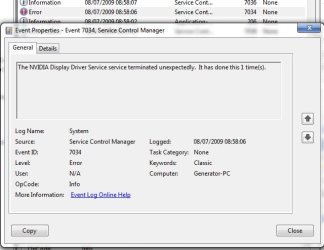
Let's just say my system has been 'heavily' stressed tested on the reboots for the past few days and it's been doing the same thing, first place I looked (Event Viewer) had red nVidia flags for each time it bummed out.
 

My Computer My Computer

Computer Manufacturer/Model Number
Self Built
OS
XP Pro SP3 x86/Vista SP2 x64/Win7 x64 Triple-boot
CPU
AMD64 X2 AM2 5000+
Motherboard
Asus MSN-X Plus
Memory
Corsair TWX 2Gb (2x1Gb) DDR2 800Mhz
Graphics Card(s)
PCI-X 2.0 Inno3D (NVidia) 9500GT 1Gb DDR2
Sound Card
Onboard Realtec ALC662-GR
Monitor(s) Displays
Relisys 17' CRT (model unknown)
Screen Resolution
1024x768
Hard Drives
750Gb Samsung 7200-3Gb/s 32Mb Cache SATA
PSU
500W
Cooling
Standard AMD CPU Fan, One side, front and rear case fan.
Keyboard
Microsoft Multimedia Keyboard
Mouse
Samsung Optical
Internet Speed
10M
You should file a bug report with............oh wait.

To me, the OP's post stands out as a potentially major issue. But, oddly enough, this is the first I've heard of it.

:shock:
Yeah lol no bug reports now...lets hope the RTM addresses the issue and if it is nvidia's fault...let's hope them get to it eventually
 

My Computer My Computer

Computer Manufacturer/Model Number
Compal JFT02 (Custom Build Laptop)
OS
Windows 7 Home Premium x64 - Mac OS X 10.6.4 x64
CPU
Intel Core 2 Duo T9300 2.5 GHz
Motherboard
JFT02
Memory
4GB Kingston DDR2-800
Graphics Card(s)
NVIDIA Geforce 8600M GT (512MB Model)
Sound Card
Realtek HD Audio
Monitor(s) Displays
WUXGA Standard Laptop Display
Screen Resolution
1680*1050
Hard Drives
Toshiba 320GB 5400RPM Laptop HD
PSU
Standard Laptop Power Supply
Case
Standard Laptop Case
Cooling
Standard Laptop Cooling
Keyboard
Standard Laptop 105 Key-Keyboard
Mouse
Synaptics Touchpad
Internet Speed
Verizion Online DSL 3360/864 kbs (dl/up)
I was busy restarting to make it happen again.

I cleared my logs then restarted, My logs are the source.
nVidia.jpg

EDIT: yeah.. there's nowt wrong with nVidia's drivers atm.. :sarc:
 

My Computer My Computer

Computer Manufacturer/Model Number
Self Built
OS
XP Pro SP3 x86/Vista SP2 x64/Win7 x64 Triple-boot
CPU
AMD64 X2 AM2 5000+
Motherboard
Asus MSN-X Plus
Memory
Corsair TWX 2Gb (2x1Gb) DDR2 800Mhz
Graphics Card(s)
PCI-X 2.0 Inno3D (NVidia) 9500GT 1Gb DDR2
Sound Card
Onboard Realtec ALC662-GR
Monitor(s) Displays
Relisys 17' CRT (model unknown)
Screen Resolution
1024x768
Hard Drives
750Gb Samsung 7200-3Gb/s 32Mb Cache SATA
PSU
500W
Cooling
Standard AMD CPU Fan, One side, front and rear case fan.
Keyboard
Microsoft Multimedia Keyboard
Mouse
Samsung Optical
Internet Speed
10M
and... Back to trolling again... (Ignore mode on...)
 

My Computer My Computer

Computer Manufacturer/Model Number
Self Built
OS
XP Pro SP3 x86/Vista SP2 x64/Win7 x64 Triple-boot
CPU
AMD64 X2 AM2 5000+
Motherboard
Asus MSN-X Plus
Memory
Corsair TWX 2Gb (2x1Gb) DDR2 800Mhz
Graphics Card(s)
PCI-X 2.0 Inno3D (NVidia) 9500GT 1Gb DDR2
Sound Card
Onboard Realtec ALC662-GR
Monitor(s) Displays
Relisys 17' CRT (model unknown)
Screen Resolution
1024x768
Hard Drives
750Gb Samsung 7200-3Gb/s 32Mb Cache SATA
PSU
500W
Cooling
Standard AMD CPU Fan, One side, front and rear case fan.
Keyboard
Microsoft Multimedia Keyboard
Mouse
Samsung Optical
Internet Speed
10M
Sorry I forgot to post in here guys. I had just gone into "Safe Mode" and just restored it from the last point my computer saved all my settings and then it went to my password screen. I put it in and my computer loaded up!!!
 

My Computer My Computer

OS
Windows 7
Bit of an update.
I can see no reference to the nvidia drivers in the event log.
I would think that as the system has stopped responding and I have to turn off manually it would possibly not write anything to it anyway.
Nothing has gone wrong today, but it still remains that I can only get round the problem by uninstalling and re-installing the nvidia drivers.
With regard to safe mode, I can boot perfectly in to it whatever so it is pointing towards drivers.
I'm sure it will either 'repair' itself with a newer driver or even go away with the RTM when I install it, Either way, it is only a niggle at the moment as I know how to recover from it.
 

My Computer My Computer

OS
Windows 7 Ultimate RC 7229
CPU
i7 920 D0@4GHz
Memory
12Gig
Back
Top