
I fear serious problems here but have tried all I know to get things working. Any help or advice greatly appreciated.
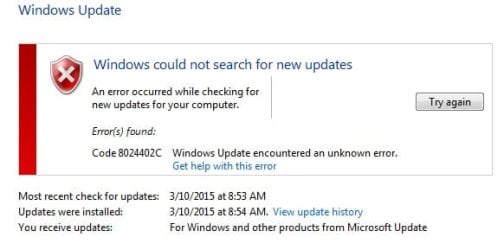
I have been noticing some general sluggishness over last week. Went to do usual manual update for Windows this morning and got notice (image attached, I hope) that "Windows could not search for new updates" "Error Code 8024402C". Have NEVER seen this before!
Here are other symptoms:
1) Then could not open Malwarebytes. Notice said files were missing or corrupted (I had just updated earlier in the day!). The notice had a button to check for updates. Seeing no other route to go, I clicked the button and seemed to receive the usual update stream from Malwarebytes, which then seemed to function normally.
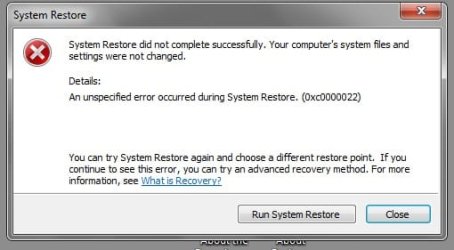
2) Then could not do System Restore. Machine seemed to go through the normal restore process but on restarting a notice said "System restore did not complete successfully." (Attaching screen shot) I've never seen this before!
3) Now cannot open Windows support pages. https://support.microsoft.com/en-us Just get a blank page.
I have downloaded no recent files, made no changes to the computer, or downloaded any updates that I can associate with this problem. The only unusual computer behavior that I've noticed is files opening a little slower than normal, and browser links working slower than usual. (I have an undiagnosed email-sending problem but I think that is unrelated).
Here is what I have tried:
1) System Restore -- No dice!
2) Scanned with Avast and Malwarebytes free versions -- No hits.
3) Ran chkdsk -- it made some small changes but found nothing serious; and running it did not solve anything.
4) I've run all the onboard diagnostics I can find. (The "windows Update troubleshooter" says updater is working, but then when I try it, I get the same error.)
This computer is a desktop, not on a network and has a wired DSL connection. Computer is not used for gaming, has loads of open disk space.
I am at a total loss and out of my computing league here. Don't know if I'm dealing with a virus or some other problem. Even if I try to restore to a past disk image I'm still not sure if that image might also be corrupted.
Any advice greatly appreciated!
I have been noticing some general sluggishness over last week. Went to do usual manual update for Windows this morning and got notice (image attached, I hope) that "Windows could not search for new updates" "Error Code 8024402C". Have NEVER seen this before!
Here are other symptoms:
1) Then could not open Malwarebytes. Notice said files were missing or corrupted (I had just updated earlier in the day!). The notice had a button to check for updates. Seeing no other route to go, I clicked the button and seemed to receive the usual update stream from Malwarebytes, which then seemed to function normally.
2) Then could not do System Restore. Machine seemed to go through the normal restore process but on restarting a notice said "System restore did not complete successfully." (Attaching screen shot) I've never seen this before!
3) Now cannot open Windows support pages. https://support.microsoft.com/en-us Just get a blank page.
I have downloaded no recent files, made no changes to the computer, or downloaded any updates that I can associate with this problem. The only unusual computer behavior that I've noticed is files opening a little slower than normal, and browser links working slower than usual. (I have an undiagnosed email-sending problem but I think that is unrelated).
Here is what I have tried:
1) System Restore -- No dice!
2) Scanned with Avast and Malwarebytes free versions -- No hits.
3) Ran chkdsk -- it made some small changes but found nothing serious; and running it did not solve anything.
4) I've run all the onboard diagnostics I can find. (The "windows Update troubleshooter" says updater is working, but then when I try it, I get the same error.)
This computer is a desktop, not on a network and has a wired DSL connection. Computer is not used for gaming, has loads of open disk space.
I am at a total loss and out of my computing league here. Don't know if I'm dealing with a virus or some other problem. Even if I try to restore to a past disk image I'm still not sure if that image might also be corrupted.
Any advice greatly appreciated!
My Computer
At a glance
Windows 7 pro 64bit - SP1Intel core-134.0 GB
- Computer type
- PC/Desktop
- Computer Manufacturer/Model Number
- Acer Veriton - X4610G
- OS
- Windows 7 pro 64bit - SP1
- CPU
- Intel core-13
- Memory
- 4.0 GB
- Antivirus
- Avast-free and Malwarebytes-free
- Browser
- IE-10


