
Windows won't update. Always asking for a restart. Noerror code

Presac

New member
Local time
8:43 AM
Messages
17
Every restart, windows requests for a restart to install updates. There are no error codes. See the picture (which sadly is in danish, so if any explaining is need, I will help with it).
It is starting to be a big problem, because sometimes it not just the pop-up where you can postpone the restart, but instead the forced restart one.
I have followed http://www.sevenforums.com/windows-...4840-windows-update-posting-instructions.html and gotten the files for it.
The System Update Readiness Tool did not do anything.
The zipped CBS folder is to big to be attached to the thread (90,5MB) so here is a link to a google drive upload. I hope it will do instead. but if I am not wrong, some of the information should be in the sfcdetails.txt gotten from findstr /c:"[SR]" %windir%\Logs\CBS\CBS.log >"%userprofile%\Desktop\sfcdetails.txt".

I have tried running a MicrosoftFixit, and the only thing it resulted in was making the two "Aldrig" appear, which means "Never". When browsing Update History, it is empty.
update.png

Edit: Reading some of the other new threads, I tried running the WindowsUpdateDiagnostic.diagcab, which gave me the following error: 0x80070005.
Tried using Reset_Windows_Update_Full.bat linked in another similar thread, but didn't solve it.
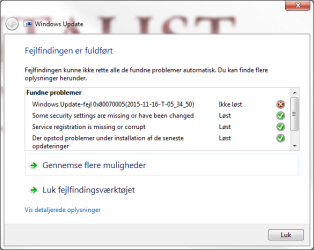
diagnostic.png
 

Attachments

Last edited:

My Computer

Computer type
PC/Desktop
Computer Manufacturer/Model Number
Vision Computer
OS
Windows 7 Professional x64
CPU
Intel Core i7 3770K CPU @ 3.50GHz 3.90GHz
Motherboard
Gigabyte Technology Co., Ltd. Z77X-D3H
Memory
8,00GB Kingston Dual-Channel DDR3
Graphics Card(s)
NVIDIA GeForce GTX 660
Hard Drives
1TB Seagate ST1000DM ST1000DM003-1CH1 SCSI Disk Device (SATA)
120GB Samsung SSD 840 Series SCSI Disk Device (SSD)
Antivirus
Bullguard
Browser
Chrome
Hi Presac & welcome to sevenforums.

Error code 0x80070005 is also known as "ACCESS DENIED." It usually occurs when you lack file or registry permissions that are required to install the update.

Check whether the System Volume Information attributes is set to Read only. If it is, uncheck it. Right click on SVI >Properties. While in the Properties tab, check the Security settings and that System has been given Full control.

For this you have to unhide all hidden folders and protected Operating system files in Folder Options > View.

When done do not forget to hide them again.
 

My Computer

Computer type
Laptop
OS
Win 7 Home Premium x64/Linux Lite 2.6 x64
The read only was partly clicked (blue square), have unclicked it now. The system already had full control.
Did a two restart and the problem persists.
 

My Computer

Computer type
PC/Desktop
Computer Manufacturer/Model Number
Vision Computer
OS
Windows 7 Professional x64
CPU
Intel Core i7 3770K CPU @ 3.50GHz 3.90GHz
Motherboard
Gigabyte Technology Co., Ltd. Z77X-D3H
Memory
8,00GB Kingston Dual-Channel DDR3
Graphics Card(s)
NVIDIA GeForce GTX 660
Hard Drives
1TB Seagate ST1000DM ST1000DM003-1CH1 SCSI Disk Device (SATA)
120GB Samsung SSD 840 Series SCSI Disk Device (SSD)
Antivirus
Bullguard
Browser
Chrome
We can try this

[FONT=&quot]Download the [/FONT][FONT=&quot]SubInACL tool[/FONT][FONT=&quot], and install it to the default path that is offered by the installer. [/FONT]
[FONT=&quot]
[/FONT]
[FONT=&quot]Download attached [/FONT]Reset Permissions, Windows Update.zip & extract to desktop.


Right-click Reset Permissions, Windows Update.cmd


Choose Run as Administrator[FONT=&quot]
[/FONT]

Try windows update again.
 

Attachments

Last edited:

My Computer

Computer type
Laptop
OS
Win 7 Home Premium x64/Linux Lite 2.6 x64
I have already tried looking into system restore points, but have no one before the issue. Or rather, I have one at 3. Decemeber 2013, but that is so far back I could just as well reinstall.

I have already looked into a lot of other error threads and post with the same error on the internet, but nothing really seem to fix it.

And I really should start making some images of my computer from time to time. Have one from when I got my computer in May 2013, there are just so many programs I need to list to make sure I get them again. I would rather try some more solutions before reverting it 2 years.
 

My Computer

Computer type
PC/Desktop
Computer Manufacturer/Model Number
Vision Computer
OS
Windows 7 Professional x64
CPU
Intel Core i7 3770K CPU @ 3.50GHz 3.90GHz
Motherboard
Gigabyte Technology Co., Ltd. Z77X-D3H
Memory
8,00GB Kingston Dual-Channel DDR3
Graphics Card(s)
NVIDIA GeForce GTX 660
Hard Drives
1TB Seagate ST1000DM ST1000DM003-1CH1 SCSI Disk Device (SATA)
120GB Samsung SSD 840 Series SCSI Disk Device (SSD)
Antivirus
Bullguard
Browser
Chrome
Did you try post #4?
 
Last edited:

My Computer

Computer type
Laptop
OS
Win 7 Home Premium x64/Linux Lite 2.6 x64
Ran SubInACL, did not solve it.
I did a complete virus scan with Bullguard yesterday. It found something, but still not solved the update problem.
 

My Computer

Computer type
PC/Desktop
Computer Manufacturer/Model Number
Vision Computer
OS
Windows 7 Professional x64
CPU
Intel Core i7 3770K CPU @ 3.50GHz 3.90GHz
Motherboard
Gigabyte Technology Co., Ltd. Z77X-D3H
Memory
8,00GB Kingston Dual-Channel DDR3
Graphics Card(s)
NVIDIA GeForce GTX 660
Hard Drives
1TB Seagate ST1000DM ST1000DM003-1CH1 SCSI Disk Device (SATA)
120GB Samsung SSD 840 Series SCSI Disk Device (SSD)
Antivirus
Bullguard
Browser
Chrome
Tweaking.com has free program, I've used it a few times, might want to take a look see. Prompts for backups when necessary. Maybe you've already been there, done that.

Been dealing with your error code on other threads, unfortunately, not having many positive results short of repair install, some failing, including yours, tried several workarounds, to no avail. :o

Never liked being stumped when it comes to locating a solution to a problem. :(

Pretty patient in regards to computer issues, no so on some others. :o

By your posts, I'm sure you Googled your issue, & tried various fixes. I totally understand if your frustrated. :)
 

My Computer

Computer type
Laptop
OS
Win 7 Home Premium x64/Linux Lite 2.6 x64
I sure have Googled a lot. In most of the Microsoft solutions, the SubInACL is something the answer with. This forum is last thing I am trying before making a bigger reset/reinstall.
 

My Computer

Computer type
PC/Desktop
Computer Manufacturer/Model Number
Vision Computer
OS
Windows 7 Professional x64
CPU
Intel Core i7 3770K CPU @ 3.50GHz 3.90GHz
Motherboard
Gigabyte Technology Co., Ltd. Z77X-D3H
Memory
8,00GB Kingston Dual-Channel DDR3
Graphics Card(s)
NVIDIA GeForce GTX 660
Hard Drives
1TB Seagate ST1000DM ST1000DM003-1CH1 SCSI Disk Device (SATA)
120GB Samsung SSD 840 Series SCSI Disk Device (SSD)
Antivirus
Bullguard
Browser
Chrome
Did you try post #4

I'll keep researching on your error code, I don't like being stumped when it comes to providing a solution to a problem. :o

Haven't had many positive results with trying to fix your error code, haven't located solutions that really work for anyone. Many have same issue as yours regarding Repair Install. Repair install error workarounds haven't produced many positive results either.

Almost anyone can reformat and reinstall windows. I don't feel that is a educated, viable fix!

If we run out of ideas, you might want to give NoelDP a should. Brilliant man. Read his posts, not easy error code fix.

Tom182 is the Windows Update Expert, however, he is in training for Malware Removal, & stated he wants to concentrate on his studies. I did give him a should regarding hive corruptions, which he said was easy fix, & provided solution. Don't believe he would feel the same way regarding your error code, being all the fixes you & I have attempted.
 

My Computer

Computer type
Laptop
OS
Win 7 Home Premium x64/Linux Lite 2.6 x64
Yes, I did try post #4. And I just appreciate the help.
 

My Computer

Computer type
PC/Desktop
Computer Manufacturer/Model Number
Vision Computer
OS
Windows 7 Professional x64
CPU
Intel Core i7 3770K CPU @ 3.50GHz 3.90GHz
Motherboard
Gigabyte Technology Co., Ltd. Z77X-D3H
Memory
8,00GB Kingston Dual-Channel DDR3
Graphics Card(s)
NVIDIA GeForce GTX 660
Hard Drives
1TB Seagate ST1000DM ST1000DM003-1CH1 SCSI Disk Device (SATA)
120GB Samsung SSD 840 Series SCSI Disk Device (SSD)
Antivirus
Bullguard
Browser
Chrome
Another forum you might want to check is Sysnative forum

Administrator Brian Drab will most likely inform you that you have a thread started in this forum.

You could close your thread here, & open one in sysnative.

I'd really satisfy my frustration if someone would provide a definitive solution.

Pretty sure I'm going to enroll in Windows Update Academy there in the very near future. One of their requirements, is during training, to refrain from assisting other, except for the ones permitted during training.
 

My Computer

Computer type
Laptop
OS
Win 7 Home Premium x64/Linux Lite 2.6 x64
I might try that. And I, too, do not like moving on without knowing the cause and solution.
 

My Computer

Computer type
PC/Desktop
Computer Manufacturer/Model Number
Vision Computer
OS
Windows 7 Professional x64
CPU
Intel Core i7 3770K CPU @ 3.50GHz 3.90GHz
Motherboard
Gigabyte Technology Co., Ltd. Z77X-D3H
Memory
8,00GB Kingston Dual-Channel DDR3
Graphics Card(s)
NVIDIA GeForce GTX 660
Hard Drives
1TB Seagate ST1000DM ST1000DM003-1CH1 SCSI Disk Device (SATA)
120GB Samsung SSD 840 Series SCSI Disk Device (SSD)
Antivirus
Bullguard
Browser
Chrome

My Computer

Computer type
PC/Desktop
Computer Manufacturer/Model Number
medionl/Aspire 6930G/acer x55a
OS
W7 home premium 32bit/W7HP 64bit/w10 tp insider ring
CPU
E5300 dual core
Motherboard
medion MS7366
Memory
3gb
Graphics Card(s)
Nvidia Geforce 7100 Nforce 630i
Monitor(s) Displays
avixc
Internet Speed
n (isp resticted to 72)
Antivirus
mse/pands
Browser
palemoon
Other Info
Belkin Fd7050 n USB using Railink RT2870 drivers, more upto date
There is no pending.xml file in the folder.
 

My Computer

Computer type
PC/Desktop
Computer Manufacturer/Model Number
Vision Computer
OS
Windows 7 Professional x64
CPU
Intel Core i7 3770K CPU @ 3.50GHz 3.90GHz
Motherboard
Gigabyte Technology Co., Ltd. Z77X-D3H
Memory
8,00GB Kingston Dual-Channel DDR3
Graphics Card(s)
NVIDIA GeForce GTX 660
Hard Drives
1TB Seagate ST1000DM ST1000DM003-1CH1 SCSI Disk Device (SATA)
120GB Samsung SSD 840 Series SCSI Disk Device (SSD)
Antivirus
Bullguard
Browser
Chrome
Been dealing with your error code on several other posts. Unsuccessfully I might add. :(
Sysnative forum included. :)

I've been monitoring your error code on this forum & others. Appears your error code is not an easy fix & most resolutions are Repair Install

That would correct your problem.

You would need win7 DVD & your 25 character product key.
 

My Computer

Computer type
Laptop
OS
Win 7 Home Premium x64/Linux Lite 2.6 x64
Something odd happened. Windows Update have installed KB3100213. Apparently happened 17-november.

But I still can't check for updates and it keeps asking for a restart.
 

My Computer

Computer type
PC/Desktop
Computer Manufacturer/Model Number
Vision Computer
OS
Windows 7 Professional x64
CPU
Intel Core i7 3770K CPU @ 3.50GHz 3.90GHz
Motherboard
Gigabyte Technology Co., Ltd. Z77X-D3H
Memory
8,00GB Kingston Dual-Channel DDR3
Graphics Card(s)
NVIDIA GeForce GTX 660
Hard Drives
1TB Seagate ST1000DM ST1000DM003-1CH1 SCSI Disk Device (SATA)
120GB Samsung SSD 840 Series SCSI Disk Device (SSD)
Antivirus
Bullguard
Browser
Chrome
Back
Top