winrar functions, what do they do

junjun

New member
Local time
9:10 AM
Messages
76
There are some function of winrar that I don't know what they do.

1) change drive(complete no idea what it does)

2) virus scan (it has a in-built scanner? Or it use your anti virus?)

3) self extract: if you double click a rar archive and click the self extract what does it do? Extract itself where?

4) extract whithout confirmation means it will extract itself without you knowing?
 

My Computer My Computer

Computer type
Laptop
Computer Manufacturer/Model Number
HP
OS
windows 7
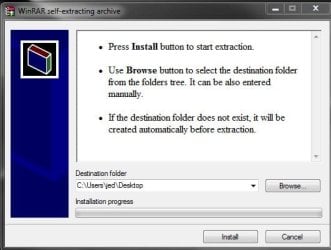
self extract creates an exe file that will extract without the recipient needing winrar. the dialog box lets you browse to a destination folder (eg desktop). the recipient of a self extract file must have the same OS ie an exe created in Windows will not open on a Mac. one downside is that some email progs (eg gmail) don't allow exe attachments, because they are often a virus. see pic of self extract in progress

self_extract.jpg
 

My Computer My Computer

Computer type
PC/Desktop
Computer Manufacturer/Model Number
self build
OS
Windows 7 pro x64 SP1
CPU
Intel i7-2600k o/c to 4.6GHz
Motherboard
MSI Z68-GD80
Memory
8GB Mushkin 1866MHz
Graphics Card(s)
Nvidia GTX 750 Ti 2GB
Sound Card
integrated
Monitor(s) Displays
Liyama ProLite 27"
Screen Resolution
1920*1080 px
Hard Drives
Seagate 2TB
PSU
Coolermaster GX 750W
Case
Antec 300 case + 5 fans
Cooling
Dark Rock Pro
Internet Speed
62Mbit down 18Mbit up
Antivirus
MSE
Browser
Firefox
Other Info
Blackgold BGT3650 Quad HD TV card. Also have various 3770 + 4770K render boxes.
1) change drive(complete no idea what it does)

It's just like a shortcut to show another drive in the main WinRar window. Goes to the root of the drive you select only, nothing fancy. I believe this is mostly a leftover from the very first versions


2) virus scan (it has a in-built scanner? Or it use your anti virus?)

Again a shortcut, this time to your antivirus. What it does is to ask for your AV executable (first time, then saved in config), extract the whole contents of rar to a temp folder, and run your AV on them.


3) self extract: if you double click a rar archive and click the self extract what does it do? Extract itself where?

It takes a .rar file and makes a .exe out of it. The purpose is to create a file that can be decompressed on its own (hence the name "self-extracting"). With a regular .rar file, you need to have WinRar to get its contents (or anything compatible, like WinZip or 7Zip). Self extracting .exe files are totally independent from those programs.


4) extract whithout confirmation means it will extract itself without you knowing?

It does the very same extraction as normal, but in case of conflicts (like existing destination file) it will NOT prompt you, but instead overwrite without asking. Of course you'll know, as you're clicking that button for initiation that action.
 

My Computer My Computer

Computer type
Laptop
Computer Manufacturer/Model Number
Toshiba Sattelite A665-S6092
OS
Windows 7 Ultimate x64
CPU
Intel Core i7-740QM
Memory
8 GB DDR3
Graphics Card(s)
NVIDIA GeForce 330GT
Screen Resolution
1366x768
Hard Drives
Samsung 840 SSD 500GB
1TB USB3 external HD
Cooling
Coolermaster Notepal U3 notebook cooling pad
Internet Speed
3mbps ASDL
Antivirus
ClamWin 0.98.7
Browser
Opera 12.17 x86 (main), Firefox 38 (sec), IE11 (last resort)
Back
Top