Wired connection dead after moving home

TimmyP

New member
Local time
8:33 PM
Messages
5
Hey folks,

I moved home not long ago and took my router with me.

Since then, the laptops with wireless connections are working fine, but my wired desktop isn't connecting to the internet.

Chrome says it's a DNS problem, Windows just connects to an unknown network and gets nowhere..

What am I doing wrong? I know what DNS is, but as far as configuring it I'm pretty stumped.

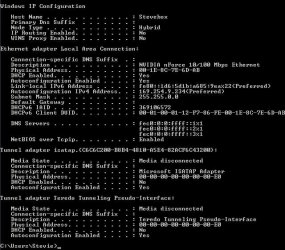
Attached is a grab of my ipconfig.

Thanks all :)
 

Attachments

  • ipconfig.jpg
    ipconfig.jpg
    54.9 KB · Views: 13

My Computer My Computer

At a glance

Windows 7 Ultimate x64
OS
Windows 7 Ultimate x64
Well the most obvious thing would be if dhcp was turned off on the router.

But also, if you have installed Photoshop or any other Adobe software you may be the victim of some Apple software installed with it. I believe it was called "Rendevous"(sp). If you see that that service is installed, it may be blocking your computer from getting dhcp.

It's also possible to burn out ehternet poirs rather easy, haveyou tried a different port onthe router? and/or maybeyour computer if you have more than one?
 

My Computer My Computer

At a glance

Windows 7 x64 Ultimatei7 96012 Gig Corsair DominatorNvidia 480
Computer Manufacturer/Model Number
Scratch built
OS
Windows 7 x64 Ultimate
CPU
i7 960
Motherboard
Asus P6X58D
Memory
12 Gig Corsair Dominator
Graphics Card(s)
Nvidia 480
Sound Card
Maudio Delta 44 + breakout box
Monitor(s) Displays
Dell UltraSharp U2410 24in and Samsung 21 dual monitors
Screen Resolution
1920x1200 and 1280x1024
Hard Drives
Primary: Intel X-25M G2 160G SSD
Secondary: Segate baracuda 1.0 TB
HDs in AHCI mode.
PSU
Corasair TX850
Case
Cooler Master HAF
Cooling
Corsair H50
Keyboard
Logitech G15 + N52 game pad
Mouse
Logitech MX518
Internet Speed
15kbs down 4.5kbps up
Other Info
WEI 7.6
CPU & RAM 7.6
Graphics 7.9
Hard disk 7.7
Will check the router for DHCP shortly. I do have some Adobe software.. I'll check for rendezvous too.

I did think it might have been a broken port/card. I've tried different ports on the router, but there's only one on my computer. Could well be that?

Just seems odd that it would do that, as it seems to have occurred because of moving house
 

My Computer My Computer

At a glance

Windows 7 Ultimate x64
OS
Windows 7 Ultimate x64
Hi Timmy, welcome o sevenforums. The address you have in the image is the default one and there is no default gateway number. Since the lappy's are working OK I would try a different ethernet cable if you have one available as these are the weakest part of the setup and can cause fault symptoms like these.
 

My Computer My Computer

At a glance

win7
OS
win7
Hi folks,

DHCP on the router is on.. And tried a different cable to no avail.. Checked for rendezvous, bonjour, and any other apple/adobe software that could be interfering but nothing.

Pretty stumped as to what it could be to be honest..

Is it just me or does it look like the network card failing? But it just really seems like it could be down to moving house too..
 

My Computer My Computer

At a glance

Windows 7 Ultimate x64
OS
Windows 7 Ultimate x64
Well you've eliminated just about everything else. You have a spare network card you can put in? That would be the easiest thing without s0pending money randomly...

It's amazingly east to "pop" any ethernet port when you plug in a net cable. So merely hooking it back up in your new place could have done it. Linksys devices were always SUPER prone to this. I had an 8 port router with only 4 working ports at once time. And it can happen at either end of course...
 

My Computer My Computer

At a glance

Windows 7 x64 Ultimatei7 96012 Gig Corsair DominatorNvidia 480
Computer Manufacturer/Model Number
Scratch built
OS
Windows 7 x64 Ultimate
CPU
i7 960
Motherboard
Asus P6X58D
Memory
12 Gig Corsair Dominator
Graphics Card(s)
Nvidia 480
Sound Card
Maudio Delta 44 + breakout box
Monitor(s) Displays
Dell UltraSharp U2410 24in and Samsung 21 dual monitors
Screen Resolution
1920x1200 and 1280x1024
Hard Drives
Primary: Intel X-25M G2 160G SSD
Secondary: Segate baracuda 1.0 TB
HDs in AHCI mode.
PSU
Corasair TX850
Case
Cooler Master HAF
Cooling
Corsair H50
Keyboard
Logitech G15 + N52 game pad
Mouse
Logitech MX518
Internet Speed
15kbs down 4.5kbps up
Other Info
WEI 7.6
CPU & RAM 7.6
Graphics 7.9
Hard disk 7.7
Will try all the ports on the router, then try finding a decent wireless card with an ethernet adapter on Amazon tomorrow.. Any suggestions? :cool:
 

My Computer My Computer

At a glance

Windows 7 Ultimate x64
OS
Windows 7 Ultimate x64
Wireless card? For your desktop? Just need a plain ethernet adapter unles you really did want to go wireless from your desktop.

I don't really have any brand suggestions... Linksys are cheap and functional but prone to burnout (historicly). Maybe better now that they are owned by Cicso. Been using Netgear stuff at home lately, seems ok.
 

My Computer My Computer

At a glance

Windows 7 x64 Ultimatei7 96012 Gig Corsair DominatorNvidia 480
Computer Manufacturer/Model Number
Scratch built
OS
Windows 7 x64 Ultimate
CPU
i7 960
Motherboard
Asus P6X58D
Memory
12 Gig Corsair Dominator
Graphics Card(s)
Nvidia 480
Sound Card
Maudio Delta 44 + breakout box
Monitor(s) Displays
Dell UltraSharp U2410 24in and Samsung 21 dual monitors
Screen Resolution
1920x1200 and 1280x1024
Hard Drives
Primary: Intel X-25M G2 160G SSD
Secondary: Segate baracuda 1.0 TB
HDs in AHCI mode.
PSU
Corasair TX850
Case
Cooler Master HAF
Cooling
Corsair H50
Keyboard
Logitech G15 + N52 game pad
Mouse
Logitech MX518
Internet Speed
15kbs down 4.5kbps up
Other Info
WEI 7.6
CPU & RAM 7.6
Graphics 7.9
Hard disk 7.7
A bit odd, I know.. My reasoning being that if it's not down to the port failing and is something more, at least I'll be able to give up on it and just use the wireless.. In theory :)

The router we have is Netgear so I'll have a dig about for something reasonable.
 

My Computer My Computer

At a glance

Windows 7 Ultimate x64
OS
Windows 7 Ultimate x64
have u tried taking ur PC just for example round to a friends house? just for 30 seconds, power on see if it finds it through 'there ethernet' and u'll have ur answer, could easily have a knock an ur NIC has died.

or even bringing a laptop/desktop to urs.
 

My Computer My Computer

At a glance

Windows 7 Ultimate N 64-bitAMD Black Edition - AMD Phenom X4 2.5 GHz Pro...8GB DDR2 800MHZ BRANDEDPalti NVIDIA GeForce GTX 460
Computer Manufacturer/Model Number
Windows 7 Ultimate 64-bit
OS
Windows 7 Ultimate N 64-bit
CPU
AMD Black Edition - AMD Phenom X4 2.5 GHz Processor
Motherboard
Bio Star
Memory
8GB DDR2 800MHZ BRANDED
Graphics Card(s)
Palti NVIDIA GeForce GTX 460
Monitor(s) Displays
3D 23.6" & 22"
Screen Resolution
1920x1080@120Hz
Hard Drives
313GB SAMSUNG SAMSUNG HD321KJ
PSU
OCZ 600W StealthXStream PSU, PowerWhisper, Active PFC
Internet Speed
22793
Back
Top