I'll start from the very beginning in hopes that it will help to receive as much advice/information as possible. I first did a clean install of Windows 7 Home Premium on my ASUS 1015-PEM Eee PC. Then, out of nowhere one day, my wireless stopped working. I tried everything to no avail. Remembering that after the clean install the wireless card was recognized and working properly, I re-installed Windows again the exact same way as before. This time Windows did not find my wireless network adapter, only showing the LAN card in Device Manager under Network Adapters. So, my basic question is; Since after the first clean re-install of Windows 7 the OS immediately recognized the wireless card, why would the OS not show the wireless adapter this time after re-installing windows again? I didn't install any drivers the first time around, and IT WAS RECOGNIZED. This leads me to believe it's not a driver issue. How do you get Windows to recognize the wireless adapter?
Things I have tried thusfar are as follows;


Things I have tried thusfar are as follows;
- WLAN is indeed enabled in the BIOS.
- WiFi is indeed toggled on, on the physical netbook itself. WiFi LED is lit blue (on).
- Tried every one of the drivers listed on the support page HERE.
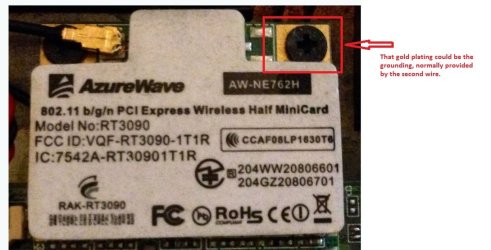
- Took apart the entire netbook to verify exact wireless card model, finding it to be AzureWave AW-NE762H OR Ralink RAK-RT3090. (Pictured below)
- NOTE: The drivers on the ASUS page provide the NE762H which installs "Ralink RT2860." I then found a driver for RT3090 HERE as it actually says on the physical card which I tried as well.
- Full clean re-install of Windows (as mentioned earlier) since the wireless was working after I first re-installed Windows.
My Computer
At a glance
Windows 7Core i7 870CORSAIR Vengence 16GBAMD Radeon HD 5570 2GB
- Computer type
- PC/Desktop
- OS
- Windows 7
- CPU
- Core i7 870
- Memory
- CORSAIR Vengence 16GB
- Graphics Card(s)
- AMD Radeon HD 5570 2GB
- Internet Speed
- 55Mbps / 6Mbps