JavaScript is disabled. For a better experience, please enable JavaScript in your browser before proceeding.
You are using an out of date browser. It may not display this or other websites correctly.
You should upgrade or use an
alternative browser .
Wireless Capability Turned Off
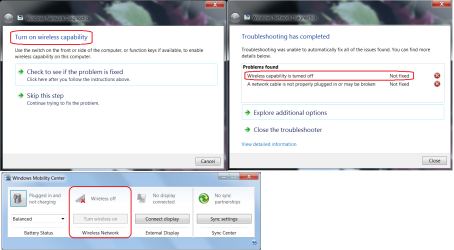
This is my TV PC. HP Pavilion model p7-1219. It's been working grate for more then a year now but to day after work I lost WIFI. Here's a pic of the trouble shooter. I installed the Mobility Center from brinks post "Enable Windows Mobility Center on a Desktop Windows PC" No link you'll have to look it up. In the Mobility Center the wireless is grayed out. If this was a laptop it'd be anther story but it a tower! No FN key and no WIFI switch. For the life of me I can't figure this out. How do I turn the Wireless Capability ON. Any ideas??
Untitled.png
71 KB
· Views: 1
Windows 10 Pro 64 bit AMD FX 9590 8 Core Black Edition Corsair Vengeance 16GB DDR3 AMD Radeon (TM) R9 380 Gaming Series PC/Desktop Custom Built By Me. Windows 10 Pro 64 bit AMD FX 9590 8 Core Black Edition MSI 990FXA GAMING (MS-7893) Corsair Vengeance 16GB DDR3 AMD Radeon (TM) R9 380 Gaming Series AMD High Definition Samsung 32" 60Hz 4ms Curved PLS LED 1920 X 1080 C: 223 GB SSD = E: 465 GB HDD = F: 931 GB HDD = G: 149 GB HDD = H: 931 GB HDD EVGA Supernova NEX750B 750W ATX EPS12V 80PLUS Bronze Cool Master Noctua NH-D15 Premium Cooler with 2x NF-A15 PWM 140mm Fan Fiber Optic: Download 332.7 Mbps / Upload 331.5 Mbps Windows Defender Slimjet (64bit)
Windows 7 x64, Vista x64, 8.1 smartphone Intel E8400 65W 64-bit DDR2 2 x 2GB, 1GB x 2 XFX Radeon HD5750 PC/Desktop Windows 7 x64, Vista x64, 8.1 smartphone Intel E8400 65W 64-bit Gigabyte EP45-UD3LR DDR2 2 x 2GB, 1GB x 2 XFX Radeon HD5750 AMD High Definition Audio; Realtek High Definition Audio iiyama prolite X2377HDS 1920 x 1080 500GB 7200 rpm Seagate ST3500413AS 16MB, 500GB 5400 rpm Toshiba MQ02ABF050H 32MB, 200GB 7200 rpm Seagate ST3200820AS 8MB, 2TB 7200 rpm Western Digital WD20EZRX 64MB Enermax Liberty Modular Antec P193 Midi Tower Mionix ZIBAL 60 Razer USB 2.0 Diamondback Mouse or Huion Graphics Tablet Internet Explorer, Lunascape, Firefox, Opera, Avast Safezone
New member
Pro User
VIP
Thread Starter
Hello Lance1,
you have a HP machine. Then perhaps this thread is relevant/of use to you:
Cannot turn Wireless On
HP has a setting in the BIOS for LAN/WLAN Switching
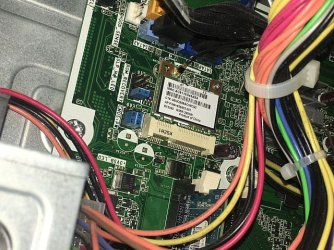
The OP says that going to this setting in the BIOS fixed the issue. I have no such setting in this BIOS. The WIFI card is recognized in the Control Panel and Network but "Not Connected". I pulled the WIFI card and boot up and shutdown reinsert and boot in hopes that it'll reset but no joy. All and any help welcome thank you.
IMG_4910.JPG
109.1 KB
· Views: 10
Windows 10 Pro 64 bit AMD FX 9590 8 Core Black Edition Corsair Vengeance 16GB DDR3 AMD Radeon (TM) R9 380 Gaming Series PC/Desktop Custom Built By Me. Windows 10 Pro 64 bit AMD FX 9590 8 Core Black Edition MSI 990FXA GAMING (MS-7893) Corsair Vengeance 16GB DDR3 AMD Radeon (TM) R9 380 Gaming Series AMD High Definition Samsung 32" 60Hz 4ms Curved PLS LED 1920 X 1080 C: 223 GB SSD = E: 465 GB HDD = F: 931 GB HDD = G: 149 GB HDD = H: 931 GB HDD EVGA Supernova NEX750B 750W ATX EPS12V 80PLUS Bronze Cool Master Noctua NH-D15 Premium Cooler with 2x NF-A15 PWM 140mm Fan Fiber Optic: Download 332.7 Mbps / Upload 331.5 Mbps Windows Defender Slimjet (64bit)
Lance1,
Windows 7 x64, Vista x64, 8.1 smartphone Intel E8400 65W 64-bit DDR2 2 x 2GB, 1GB x 2 XFX Radeon HD5750 PC/Desktop Windows 7 x64, Vista x64, 8.1 smartphone Intel E8400 65W 64-bit Gigabyte EP45-UD3LR DDR2 2 x 2GB, 1GB x 2 XFX Radeon HD5750 AMD High Definition Audio; Realtek High Definition Audio iiyama prolite X2377HDS 1920 x 1080 500GB 7200 rpm Seagate ST3500413AS 16MB, 500GB 5400 rpm Toshiba MQ02ABF050H 32MB, 200GB 7200 rpm Seagate ST3200820AS 8MB, 2TB 7200 rpm Western Digital WD20EZRX 64MB Enermax Liberty Modular Antec P193 Midi Tower Mionix ZIBAL 60 Razer USB 2.0 Diamondback Mouse or Huion Graphics Tablet Internet Explorer, Lunascape, Firefox, Opera, Avast Safezone
I WANT TO BELIEVE!
Guru
Gold Member
VIP
Win 7 HP SP1 64-bit Vista HB SP2 32-bit Linux... Intel(R) Pentium(R) CPU P6200 @ 2.13GHz 4.00 GB Intel(R) Graphics Media Accelerator HD Laptop Fujitsu LIFEBOOK Win 7 HP SP1 64-bit Vista HB SP2 32-bit Linux Mint 18.3 Intel(R) Pentium(R) CPU P6200 @ 2.13GHz FUJITSU FJNBB06 4.00 GB Intel(R) Graphics Media Accelerator HD [1] Realtek High Definition Audio [2] Intel(R) Display Audio 1366 x 768 x 32 bits (4294967296 colors) @ 59 Hz TOSHIBA MK5076GSX AVG FREE
New member
Pro User
VIP
Thread Starter
Lance1,
It says that it just fine.
DM.png
43.6 KB
· Views: 0
Windows 10 Pro 64 bit AMD FX 9590 8 Core Black Edition Corsair Vengeance 16GB DDR3 AMD Radeon (TM) R9 380 Gaming Series PC/Desktop Custom Built By Me. Windows 10 Pro 64 bit AMD FX 9590 8 Core Black Edition MSI 990FXA GAMING (MS-7893) Corsair Vengeance 16GB DDR3 AMD Radeon (TM) R9 380 Gaming Series AMD High Definition Samsung 32" 60Hz 4ms Curved PLS LED 1920 X 1080 C: 223 GB SSD = E: 465 GB HDD = F: 931 GB HDD = G: 149 GB HDD = H: 931 GB HDD EVGA Supernova NEX750B 750W ATX EPS12V 80PLUS Bronze Cool Master Noctua NH-D15 Premium Cooler with 2x NF-A15 PWM 140mm Fan Fiber Optic: Download 332.7 Mbps / Upload 331.5 Mbps Windows Defender Slimjet (64bit)
New member
Pro User
VIP
Thread Starter
Hi
Lance1 ,
You could run my
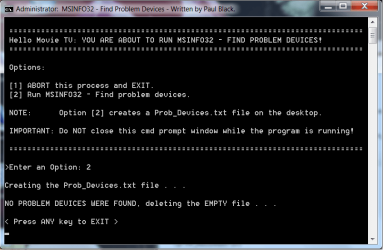
Problem_Devices batch script to find any problems and errors =>
View attachment 409417 .
I hope this helps!
It says nothing was found.
PF.png
23.2 KB
· Views: 0
Windows 10 Pro 64 bit AMD FX 9590 8 Core Black Edition Corsair Vengeance 16GB DDR3 AMD Radeon (TM) R9 380 Gaming Series PC/Desktop Custom Built By Me. Windows 10 Pro 64 bit AMD FX 9590 8 Core Black Edition MSI 990FXA GAMING (MS-7893) Corsair Vengeance 16GB DDR3 AMD Radeon (TM) R9 380 Gaming Series AMD High Definition Samsung 32" 60Hz 4ms Curved PLS LED 1920 X 1080 C: 223 GB SSD = E: 465 GB HDD = F: 931 GB HDD = G: 149 GB HDD = H: 931 GB HDD EVGA Supernova NEX750B 750W ATX EPS12V 80PLUS Bronze Cool Master Noctua NH-D15 Premium Cooler with 2x NF-A15 PWM 140mm Fan Fiber Optic: Download 332.7 Mbps / Upload 331.5 Mbps Windows Defender Slimjet (64bit)
It says that it just fine.
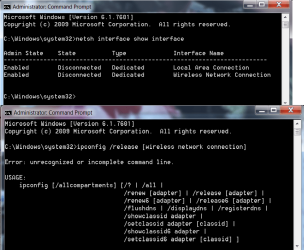
From a command prompt window, type:
netsh interface show interface
- what is the State of the wifi interface?
Windows 7 x64, Vista x64, 8.1 smartphone Intel E8400 65W 64-bit DDR2 2 x 2GB, 1GB x 2 XFX Radeon HD5750 PC/Desktop Windows 7 x64, Vista x64, 8.1 smartphone Intel E8400 65W 64-bit Gigabyte EP45-UD3LR DDR2 2 x 2GB, 1GB x 2 XFX Radeon HD5750 AMD High Definition Audio; Realtek High Definition Audio iiyama prolite X2377HDS 1920 x 1080 500GB 7200 rpm Seagate ST3500413AS 16MB, 500GB 5400 rpm Toshiba MQ02ABF050H 32MB, 200GB 7200 rpm Seagate ST3200820AS 8MB, 2TB 7200 rpm Western Digital WD20EZRX 64MB Enermax Liberty Modular Antec P193 Midi Tower Mionix ZIBAL 60 Razer USB 2.0 Diamondback Mouse or Huion Graphics Tablet Internet Explorer, Lunascape, Firefox, Opera, Avast Safezone
If you typeipconfig /release [adaptor]
Windows 7 x64, Vista x64, 8.1 smartphone Intel E8400 65W 64-bit DDR2 2 x 2GB, 1GB x 2 XFX Radeon HD5750 PC/Desktop Windows 7 x64, Vista x64, 8.1 smartphone Intel E8400 65W 64-bit Gigabyte EP45-UD3LR DDR2 2 x 2GB, 1GB x 2 XFX Radeon HD5750 AMD High Definition Audio; Realtek High Definition Audio iiyama prolite X2377HDS 1920 x 1080 500GB 7200 rpm Seagate ST3500413AS 16MB, 500GB 5400 rpm Toshiba MQ02ABF050H 32MB, 200GB 7200 rpm Seagate ST3200820AS 8MB, 2TB 7200 rpm Western Digital WD20EZRX 64MB Enermax Liberty Modular Antec P193 Midi Tower Mionix ZIBAL 60 Razer USB 2.0 Diamondback Mouse or Huion Graphics Tablet Internet Explorer, Lunascape, Firefox, Opera, Avast Safezone
New member
Pro User
VIP
Thread Starter
Thanks for your help iKO22. I ran both commands. here are the results.
IP.png
35.6 KB
· Views: 0
IP2.png
18.9 KB
· Views: 0
Windows 10 Pro 64 bit AMD FX 9590 8 Core Black Edition Corsair Vengeance 16GB DDR3 AMD Radeon (TM) R9 380 Gaming Series PC/Desktop Custom Built By Me. Windows 10 Pro 64 bit AMD FX 9590 8 Core Black Edition MSI 990FXA GAMING (MS-7893) Corsair Vengeance 16GB DDR3 AMD Radeon (TM) R9 380 Gaming Series AMD High Definition Samsung 32" 60Hz 4ms Curved PLS LED 1920 X 1080 C: 223 GB SSD = E: 465 GB HDD = F: 931 GB HDD = G: 149 GB HDD = H: 931 GB HDD EVGA Supernova NEX750B 750W ATX EPS12V 80PLUS Bronze Cool Master Noctua NH-D15 Premium Cooler with 2x NF-A15 PWM 140mm Fan Fiber Optic: Download 332.7 Mbps / Upload 331.5 Mbps Windows Defender Slimjet (64bit)
New member
Pro User
VIP
Thread Starter
I just ran a cable to the system but I'll keep looking for a solution. Thanks for your help.
Windows 10 Pro 64 bit AMD FX 9590 8 Core Black Edition Corsair Vengeance 16GB DDR3 AMD Radeon (TM) R9 380 Gaming Series PC/Desktop Custom Built By Me. Windows 10 Pro 64 bit AMD FX 9590 8 Core Black Edition MSI 990FXA GAMING (MS-7893) Corsair Vengeance 16GB DDR3 AMD Radeon (TM) R9 380 Gaming Series AMD High Definition Samsung 32" 60Hz 4ms Curved PLS LED 1920 X 1080 C: 223 GB SSD = E: 465 GB HDD = F: 931 GB HDD = G: 149 GB HDD = H: 931 GB HDD EVGA Supernova NEX750B 750W ATX EPS12V 80PLUS Bronze Cool Master Noctua NH-D15 Premium Cooler with 2x NF-A15 PWM 140mm Fan Fiber Optic: Download 332.7 Mbps / Upload 331.5 Mbps Windows Defender Slimjet (64bit)
Thanks for your help iKO22. I ran both commands. here are the results.
Sorry, my fault, the [] brackets should not have been included. Instead use "" because your network interface name has spaces in it:
ipconfig /release "Wireless Network Connection"
Windows 7 x64, Vista x64, 8.1 smartphone Intel E8400 65W 64-bit DDR2 2 x 2GB, 1GB x 2 XFX Radeon HD5750 PC/Desktop Windows 7 x64, Vista x64, 8.1 smartphone Intel E8400 65W 64-bit Gigabyte EP45-UD3LR DDR2 2 x 2GB, 1GB x 2 XFX Radeon HD5750 AMD High Definition Audio; Realtek High Definition Audio iiyama prolite X2377HDS 1920 x 1080 500GB 7200 rpm Seagate ST3500413AS 16MB, 500GB 5400 rpm Toshiba MQ02ABF050H 32MB, 200GB 7200 rpm Seagate ST3200820AS 8MB, 2TB 7200 rpm Western Digital WD20EZRX 64MB Enermax Liberty Modular Antec P193 Midi Tower Mionix ZIBAL 60 Razer USB 2.0 Diamondback Mouse or Huion Graphics Tablet Internet Explorer, Lunascape, Firefox, Opera, Avast Safezone
I just ran a cable to the system but I'll keep looking for a solution. Thanks for your help.
How are you getting on? Your in another Time Zone. If you want to find more information on the problem, try these commands and make note of their outputs:
netsh wlan show drivers
and from an elevated command prompt, type the following:
netsh wlan show wlanreport
Windows 7 x64, Vista x64, 8.1 smartphone Intel E8400 65W 64-bit DDR2 2 x 2GB, 1GB x 2 XFX Radeon HD5750 PC/Desktop Windows 7 x64, Vista x64, 8.1 smartphone Intel E8400 65W 64-bit Gigabyte EP45-UD3LR DDR2 2 x 2GB, 1GB x 2 XFX Radeon HD5750 AMD High Definition Audio; Realtek High Definition Audio iiyama prolite X2377HDS 1920 x 1080 500GB 7200 rpm Seagate ST3500413AS 16MB, 500GB 5400 rpm Toshiba MQ02ABF050H 32MB, 200GB 7200 rpm Seagate ST3200820AS 8MB, 2TB 7200 rpm Western Digital WD20EZRX 64MB Enermax Liberty Modular Antec P193 Midi Tower Mionix ZIBAL 60 Razer USB 2.0 Diamondback Mouse or Huion Graphics Tablet Internet Explorer, Lunascape, Firefox, Opera, Avast Safezone
New member
Pro User
VIP
Thread Starter
Thanks iko22 I'll run those commends and post the results. Like I said I ran a CAT cable to the TV comp so the wife could watch Netflix and keep the peace...
The comp works just fine with the cable but the wife hates the cable running on the floor. Happy Wife Happy Life! Not right now....
Windows 10 Pro 64 bit AMD FX 9590 8 Core Black Edition Corsair Vengeance 16GB DDR3 AMD Radeon (TM) R9 380 Gaming Series PC/Desktop Custom Built By Me. Windows 10 Pro 64 bit AMD FX 9590 8 Core Black Edition MSI 990FXA GAMING (MS-7893) Corsair Vengeance 16GB DDR3 AMD Radeon (TM) R9 380 Gaming Series AMD High Definition Samsung 32" 60Hz 4ms Curved PLS LED 1920 X 1080 C: 223 GB SSD = E: 465 GB HDD = F: 931 GB HDD = G: 149 GB HDD = H: 931 GB HDD EVGA Supernova NEX750B 750W ATX EPS12V 80PLUS Bronze Cool Master Noctua NH-D15 Premium Cooler with 2x NF-A15 PWM 140mm Fan Fiber Optic: Download 332.7 Mbps / Upload 331.5 Mbps Windows Defender Slimjet (64bit)
I WANT TO BELIEVE!
Guru
Gold Member
VIP
Hi
iko22 ,
. . . and from an elevated command prompt, type the following:netsh wlan show wlanreport
I didn't think that was a Windows 7 command [Windows 10]!
Win 7 HP SP1 64-bit Vista HB SP2 32-bit Linux... Intel(R) Pentium(R) CPU P6200 @ 2.13GHz 4.00 GB Intel(R) Graphics Media Accelerator HD Laptop Fujitsu LIFEBOOK Win 7 HP SP1 64-bit Vista HB SP2 32-bit Linux Mint 18.3 Intel(R) Pentium(R) CPU P6200 @ 2.13GHz FUJITSU FJNBB06 4.00 GB Intel(R) Graphics Media Accelerator HD [1] Realtek High Definition Audio [2] Intel(R) Display Audio 1366 x 768 x 32 bits (4294967296 colors) @ 59 Hz TOSHIBA MK5076GSX AVG FREE
Hi iko22 ,
:banghead: Thank you Paul.
Windows 7 x64, Vista x64, 8.1 smartphone Intel E8400 65W 64-bit DDR2 2 x 2GB, 1GB x 2 XFX Radeon HD5750 PC/Desktop Windows 7 x64, Vista x64, 8.1 smartphone Intel E8400 65W 64-bit Gigabyte EP45-UD3LR DDR2 2 x 2GB, 1GB x 2 XFX Radeon HD5750 AMD High Definition Audio; Realtek High Definition Audio iiyama prolite X2377HDS 1920 x 1080 500GB 7200 rpm Seagate ST3500413AS 16MB, 500GB 5400 rpm Toshiba MQ02ABF050H 32MB, 200GB 7200 rpm Seagate ST3200820AS 8MB, 2TB 7200 rpm Western Digital WD20EZRX 64MB Enermax Liberty Modular Antec P193 Midi Tower Mionix ZIBAL 60 Razer USB 2.0 Diamondback Mouse or Huion Graphics Tablet Internet Explorer, Lunascape, Firefox, Opera, Avast Safezone
I WANT TO BELIEVE!
Guru
Gold Member
VIP
:banghead: Thank you Paul.
Win 7 HP SP1 64-bit Vista HB SP2 32-bit Linux... Intel(R) Pentium(R) CPU P6200 @ 2.13GHz 4.00 GB Intel(R) Graphics Media Accelerator HD Laptop Fujitsu LIFEBOOK Win 7 HP SP1 64-bit Vista HB SP2 32-bit Linux Mint 18.3 Intel(R) Pentium(R) CPU P6200 @ 2.13GHz FUJITSU FJNBB06 4.00 GB Intel(R) Graphics Media Accelerator HD [1] Realtek High Definition Audio [2] Intel(R) Display Audio 1366 x 768 x 32 bits (4294967296 colors) @ 59 Hz TOSHIBA MK5076GSX AVG FREE
Well-known member
Guru
Gold Member
VIP
Hi Lance,
W7 home premium 32bit/W7HP 64bit/w10 tp insid... E5300 dual core 3gb Nvidia Geforce 7100 Nforce 630i PC/Desktop medionl/Aspire 6930G/acer x55a W7 home premium 32bit/W7HP 64bit/w10 tp insider ring E5300 dual core medion MS7366 3gb Nvidia Geforce 7100 Nforce 630i avixc n (isp resticted to 72) mse/pands palemoon Belkin Fd7050 n USB using Railink RT2870 drivers, more upto date
New member
Pro User
VIP
Thread Starter
Hi Lance,
Thank you. I'll look into that after work today.
Windows 10 Pro 64 bit AMD FX 9590 8 Core Black Edition Corsair Vengeance 16GB DDR3 AMD Radeon (TM) R9 380 Gaming Series PC/Desktop Custom Built By Me. Windows 10 Pro 64 bit AMD FX 9590 8 Core Black Edition MSI 990FXA GAMING (MS-7893) Corsair Vengeance 16GB DDR3 AMD Radeon (TM) R9 380 Gaming Series AMD High Definition Samsung 32" 60Hz 4ms Curved PLS LED 1920 X 1080 C: 223 GB SSD = E: 465 GB HDD = F: 931 GB HDD = G: 149 GB HDD = H: 931 GB HDD EVGA Supernova NEX750B 750W ATX EPS12V 80PLUS Bronze Cool Master Noctua NH-D15 Premium Cooler with 2x NF-A15 PWM 140mm Fan Fiber Optic: Download 332.7 Mbps / Upload 331.5 Mbps Windows Defender Slimjet (64bit)
New member
Pro User
VIP
Thread Starter
Hi Lance,
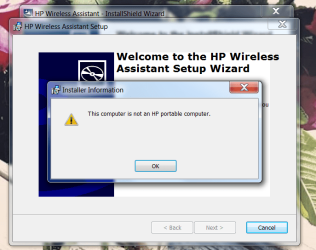
I had to download it I couldn't find it on the system. I ran it and it said this and discontinued the install.. So I'm assuming this app is just for Laptops.
Untitled1.png
53.9 KB
· Views: 3
Windows 10 Pro 64 bit AMD FX 9590 8 Core Black Edition Corsair Vengeance 16GB DDR3 AMD Radeon (TM) R9 380 Gaming Series PC/Desktop Custom Built By Me. Windows 10 Pro 64 bit AMD FX 9590 8 Core Black Edition MSI 990FXA GAMING (MS-7893) Corsair Vengeance 16GB DDR3 AMD Radeon (TM) R9 380 Gaming Series AMD High Definition Samsung 32" 60Hz 4ms Curved PLS LED 1920 X 1080 C: 223 GB SSD = E: 465 GB HDD = F: 931 GB HDD = G: 149 GB HDD = H: 931 GB HDD EVGA Supernova NEX750B 750W ATX EPS12V 80PLUS Bronze Cool Master Noctua NH-D15 Premium Cooler with 2x NF-A15 PWM 140mm Fan Fiber Optic: Download 332.7 Mbps / Upload 331.5 Mbps Windows Defender Slimjet (64bit)





 The comp works just fine with the cable but the wife hates the cable running on the floor. Happy Wife Happy Life! Not right now....
 :banghead: Thank you Paul.