Wireless connection unstable and constant dropping in signal quality

Plater

New member
Member
Local time
8:24 PM
Messages
24
I have had the WRT160N for about a year now, and it seems to be working fine until about 2 weeks ago. I did not change anything on my notebook nor on the router setup.


The only thing that i can think of is that I have recently purchased a diNovo Mini keyboard from logitech. But i dont think thats the reason for this.

The problem is that while the LAN connections are fine without any unstability, the wireless signal always drops for like 2 seconds and return to normal.


I have tried downloading some files on both LAN and wireless and i can clearly see that there is no dropping in signal for the LAN, but when i see the wireless, it keeps going down to 0 (kps) and then returning back to normal speed.


I am currently using custom firmware:DD-WRT v24-sp2 (10/10/09) std.


Also, both machines are using windows 7 professional edition. And i have just finished running the "check for updated driver" on my adapter and it said it that my current driver is up-to-date already.


Does anyone know how to solve this problme? if so please shine a light to me because this is really getting annoying.
 

My Computer My Computer

At a glance

Windows 7
OS
Windows 7
Could be that someone else close by began using wireless 2 weeks ago and is causing channel crossover. Use the inSSIDer Wi-Fi Scanner tool to see the channels in use around you. Choose an alternate channel with less crossover and you should see better, more constant connection.

Post back to let us know if this helps with your issue.
 

My Computer My Computer

At a glance

Win 7 Ult x64, Win 8.1 BlueIntel Core i78GbATI Radeon 9600
Computer type
PC/Desktop
Computer Manufacturer/Model Number
Custom Home Build
OS
Win 7 Ult x64, Win 8.1 Blue
CPU
Intel Core i7
Motherboard
Abit NF7-S
Memory
8Gb
Graphics Card(s)
ATI Radeon 9600
Sound Card
None
Monitor(s) Displays
Cheapo Dell 17" LCD
Case
Antec 1200
Cooling
5 fans
Keyboard
Microsoft 5500 Series
Mouse
Microsoft 5500 Series
Antivirus
MSE
Browser
Google Chrome as Primary. Also use Firefox, IE, and Chromium
Other Info
Built this PC in 2003, and it has served me very well since then. I feel its time to build a new system, so that is what brought me here.
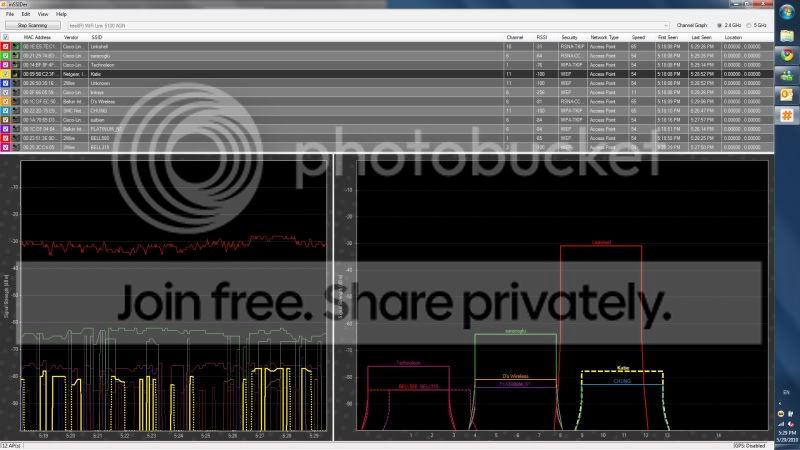
Ok, so i have tried to use the inSSIDer wi-fi scanner tool and i noticed that there are alot of people using the same channel as i was using (channel 6). After i changed it to channel 10 the wireless is stable now.

Here is a screen shot after i have changed the channel to 10.

inSSIDer.jpg


Is there a better to choose from except for channel 10? or what im doing is already the best?

And for some reason, when i tried to use channel 11 my other notebook which is a macbook Pro 13 cannot find my wireless router. Is it because it does not support the high number of channels? or is there something i can do to make it work with the mac?
 

My Computer My Computer

At a glance

Windows 7
OS
Windows 7
That may be the case.. the aircard that your MAC is holding may not support the higher channels. You got to remember the Firmware on your router is umm on steroids.. it can do alot more then most wireless adapters can't...

so i say that if channel 10 is working for you and it seems stable... then go for it.
 

My Computer My Computer

At a glance

Windows 7 Ultimate x64AMD Phenom x6 1045t8 GBATI Radeon HD 5570
Computer Manufacturer/Model Number
HP Pavilion Elite HPE-410f
OS
Windows 7 Ultimate x64
CPU
AMD Phenom x6 1045t
Motherboard
N/A
Memory
8 GB
Graphics Card(s)
ATI Radeon HD 5570
Sound Card
Realtek Highdefinition Audio / 5.1 Dolby Setup
Monitor(s) Displays
HP w2207h Widescreen
Screen Resolution
1680*1050
Hard Drives
1 TB (fixed), 320 Portable maxtor, Server Hard drives
PSU
350 Watt
Case
HP CASE
Cooling
Bass
Keyboard
Logitech MX 5500
Mouse
Logitech MX 5500
Internet Speed
ROAD RUNNER 16MB D/512 U
Could be that someone else close by began using wireless 2 weeks ago and is causing channel crossover. Use the inSSIDer Wi-Fi Scanner tool to see the channels in use around you. Choose an alternate channel with less crossover and you should see better, more constant connection.

Post back to let us know if this helps with your issue.

:ar: Great Tool!

:)
 

My Computer My Computer

At a glance

Windows 7 Professional SP1 - x64 [Non-UEFI Boot]Ivy Bridge Core i5 3570K (Delidded)G.Skill "Ares" DDR3 PC3-12800 - 1600MHz (16Gb)Asus Dual-RX480-O4G
Computer type
PC/Desktop
Computer Manufacturer/Model Number
Custom Build
OS
Windows 7 Professional SP1 - x64 [Non-UEFI Boot]
CPU
Ivy Bridge Core i5 3570K (Delidded)
Motherboard
Asus P8Z77-V LE PLUS
Memory
G.Skill "Ares" DDR3 PC3-12800 - 1600MHz (16Gb)
Graphics Card(s)
Asus Dual-RX480-O4G
Sound Card
Creative Sound Blaster Z w/5.1 sound system
Monitor(s) Displays
Asus IPS 23"
Screen Resolution
16/9
Hard Drives
Internal:
500Go Sata 6Gb/s (x2)
500Go Sata 3Gb/s (x2)
SSD 60Go Sata 6Gb/s
PSU
In Win C 900W Series 80+ Platinum
Case
Thermaltake Chaser A71
Cooling
Custom Water Cooling Loop
Keyboard
Cooler Master QuickFire XTi
Mouse
Razer Imperator 2012 (4G)
Antivirus
MSE
Browser
IE 11.0.xxx Rtm
Other Info
"Raid0" with Intel Smart Response Technology (HDD/SSD)
Ok, so i have tried to use the inSSIDer wi-fi scanner tool and i noticed that there are alot of people using the same channel as i was using (channel 6). After i changed it to channel 10 the wireless is stable now.

Here is a screen shot after i have changed the channel to 10.

inSSIDer.jpg


Is there a better to choose from except for channel 10? or what im doing is already the best?

And for some reason, when i tried to use channel 11 my other notebook which is a macbook Pro 13 cannot find my wireless router. Is it because it does not support the high number of channels? or is there something i can do to make it work with the mac?

Could be that the Mac doesn't support it. I don't know that much about Macs, sorry.
I am glad that you were able to get a channel that gets you a better connection. Your area is fairly saturated in the 2.4Ghz band. If you get any more traffic you may want to consider something in the 5Ghz band.

:ar: Great Tool!

:)

Thanks. Comes in handy diagnosing wireless issues.
 

My Computer My Computer

At a glance

Win 7 Ult x64, Win 8.1 BlueIntel Core i78GbATI Radeon 9600
Computer type
PC/Desktop
Computer Manufacturer/Model Number
Custom Home Build
OS
Win 7 Ult x64, Win 8.1 Blue
CPU
Intel Core i7
Motherboard
Abit NF7-S
Memory
8Gb
Graphics Card(s)
ATI Radeon 9600
Sound Card
None
Monitor(s) Displays
Cheapo Dell 17" LCD
Case
Antec 1200
Cooling
5 fans
Keyboard
Microsoft 5500 Series
Mouse
Microsoft 5500 Series
Antivirus
MSE
Browser
Google Chrome as Primary. Also use Firefox, IE, and Chromium
Other Info
Built this PC in 2003, and it has served me very well since then. I feel its time to build a new system, so that is what brought me here.
Ok, so i have tried to use the inSSIDer wi-fi scanner tool and i noticed that there are alot of people using the same channel as i was using (channel 6). After i changed it to channel 10 the wireless is stable now.

Here is a screen shot after i have changed the channel to 10.

inSSIDer.jpg


Is there a better to choose from except for channel 10? or what im doing is already the best?

And for some reason, when i tried to use channel 11 my other notebook which is a macbook Pro 13 cannot find my wireless router. Is it because it does not support the high number of channels? or is there something i can do to make it work with the mac?

Could be that the Mac doesn't support it. I don't know that much about Macs, sorry.
I am glad that you were able to get a channel that gets you a better connection. Your area is fairly saturated in the 2.4Ghz band. If you get any more traffic you may want to consider something in the 5Ghz band.

:ar: Great Tool!

:)

Thanks. Comes in handy diagnosing wireless issues.

Another quick question. One is that does all wireless adapter is compatible with 5.0ghz band? and also, if there anyone out there also using a macbook pro can tell me if MACs can use with 5.0Ghz band.

Thank you.
 

My Computer My Computer

At a glance

Windows 7
OS
Windows 7

Another quick question. One is that does all wireless adapter is compatible with 5.0ghz band? and also, if there anyone out there also using a macbook pro can tell me if MACs can use with 5.0Ghz band.

Thank you.[/QUOTE]

You should be able to see if yours handle 5Ghz in the Device Manager, have a look at the parameters of your wireless card and it will tells you whenever it is 2,4Ghz, or both.
 

My Computer My Computer

At a glance

Windows 7 Professional SP1 - x64 [Non-UEFI Boot]Ivy Bridge Core i5 3570K (Delidded)G.Skill "Ares" DDR3 PC3-12800 - 1600MHz (16Gb)Asus Dual-RX480-O4G
Computer type
PC/Desktop
Computer Manufacturer/Model Number
Custom Build
OS
Windows 7 Professional SP1 - x64 [Non-UEFI Boot]
CPU
Ivy Bridge Core i5 3570K (Delidded)
Motherboard
Asus P8Z77-V LE PLUS
Memory
G.Skill "Ares" DDR3 PC3-12800 - 1600MHz (16Gb)
Graphics Card(s)
Asus Dual-RX480-O4G
Sound Card
Creative Sound Blaster Z w/5.1 sound system
Monitor(s) Displays
Asus IPS 23"
Screen Resolution
16/9
Hard Drives
Internal:
500Go Sata 6Gb/s (x2)
500Go Sata 3Gb/s (x2)
SSD 60Go Sata 6Gb/s
PSU
In Win C 900W Series 80+ Platinum
Case
Thermaltake Chaser A71
Cooling
Custom Water Cooling Loop
Keyboard
Cooler Master QuickFire XTi
Mouse
Razer Imperator 2012 (4G)
Antivirus
MSE
Browser
IE 11.0.xxx Rtm
Other Info
"Raid0" with Intel Smart Response Technology (HDD/SSD)
Back
Top