wireless network between xp and 7

7up

New member
Member
Local time
5:12 PM
Messages
69
I have a laptop which is wireless and a desktop which is wired, both to the same router.

Desktop is XP home and laptop is windows 7 home premium.


They should both network set up like this shouldnt they?

For some reason I can sometimes access the 7 computer from the xp computer, but not from windows 7 to xp. On the windows 7 computer it shows both computers but when I click to open the XP computer it says the network path was not found.

THey are both on the same Workgroup
 

My Computer

OS
windows 7 pro
Can both machines ping one another? Pls provide details of ipconifg of both machines.
 

My Computer

Computer Manufacturer/Model Number
Lenovo ThinkPad T60
OS
Windows 7 Ultimate 64Bit
CPU
GenuineIntel Intel(R) Core(TM) DuoCore T2400 @ 1.83GHz
Motherboard
Intel(R) 82801G (ICH7 Family)
Memory
2.00 GB
Graphics Card(s)
Mobile Intel(R) 945 Express Chipset
Sound Card
SoundMAX Integrated Digital HD Audio
Monitor(s) Displays
ThinkPad Display
Screen Resolution
1400x1050
Hard Drives
100Gb SATA
Keyboard
Standard Keyboard
Mouse
HID-compliant Mouse
Internet Speed
Cable Broadband - 54Mbps
Other Info
Intel(R) PRO/1000 PL Network Connection
11a/b/g Wireless LAN Mini PCI Express Adapter

My Computer

OS
Windows 7 Ultimate x64 Service Pack 1 (Build 6.1.7601)
CPU
Intel Core 2 Quad Q6600 (G0 Kentsfield) LGA775 (FC-LGA6)
Motherboard
GIGABYTE GA-EP35C-DS3R (Rev. 2.1)
Memory
Corsair TW3X4G1333C9A 4GB PC-10600 (2x XMS3 2GB)
Graphics Card(s)
ASUS nVIDIA GeForce 560
Sound Card
RealTek ALC885/889A/890
Monitor(s) Displays
ChiMei CMV CT-730D 17inch (LCD Monitor)
Screen Resolution
1280-1024 60Hertz (Ture Colour 32bit)
Hard Drives
2x Barracuda 7200.10 SATA 3.0Gb/s 160-GB Hard Drive ST3160815AS (AHCI)
PSU
ANTEC 750w Earthwatts
Case
Thermaltake Shark (VA7000SWA ATX) Full Tower
Cooling
Front 120mm fan (1400 RPM) /Rear 120mm (1400 RPM) blue LED
Keyboard
Labtec Media Desktop Y-SAD65
Mouse
Razer DeathAdder 3G Infrared Sensor (1800DPI)
Internet Speed
Telstra BigPond Elite Liberty ADSL2+ 24Mbps/256kbps
Other Info
ASUS PCE-N13 802.11n Wireless LAN card
Hi 7up,

Did you see my response in your other thread about this issue? Please let us know if you tried following the instructions on this page: Networking home computers running different versions of Windows

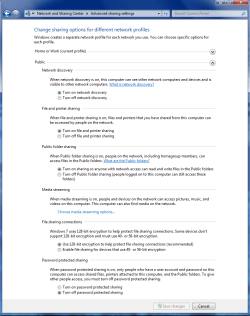
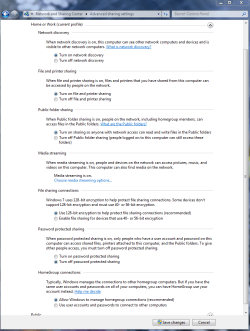
Also, in your File sharing settings try switching from 128-bit encryption to 40- or 50-bit encryption. Let us know if that fixes anything.

Cheers,

Walker
Windows Outreach Team
 

My Computer

Computer Manufacturer/Model Number
HP Pavilion dm3 (netbook) *** 27" iMac (Dual-Boot)
OS
Windows 7 Home Premium (64-bit) *** Windows XP SP3 (32-bit), OSX 10.6
CPU
AMD Athlon Neo X2 1.6GHz *** Intel Core i7 Quad Core 2.8GHz
Memory
4.00 GB *** 4.00 GB
Graphics Card(s)
ATI Radeon HD 3200, 384MB *** ATI Radeon HD 4850, 1GB
Sound Card
ATI High Definition Audio *** ATI High Definition Audio
Monitor(s) Displays
LG Flatron W2053TX
Screen Resolution
1600 x 900 (monitor), 1266 x 768 (laptop) *** 2560 x 1440
Hard Drives
300 GB SATA (internal), 500 GB HP SimpleSave (external) *** 1 TB SATA (internal), 160 GB LaCie (external)
Mouse
Logitech Cordless Optical Mouse for Notebooks
Internet Speed
Broadband
Please make sure that both of your advance network sharing windows look like this.

If you are using passwords it sometimes helps to use the same user name and password on both the Windows 7 and the XP machines. You do however, need to use a different machine name on both machines.
 

Attachments

  • public sharing enabled all.PNG
    public sharing enabled all.PNG
    39.7 KB · Views: 492
  • Home or work homegroup enable.PNG
    Home or work homegroup enable.PNG
    45 KB · Views: 344
Last edited:

My Computer

Computer type
PC/Desktop
Computer Manufacturer/Model Number
Home built
OS
Windows 7 Ult, Windows 8.1 Pro,
CPU
Q9650-4.275GHz, E8600 4.5GHz, E6750-3.8GHz
Motherboard
Evga 780i FTW
Memory
G.Skill PC2 9600 1200Mhz 5 5 5 15 2T
Graphics Card(s)
GTX480
Sound Card
Asus Xonar D2
Monitor(s) Displays
HannsG
Screen Resolution
1680X1050
Hard Drives
GSkill Phoenix Pro 120GB SSD
PSU
ThermalTake Toughpower 1000Watt modular
Case
ThermalTake XaserV
Cooling
Xigmatek S1283
Keyboard
Logitech G15
Mouse
Logitech G9
Internet Speed
T1
All settings are correct, yet nothing works. I have 7 pro on a desktop and xp on a desktop. I can view both and share files between both.

Yet the laptop is 7 home premium and nothing works. I cannot "see" the laptop from the xp computer. I can "see" the laptop from the 7 desktop but cannot access it. It says the network name cannot be found. It shows the name of the laptop on the desktop 7 computer when I click network, but gives me the message that the name cannot be found on the network.

Am going to try reinstalling home premium on the laptop and see if that helps.


On the laptop, using explorer and clicking network, I can see the laptop computer name only.....none of the others
 
Last edited:

My Computer

OS
windows 7 pro
Turn your firewall off.
 

My Computer

OS
Windows 7 Ultimate x64 Service Pack 1 (Build 6.1.7601)
CPU
Intel Core 2 Quad Q6600 (G0 Kentsfield) LGA775 (FC-LGA6)
Motherboard
GIGABYTE GA-EP35C-DS3R (Rev. 2.1)
Memory
Corsair TW3X4G1333C9A 4GB PC-10600 (2x XMS3 2GB)
Graphics Card(s)
ASUS nVIDIA GeForce 560
Sound Card
RealTek ALC885/889A/890
Monitor(s) Displays
ChiMei CMV CT-730D 17inch (LCD Monitor)
Screen Resolution
1280-1024 60Hertz (Ture Colour 32bit)
Hard Drives
2x Barracuda 7200.10 SATA 3.0Gb/s 160-GB Hard Drive ST3160815AS (AHCI)
PSU
ANTEC 750w Earthwatts
Case
Thermaltake Shark (VA7000SWA ATX) Full Tower
Cooling
Front 120mm fan (1400 RPM) /Rear 120mm (1400 RPM) blue LED
Keyboard
Labtec Media Desktop Y-SAD65
Mouse
Razer DeathAdder 3G Infrared Sensor (1800DPI)
Internet Speed
Telstra BigPond Elite Liberty ADSL2+ 24Mbps/256kbps
Other Info
ASUS PCE-N13 802.11n Wireless LAN card
Reinstall worked so something was getting in the way

Thanks
 

My Computer

OS
windows 7 pro
Reinstall worked so something was getting in the way

Thanks

That's IT for you, always think simple. The more advnace you try to do things, the worse it gets. And yeh, as per my sig.

Have a Happy New Year ;)
 

My Computer

Computer Manufacturer/Model Number
Lenovo ThinkPad T60
OS
Windows 7 Ultimate 64Bit
CPU
GenuineIntel Intel(R) Core(TM) DuoCore T2400 @ 1.83GHz
Motherboard
Intel(R) 82801G (ICH7 Family)
Memory
2.00 GB
Graphics Card(s)
Mobile Intel(R) 945 Express Chipset
Sound Card
SoundMAX Integrated Digital HD Audio
Monitor(s) Displays
ThinkPad Display
Screen Resolution
1400x1050
Hard Drives
100Gb SATA
Keyboard
Standard Keyboard
Mouse
HID-compliant Mouse
Internet Speed
Cable Broadband - 54Mbps
Other Info
Intel(R) PRO/1000 PL Network Connection
11a/b/g Wireless LAN Mini PCI Express Adapter
Reinstall worked so something was getting in the way

Thanks

I'd like to tell everyone with these types of problems to reinstall as 99.99 percent of the time it's something that the user did to cause the problem in the first place. Nobody's fault at all just people getting used to a new Op system. Unfortunately not everyone wants to spend the 15 minutes it takes to do that. Glad you got it working again. ;)
 
Last edited:

My Computer

Computer type
PC/Desktop
Computer Manufacturer/Model Number
Home built
OS
Windows 7 Ult, Windows 8.1 Pro,
CPU
Q9650-4.275GHz, E8600 4.5GHz, E6750-3.8GHz
Motherboard
Evga 780i FTW
Memory
G.Skill PC2 9600 1200Mhz 5 5 5 15 2T
Graphics Card(s)
GTX480
Sound Card
Asus Xonar D2
Monitor(s) Displays
HannsG
Screen Resolution
1680X1050
Hard Drives
GSkill Phoenix Pro 120GB SSD
PSU
ThermalTake Toughpower 1000Watt modular
Case
ThermalTake XaserV
Cooling
Xigmatek S1283
Keyboard
Logitech G15
Mouse
Logitech G9
Internet Speed
T1
Same problem different place. Took the laptop to a freinds place and he has XP. Both computers on the same workgroup.

Can see and access the windows 7 computer from the XP computer, but cannot see or access the windows XP computer from the windows 7 computer.

Does this make any sense?

Guessing it might be his router, but why can I see the windows 7 computer from the XP computer.
 

My Computer

OS
windows 7 pro
The router doesn't know what machine has what installed. So you can safely eliminate the router surely.

Personally i'm really not a fan of Homegroup/Workgroup access. Disabled or remove it if you have it setup.
If both machines are on the network (wireless or wired), and pingable for one another, file sharing is just a matter of creating shares and giving it access permissions. I think i've said this many many times. If it doesnt work for u then, restart your steps and take note of what is in my sig.
 

My Computer

Computer Manufacturer/Model Number
Lenovo ThinkPad T60
OS
Windows 7 Ultimate 64Bit
CPU
GenuineIntel Intel(R) Core(TM) DuoCore T2400 @ 1.83GHz
Motherboard
Intel(R) 82801G (ICH7 Family)
Memory
2.00 GB
Graphics Card(s)
Mobile Intel(R) 945 Express Chipset
Sound Card
SoundMAX Integrated Digital HD Audio
Monitor(s) Displays
ThinkPad Display
Screen Resolution
1400x1050
Hard Drives
100Gb SATA
Keyboard
Standard Keyboard
Mouse
HID-compliant Mouse
Internet Speed
Cable Broadband - 54Mbps
Other Info
Intel(R) PRO/1000 PL Network Connection
11a/b/g Wireless LAN Mini PCI Express Adapter
Hi 7up,

See if my attached checklist helps.

& Happy New Year!
 

Attachments

My Computer

Computer Manufacturer/Model Number
Custom Hack job
OS
Windows 7 Ultimate 64 bit
CPU
Intel(R) Core(TM)2 Quad CPU Q8200 @ 2.33GHz
Motherboard
GigaByte EP45-UD3
Memory
8 GB Kingston
Graphics Card(s)
Nvidia GeForce 9600GT
Sound Card
Soundblaster Audigy
Monitor(s) Displays
AOC x2 22"
Hard Drives
2 x Samsung 500GB (RAID)
2 x Samsung 2TB
1 x WD Green 2TB
1 x Seagate 1TB
1 x Samsung 500GB
PSU
Thermaltake QFan 750W
Case
CM Scout Gaming
Cooling
Coolermaster V10
Keyboard
Microsoft Wireless Keyboard 1000
Mouse
Microsoft Wireless Optical 2000
Internet Speed
320
Other Info
Winfast PVR2000CP
LG DVD-RAM DVD/RW/DL Super Multi
Linksys WMP300Nx2 Wireless Adapter
On the XP computer when I open My network places, it takes quite a while to open. Usually says Not Responding for a while.

Does this mean anything that is easily fixed
 

My Computer

OS
windows 7 pro
Nope, it's normal to say not responding for a short time... Try to access Xp via ip address - just type the ip address of the xp instead of computer name in your Explorer - something like \\192.168.1.2\
 

My Computer

OS
Windows Se7en Ultimate + Windows XP SP3
CPU
AMD Athlon64 X2 5200+
Motherboard
Gigabyte GA-MA770-DS3
Memory
CORSAIR DOMINATOR TWIN2X2048-8500C5D 2 GB
Graphics Card(s)
Ati Radeon HD3870
Monitor(s) Displays
Sony KDL32V4500
Screen Resolution
1920X1080X60Hz
Hard Drives
HITACHI 320GB SATA
HITACHI 80GB ATA
PSU
Point Of View 450 Watts
Internet Speed
20Mbits Cable Internet
You guys need to run the network set up wizard on the XP machines if you want to see them from the Win 7 machines. Make sure all the sharing permissions are enabled on the XP machines also.
 

My Computer

Computer type
PC/Desktop
Computer Manufacturer/Model Number
Home built
OS
Windows 7 Ult, Windows 8.1 Pro,
CPU
Q9650-4.275GHz, E8600 4.5GHz, E6750-3.8GHz
Motherboard
Evga 780i FTW
Memory
G.Skill PC2 9600 1200Mhz 5 5 5 15 2T
Graphics Card(s)
GTX480
Sound Card
Asus Xonar D2
Monitor(s) Displays
HannsG
Screen Resolution
1680X1050
Hard Drives
GSkill Phoenix Pro 120GB SSD
PSU
ThermalTake Toughpower 1000Watt modular
Case
ThermalTake XaserV
Cooling
Xigmatek S1283
Keyboard
Logitech G15
Mouse
Logitech G9
Internet Speed
T1
Back
Top