
So I am at my wits end with this issue. I have dug through a few similar threads I found on here, followed the advice, but I still have not fixed the issue.
I have a Lenovo T50 that I have been using for about 3 years without issue. The wireless NIC has never had an issue connecting to my work's AP setup. For one reason or another, I pulled my laptop off the dock one morning, and I have not been able to connect wirelesly ever since.
So here is my issue: When I tried to use DHCP, it will connect to the AP but my computer will assign me a APIPA address (169.254.x.x). The DHCP Client service is running on my laptop. When I tried to use a static IP, I get the same APIPA address assigned.
Here is just about everything that I have tried to date:
- Turning off Kaspersky
- New wireless NIC
- Onboard wired NIC: works with static and DHCP
- USB wired NIC: works with static and DHCP
- USB wireless NIC: APIPA address with DHCP and static
- Use my phone as a hotspot and connect wirelesly, same result
- Deleted all network adapters, restart, and let the computer find them again
- Delete any ip routes
- Reset the IP stack with the following commands
- Many, many, many reboots
Nothing has worked so far.
Here is my ipconfig results:
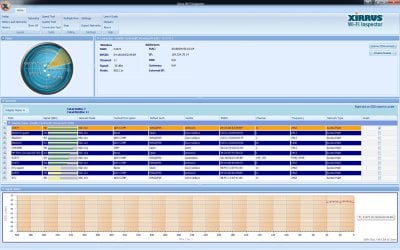
And I attached my Xirrus screen shot. I really think this is a Windows client side issue, as I think I have ruled out any issues with the router or network. I am at a loss here folks, so any advice would be helpful. Thanks.
I have a Lenovo T50 that I have been using for about 3 years without issue. The wireless NIC has never had an issue connecting to my work's AP setup. For one reason or another, I pulled my laptop off the dock one morning, and I have not been able to connect wirelesly ever since.
So here is my issue: When I tried to use DHCP, it will connect to the AP but my computer will assign me a APIPA address (169.254.x.x). The DHCP Client service is running on my laptop. When I tried to use a static IP, I get the same APIPA address assigned.
Here is just about everything that I have tried to date:
- Turning off Kaspersky
- New wireless NIC
- Onboard wired NIC: works with static and DHCP
- USB wired NIC: works with static and DHCP
- USB wireless NIC: APIPA address with DHCP and static
- Use my phone as a hotspot and connect wirelesly, same result
- Deleted all network adapters, restart, and let the computer find them again
- Delete any ip routes
- Reset the IP stack with the following commands
Code:
ipconfig /flushdns
netsh int ip reset reset.log
netsh winsock reset
netsh winsock reset catalogNothing has worked so far.
Here is my ipconfig results:
Code:
Windows IP Configuration

   Host Name . . . . . . . . . . . . : ENG-NAME-LT
   Primary Dns Suffix  . . . . . . . : something.com
   Node Type . . . . . . . . . . . . : Hybrid
   IP Routing Enabled. . . . . . . . : No
   WINS Proxy Enabled. . . . . . . . : No
   DNS Suffix Search List. . . . . . : something.com

Ethernet adapter Local Area Connection:

   Connection-specific DNS Suffix  . : something.com
   Description . . . . . . . . . . . : Intel(R) 82579LM Gigabit Network Connection
   Physical Address. . . . . . . . . : 3C-97-0E-7F-FF-51
   DHCP Enabled. . . . . . . . . . . : Yes
   Autoconfiguration Enabled . . . . : Yes
   Link-local IPv6 Address . . . . . : fe80::99c9:a6db:5c9c:acf8%29(Preferred)
   IPv4 Address. . . . . . . . . . . : 172.23.151.61(Preferred)
   Subnet Mask . . . . . . . . . . . : 255.255.0.0
   Lease Obtained. . . . . . . . . . : Friday, February 24, 2017 9:11:16 AM
   Lease Expires . . . . . . . . . . : Friday, March 10, 2017 9:11:16 AM
   Default Gateway . . . . . . . . . : 172.23.1.1
   DHCP Server . . . . . . . . . . . : 172.21.65.1
   DHCPv6 IAID . . . . . . . . . . . : 742168334
   DHCPv6 Client DUID. . . . . . . . : 00-01-00-01-20-37-B8-EB-3C-97-0E-7F-FF-51
   DNS Servers . . . . . . . . . . . : 172.21.65.1
                                       172.21.65.100
   NetBIOS over Tcpip. . . . . . . . : Enabled

Wireless LAN adapter Wireless Network Connection:

   Media State . . . . . . . . . . . : Media disconnected
   Connection-specific DNS Suffix  . :
   Description . . . . . . . . . . . : Intel(R) Centrino(R) Advanced-N 6205
   Physical Address. . . . . . . . . : A0-88-B4-50-A3-A4
   DHCP Enabled. . . . . . . . . . . : Yes
   Autoconfiguration Enabled . . . . : Yes

Tunnel adapter isatap.{070F4320-EA71-43D0-8055-19BCE086432C}:

   Media State . . . . . . . . . . . : Media disconnected
   Connection-specific DNS Suffix  . :
   Description . . . . . . . . . . . : Microsoft ISATAP Adapter
   Physical Address. . . . . . . . . : 00-00-00-00-00-00-00-E0
   DHCP Enabled. . . . . . . . . . . : No
   Autoconfiguration Enabled . . . . : Yes

Tunnel adapter isatap.something.com:

   Media State . . . . . . . . . . . : Media disconnected
   Connection-specific DNS Suffix  . : something.com
   Description . . . . . . . . . . . : Microsoft ISATAP Adapter #4
   Physical Address. . . . . . . . . : 00-00-00-00-00-00-00-E0
   DHCP Enabled. . . . . . . . . . . : No
   Autoconfiguration Enabled . . . . : Yes
And I attached my Xirrus screen shot. I really think this is a Windows client side issue, as I think I have ruled out any issues with the router or network. I am at a loss here folks, so any advice would be helpful. Thanks.
Attachments
My Computer
At a glance
Windows 7 Professional 64bit
- Computer type
- PC/Desktop
- Computer Manufacturer/Model Number
- Lenovo T50
- OS
- Windows 7 Professional 64bit


