Wireless not working

mer3515

New member
Local time
11:40 PM
Messages
6
Location
AZ
For the 700th time I will write my issues. Got a new Dell laptop for Christmas. Went to set up the wireless and my network is listed so I select it and enter the security key and then I get this message. Windows was unable to connect to (my router name). Then when I go to trouble shoot it says Problem with wireless adapter or access point. HELP!!!!!!!!!!!!!!!!!!! Does that mean my router/modem which is from Qwest and is actiontec Q1000 does not work with windows 7? All the other laptops work fine this is the only one not working. Wireless is wireless n card. I'm ready to chuck the new laptop especially windows 7 because so far it isn't more efficient and anything that it is claiming to be. Been at this issue for almost 7 hours. Nothing on the net helps or gives the answer...
 

My Computer

Computer Manufacturer/Model Number
Dell inspiron n4010
OS
windows 7 64 bit home premium
Memory
4gb
Hard Drives
500
Have you called your ISP yet? Do you have admin access to the router configuration? Have you checked the router logs? Have you connected the laptop directly to the router via ethernet cable, then checked for updated drivers for your Dell's wifi card? What are the exact error messages and error numbers that Windows reports? Do you have any internet security software installed on the Dell? Have you compared software/hardware/security settings on your new computer to existing computers at your house to see what, if any, differences exist?

FYI - please update your system specs (at the bottom of your post in the left hand corner there is a part called "My System Specs") so we know exactly what hardware and software you have.
 

My Computer

Computer Manufacturer/Model Number
Dell XPS 15 L502x
OS
Windows 7 Ultimate x64 SP1
CPU
Core i7-2670QM
Memory
8GB DDR3 PC3-10600
Graphics Card(s)
Intel HD Graphics 3000 + GeForce GT 540M
Screen Resolution
1920x1080
Hard Drives
1TB 5400RPM Seagate
Try merging or deleting your network locations in the Sharing Center and set up the network again .
 

My Computer

OS
Windows 7 x64 Ultimate
1. I was on hold for 15 plus mins with the ISP and didn't have the patience to wait any longer. So tried looking at the net on my other computer which is wired to the internet.

2. By admin do you mean go the ip address and the internet option pulls up for the router like change to wpa or wep. Yes I can change the ssid and pass key and other options like that.

3. What/where would I look for router logs and what would that help me find out?

4. Yes I connected with the ethernet cable and there are no updates for the driver.

5. There are no numbers for the error just this message - Windows was unable to connect to (my router name). When I click troubleshoot I then get this message again with no numbers - Problem with wireless adapter or access point. It does not give me any other information then that.

6. I deleted the mcafee that was preinstalled on the computer as I have a software that I use and have not installed that a of yet.

7. software/hardware/security settings do you mean office 2003 old computer office 2010 demo on new computer. Stuff like that? Under internet options under the security tab everything is checked the same I have never adjusted those settings.
 

My Computer

Computer Manufacturer/Model Number
Dell inspiron n4010
OS
windows 7 64 bit home premium
Memory
4gb
Hard Drives
500
Try merging or deleting your network locations in the Sharing Center and set up the network again .

Where would I do this? If I delete the wireless card how would I add it again. There is nothing that came with the computer like disks or anything to reinstall something.
 

My Computer

Computer Manufacturer/Model Number
Dell inspiron n4010
OS
windows 7 64 bit home premium
Memory
4gb
Hard Drives
500
Hi,

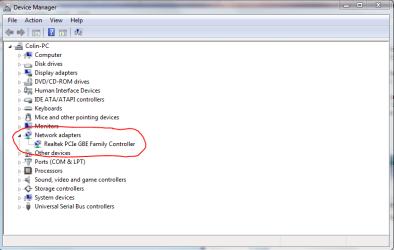
Can you please post an image similar to one below showing your wireless adapter? In Start < type device manager, and then select it.
 

Attachments

  • Capture2.PNG
    Capture2.PNG
    21.6 KB · Views: 234

My Computer

Computer type
PC/Desktop
Computer Manufacturer/Model Number
Golden Mk. I.4
OS
Windows 10 Pro x64 ; Xubuntu x64
CPU
Intel i7 860 @ 2.80 GHz O/C'ed to 4.0GHz
Motherboard
Gigabyte P55A-UD3R Rev.1. Award BIOS F13
Memory
16GB Corsair Vengance DDR3 @ 661 MHz Dual Channel (9-9-9-24)
Graphics Card(s)
EVGA NVidia GTX 560 1024MB
Sound Card
Realtek Integrated
Monitor(s) Displays
Dual Samsung SyncMaster 2494HS
Screen Resolution
1920*1080 and 1920*1080
Hard Drives
1*Samsung 840 EVO 120GB SSD;
1*OCZ Vertex 2 60GB SSD;
2*Samsung F3 SpinPoint 1TB in RAID0;
1*Samsung F1 SpinPoint 1TB;
2*Western Digital 1TB External USB 3.0
1*Western Digital 500GB External USB 3.0
1*Seagate 500GB External USB 2.0
PSU
Thermaltake ToughPower QFan 750W
Case
Thermaltake Element S VK60001W2Z
Cooling
Corsair H60 Water Cooling, 2*230mm and 2*80mm case fans
Keyboard
Logitech G110
Mouse
Logitech MX518
You really need to talk to your ISP about this. I know it sucks being on hold with them, but they provided the router to you and they are in the best position to help you with the settings.

To delete a network connection, go to control panel -> network and internet -> manage wireless networks. Delete the wireless network and try again.
 

My Computer

Computer Manufacturer/Model Number
Dell XPS 15 L502x
OS
Windows 7 Ultimate x64 SP1
CPU
Core i7-2670QM
Memory
8GB DDR3 PC3-10600
Graphics Card(s)
Intel HD Graphics 3000 + GeForce GT 540M
Screen Resolution
1920x1080
Hard Drives
1TB 5400RPM Seagate
Does your router support wireless & is it switched on within the router?
 

My Computer

Computer type
PC/Desktop
Computer Manufacturer/Model Number
Self Build
OS
MS Windows 7 Professional 64-bit SP1
CPU
AMD FX(tm)-6100 Six-Core Processor Socket AM3+ (942)
Motherboard
ASUSTeK COMPUTER INC. SABERTOOTH 990FX (AM3r2)
Memory
8.00 GB Dual-Channel DDR3 @ 802MHz (11-11-11-36) 1.5Volts
Graphics Card(s)
NVIDIA GeForce GTX 560 Ti
Sound Card
Onboard Realtek HD
Monitor(s) Displays
shimian (1920x1080@60Hz)
Screen Resolution
1920*1080
Hard Drives
OCZ-AGIL ITY3 SATA Disk Device 120GB
PSU
Corsair TX 750
Case
Corsair
Cooling
WaterCooled
Keyboard
Microsoft Wired
Mouse
Logitech USB Optical TiltWheel Mouse
Internet Speed
Realtek PCIe GBE Family Controller 20MB*1MB
Antivirus
Avast
Browser
Firefox
Other Info
150GB Internal Hard Drive for Backing Up Important Files -
Hauppauge Nova-DT Dual DVB-T Tuner Device (+IR) -
USB PC Camera with Mic (SN9C105)
Hi,

Can you please post an image similar to one below showing your wireless adapter? In Start < type device manager, and then select it.

I'm at work and will do this when I get home. 4:30pm az time
 

My Computer

Computer Manufacturer/Model Number
Dell inspiron n4010
OS
windows 7 64 bit home premium
Memory
4gb
Hard Drives
500
im having the same problem with my folks laptop. i can pick up the wifi on my iphone and use it just fine but windows 7 on the laptop tells me "unable to connect to xxxx" same as MER.
im using a belkin n router and an acer aspire laptop which has a broadcom 802.11n adapter. ive updated firmware and drivers for everything but nothing helps.
checked a few other forums but not much help there either.
im assuming its a windows 7 issue from all the other forums ive seen.
its driving me mad lol. cheers for any help.
 

My Computer

Computer Manufacturer/Model Number
acer aspire
OS
windows 7
Thanks everyone for your suggestions I actually found a solution and i'm going with it. Thanks again and I hope to not have any issues with my new computer. thanks again
 

My Computer

Computer Manufacturer/Model Number
Dell inspiron n4010
OS
windows 7 64 bit home premium
Memory
4gb
Hard Drives
500
im having the same problem with my folks laptop. i can pick up the wifi on my iphone and use it just fine but windows 7 on the laptop tells me "unable to connect to xxxx" same as MER.
im using a belkin n router and an acer aspire laptop which has a broadcom 802.11n adapter. ive updated firmware and drivers for everything but nothing helps.
checked a few other forums but not much help there either.
im assuming its a windows 7 issue from all the other forums ive seen.
its driving me mad lol. cheers for any help.

What i did was under the ssid there were 4 options I changed what the other laptops are using and did another ssid and well it worked. the other laptops are running just fine and so is mine now. try that hope it helps for you.
 

My Computer

Computer Manufacturer/Model Number
Dell inspiron n4010
OS
windows 7 64 bit home premium
Memory
4gb
Hard Drives
500
Back
Top