icecream12345
New member
- Local time
- 11:47 PM
- Messages
- 8
Hello,
I have not been able to use wireless on my laptop for the past 3 days. I've tried almost anything but it still isn't working.
Windows IP Configuration
Here is my ipconfig
Host Name . . . . . . . . . . . . : Justin-Thinkpad
Primary Dns Suffix . . . . . . . :
Node Type . . . . . . . . . . . . : Peer-Peer
IP Routing Enabled. . . . . . . . : No
WINS Proxy Enabled. . . . . . . . : No
Wireless LAN adapter Wireless Network Connection 3:
Media State . . . . . . . . . . . : Media disconnected
Connection-specific DNS Suffix . :
Description . . . . . . . . . . . : Microsoft Virtual WiFi Miniport Adapter #
2
Physical Address. . . . . . . . . : 24-77-03-89-AD-61
DHCP Enabled. . . . . . . . . . . : Yes
Autoconfiguration Enabled . . . . : Yes
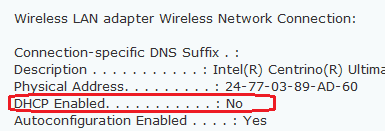
Wireless LAN adapter Wireless Network Connection:
Connection-specific DNS Suffix . :
Description . . . . . . . . . . . : Intel(R) Centrino(R) Ultimate-N 6300 AGN
Physical Address. . . . . . . . . : 24-77-03-89-AD-60
DHCP Enabled. . . . . . . . . . . : No
Autoconfiguration Enabled . . . . : Yes
Link-local IPv6 Address . . . . . : fe80::4d89:d7ce:6b71:f107%18(Preferred)
IPv4 Address. . . . . . . . . . . : 192.168.0.11(Preferred)
Subnet Mask . . . . . . . . . . . : 255.255.255.0
Default Gateway . . . . . . . . . : 192.168.0.1
DHCPv6 IAID . . . . . . . . . . . : 371488515
DHCPv6 Client DUID. . . . . . . . : 00-01-00-01-18-6A-F8-4C-00-21-CC-C2-42-5E
DNS Servers . . . . . . . . . . . : 192.168.0.1
216.104.72.5
NetBIOS over Tcpip. . . . . . . . : Enabled
Ethernet adapter Local Area Connection:
Media State . . . . . . . . . . . : Media disconnected
Connection-specific DNS Suffix . : home
Description . . . . . . . . . . . : Intel(R) 82579LM Gigabit Network Connecti
on
Physical Address. . . . . . . . . : 00-21-CC-C2-42-5E
DHCP Enabled. . . . . . . . . . . : Yes
Autoconfiguration Enabled . . . . : Yes
Tunnel adapter isatap.{FB5ADDB3-9899-4697-99BE-3A0B13DD52B8}:
Media State . . . . . . . . . . . : Media disconnected
Connection-specific DNS Suffix . :
Description . . . . . . . . . . . : Microsoft ISATAP Adapter
Physical Address. . . . . . . . . : 00-00-00-00-00-00-00-E0
DHCP Enabled. . . . . . . . . . . : No
Autoconfiguration Enabled . . . . : Yes
Tunnel adapter Teredo Tunneling Pseudo-Interface:
Media State . . . . . . . . . . . : Media disconnected
Connection-specific DNS Suffix . :
Description . . . . . . . . . . . : Teredo Tunneling Pseudo-Interface
Physical Address. . . . . . . . . : 00-00-00-00-00-00-00-E0
DHCP Enabled. . . . . . . . . . . : No
Autoconfiguration Enabled . . . . : Yes
Tunnel adapter isatap.home:
Media State . . . . . . . . . . . : Media disconnected
Connection-specific DNS Suffix . :
Description . . . . . . . . . . . : Microsoft ISATAP Adapter #2
Physical Address. . . . . . . . . : 00-00-00-00-00-00-00-E0
DHCP Enabled. . . . . . . . . . . : No
Autoconfiguration Enabled . . . . : Yes
Tunnel adapter isatap.{87AE74AB-897C-4DBE-A32B-9A5606E7CA75}:
Media State . . . . . . . . . . . : Media disconnected
Connection-specific DNS Suffix . :
Description . . . . . . . . . . . : Microsoft ISATAP Adapter #3
Physical Address. . . . . . . . . : 00-00-00-00-00-00-00-E0
DHCP Enabled. . . . . . . . . . . : No
Autoconfiguration Enabled . . . . : Yes
Tunnel adapter Reusable ISATAP Interface {8FC710BA-7F17-4CDB-890E-D94378ACDC46}:
Media State . . . . . . . . . . . : Media disconnected
Connection-specific DNS Suffix . :
Description . . . . . . . . . . . : Microsoft ISATAP Adapter #4
Physical Address. . . . . . . . . : 00-00-00-00-00-00-00-E0
DHCP Enabled. . . . . . . . . . . : No
Autoconfiguration Enabled . . . . : Yes
Right now, I am connected to an unidentified network and have no network access. And it says that I have "limited access"
please help and happy holidays
I have not been able to use wireless on my laptop for the past 3 days. I've tried almost anything but it still isn't working.
Windows IP Configuration
Here is my ipconfig
Host Name . . . . . . . . . . . . : Justin-Thinkpad
Primary Dns Suffix . . . . . . . :
Node Type . . . . . . . . . . . . : Peer-Peer
IP Routing Enabled. . . . . . . . : No
WINS Proxy Enabled. . . . . . . . : No
Wireless LAN adapter Wireless Network Connection 3:
Media State . . . . . . . . . . . : Media disconnected
Connection-specific DNS Suffix . :
Description . . . . . . . . . . . : Microsoft Virtual WiFi Miniport Adapter #
2
Physical Address. . . . . . . . . : 24-77-03-89-AD-61
DHCP Enabled. . . . . . . . . . . : Yes
Autoconfiguration Enabled . . . . : Yes
Wireless LAN adapter Wireless Network Connection:
Connection-specific DNS Suffix . :
Description . . . . . . . . . . . : Intel(R) Centrino(R) Ultimate-N 6300 AGN
Physical Address. . . . . . . . . : 24-77-03-89-AD-60
DHCP Enabled. . . . . . . . . . . : No
Autoconfiguration Enabled . . . . : Yes
Link-local IPv6 Address . . . . . : fe80::4d89:d7ce:6b71:f107%18(Preferred)
IPv4 Address. . . . . . . . . . . : 192.168.0.11(Preferred)
Subnet Mask . . . . . . . . . . . : 255.255.255.0
Default Gateway . . . . . . . . . : 192.168.0.1
DHCPv6 IAID . . . . . . . . . . . : 371488515
DHCPv6 Client DUID. . . . . . . . : 00-01-00-01-18-6A-F8-4C-00-21-CC-C2-42-5E
DNS Servers . . . . . . . . . . . : 192.168.0.1
216.104.72.5
NetBIOS over Tcpip. . . . . . . . : Enabled
Ethernet adapter Local Area Connection:
Media State . . . . . . . . . . . : Media disconnected
Connection-specific DNS Suffix . : home
Description . . . . . . . . . . . : Intel(R) 82579LM Gigabit Network Connecti
on
Physical Address. . . . . . . . . : 00-21-CC-C2-42-5E
DHCP Enabled. . . . . . . . . . . : Yes
Autoconfiguration Enabled . . . . : Yes
Tunnel adapter isatap.{FB5ADDB3-9899-4697-99BE-3A0B13DD52B8}:
Media State . . . . . . . . . . . : Media disconnected
Connection-specific DNS Suffix . :
Description . . . . . . . . . . . : Microsoft ISATAP Adapter
Physical Address. . . . . . . . . : 00-00-00-00-00-00-00-E0
DHCP Enabled. . . . . . . . . . . : No
Autoconfiguration Enabled . . . . : Yes
Tunnel adapter Teredo Tunneling Pseudo-Interface:
Media State . . . . . . . . . . . : Media disconnected
Connection-specific DNS Suffix . :
Description . . . . . . . . . . . : Teredo Tunneling Pseudo-Interface
Physical Address. . . . . . . . . : 00-00-00-00-00-00-00-E0
DHCP Enabled. . . . . . . . . . . : No
Autoconfiguration Enabled . . . . : Yes
Tunnel adapter isatap.home:
Media State . . . . . . . . . . . : Media disconnected
Connection-specific DNS Suffix . :
Description . . . . . . . . . . . : Microsoft ISATAP Adapter #2
Physical Address. . . . . . . . . : 00-00-00-00-00-00-00-E0
DHCP Enabled. . . . . . . . . . . : No
Autoconfiguration Enabled . . . . : Yes
Tunnel adapter isatap.{87AE74AB-897C-4DBE-A32B-9A5606E7CA75}:
Media State . . . . . . . . . . . : Media disconnected
Connection-specific DNS Suffix . :
Description . . . . . . . . . . . : Microsoft ISATAP Adapter #3
Physical Address. . . . . . . . . : 00-00-00-00-00-00-00-E0
DHCP Enabled. . . . . . . . . . . : No
Autoconfiguration Enabled . . . . : Yes
Tunnel adapter Reusable ISATAP Interface {8FC710BA-7F17-4CDB-890E-D94378ACDC46}:
Media State . . . . . . . . . . . : Media disconnected
Connection-specific DNS Suffix . :
Description . . . . . . . . . . . : Microsoft ISATAP Adapter #4
Physical Address. . . . . . . . . : 00-00-00-00-00-00-00-E0
DHCP Enabled. . . . . . . . . . . : No
Autoconfiguration Enabled . . . . : Yes
Right now, I am connected to an unidentified network and have no network access. And it says that I have "limited access"
please help and happy holidays
My Computer
At a glance
windows 7 ultimate
- OS
- windows 7 ultimate