Solved Wireless stopped working on Gateway Laptop help!!

techwomen

New member
Local time
3:13 AM
Messages
12
Hi all I am new to this form but trying to help my friend with her Laptop. It was working fine then the next day the internet stopped working on her laptop.

The internet works fine on my laptop and other computers but not on her laptop so something is up. Anyway she has a Gateway windows 7 64bit laptop.

Any help would be appreciated.

Thanks:)
 

My Computer My Computer

OS
Windows 7 64bit
Welcome to SevenForums. In Network and Sharing, Change Adapter Settings, is the adapter enabled. If not, right click and enable, this should turn on wireless.
 

My Computer My Computer

Computer type
Laptop
Computer Manufacturer/Model Number
HP 17-ak0xx, dv7 3173nr
OS
Win7 Home Premium x64 W10Pro&Home
CPU
A12 9720p 4+8 TurionII M520
Motherboard
HP 3839
Memory
6GB 8GB
Graphics Card(s)
R7
Monitor(s) Displays
24" sa550
Screen Resolution
1600x900 1920x1080
Mouse
Logitechx2
Internet Speed
120Mb/s down 12up
It is enabled so that is not the problem. Any other suggestions?
 

My Computer My Computer

OS
Windows 7 64bit
Look in the ipv4 properties for the adapter, click on the Advanced button, enter your default gateway address.
 

My Computer My Computer

Computer type
Laptop
Computer Manufacturer/Model Number
HP 17-ak0xx, dv7 3173nr
OS
Win7 Home Premium x64 W10Pro&Home
CPU
A12 9720p 4+8 TurionII M520
Motherboard
HP 3839
Memory
6GB 8GB
Graphics Card(s)
R7
Monitor(s) Displays
24" sa550
Screen Resolution
1600x900 1920x1080
Mouse
Logitechx2
Internet Speed
120Mb/s down 12up
Where do I find the IPV?? I am a newbe at this.What is my default Gateway address?
 

My Computer My Computer

OS
Windows 7 64bit
Have you tried diagnosing the adapter connection in change adapter settings?
 

My Computer My Computer

Computer type
Laptop
Computer Manufacturer/Model Number
HP 17-ak0xx, dv7 3173nr
OS
Win7 Home Premium x64 W10Pro&Home
CPU
A12 9720p 4+8 TurionII M520
Motherboard
HP 3839
Memory
6GB 8GB
Graphics Card(s)
R7
Monitor(s) Displays
24" sa550
Screen Resolution
1600x900 1920x1080
Mouse
Logitechx2
Internet Speed
120Mb/s down 12up
Yes I did. I did IPV4 and found default address added it did not work. Please show me step by step how to fix this.

Thanks
 

My Computer My Computer

OS
Windows 7 64bit
This is what the diagnostic scan says," Windows can't automatically detect this network settings.
 

My Computer My Computer

OS
Windows 7 64bit
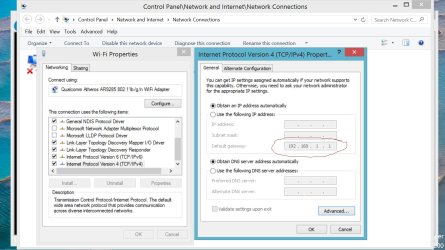
The default gateway is the address of your router. Some variation of 192.168.0.1 or 192.168.1.1 it depends on the model/maker of the router.
Sometimes, the adapter forgets the address of the router, and can't get its issued address from that router. In the Network and Sharing Center, on the left is link to Change Adapter settings. On this page you see the Ethernet and WiFi adapters. In the properties of the wifi, find the ipv4 line and highlight it, press on properties below, this page has an Advanced button, in this page you should see a default gateway address, if it is empty, you need to add the address of the router.

To find info about your network, open a cmd window and type ipconfig /all
You can save this file as a .txt and attach it in your next post, this would help.
 

My Computer My Computer

Computer type
Laptop
Computer Manufacturer/Model Number
HP 17-ak0xx, dv7 3173nr
OS
Win7 Home Premium x64 W10Pro&Home
CPU
A12 9720p 4+8 TurionII M520
Motherboard
HP 3839
Memory
6GB 8GB
Graphics Card(s)
R7
Monitor(s) Displays
24" sa550
Screen Resolution
1600x900 1920x1080
Mouse
Logitechx2
Internet Speed
120Mb/s down 12up
The problem is I am using my laptop and hers has no internet. So I will have to try and post mine which is the same Ip's
 

My Computer My Computer

OS
Windows 7 64bit
How do I make it text form I try it wont let me.
 

My Computer My Computer

OS
Windows 7 64bit
Here is is the IPV4 Address 192.168.1.70 (preferred) Subnet Mask 255.255.255.0 Default 192.168.1254
 

My Computer My Computer

OS
Windows 7 64bit
If 192.168.1.254 is the router address, put that in the advanced button of ipv4 props for wireless adapter...
 

My Computer My Computer

Computer type
Laptop
Computer Manufacturer/Model Number
HP 17-ak0xx, dv7 3173nr
OS
Win7 Home Premium x64 W10Pro&Home
CPU
A12 9720p 4+8 TurionII M520
Motherboard
HP 3839
Memory
6GB 8GB
Graphics Card(s)
R7
Monitor(s) Displays
24" sa550
Screen Resolution
1600x900 1920x1080
Mouse
Logitechx2
Internet Speed
120Mb/s down 12up
Okay I did that and it did not work earlier. However is this what I am suppose to do to make it clear. Where it says, Default Gateways I put in 192.168.1.254 then click add yes? then okay? If this is what I was supose to do I already did it and it did not work.

Thanks
 

My Computer My Computer

OS
Windows 7 64bit
Reboot the laptop and tell me what it says in the Network and Sharing Center page under active networks. Also check if Network Discovery is on or off in Advanced Sharing settings.
 

My Computer My Computer

Computer type
Laptop
Computer Manufacturer/Model Number
HP 17-ak0xx, dv7 3173nr
OS
Win7 Home Premium x64 W10Pro&Home
CPU
A12 9720p 4+8 TurionII M520
Motherboard
HP 3839
Memory
6GB 8GB
Graphics Card(s)
R7
Monitor(s) Displays
24" sa550
Screen Resolution
1600x900 1920x1080
Mouse
Logitechx2
Internet Speed
120Mb/s down 12up
Under active networks it says, Acesses type No internet acess Wireless Network Connection 2wiree 650 active. What is Also check if Network Discovery is on or off. The wireless button is turned on, on the laptop if that is what you mean.
 

My Computer My Computer

OS
Windows 7 64bit
No, under Change Adapter settings is Change Advanced Sharing settings...turn on network discovery and file sharing, no password, in case it is antivirus stopping the connection...
 

My Computer My Computer

Computer type
Laptop
Computer Manufacturer/Model Number
HP 17-ak0xx, dv7 3173nr
OS
Win7 Home Premium x64 W10Pro&Home
CPU
A12 9720p 4+8 TurionII M520
Motherboard
HP 3839
Memory
6GB 8GB
Graphics Card(s)
R7
Monitor(s) Displays
24" sa550
Screen Resolution
1600x900 1920x1080
Mouse
Logitechx2
Internet Speed
120Mb/s down 12up
Okay here we got under Ip address Subnet mask is DHCP Enabled.

Under default gateway there is nothing. I put in the number and it goes to general tab where there is nothing in either boxes it is empty and with no IP numbers.
 

My Computer My Computer

OS
Windows 7 64bit
The gateway shows on the ipsettings page after you add it...
 

Attachments

  • defaultGateway.jpg
    defaultGateway.jpg
    160.7 KB · Views: 9

My Computer My Computer

Computer type
Laptop
Computer Manufacturer/Model Number
HP 17-ak0xx, dv7 3173nr
OS
Win7 Home Premium x64 W10Pro&Home
CPU
A12 9720p 4+8 TurionII M520
Motherboard
HP 3839
Memory
6GB 8GB
Graphics Card(s)
R7
Monitor(s) Displays
24" sa550
Screen Resolution
1600x900 1920x1080
Mouse
Logitechx2
Internet Speed
120Mb/s down 12up
Well it is fixed I think we turned the router off then on again and now it is working. Thanks for your time and I am happy she has a working computer.
 

My Computer My Computer

OS
Windows 7 64bit
Back
Top