Metal Loops
New member
- Local time
- 11:39 AM
- Messages
- 13
Hello there, I just wondered if I could have some help connecting my Netgear DG834PN.
I have connected everything up properly, put my ISP's username and password in right, because I'm connected right now via ethernet, made sure every setting is correct.
But my Windows 7 PC just won't pick up the signal from my router, I used the netgear USB adapter that came with the router, installed the latest drivers, the application wouldn't open so I thought it was a W7 Compatabilty Issue.
So I went and bought a PCI Wireless card for my new PC. Bought a TP-Link TL-WN350G, I bought it because it said it was windows 7 32 and 64 bit compatability, installed the card, windows 7 automatically found the drivers and installed 100% correctly, but still my PC doesn't find a connection at all.
I've tired the wireless connection through my xbox 360 Wireless Adapter and it connecting flawlessly, so that means that the router is working right? I just don't see why my computer is not picking up a connection.
Heres a pic of what troubleshooting gives me:
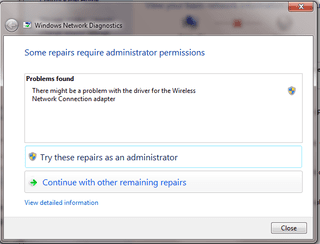
This shouldn't be happening because on the TP-Link site it says that W7 should automatically find the drivers and installs them, it does due to saying that the card is working in Device Manager.
So can anyone help me here, me and my friend are really stumped on what it could be, we think it's just a windows 7 issue, but I really want to go wireless.
I have connected everything up properly, put my ISP's username and password in right, because I'm connected right now via ethernet, made sure every setting is correct.
But my Windows 7 PC just won't pick up the signal from my router, I used the netgear USB adapter that came with the router, installed the latest drivers, the application wouldn't open so I thought it was a W7 Compatabilty Issue.
So I went and bought a PCI Wireless card for my new PC. Bought a TP-Link TL-WN350G, I bought it because it said it was windows 7 32 and 64 bit compatability, installed the card, windows 7 automatically found the drivers and installed 100% correctly, but still my PC doesn't find a connection at all.
I've tired the wireless connection through my xbox 360 Wireless Adapter and it connecting flawlessly, so that means that the router is working right? I just don't see why my computer is not picking up a connection.
Heres a pic of what troubleshooting gives me:
This shouldn't be happening because on the TP-Link site it says that W7 should automatically find the drivers and installs them, it does due to saying that the card is working in Device Manager.
So can anyone help me here, me and my friend are really stumped on what it could be, we think it's just a windows 7 issue, but I really want to go wireless.
My Computer
At a glance
Windows 7 Home Prem. 32-BitIntel Core i7 920 @ 2.67Ghz3GB DDR3NVIDIA Geforce GTX 295 1792MB (I think it has...
- Computer Manufacturer/Model Number
- Built it myself with a friend, Ashy B.
- OS
- Windows 7 Home Prem. 32-Bit
- CPU
- Intel Core i7 920 @ 2.67Ghz
- Motherboard
- ASUS P6T SE
- Memory
- 3GB DDR3
- Graphics Card(s)
- NVIDIA Geforce GTX 295 1792MB (I think it has that much)
- Sound Card
- On-Board Sound Card
- Monitor(s) Displays
- Samsung 22"
- Screen Resolution
- 1920 x1080
- Hard Drives
- 320GB
- PSU
- 700W
- Case
- Coolmaster case
- Keyboard
- Eclipse III
- Mouse
- Razer Naga
- Internet Speed
- 8MB Bradband
- Other Info
- I do know that the PSU can run this computer, I made sure it does. If you need more detailed information about my rig, just ask.