- Local time
- 10:56 AM
- Messages
- 2,066
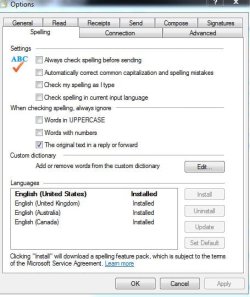
Tools>Options>Spelling>Languages used to have a list of available and installed languages. I noticed recently that the list now has only the four I installed for "English" and none listed as "available". In the Vista forums, Brink had posted a tutorial about how to fix that problem in Windows Mail with a registry fix for spelling related items in Windows Mail, but there doesn't seem to be a registry fix posted for WLM: Windows Mail Spell Check - Vista Forums
In attempting to fix the problem, I repaired WLE via Programs and Features and reestablished WLM as the default email program but it did not help. I also verified that spell check is still functioning.
In attempting to fix the problem, I repaired WLE via Programs and Features and reestablished WLM as the default email program but it did not help. I also verified that spell check is still functioning.
My Computer
At a glance
Windows 8 Pro w/MC 32-bitIntel Atom 1.86 GHz2 GBIntel GMA 500
- Computer type
- PC/Desktop
- Computer Manufacturer/Model Number
- OQO 2+
- OS
- Windows 8 Pro w/MC 32-bit
- CPU
- Intel Atom 1.86 GHz
- Motherboard
- OQO 2+
- Memory
- 2 GB
- Graphics Card(s)
- Intel GMA 500
- Sound Card
- IDT
- Monitor(s) Displays
- LCD
- Screen Resolution
- 800 x 480 (portable) 1280 x 1024 (docked)
- Hard Drives
- 64 GB SSD
- PSU
- 9 Ah Battery (portable) or OQO Brick (docked)
- Case
- Shirt Pocket Sized
- Cooling
- Tiny Fan
- Keyboard
- Slide out (portable) DiNovo Edge (docked)
- Mouse
- Eraser head (portable) Logitech Bluetooth (docked)
- Internet Speed
- WWAN or 802.11G (portable) T1 (docked)
- Browser
- IE 10
- Other Info
- DVD-RW OQO Docking Station