Solved WMC Audio dropouts

Mikesin

New member
Local time
5:28 AM
Messages
24
Location
London
Built my replacement MC PC January this year having retired my original ageing setup.

Asrock H77M i5 with 4GB memory, 500GB SSD for o/s and 500GB sata drive for data (Recorded TV/Music/Photos). Win 7 Home Premium with no non-Microsoft add ons

PC is only used for FTA TV and recordings - does have a large music library and photo library but these are not showing any problems. No sure when this problem started buthave had it for a couple of weeks at least.

After MC has been loaded (even if left in stop status i.e. not doing live TV or anything) it will start having 0.5 second audio dropouts but they are at randoms intervals - i have counted 20 secs, 40 secs and even longer between occurenceswhen I start watching TV. This can happen on playback of recorded TV but it has not been recorded with the problemr because a rewind/replay does not have the hiccup in the same place. A restart of Win 7 will clear the problem - just restarting WMC will not - but at some stage it returns.

CPU utilisation is around 6%, has about 66 processes running which seems normal. Apart from Win 7, I have Teamviewer for remote control and PLEX but neither of these are being used when the problem is active - have never noticed problem when watching internet TV through the PC i.e. football on SKY via IE or Chrome.


All drivers are up to date - sound is via integrated audio with microsoft drivers. SFC /scannow no errors found and CCleaner used on registry to eliminate errors.

PC is connected to Samsung smart TV via HDMI and am using TV speakers.

I did have AVG installed but removed it as the likelyhood of getting a virus is low as I do not have email on the setup and internet is only used for SKY footy.

I have tried watching Task Manager process monitor for CPU , Memory and disk when problem is occuring but cannot see any glitches.

Have thought about installing codecs from another source but not sure which to install.

Anyone with ideas on what to try next ?

Thanks
 
Last edited:

My Computer

Computer type
PC/Desktop
Computer Manufacturer/Model Number
Custom
OS
Microsoft Windows 7 Home Premium 64-bit 7601 Multiprocessor Free Service Pack 1
CPU
Intel(R) Core(TM) i5-2400 CPU @ 3.10GHz
Motherboard
ASRock H77M
Memory
4.00 GB
Graphics Card(s)
Intel(R) HD Graphics
Sound Card
(1) Realtek High Definition Audio (2) High Definition Audi
Monitor(s) Displays
Samsung LCD HDMI connection
Screen Resolution
1920 x 1080 x 32 bits (4294967296 colors) @ 60 Hz
Hard Drives
(1) Crucial_CT525MX300SSD1 ATA Device (2) ST3500413AS ATA Device
Internet Speed
50Mb

Attachments

  • LatMon_2017-03-23_10-45-00.png
    LatMon_2017-03-23_10-45-00.png
    18.2 KB · Views: 1

My Computer

Computer type
PC/Desktop
Computer Manufacturer/Model Number
Custom
OS
10 Pro x64
CPU
Ryzen 9 3900X
Motherboard
Asrock x370 Tachi
Memory
64GB(4x16GB) DDR4
Graphics Card(s)
EVGA 1080ti FTW3
Sound Card
ASUS Xonar Essence STX (V4 Bursons), ODAC rev B, NFB-11, O2
Monitor(s) Displays
3xASUS PB278Q/R, Optoma HD142X
Screen Resolution
3x1440p, 1080p
Hard Drives
512GB 850 EVO(OS, Programs)
4TB (Movies)
3TB (Downloads)
3TB (Programs)
1TB HDD (Games)
2x6TB R1 (videos)
PSU
AX760
Case
Fractal Define R5
Cooling
NH-D15S
Keyboard
Massdrop Ctrl with Box Navy's
Mouse
G903, Alioth XXL Mat
Internet Speed
280/40
Antivirus
MBAM, ESET
Browser
Canary 64 Bit
Other Info
I also own a Thinkpad P50 Xeon 4K, X220T, X1C5
Along with what has been suggested,
sound is via integrated audio with microsoft drivers
says you only have the generic, basic function, Windows installed sound drivers, not the correct sound hardware drivers.

Only 2GB of RAM potentially can be an issue.

If you are connected wireless that is a common source of audio dropouts.
 

My Computer

Computer type
PC/Desktop
Computer Manufacturer/Model Number
My Own Build
OS
Windows 10 64 bit
CPU
Intel i7 6700K
Motherboard
ASUS ROG Maximus VIII Hero
Memory
16GB Corsair Dominator
Graphics Card(s)
Intel CPU Graphics
Sound Card
RealTek
Monitor(s) Displays
27" Dell S2719dgf
Screen Resolution
2560X1440
Hard Drives
1 TB Samsung 850 EVO SSD for Win 10 Pro
500GB Samsung 850 EVO SSD for Win 10 Insider
2 TB drive for backup
PSU
EVGA Supernova 750G2
Case
BeQuiet Silent Base 600
Cooling
Deepcool Captain 120EX
Keyboard
Microsoft Wireless 2000
Mouse
Microsoft wireless
Internet Speed
100 MB/sec (Cable)
Antivirus
Microsoft Defender and Malwarebytes
Browser
Edge/Firefox
Other Info
Cakewalk (Sonar) by BandLab and Studio One 4.1 Pro recording studio software. MOTU 896Mk3 Hybrid recording interface, Frontier Tranzport wireless control unit, Behringer X-Touch Control Surface.
Five USB connected optical drives for CD Audio production using Nero BurningROM
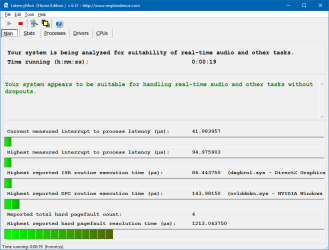
DPC latency checker shows green with "absolute maximum" of 440us but average is below 100us - no visible increase when dropout occurs.

Will dig out Asrock disk to see if it has audio driver. No wireless adapter

thanks
 

My Computer

Computer type
PC/Desktop
Computer Manufacturer/Model Number
Custom
OS
Microsoft Windows 7 Home Premium 64-bit 7601 Multiprocessor Free Service Pack 1
CPU
Intel(R) Core(TM) i5-2400 CPU @ 3.10GHz
Motherboard
ASRock H77M
Memory
4.00 GB
Graphics Card(s)
Intel(R) HD Graphics
Sound Card
(1) Realtek High Definition Audio (2) High Definition Audi
Monitor(s) Displays
Samsung LCD HDMI connection
Screen Resolution
1920 x 1080 x 32 bits (4294967296 colors) @ 60 Hz
Hard Drives
(1) Crucial_CT525MX300SSD1 ATA Device (2) ST3500413AS ATA Device
Internet Speed
50Mb
Along with what has been suggested, says you only have the generic, basic function, Windows installed sound drivers, not the correct sound hardware drivers.

Only 2GB of RAM potentially can be an issue.

If you are connected wireless that is a common source of audio dropouts.

Oh yeah did not catch that 2GB could definitely be bottle necking that system.

Also Mikesin what model is your OS SSD?

Malcolm
 

My Computer

Computer type
PC/Desktop
Computer Manufacturer/Model Number
Custom
OS
10 Pro x64
CPU
Ryzen 9 3900X
Motherboard
Asrock x370 Tachi
Memory
64GB(4x16GB) DDR4
Graphics Card(s)
EVGA 1080ti FTW3
Sound Card
ASUS Xonar Essence STX (V4 Bursons), ODAC rev B, NFB-11, O2
Monitor(s) Displays
3xASUS PB278Q/R, Optoma HD142X
Screen Resolution
3x1440p, 1080p
Hard Drives
512GB 850 EVO(OS, Programs)
4TB (Movies)
3TB (Downloads)
3TB (Programs)
1TB HDD (Games)
2x6TB R1 (videos)
PSU
AX760
Case
Fractal Define R5
Cooling
NH-D15S
Keyboard
Massdrop Ctrl with Box Navy's
Mouse
G903, Alioth XXL Mat
Internet Speed
280/40
Antivirus
MBAM, ESET
Browser
Canary 64 Bit
Other Info
I also own a Thinkpad P50 Xeon 4K, X220T, X1C5
Installed Realtek audio driver for Win7 64bit - think this may be solution - will know by end of day. I actually have 4GB memory - my mistake (thinking of old system) - using a Crucial CT525M SSD .
I uninstalled Realtek after fiddling with setup to try and get 4 CH stereo working to my analogue hi fi system - forgot I had done that- doh !
 

My Computer

Computer type
PC/Desktop
Computer Manufacturer/Model Number
Custom
OS
Microsoft Windows 7 Home Premium 64-bit 7601 Multiprocessor Free Service Pack 1
CPU
Intel(R) Core(TM) i5-2400 CPU @ 3.10GHz
Motherboard
ASRock H77M
Memory
4.00 GB
Graphics Card(s)
Intel(R) HD Graphics
Sound Card
(1) Realtek High Definition Audio (2) High Definition Audi
Monitor(s) Displays
Samsung LCD HDMI connection
Screen Resolution
1920 x 1080 x 32 bits (4294967296 colors) @ 60 Hz
Hard Drives
(1) Crucial_CT525MX300SSD1 ATA Device (2) ST3500413AS ATA Device
Internet Speed
50Mb
Installed Realtek audio driver for Win7 64bit - think this may be solution - will know by end of day. I actually have 4GB memory - my mistake (thinking of old system) - using a Crucial CT525M SSD .
I uninstalled Realtek after fiddling with setup to try and get 4 CH stereo working to my analogue hi fi system - forgot I had done that- doh !

Let us know how it goes with the right drivers then, best of luck.

Malcolm
 

My Computer

Computer type
PC/Desktop
Computer Manufacturer/Model Number
Custom
OS
10 Pro x64
CPU
Ryzen 9 3900X
Motherboard
Asrock x370 Tachi
Memory
64GB(4x16GB) DDR4
Graphics Card(s)
EVGA 1080ti FTW3
Sound Card
ASUS Xonar Essence STX (V4 Bursons), ODAC rev B, NFB-11, O2
Monitor(s) Displays
3xASUS PB278Q/R, Optoma HD142X
Screen Resolution
3x1440p, 1080p
Hard Drives
512GB 850 EVO(OS, Programs)
4TB (Movies)
3TB (Downloads)
3TB (Programs)
1TB HDD (Games)
2x6TB R1 (videos)
PSU
AX760
Case
Fractal Define R5
Cooling
NH-D15S
Keyboard
Massdrop Ctrl with Box Navy's
Mouse
G903, Alioth XXL Mat
Internet Speed
280/40
Antivirus
MBAM, ESET
Browser
Canary 64 Bit
Other Info
I also own a Thinkpad P50 Xeon 4K, X220T, X1C5
Installed realtek this morning but still had problem -just been into control panel and changed default devicein sound managr from Speakers to top TV icon and will monitor behaviour
 

My Computer

Computer type
PC/Desktop
Computer Manufacturer/Model Number
Custom
OS
Microsoft Windows 7 Home Premium 64-bit 7601 Multiprocessor Free Service Pack 1
CPU
Intel(R) Core(TM) i5-2400 CPU @ 3.10GHz
Motherboard
ASRock H77M
Memory
4.00 GB
Graphics Card(s)
Intel(R) HD Graphics
Sound Card
(1) Realtek High Definition Audio (2) High Definition Audi
Monitor(s) Displays
Samsung LCD HDMI connection
Screen Resolution
1920 x 1080 x 32 bits (4294967296 colors) @ 60 Hz
Hard Drives
(1) Crucial_CT525MX300SSD1 ATA Device (2) ST3500413AS ATA Device
Internet Speed
50Mb
Still getting dropouts - frequency variable. Have uploaded system specs and have a .csv file from hardwinfo - what to do with it ?

Thanks
 

My Computer

Computer type
PC/Desktop
Computer Manufacturer/Model Number
Custom
OS
Microsoft Windows 7 Home Premium 64-bit 7601 Multiprocessor Free Service Pack 1
CPU
Intel(R) Core(TM) i5-2400 CPU @ 3.10GHz
Motherboard
ASRock H77M
Memory
4.00 GB
Graphics Card(s)
Intel(R) HD Graphics
Sound Card
(1) Realtek High Definition Audio (2) High Definition Audi
Monitor(s) Displays
Samsung LCD HDMI connection
Screen Resolution
1920 x 1080 x 32 bits (4294967296 colors) @ 60 Hz
Hard Drives
(1) Crucial_CT525MX300SSD1 ATA Device (2) ST3500413AS ATA Device
Internet Speed
50Mb
Is your power profile in windows set to high performance, I would check that first.

Malcolm
 

My Computer

Computer type
PC/Desktop
Computer Manufacturer/Model Number
Custom
OS
10 Pro x64
CPU
Ryzen 9 3900X
Motherboard
Asrock x370 Tachi
Memory
64GB(4x16GB) DDR4
Graphics Card(s)
EVGA 1080ti FTW3
Sound Card
ASUS Xonar Essence STX (V4 Bursons), ODAC rev B, NFB-11, O2
Monitor(s) Displays
3xASUS PB278Q/R, Optoma HD142X
Screen Resolution
3x1440p, 1080p
Hard Drives
512GB 850 EVO(OS, Programs)
4TB (Movies)
3TB (Downloads)
3TB (Programs)
1TB HDD (Games)
2x6TB R1 (videos)
PSU
AX760
Case
Fractal Define R5
Cooling
NH-D15S
Keyboard
Massdrop Ctrl with Box Navy's
Mouse
G903, Alioth XXL Mat
Internet Speed
280/40
Antivirus
MBAM, ESET
Browser
Canary 64 Bit
Other Info
I also own a Thinkpad P50 Xeon 4K, X220T, X1C5
Was set to power saver - changed to high perf - however haven't had any dropouts for several hours so may take a while before I post result -thanks

UPDATE - no problems for 24 hours so think this is a result. I think I changed the power profile because I was concerned about temperatures of processor etc and didn't realy know if I had enough cooling - as a byproduct of this problem resolution I now have HWINFO that lets me see in realtime what is happening as regards core temperatures etc - double result
Many thanks Malcom

Mike
 
Last edited:

My Computer

Computer type
PC/Desktop
Computer Manufacturer/Model Number
Custom
OS
Microsoft Windows 7 Home Premium 64-bit 7601 Multiprocessor Free Service Pack 1
CPU
Intel(R) Core(TM) i5-2400 CPU @ 3.10GHz
Motherboard
ASRock H77M
Memory
4.00 GB
Graphics Card(s)
Intel(R) HD Graphics
Sound Card
(1) Realtek High Definition Audio (2) High Definition Audi
Monitor(s) Displays
Samsung LCD HDMI connection
Screen Resolution
1920 x 1080 x 32 bits (4294967296 colors) @ 60 Hz
Hard Drives
(1) Crucial_CT525MX300SSD1 ATA Device (2) ST3500413AS ATA Device
Internet Speed
50Mb
cool.... any update?
 

My Computer

Computer type
PC/Desktop
Computer Manufacturer/Model Number
HP
OS
Windows 7 Ultimate x64
Was set to power saver - changed to high perf - however haven't had any dropouts for several hours so may take a while before I post result -thanks

UPDATE - no problems for 24 hours so think this is a result. I think I changed the power profile because I was concerned about temperatures of processor etc and didn't realy know if I had enough cooling - as a byproduct of this problem resolution I now have HWINFO that lets me see in realtime what is happening as regards core temperatures etc - double result
Many thanks Malcom

Mike

Glad to hear it. What were the temps you think were to hot?

Malcolm
 

My Computer

Computer type
PC/Desktop
Computer Manufacturer/Model Number
Custom
OS
10 Pro x64
CPU
Ryzen 9 3900X
Motherboard
Asrock x370 Tachi
Memory
64GB(4x16GB) DDR4
Graphics Card(s)
EVGA 1080ti FTW3
Sound Card
ASUS Xonar Essence STX (V4 Bursons), ODAC rev B, NFB-11, O2
Monitor(s) Displays
3xASUS PB278Q/R, Optoma HD142X
Screen Resolution
3x1440p, 1080p
Hard Drives
512GB 850 EVO(OS, Programs)
4TB (Movies)
3TB (Downloads)
3TB (Programs)
1TB HDD (Games)
2x6TB R1 (videos)
PSU
AX760
Case
Fractal Define R5
Cooling
NH-D15S
Keyboard
Massdrop Ctrl with Box Navy's
Mouse
G903, Alioth XXL Mat
Internet Speed
280/40
Antivirus
MBAM, ESET
Browser
Canary 64 Bit
Other Info
I also own a Thinkpad P50 Xeon 4K, X220T, X1C5
Back
Top