WMC Captions are in wrong place when edited.

hydeIT

New member
Local time
9:00 AM
Messages
20
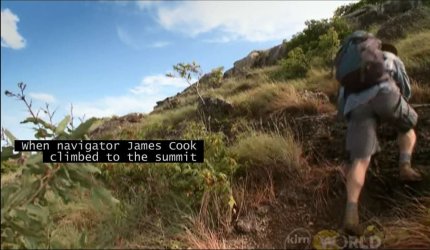
When I customize caption display in WMC, change the font or try to make them smaller, the captions get all messed up, sometimes show up in the middle of the picture, sometimes towards top right in front of their faces.

Was there a bug in WMC Closed Captions that caused edits to corrupt the CC display?
 
Last edited:

My Computer My Computer

Computer type
PC/Desktop
Computer Manufacturer/Model Number
Thinkpad X220
OS
Windows 7 Professional 64bit
CPU
Intel® Core™ i5-2540M / 2.6Ghz
Memory
8GB 1333
Graphics Card(s)
Intel 3000 Integrated
Sound Card
Integrated
Monitor(s) Displays
12.5" IPS + 23" Dell
Hard Drives
320GB 7200RPM

How are you editing the captions? My WMC allows only turning it on or off. I suspect there's a problem with your add-on software.

Never mind. I found it but don't use it. Try setting it back to "Broadcast" defaults and see if that works first.
 
Last edited:

My Computer My Computer

Computer type
PC/Desktop
Computer Manufacturer/Model Number
Built 2/11/2011
OS
Windows 7 Pro-x64
CPU
i7-2600 3.4GHz - 3.8GHz Turbo
Motherboard
Intel DH67BL-B3
Memory
8Gb - 2x4GB, Muskin 991770 PC3-1333
Graphics Card(s)
Integrated Intel HD 2000
Sound Card
Integrated Intel 10.1 HD, RealTek ALC892
Monitor(s) Displays
Asus LCD VH222H, Haier HL24XSL2a
Screen Resolution
1920x1080, 1920x1080
Hard Drives
Crucial SSD C300-128Gb,
Western Digital WD5002AALX - 500Gb,
Western Digital WD7501AALS - 750Gb
PSU
Seasonic 650W 80+ Gold Modular
Case
Rosewill Defender
Cooling
Stock CPU, Four 120mm case fans, PCH fan added
Keyboard
Logitech EX100 Y-RBH94 Wireless
Mouse
Logitech EX100 M-RCE95 Wireless
Internet Speed
3.0/1.5 Mbs
Antivirus
Microsoft Security Essentials
Browser
Microsoft Internet Explorer 11
Other Info
Antec Veris Premier-Multimedia IR Station,
Cyber Accoustics-3602 Speakers,
AFT XM-5U Card Reader,
Hauppauge TV-HVR-2250,
Sony LX300 USB Turntable
Setting it back to broadcast helps, but honestly on a 60" TV those captions come out huge.
When I customize the font and use "small" the size is perfect, but then the text right in the middle of the picture!

I just wanted to know if this was a known bug or if it was just my installation, something messing it up, maybe video card, or drivers..

When you customize yours, does your text also move to odd places?
 

My Computer My Computer

Computer type
PC/Desktop
Computer Manufacturer/Model Number
Thinkpad X220
OS
Windows 7 Professional 64bit
CPU
Intel® Core™ i5-2540M / 2.6Ghz
Memory
8GB 1333
Graphics Card(s)
Intel 3000 Integrated
Sound Card
Integrated
Monitor(s) Displays
12.5" IPS + 23" Dell
Hard Drives
320GB 7200RPM
I just tried it and yes, it appears to come out in the middle of the screen most of the time when any of the options are set. It did change to the top and bottom on some scenes but it shows mostly in the middle. I grabbed this snip off NOVA as a sample. (Small text, all other option set to broadcast.)

Wish I could help but there doesn't appear to be a fixed location for captions. I looked through my TV documentation and screen menu and it shows basically the same options as WMC--No position options there either.
 

Attachments

  • Captions-Small.JPG
    Captions-Small.JPG
    99.8 KB · Views: 3

My Computer My Computer

Computer type
PC/Desktop
Computer Manufacturer/Model Number
Built 2/11/2011
OS
Windows 7 Pro-x64
CPU
i7-2600 3.4GHz - 3.8GHz Turbo
Motherboard
Intel DH67BL-B3
Memory
8Gb - 2x4GB, Muskin 991770 PC3-1333
Graphics Card(s)
Integrated Intel HD 2000
Sound Card
Integrated Intel 10.1 HD, RealTek ALC892
Monitor(s) Displays
Asus LCD VH222H, Haier HL24XSL2a
Screen Resolution
1920x1080, 1920x1080
Hard Drives
Crucial SSD C300-128Gb,
Western Digital WD5002AALX - 500Gb,
Western Digital WD7501AALS - 750Gb
PSU
Seasonic 650W 80+ Gold Modular
Case
Rosewill Defender
Cooling
Stock CPU, Four 120mm case fans, PCH fan added
Keyboard
Logitech EX100 Y-RBH94 Wireless
Mouse
Logitech EX100 M-RCE95 Wireless
Internet Speed
3.0/1.5 Mbs
Antivirus
Microsoft Security Essentials
Browser
Microsoft Internet Explorer 11
Other Info
Antec Veris Premier-Multimedia IR Station,
Cyber Accoustics-3602 Speakers,
AFT XM-5U Card Reader,
Hauppauge TV-HVR-2250,
Sony LX300 USB Turntable
Looks to be a bug in WMC..
Thanks for trying. By the way, mine seems to be a bit better compared to yours :) At least I got it smaller, but still in the middle of the screen..
ec0265eb1722e8246140b18293dba657.png


I wonder if we can fiddle in registry, there must be something to make a correction...
 

My Computer My Computer

Computer type
PC/Desktop
Computer Manufacturer/Model Number
Thinkpad X220
OS
Windows 7 Professional 64bit
CPU
Intel® Core™ i5-2540M / 2.6Ghz
Memory
8GB 1333
Graphics Card(s)
Intel 3000 Integrated
Sound Card
Integrated
Monitor(s) Displays
12.5" IPS + 23" Dell
Hard Drives
320GB 7200RPM
There's nothing defined in the Registry for position of CC. I did a little browsing and came to the conclusion that this has been a problem with all display devices of various manufactures. After surfing a range of programs on OTA and Satellite signals, I think the position is controlled by the program source encoding of the closed caption text.

I viewed various programs and noticed some had no problem with small text at the bottom-left of the screen. On others, the text moved from bottom to top when program information was displayed at the bottom. The text moved back to the bottom after the information faded. On still others, the text remained at or near the center of the screen. Changing a channel back to one of the others resulted in text appearing just as it was in that program before changing the channel--Top, bottom or center.

It may be a problem but it is certainly not an isolated event with WMC. It occurs the same way on my TV and appears to be program dependent.
 

My Computer My Computer

Computer type
PC/Desktop
Computer Manufacturer/Model Number
Built 2/11/2011
OS
Windows 7 Pro-x64
CPU
i7-2600 3.4GHz - 3.8GHz Turbo
Motherboard
Intel DH67BL-B3
Memory
8Gb - 2x4GB, Muskin 991770 PC3-1333
Graphics Card(s)
Integrated Intel HD 2000
Sound Card
Integrated Intel 10.1 HD, RealTek ALC892
Monitor(s) Displays
Asus LCD VH222H, Haier HL24XSL2a
Screen Resolution
1920x1080, 1920x1080
Hard Drives
Crucial SSD C300-128Gb,
Western Digital WD5002AALX - 500Gb,
Western Digital WD7501AALS - 750Gb
PSU
Seasonic 650W 80+ Gold Modular
Case
Rosewill Defender
Cooling
Stock CPU, Four 120mm case fans, PCH fan added
Keyboard
Logitech EX100 Y-RBH94 Wireless
Mouse
Logitech EX100 M-RCE95 Wireless
Internet Speed
3.0/1.5 Mbs
Antivirus
Microsoft Security Essentials
Browser
Microsoft Internet Explorer 11
Other Info
Antec Veris Premier-Multimedia IR Station,
Cyber Accoustics-3602 Speakers,
AFT XM-5U Card Reader,
Hauppauge TV-HVR-2250,
Sony LX300 USB Turntable
Back
Top