WMC Connecting/Extender issue

crispyclot

New member
Local time
7:14 PM
Messages
53
Trying to configure WMC , got thru the install , device driver loaded onto laptop , media library built, then last connection to extender fails . Tried a few differ times , with new codes , added to firewall list . In WMC on laptop , say extender installed working but connection failed , is it uac or missing extra prog in firewall list ??

1st laptop , 1st Windows 7 , but have 2 computers , PS3 , Xbox360 , 3 security cams and Telus Optic all on network so no stranger to setting up devices ....

Media center on laptop running fine , when 'contacting' on xbox screen , get the error ' xbox has been disconnected from WMC PC ' ....

On the PC side of it , when xbox is contacting , PC page reads the extender is installed and ready to use . After xbox fails and disconnects , pc gets the yellow exclamation and ' setup is not available ....

Any ideas thanks

Chris
 

My Computer

OS
Window 7 Home Premium 64Bit
I used my extender for months and one day it would no longer connect. Struggled with it for days and finally had to reinstally Windows 7 to get it back.
 

My Computer

Computer Manufacturer/Model Number
Custom
OS
Windows 7 Ultimate RTM (Technet)
CPU
3.00 gigahertz Intel Core2 Duo E8400
Motherboard
ASUSTeK Computer INC. P5K/EPU Rev 1.xx
Memory
4GB
Graphics Card(s)
ATI Radeon X1950 Pro
Sound Card
Built in HD Audio
Monitor(s) Displays
22" Gateway LCD
Screen Resolution
1920 x 1200
Hard Drives
ST3160023A [Hard drive] (160.04 GB) -- drive 0, rev 8.01, ST3500630AS [Hard drive] (500.11 GB) -- drive 2, rev 3.AAK
ST3500630AS [Hard drive] (500.11 GB) -- drive 1, rev 3.AAK
Keyboard
Logitech G11
Mouse
Microsoft Wireless Laser Mouse 5000
Internet Speed
13.44 Mbps
Well i got a brand new computer witht fresh Win 7 and never had an extender hooked up , so hoping to not have to do that already ! Thanks for the info though :)
 

My Computer

OS
Window 7 Home Premium 64Bit
Anything , its right there and fails at bitter end .....?
 

My Computer

OS
Window 7 Home Premium 64Bit
Have you got uPnP enabled on your router? If a firewall is stopping you connecting to other devices then uPnP will forward the correct ports for you, if that doesn't work then there's something wrong with your router.
 

My Computer

Computer type
PC/Desktop
Computer Manufacturer/Model Number
Custom Build
OS
Windows 7 Ultimate x64 SP1
CPU
Intel Q6600 @ 2.6Ghz
Motherboard
Evga NF78-CK-132-A 3-Way SLI
Memory
4Gb DDR2 Corsair Dominator @ 800Mhz 5-5-5-15
Graphics Card(s)
EVGA 560 GTX SC FTW 1GB
Sound Card
Realtek HD 7.1 Audio, Plantronics GameCom780 7.1 Headset
Monitor(s) Displays
Dell S2409W
Screen Resolution
1920 x 1080
Hard Drives
SanDisk SDSSDHII-120G-G25 120GB SSD
Samsung 7200RPM 750Gb SATA
Samsung 850 EVO 120GB SSD
Western Digital Green 1TB 7200RPM
PSU
Xigmatek 750W Quad sli quad core 80% eff
Case
Antec 900 Gaming Case
Cooling
Zalman CNPS9700-NT NVIDIA Tritium
Keyboard
Logitech generic keyboard, MS wireless keyboard
Mouse
Razor Lachesis Banshee V2 Blue, 4000DPI, MS wireless mouse
Internet Speed
152Mb Virgin Media Fibre Optic
Antivirus
Microsoft Security Essentials
Browser
Google Chrome
Other Info
Wireless Gaming Receiver for Windows, Wireless Xbox 360 Pad
Thanks for the reply ! Ill try that after work , and see what happens :)
 

My Computer

OS
Window 7 Home Premium 64Bit
fingers crossed :)
 

My Computer

Computer type
PC/Desktop
Computer Manufacturer/Model Number
Custom Build
OS
Windows 7 Ultimate x64 SP1
CPU
Intel Q6600 @ 2.6Ghz
Motherboard
Evga NF78-CK-132-A 3-Way SLI
Memory
4Gb DDR2 Corsair Dominator @ 800Mhz 5-5-5-15
Graphics Card(s)
EVGA 560 GTX SC FTW 1GB
Sound Card
Realtek HD 7.1 Audio, Plantronics GameCom780 7.1 Headset
Monitor(s) Displays
Dell S2409W
Screen Resolution
1920 x 1080
Hard Drives
SanDisk SDSSDHII-120G-G25 120GB SSD
Samsung 7200RPM 750Gb SATA
Samsung 850 EVO 120GB SSD
Western Digital Green 1TB 7200RPM
PSU
Xigmatek 750W Quad sli quad core 80% eff
Case
Antec 900 Gaming Case
Cooling
Zalman CNPS9700-NT NVIDIA Tritium
Keyboard
Logitech generic keyboard, MS wireless keyboard
Mouse
Razor Lachesis Banshee V2 Blue, 4000DPI, MS wireless mouse
Internet Speed
152Mb Virgin Media Fibre Optic
Antivirus
Microsoft Security Essentials
Browser
Google Chrome
Other Info
Wireless Gaming Receiver for Windows, Wireless Xbox 360 Pad
I recommend NOT using an xbox as an extender for your media.
besides it being a pain for you right now to set up,
Currently it WILL not show/streaming pictures or videos correctly. It takes away some image from pictures and videos and you can check it yourself and see the difference. It also takes away when streaming from apps like netflicks and huluplus.

Again if you think i might have something just stupidly wrong in my settings check for yourself.
 

My Computer

OS
Windows 7 Home Premium 64bit.
Memory
4 gb
Heat .... Well now , im really curious to get the damn thing set up just to see what you mean . I dont neccesary need it , i already have the PS3 and the brand new ASUS laptop , but i like to have to most out of what i buy , if it can do something i want to enable and run it !
I also have Zune running on the actual Xbox streaming all the same stuff that will be in WMC anyway but like i said , want to see how it looks . Plus i thought i heard they were axing Zune eventually ?

MrNeeds , thanks for the tip , i checked and it is enabled already . Thing is i have 3 security cams , 2 putes and an Xbox and PS3 all on same network running great.
For a simple plug and play setup , its been a real pain. It has to be some small setting somewhere ..... now its personal !!

Thanks

Chris
 

My Computer

OS
Window 7 Home Premium 64Bit
I recommend NOT using an xbox as an extender for your media.
besides it being a pain for you right now to set up,
Currently it WILL not show/streaming pictures or videos correctly. It takes away some image from pictures and videos and you can check it yourself and see the difference. It also takes away when streaming from apps like netflicks and huluplus.

Again if you think i might have something just stupidly wrong in my settings check for yourself.

Ermm, yea, you've got something stupidly wrong in your settings, mine works a treat, videos and pictures, at the correct aspect ratio and everything, I was watching ironman 2 in mp4 an hour ago, I suggest you download tversity as your streaming server.
 

My Computer

Computer type
PC/Desktop
Computer Manufacturer/Model Number
Custom Build
OS
Windows 7 Ultimate x64 SP1
CPU
Intel Q6600 @ 2.6Ghz
Motherboard
Evga NF78-CK-132-A 3-Way SLI
Memory
4Gb DDR2 Corsair Dominator @ 800Mhz 5-5-5-15
Graphics Card(s)
EVGA 560 GTX SC FTW 1GB
Sound Card
Realtek HD 7.1 Audio, Plantronics GameCom780 7.1 Headset
Monitor(s) Displays
Dell S2409W
Screen Resolution
1920 x 1080
Hard Drives
SanDisk SDSSDHII-120G-G25 120GB SSD
Samsung 7200RPM 750Gb SATA
Samsung 850 EVO 120GB SSD
Western Digital Green 1TB 7200RPM
PSU
Xigmatek 750W Quad sli quad core 80% eff
Case
Antec 900 Gaming Case
Cooling
Zalman CNPS9700-NT NVIDIA Tritium
Keyboard
Logitech generic keyboard, MS wireless keyboard
Mouse
Razor Lachesis Banshee V2 Blue, 4000DPI, MS wireless mouse
Internet Speed
152Mb Virgin Media Fibre Optic
Antivirus
Microsoft Security Essentials
Browser
Google Chrome
Other Info
Wireless Gaming Receiver for Windows, Wireless Xbox 360 Pad
3. questions.

1. Which xbox model do you have?

2. Did you stream with wmc in the xbox and it worked fine after comparing? the differences are rather small for certain types like black bar widescreen
3. What type of T.V do you have and is it set up with hdmi?

If i do have something messed up in my wmc settings, why would xbox streaming apps like netflicks and hulu do the same? I'm really thinking its my old 2006 LCD 37'in now or the fact that im not using an hdmi cable but that avHD cable that the old xbox comes in.

Also might note that when i stream stuff from PC's to PC's everything is fine.
 
Last edited:

My Computer

OS
Windows 7 Home Premium 64bit.
Memory
4 gb
3. questions.

1. Which xbox model do you have?

2. Did you stream with wmc in the xbox and it worked fine after comparing? the differences are rather small for certain types
3. What type of T.V do you have and is it set up with hdmi?

If i do have something messed up in my wmc settings, why would xbox streaming apps like netflicks and hulu do the same? I'm really thinking its my old 2006 LCD 37'in now or the fact that im not using an hdmi cable but that avHD cable that the old xbox comes in.

Also might note that when i stream stuff from PC's to PC's everything is fine.

ive got the 2007 model xbox premium with HDMI, i connect to a sony bravia 32" 2010 model, with internet streaming and whatnot, it works brilliantly with WMC, when i have the codecs installed off xbox live, otherwise the videos wont load, but they display perfectly, in normal film resolution, no zooming or anything, sounds like you have video overscan enabled on your tv
 

My Computer

Computer type
PC/Desktop
Computer Manufacturer/Model Number
Custom Build
OS
Windows 7 Ultimate x64 SP1
CPU
Intel Q6600 @ 2.6Ghz
Motherboard
Evga NF78-CK-132-A 3-Way SLI
Memory
4Gb DDR2 Corsair Dominator @ 800Mhz 5-5-5-15
Graphics Card(s)
EVGA 560 GTX SC FTW 1GB
Sound Card
Realtek HD 7.1 Audio, Plantronics GameCom780 7.1 Headset
Monitor(s) Displays
Dell S2409W
Screen Resolution
1920 x 1080
Hard Drives
SanDisk SDSSDHII-120G-G25 120GB SSD
Samsung 7200RPM 750Gb SATA
Samsung 850 EVO 120GB SSD
Western Digital Green 1TB 7200RPM
PSU
Xigmatek 750W Quad sli quad core 80% eff
Case
Antec 900 Gaming Case
Cooling
Zalman CNPS9700-NT NVIDIA Tritium
Keyboard
Logitech generic keyboard, MS wireless keyboard
Mouse
Razor Lachesis Banshee V2 Blue, 4000DPI, MS wireless mouse
Internet Speed
152Mb Virgin Media Fibre Optic
Antivirus
Microsoft Security Essentials
Browser
Google Chrome
Other Info
Wireless Gaming Receiver for Windows, Wireless Xbox 360 Pad
I have realized that I have an overscan problem. The T.v I'm using does not have anything to disable overscan I reading that getting a vga xbox cable will fix the issue but i bought and hdmi cable i should get soon and hope that fixes the issue.

Where would i go in the settings of a t.v that can disable overscan anyway?
 

My Computer

OS
Windows 7 Home Premium 64bit.
Memory
4 gb
Well its seems ive tried everything ( maybe ) , one thing i think might be interfering is the fact that i use my Xbox as PVR for the Telus Optik service i have here . It builds the library , says connected , shows that it is , then fails a minute later .

DL'd the Tversity , looks pretty good . Still want to get WMC streaming between the ASUS and Xbox .

What about UAC level , would that matter ?
 

My Computer

OS
Window 7 Home Premium 64Bit
If its still networking problems calling xbox and asking to transfer to their extender support will help ALOT. try it
 

My Computer

OS
Windows 7 Home Premium 64bit.
Memory
4 gb
Got Zune working , but only in My Xbox library section . The Zune app in there is just for online media , not personal folders ?
 

My Computer

OS
Window 7 Home Premium 64Bit
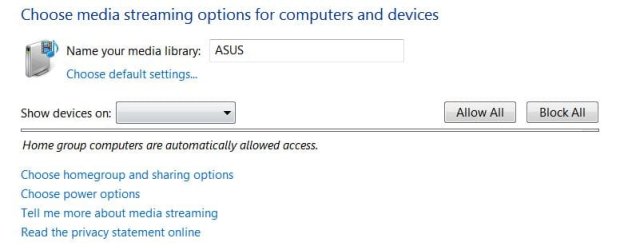
Found this option unavailable after all the sharing and homegroup creating , firewall adding , extender etc . Nothing ever shows up in " Show devices on " dropdown menu ? I assume the xbox or ps3 should be showing up in there ?
 

Attachments

  • homegroup.JPG
    homegroup.JPG
    29.8 KB · Views: 16

My Computer

OS
Window 7 Home Premium 64Bit
It needs to be set in windows media player if you want to stream the folder library, open up WMP and click on the drop down menu under library, select media sharing, and there should be a list of devices in there that you need to allow or deny(I've not set it up with 7 yet so I'm just going from memory with vista) hope this helps
 

My Computer

Computer type
PC/Desktop
Computer Manufacturer/Model Number
Custom Build
OS
Windows 7 Ultimate x64 SP1
CPU
Intel Q6600 @ 2.6Ghz
Motherboard
Evga NF78-CK-132-A 3-Way SLI
Memory
4Gb DDR2 Corsair Dominator @ 800Mhz 5-5-5-15
Graphics Card(s)
EVGA 560 GTX SC FTW 1GB
Sound Card
Realtek HD 7.1 Audio, Plantronics GameCom780 7.1 Headset
Monitor(s) Displays
Dell S2409W
Screen Resolution
1920 x 1080
Hard Drives
SanDisk SDSSDHII-120G-G25 120GB SSD
Samsung 7200RPM 750Gb SATA
Samsung 850 EVO 120GB SSD
Western Digital Green 1TB 7200RPM
PSU
Xigmatek 750W Quad sli quad core 80% eff
Case
Antec 900 Gaming Case
Cooling
Zalman CNPS9700-NT NVIDIA Tritium
Keyboard
Logitech generic keyboard, MS wireless keyboard
Mouse
Razor Lachesis Banshee V2 Blue, 4000DPI, MS wireless mouse
Internet Speed
152Mb Virgin Media Fibre Optic
Antivirus
Microsoft Security Essentials
Browser
Google Chrome
Other Info
Wireless Gaming Receiver for Windows, Wireless Xbox 360 Pad
Thats exactly the page i was talking about , there are NO devices to choose in that menu , thats the problem .
 

My Computer

OS
Window 7 Home Premium 64Bit
have you enabled sharing on your network, this can be achieved in network and sharing center > homegroup and sharing options
 

My Computer

Computer type
PC/Desktop
Computer Manufacturer/Model Number
Custom Build
OS
Windows 7 Ultimate x64 SP1
CPU
Intel Q6600 @ 2.6Ghz
Motherboard
Evga NF78-CK-132-A 3-Way SLI
Memory
4Gb DDR2 Corsair Dominator @ 800Mhz 5-5-5-15
Graphics Card(s)
EVGA 560 GTX SC FTW 1GB
Sound Card
Realtek HD 7.1 Audio, Plantronics GameCom780 7.1 Headset
Monitor(s) Displays
Dell S2409W
Screen Resolution
1920 x 1080
Hard Drives
SanDisk SDSSDHII-120G-G25 120GB SSD
Samsung 7200RPM 750Gb SATA
Samsung 850 EVO 120GB SSD
Western Digital Green 1TB 7200RPM
PSU
Xigmatek 750W Quad sli quad core 80% eff
Case
Antec 900 Gaming Case
Cooling
Zalman CNPS9700-NT NVIDIA Tritium
Keyboard
Logitech generic keyboard, MS wireless keyboard
Mouse
Razor Lachesis Banshee V2 Blue, 4000DPI, MS wireless mouse
Internet Speed
152Mb Virgin Media Fibre Optic
Antivirus
Microsoft Security Essentials
Browser
Google Chrome
Other Info
Wireless Gaming Receiver for Windows, Wireless Xbox 360 Pad
Back
Top