Solved Wndows Experience Index

converse5

Banned
Local time
3:14 PM
Messages
26
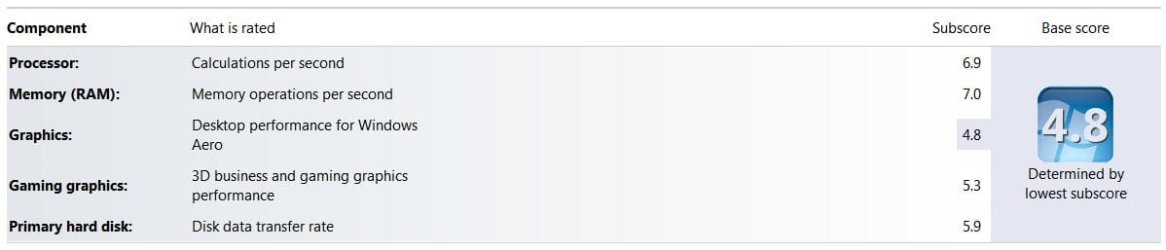
I need to know that how can i increase the highlighted item
wjf7dd.png

I have everything correct
I have intel core 2 duo 2.93 GHz, DG41RQ motherboard, 3GB Ram DDR2, Nvidia Geforce 9500GT 1GB,
What am i missing here?
 

My Computer

Computer Manufacturer/Model Number
Custom
OS
Windows 7 Ultimate 64 bit
CPU
E7500
Motherboard
Intel DG41RG
Memory
3GB
Graphics Card(s)
Nvidia GeForce GTX 550 Ti
Sound Card
Onboard
Monitor(s) Displays
Acer v193HQ
Screen Resolution
1366x768
Hard Drives
250GB SATA
PSU
CoolerMaster 450W Bronze
Keyboard
A4Tech
Mouse
A4Tech
Internet Speed
1Mbps Dl and 512Kbps Ul
Graphics card may not be supporting Aero do you have all the drivers in for the card and not the generic microsoft ones?
 

My Computer

Computer Manufacturer/Model Number
Alienware
OS
Windows 7 Ultimate x64
CPU
I7
Motherboard
GA-X58-USB3
Memory
6 x 1.5V DDR3 DIMM sockets supporting up to 24 GB of system
Graphics Card(s)
GeForce GTX 580
Sound Card
Realtek ALC892 codec 2/4/5.1/7.1-channel
Monitor(s) Displays
NEC Display Solutions E321 Black 32"
Screen Resolution
1366 x 768
Hard Drives
OCZ Colossus LT Series OCZSSD2-1CLSLT1T 3.5" 1TB SATA II MLC Internal Solid State Drive
PSU
XFX Black Edition XPS-850W-BES 850W ATX12V
Case
Antec
Cooling
Zalman
Keyboard
Microsoft
Mouse
Microsoft
That is actually not so bad here is mine,
11.JPG
and you can compare it against my System Specs.


IMHO, The Microsoft (MS) site for the 7 version of the Windows Experience
Gaming and graphic-intensive programs. If you use your computer for games or programs that are graphic-intensive, such as digital video editing programs or realistic first-person games, then high subscores in the RAM, desktop graphics, 3‑D gaming graphics, and CPU categories are important. A subscore of 3.0 or higher is usually sufficient in the hard disk category.
Does not explain it as well as the Vista version of the Windows Experience
Graphics subscore.
This subscore indicates how well a computer will run Windows Aeroand play videos. This measurement is based on video memory bandwidth (megabytes per second), so the higher the dedicated graphics memory in your video card, the better this score is likely to be.

A 256-megabyte (MB) video card, for example, is almost certain to get a higher score than a 128-MB card.

Any graphics card that doesn't support Microsoft* DirectX 9 automatically receives a score of 1.0, regardless of other factors. Also note that a video card using a driver that doesn't support Windows Vista Display Driver Model (WDDM) can't receive a score higher than 1.9. (DirectX 9 and WDDM are requirements for Windows Aero.)
For 7 though, It does explain:
  • The display driver is older. If your computer is using an older version of the display driver, your scores might not be updated. For more information, see Update drivers: recommended links
  • This is located at the bottom of the page where it says:
Show all:
If your base score or subscores can't be updated


Using the Specs you supplied I found a recent! :shock: 2011.08.09 (Two weeks old) driver for your card here: NVIDIA DRIVERS 280.26 WHQL
Can you compare to make sure you have the latest?

There can also be other factors in determining the graphics subscore, one that comes to mind is you might break 5.0 if, you had 64bit instead of 32. A Windows Update can lower the score.

You may even find your score going down after you upgrade to the newest drivers :(
See: http://www.sevenforums.com/performa...indows-experience-index-score.html#post743826 A Bill2 post.

You will need to do some research here is ten pages, and elsewhere.
 

My Computer

Computer type
PC/Desktop
Computer Manufacturer/Model Number
Gateway DX4831-01e (Mid-Tower Desktop)
OS
Originally Win 7 Hm Prem x64 Ver 6.1.7600 Build 7601-SP1 | Upgraded to Windows 10 December 14, 2019
CPU
Intel i3 530 2.93GHz, 2933MHz 2 Cores 4 Logical Processors
Motherboard
Gateway H57M01 133 megahertz
Memory
6GB of 1,333MHz DDR3 SDRAM
Graphics Card(s)
32MB Intel Graphics Media Accelerator HD IGChip
Sound Card
Realtek High Definition Audio
Monitor(s) Displays
Gateway HX2000 20inch TFT active matrix TN
Screen Resolution
1600 x 900 x 59 hertz
Hard Drives
WDC WD10EADS-00M2B0 [HDD] (1000.20 GB) -- drive 0,
HL-DT-ST DVDRAM GH41N [CD-ROM dr]
Four card readers, and Four USB 2.0
PSU
300watts.
Case
Mid-Tower Desktop
Cooling
Stock from Gateway
Keyboard
Natural Ergonomic Keyboard 4000, see Other Info
Mouse
Orig. Gateway wore out now using Insignia USB wired optical
Internet Speed
Vz FIOS 10ms png 57.64Mbps down 65.53Mbps up Speedtest.org
Antivirus
Zamana Anti-logger with Anti-malware, MSE, Windows Firewall,
Browser
IE11.0.9600.19399-Upd ver11.0.135, Firefox 68.0.1 x64
Other Info
System Specs by Belarc.

BIOS: American Megatrends Inc. P01-A0 11/17/2009

Replaced the MS 'Natural' Standard PS/2 Enhanced 101-102 Keyboard with a new Natural Ergonomic Keyboard 4000 on August 1st 2014.

Canon Pixma MG3222 Printer.

Updated to IE11 on 12102015 | Fios Quantum Router g1100

Additional AV: SpywareBlaster, manual Mbam, SAS
Is there a problem with how your graphics function? If not who cares about a number.
 

My Computer

Computer Manufacturer/Model Number
HP p6608f
OS
Win 7 Home Premium x64
CPU
Intel Core i3-540 3.07 GHz
Motherboard
MS-7613 (Iona-GL8E)
Memory
4 GB (2 X 2) Dual-Channel PC-10600 DDR3 @ 665MHz (9-9-9-24)
Graphics Card(s)
Integrated Intel H57
Sound Card
Integrated Realtek ALC888S Audio
Monitor(s) Displays
17" SDM-HS73 (a vestige from my old computer)
Screen Resolution
1280 X 1024
Hard Drives
750GB SATA 7200 RPM
PSU
250W
Keyboard
HP USB keyboard
Mouse
HP USB optical mouse
Internet Speed
15Mbps/1Mbps
i have 32 bit windows, if i install 64 bit would it help?
because i have 3GB ram and 1GB video card,
 

My Computer

Computer Manufacturer/Model Number
Custom
OS
Windows 7 Ultimate 64 bit
CPU
E7500
Motherboard
Intel DG41RG
Memory
3GB
Graphics Card(s)
Nvidia GeForce GTX 550 Ti
Sound Card
Onboard
Monitor(s) Displays
Acer v193HQ
Screen Resolution
1366x768
Hard Drives
250GB SATA
PSU
CoolerMaster 450W Bronze
Keyboard
A4Tech
Mouse
A4Tech
Internet Speed
1Mbps Dl and 512Kbps Ul
i have 32 bit windows, if i install 64 bit would it help?
because i have 3GB ram and 1GB video card,

Not in the slightest as one has nothing to do with the other, they are never added together.

You updated the driver for it as Anak suggested? Also as bru said,

Is there a problem with how your graphics function? If not who cares about a number.
 

My Computer

Computer type
PC/Desktop
Computer Manufacturer/Model Number
Me
OS
Win 7 Ultimate x64
CPU
FX-8350 @ 4.6 GHz so far
Motherboard
Asus M5A97 EVO
Memory
ADATA XPG V1 Series Black 8GB DDR3 1600
Graphics Card(s)
Sapphire R9 270x Dual-X
Sound Card
Xonar DGX w/ Corsair Vengence 1300
Monitor(s) Displays
Acer S232HL Abid
Screen Resolution
1920x1080
Hard Drives
120 GB OCZ Vertex 3
500 GB Seagate 7200.12
PSU
Antec Earthwatts 650W Green
Case
Antec Three Hundred
Cooling
Cooler Master 212 EVO
Keyboard
Logitech G510
Mouse
Logitech G500s
Internet Speed
35000/3000
I have a 9500GT 1GB graphics cards aswell, I get the same score for Aero on the experience index, I havent installed driver 280.26 as I'm going to do it when I next clean re-install (needed soon).

I am using 64bit (even though I dont need it yet). I still have use of aeropeek at good speed and am still clocking playable FPS in Fallout New Vegas with moderate to high detail (slightly lower resolution than 1920x1080).

As Bru said above, if it's not broken, why are you trying to fix it?
 

My Computer

Computer type
PC/Desktop
Computer Manufacturer/Model Number
Self Build
OS
Windows 7 Ultimate x64
CPU
Intel Core2 Quad Q8300 2.5Ghz
Motherboard
Asus P5QD Turbo
Memory
Kingston HyperX 4x1GB DDR2 1066Mhz
Graphics Card(s)
Asus/Nvidia 9500GT 1GB
Sound Card
On-Board HD
Monitor(s) Displays
22" Widescreen TFT
Screen Resolution
1920x1080
Hard Drives
2x 320Gb Seagate SATAII RAID 0
2x 80Gb Seagate SATAII RAID 0
1x 1tb hybrid (8gb ssd)
PSU
650w
Case
ATX
Cooling
140mm front, 120mm Rear, 80mm Chipset + stock CPU and GPU
Keyboard
Plastic one
Mouse
Plastic one
Internet Speed
4Mbps
Other Info
Laptop: HP Elitebook 2560p
i5 @2.7Ghz 4GB DDR3
As others have said, this card is not going to score higher regardless of 32 or 64bit. Also, the number is probably fairly accurate as the card was designed for gaming, so it has very good throughput under load - however, the gaming graphics score focuses on things like how many frames per second the card achieves during the tests of all different sorts of textures and DirectX commands, and the kind of 3D performance the card acheives. However, the graphics score focuses on the amount of video RAM in the card, the bandwidth and throughput of that memory during the tests, and the 2D performance of the cards. Given the 9xxx series is a much better 3D performer than a 2D performer, as well as having a slower memory bus than newer cards, this isn't an unexpected score.

If you want a higher score, get a newer/better video card.
 

My Computer

Computer type
PC/Desktop
Computer Manufacturer/Model Number
Custom
OS
Windows 10 Pro x64
CPU
Intel Core i7 4790K @ 4.5GHz
Motherboard
Asus Maximus Hero VII
Memory
32GB DDR3
Graphics Card(s)
Nvidia GeForce GTX970
Sound Card
Realtek HD Audio
Screen Resolution
1920x1200
Hard Drives
1x Samsung 250GB SSD
4x WD RE 2TB (RAIDZ)
PSU
Corsair AX760i
Case
Fractal Design Define R4
Cooling
Noctua NH-D15
my graphic card is working fine, and i have new drivers installed i.e 280.26
and well i just thought it would be great if it increased, but i'll try to buy a newer card and see.
Thanks all for your help :)
 

My Computer

Computer Manufacturer/Model Number
Custom
OS
Windows 7 Ultimate 64 bit
CPU
E7500
Motherboard
Intel DG41RG
Memory
3GB
Graphics Card(s)
Nvidia GeForce GTX 550 Ti
Sound Card
Onboard
Monitor(s) Displays
Acer v193HQ
Screen Resolution
1366x768
Hard Drives
250GB SATA
PSU
CoolerMaster 450W Bronze
Keyboard
A4Tech
Mouse
A4Tech
Internet Speed
1Mbps Dl and 512Kbps Ul
I have a 9500GT (1GB) on one PC and get a WEI of 4.9.
I have a GTS450 on another and get 7.2.

I use Photoshop and do some video work and it makes no practical difference to me. I wouldn't buy a card simply to make the number larger.
 

My Computer

Computer type
PC/Desktop
Computer Manufacturer/Model Number
Own build
OS
Windows 7x64 Home Premium SP1
CPU
Intel i7 2600k
Motherboard
ASUS P8Z68 Deluxe
Memory
G.Skill Ripjaws (DDR3-1600) 2x4GB
Graphics Card(s)
Nvidia GeForce GTS 450; Intel HD Graphics 3000(GT2+)
Monitor(s) Displays
Dell Ultrasharp IPS panel U2311H, Samsung SyncMaster P2350
Screen Resolution
1920x1080
Hard Drives
Samsung 850 Pro SSD 256GB, Samsung SSD 840 120GB, Seagates 1TB Barracuda ST31000528AS x2
PSU
Seasonic M12II 520W
Case
Lian Li Lancool PC-K60
Cooling
Case: 1x120mm, 3x140mm CPU: Hyper 212+
Keyboard
Logitech MK520 (wireless)
Mouse
Logitech MK520
Internet Speed
6-7 Mbps
Antivirus
Norton Security Premium, Malwarebytes on 2 (MSE on 3rd PC)
Browser
FireFox
Other Info
Audio: Logitech Z523 2.1
Back
Top