Won't automatically connect to wireless

PackersFTW

New member
Local time
11:09 PM
Messages
21
I have been Googling this for weeks, trying everything. It appears many people have this problem, and there are no solutions that work.

I've deleted my wireless networks, and then rediscovered them and chose to automatically connect. Done this a few times while troubleshooting. I did what one person said, which he said it's a bug with Windows 7, where you have to uncheck "connect automatically", then restart, then recheck it, then restart. Yes, that works, but only for one reboot. I notice that every network I can see has the "connect automatically" box checked, but the one I connect to doesn't have one at all. And yes I confirmed it's set to auto connect in the properties. I'm not having the problem where the box unchecks itself. I don't have to re-enter my password when I connect to my network at home. I'm not getting any type of errors.

I'm using an Intel 6205 wireless card, and the driver is only months old (newest driver I assume).

This guy is having the exact same problem as me: http://windows.bigresource.com/Win7...atically-to-wireless-connection-FUAjUUu3.html
 
Last edited:

My Computer

Computer Manufacturer/Model Number
Asus G73SW
OS
Windows 7 Ultimate 64bit
Do you have any third party security software (McAfee, Norton, etc) installed?
 

My Computer

Computer Manufacturer/Model Number
Dell XPS 15 L502x
OS
Windows 7 Ultimate x64 SP1
CPU
Core i7-2670QM
Memory
8GB DDR3 PC3-10600
Graphics Card(s)
Intel HD Graphics 3000 + GeForce GT 540M
Screen Resolution
1920x1080
Hard Drives
1TB 5400RPM Seagate
Have you tried taking your computer to someone else's house and attempting to connect via wifi, to see if you can reproduce the problem?
 

My Computer

Computer Manufacturer/Model Number
Dell XPS 15 L502x
OS
Windows 7 Ultimate x64 SP1
CPU
Core i7-2670QM
Memory
8GB DDR3 PC3-10600
Graphics Card(s)
Intel HD Graphics 3000 + GeForce GT 540M
Screen Resolution
1920x1080
Hard Drives
1TB 5400RPM Seagate
Did you try checking the box to connect even when the SSID is not broadcast?
 

My Computer

OS
Windows 7 Ultimate x64,Windows 7 Professional x64, Windows 7 Enterprise x64
Did you try checking the box to connect even when the SSID is not broadcast?

Yes. I thought this is only for when you can't see your network in the list?
 

My Computer

Computer Manufacturer/Model Number
Asus G73SW
OS
Windows 7 Ultimate 64bit

My Computer

OS
Windows 7 Ultimate x64,Windows 7 Professional x64, Windows 7 Enterprise x64
If you're reading this, and have this problem, go make a new thread on it so MS can see this problem is not a rare one!
 

My Computer

Computer Manufacturer/Model Number
Asus G73SW
OS
Windows 7 Ultimate 64bit
So no solution to this? My computer now auto connects to work, but not home here.
 

My Computer

Computer Manufacturer/Model Number
Asus G73SW
OS
Windows 7 Ultimate 64bit
Take your computer to a friend's house that uses a different router than the one you have (or borrow that router and set it up at your house). Can you connect automatically on that router?
 

My Computer

Computer Manufacturer/Model Number
Dell XPS 15 L502x
OS
Windows 7 Ultimate x64 SP1
CPU
Core i7-2670QM
Memory
8GB DDR3 PC3-10600
Graphics Card(s)
Intel HD Graphics 3000 + GeForce GT 540M
Screen Resolution
1920x1080
Hard Drives
1TB 5400RPM Seagate
So no solution to this? My computer now auto connects to work, but not home here.

If the common if your router/AP, then you need to focus on looking at fix that, not your laptop.
 

My Computer

OS
Windows 7 Ultimate x64,Windows 7 Professional x64, Windows 7 Enterprise x64
So no solution to this? My computer now auto connects to work, but not home here.

If the common if your router/AP, then you need to focus on looking at fix that, not your laptop.

It's not. At one point I couldn't auto connect to anywhere. Now it works at my work.
 

My Computer

Computer Manufacturer/Model Number
Asus G73SW
OS
Windows 7 Ultimate 64bit
Have you checked for driver updates for all of your hardware? How about a BIOS update? Have you checked your router and looked for a firmware update for it as well? Have you tried using a USB wifi dongle, to see if the problem lies with your internal card and not in Windows itself?
 

My Computer

Computer Manufacturer/Model Number
Dell XPS 15 L502x
OS
Windows 7 Ultimate x64 SP1
CPU
Core i7-2670QM
Memory
8GB DDR3 PC3-10600
Graphics Card(s)
Intel HD Graphics 3000 + GeForce GT 540M
Screen Resolution
1920x1080
Hard Drives
1TB 5400RPM Seagate
Have you checked for driver updates for all of your hardware? How about a BIOS update? Have you checked your router and looked for a firmware update for it as well? Have you tried using a USB wifi dongle, to see if the problem lies with your internal card and not in Windows itself?

My network card has a driver from 2011, and the BIOS... you never update the BIOS unless you're ready to deal with more problems. The computer I have is known to have its keyboard backlight stop working after a BIOS update, among other problems. It's amazing how half of the web says update BIOS like it ain't no thing, and the other have makes fun of you for even asking.
 

My Computer

Computer Manufacturer/Model Number
Asus G73SW
OS
Windows 7 Ultimate 64bit
Have you checked for driver updates for all of your hardware? How about a BIOS update? Have you checked your router and looked for a firmware update for it as well? Have you tried using a USB wifi dongle, to see if the problem lies with your internal card and not in Windows itself?

My network card has a driver from 2011, and the BIOS... you never update the BIOS unless you're ready to deal with more problems. The computer I have is known to have its keyboard backlight stop working after a BIOS update, among other problems. It's amazing how half of the web says update BIOS like it ain't no thing, and the other have makes fun of you for even asking.


No one's making fun of you. Usually you can restore to the older BIOS versions. A lot of motherboards I've updated the BIOS on allow you to save the old version before upgrading. New equipment usually has a very easy and intuitive BIOS update process (you can even do some within Windows). If wireless issues are corrected by the update and that seems to be your biggest issue, then do it and deal with the backlight issue. If that's an issue for you, maybe you should return the laptop as defective or call the manufacture to help you.

Have you tried a bootable Linux distro that supports your wireless adapter to see if it works. If so, then it's most likely your Windows 7 install.

Have you tried a clean install? Maybe use software to backup your hard drive before doing so in case it wasn't.

Have you tried another adapter like others suggested?

Have you tried the Intel driver and PROSet/Wireless software? If yes, have you tried only the Windows wireless? Have you tried the Windows wireless with the manufactures driver?

What wireless security and/or settings do you have that might be different than work?

Is your wireless AP/router set to broadcast the SSID (not the same as hidden)?

What make/model is your laptop?
 

My Computer

OS
Windows 7 Ultimate x64,Windows 7 Professional x64, Windows 7 Enterprise x64
I think I found the issue.

So I go to work and notice it won't connect automatically. What changed? I added the second network here at work, as we have 2. And at home, I live in an apartment, so there are tons of networks, even one with no security. So I think that's the problem. This would explain why when troubleshooting this problem, I'd sometimes get it to work at work. What was happening was I was deleting all the networks and starting over, and sometimes I'd add both, and sometimes I'd just add the one here at work.

So the question is: Why does Windows have a problem deciding what to connect to, or why do multiple networks on my list cause a problem?

And as the OP probably mentioned, there is no "connect automatically" box to networks I've connected to, and then every single other network has it checked, even though I've never connected to that network.

This is a big problem many people are having, and it's not something like my BIOS or my network adapter is bad or anything like that. I know to people who don't know any better, they run through the steps like any other problem, but I'm telling you this is a bug in W7 of some type. One guy even said it was, and how to fix it, but it only fixed it for one restart.
 

My Computer

Computer Manufacturer/Model Number
Asus G73SW
OS
Windows 7 Ultimate 64bit
I think I found the issue.

So I go to work and notice it won't connect automatically. What changed? I added the second network here at work, as we have 2. And at home, I live in an apartment, so there are tons of networks, even one with no security. So I think that's the problem. This would explain why when troubleshooting this problem, I'd sometimes get it to work at work. What was happening was I was deleting all the networks and starting over, and sometimes I'd add both, and sometimes I'd just add the one here at work.

So the question is: Why does Windows have a problem deciding what to connect to, or why do multiple networks on my list cause a problem?

And as the OP probably mentioned, there is no "connect automatically" box to networks I've connected to, and then every single other network has it checked, even though I've never connected to that network.

This is a big problem many people are having, and it's not something like my BIOS or my network adapter is bad or anything like that. I know to people who don't know any better, they run through the steps like any other problem, but I'm telling you this is a bug in W7 of some type. One guy even said it was, and how to fix it, but it only fixed it for one restart.


At work we have MULTIPLE APs and about 4 SSIDs (you can see 20+ APs in most offices/conference rooms). We don't run into this issue. At home I have 2 APs setup (with the same SSID, security, ect) and can see about 4 other APs...we don't have this issue with 4 laptops. I think you have something set wrong on the laptop and not a bug in Win7. If it were Vista, I'd kinda lean to a bug.

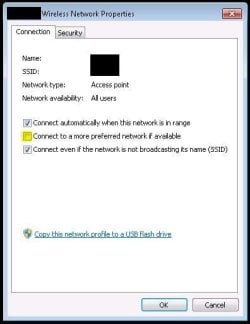
Have you made sure that the highlighted box in the attachment is NOT checked?
 

Attachments

  • Wireless Properties.JPG
    Wireless Properties.JPG
    27.3 KB · Views: 43

My Computer

OS
Windows 7 Ultimate x64,Windows 7 Professional x64, Windows 7 Enterprise x64
I think I found the issue.

So I go to work and notice it won't connect automatically. What changed? I added the second network here at work, as we have 2. And at home, I live in an apartment, so there are tons of networks, even one with no security. So I think that's the problem. This would explain why when troubleshooting this problem, I'd sometimes get it to work at work. What was happening was I was deleting all the networks and starting over, and sometimes I'd add both, and sometimes I'd just add the one here at work.

So the question is: Why does Windows have a problem deciding what to connect to, or why do multiple networks on my list cause a problem?

And as the OP probably mentioned, there is no "connect automatically" box to networks I've connected to, and then every single other network has it checked, even though I've never connected to that network.

This is a big problem many people are having, and it's not something like my BIOS or my network adapter is bad or anything like that. I know to people who don't know any better, they run through the steps like any other problem, but I'm telling you this is a bug in W7 of some type. One guy even said it was, and how to fix it, but it only fixed it for one restart.


At work we have MULTIPLE APs and about 4 SSIDs (you can see 20+ APs in most offices/conference rooms). We don't run into this issue. At home I have 2 APs setup (with the same SSID, security, ect) and can see about 4 other APs...we don't have this issue with 4 laptops. I think you have something set wrong on the laptop and not a bug in Win7. If it were Vista, I'd kinda lean to a bug.

Have you made sure that the highlighted box in the attachment is NOT checked?

Yes I have. I've done so much troubleshooting to try and fix this. Lots of people have this problem. If I set something wrong, it'd be a few.
 

My Computer

Computer Manufacturer/Model Number
Asus G73SW
OS
Windows 7 Ultimate 64bit
Windows 7 Forgets Wireless Networks

I understand your frustration! I was having the same problem. I would sign on to a network, with the "remember password" box checked, and then when I would come come back to the network, it would not have remembered it. I was constantly having to re-enter passwords for networks.

Here is how I solved the problem:

Go to the start menu
Run MSConfig
Go to the Startup tab
Look down the list and see if you can see anything which looks like it is a wireless controller. In my case it was:

No HKLM:Run IntelPROSet Intel(R) Corporation

"C:\Program Files\Common Files\Intel\WirelessCommon\iFrmewrk.exe" /tf Intel PROSet/Wireless

Uncheck the box which makes this a startup item.

Reboot, and the reconnect with your wireless.
Reboot again, and see if the wireless has automatically reconnected.

Hope this helps!
 

My Computer

OS
Windows 7 Professional X64
Back
Top