Solved Won't boot if remove 2nd flaky HD

RogerNess

New member
Local time
8:30 AM
Messages
5
Win 7 64bit
Custom build, 16g ram, asus MB, i5 cpu
2) 1T WD internalHD
System running fine for 2 months.
All software running on C:
2nd HD used for simple backups

Now getting SMART error on 2nd drive ( E:,F: )
so I need to replace 2nd drive but system wont boot without it.

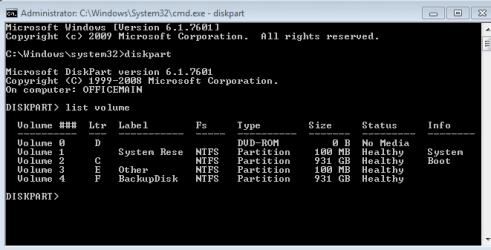
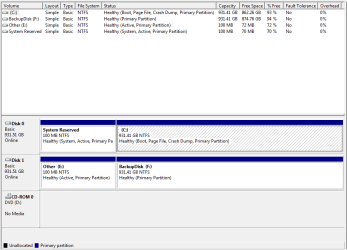
Attached is pics of disk management screen and diskpart listing.

I want to save this install, spent too much time installing software.

What has windows done with my 2nd drive and how do I allow sys to boot with single drive so I can install a new 2nd drive?
 

Attachments
  • diskmanagement.png
    diskmanagement.png
    13 KB · Views: 8
  • diskpartstuff2.png
    diskpartstuff2.png
    6.4 KB · Views: 6

My Computer

Computer type
PC/Desktop
Computer Manufacturer/Model Number
custom build
OS
Windows 7 Pro 64bit
CPU
5
Motherboard
asus
Memory
16g
Graphics Card(s)
builtin
Hard Drives
2) 1T WD drives
Antivirus
MS security essentials
Browser
firefox
The System Reserved partition on Disk0 is booting Win7 as signified by the System Active flags. It should be able to boot with only that HD plugged in.

There should be no Active flag on E (only on a System partition) but since you're unplugging it that shouldn't make a difference.

Make sure Disk0 remains set as first HD to boot in BIOS setup.

If it won't boot after removing Disk1 then boot Win7 DVD or System Repair Disk to run Startup Repair - Run up to 3 Separate Times
 
Have you made any progress ?
 

My Computer

Computer type
PC/Desktop
Computer Manufacturer/Model Number
Skylake Special #666
OS
Windows 10 Pro x64
CPU
Intel Core i7 6700K
Motherboard
Asus Sabertooth Z170 Mark 1
Memory
GSkill TridentZ RGB 16GB 3600 16-16-16-36
Graphics Card(s)
EVGA GTX 980 Ti SC x2
Sound Card
Realtek High Definition
Monitor(s) Displays
AOC G2460PG
Screen Resolution
1920 x 1080 144Hz
Hard Drives
Samsung 860 Pro 256GB, Seagate Barracuda 4TB x2
PSU
EVGA 1000 P2, EVGA White Custom Braided Cables
Case
Corsair Vengeance C70 Gunmetal Black
Cooling
Corsair H100i v2, Corsair ML120 x2, Thermal Grizzly Kryonaut
Keyboard
Logitech G910 Orion Spectrum
Mouse
Logitech G700s
Internet Speed
Verizon Fios Quantum Gateway 75/75
Antivirus
Windows Defender, Malwarebytes Free 3.8.3
Browser
Chrome
Other Info
Corsair SP120 x4, LG Blu-ray Drive, Durabrand HT-395 100 Watt Dolby Digital Amp, Corsair H2100 Wireless 7.1 Headset
I want to understand enough about what happened and how to solve it before I jump in. Don't want to end up with an unbootable system since this is a Quickbooks server at work.

Since the first answer says "It should be able to boot with only that HD plugged in." and it wont, concerns me.

Luckily, the machine works, just keeps giving an Error window for E:/F:

I'm just being super cautious since my small business runs on this and I don't want to do a reinstall.
 

My Computer

Computer type
PC/Desktop
Computer Manufacturer/Model Number
custom build
OS
Windows 7 Pro 64bit
CPU
5
Motherboard
asus
Memory
16g
Graphics Card(s)
builtin
Hard Drives
2) 1T WD drives
Antivirus
MS security essentials
Browser
firefox
As Greg states, it`s a simple process of unplugging drive 1, then running startup repair to get disk 0 ( your C partition ) booting again.

That partition marked ( other E: ) should not even be there.

Disk 1 should be just 1 partition, labeled Backup Disk E: not F: although it can be labeled any letter from E to Z
 

My Computer

Computer type
PC/Desktop
Computer Manufacturer/Model Number
Skylake Special #666
OS
Windows 10 Pro x64
CPU
Intel Core i7 6700K
Motherboard
Asus Sabertooth Z170 Mark 1
Memory
GSkill TridentZ RGB 16GB 3600 16-16-16-36
Graphics Card(s)
EVGA GTX 980 Ti SC x2
Sound Card
Realtek High Definition
Monitor(s) Displays
AOC G2460PG
Screen Resolution
1920 x 1080 144Hz
Hard Drives
Samsung 860 Pro 256GB, Seagate Barracuda 4TB x2
PSU
EVGA 1000 P2, EVGA White Custom Braided Cables
Case
Corsair Vengeance C70 Gunmetal Black
Cooling
Corsair H100i v2, Corsair ML120 x2, Thermal Grizzly Kryonaut
Keyboard
Logitech G910 Orion Spectrum
Mouse
Logitech G700s
Internet Speed
Verizon Fios Quantum Gateway 75/75
Antivirus
Windows Defender, Malwarebytes Free 3.8.3
Browser
Chrome
Other Info
Corsair SP120 x4, LG Blu-ray Drive, Durabrand HT-395 100 Watt Dolby Digital Amp, Corsair H2100 Wireless 7.1 Headset
Thank you, I'm building confidence in spite of your avatar :)
Will try this tomorrow and report back.
 

My Computer

Computer type
PC/Desktop
Computer Manufacturer/Model Number
custom build
OS
Windows 7 Pro 64bit
CPU
5
Motherboard
asus
Memory
16g
Graphics Card(s)
builtin
Hard Drives
2) 1T WD drives
Antivirus
MS security essentials
Browser
firefox
Don`t be afraid. Although it`s Scary, it`s still just an Avatar :eek:
 

My Computer

Computer type
PC/Desktop
Computer Manufacturer/Model Number
Skylake Special #666
OS
Windows 10 Pro x64
CPU
Intel Core i7 6700K
Motherboard
Asus Sabertooth Z170 Mark 1
Memory
GSkill TridentZ RGB 16GB 3600 16-16-16-36
Graphics Card(s)
EVGA GTX 980 Ti SC x2
Sound Card
Realtek High Definition
Monitor(s) Displays
AOC G2460PG
Screen Resolution
1920 x 1080 144Hz
Hard Drives
Samsung 860 Pro 256GB, Seagate Barracuda 4TB x2
PSU
EVGA 1000 P2, EVGA White Custom Braided Cables
Case
Corsair Vengeance C70 Gunmetal Black
Cooling
Corsair H100i v2, Corsair ML120 x2, Thermal Grizzly Kryonaut
Keyboard
Logitech G910 Orion Spectrum
Mouse
Logitech G700s
Internet Speed
Verizon Fios Quantum Gateway 75/75
Antivirus
Windows Defender, Malwarebytes Free 3.8.3
Browser
Chrome
Other Info
Corsair SP120 x4, LG Blu-ray Drive, Durabrand HT-395 100 Watt Dolby Digital Amp, Corsair H2100 Wireless 7.1 Headset
I want to understand enough about what happened and how to solve it before I jump in. Don't want to end up with an unbootable system since this is a Quickbooks server at work.

Since the first answer says "It should be able to boot with only that HD plugged in." and it wont, concerns me.

Luckily, the machine works, just keeps giving an Error window for E:/F:

I'm just being super cautious since my small business runs on this and I don't want to do a reinstall.

Always have your data and a Win7 backup image backed up externally.

You gave the impression that Disk0 will not boot when Disk1 is unplugged. What is the verbatim error message you are getting and what exactly are you doing when it occurs?

There shouldn't be any problem with running repeated Startup Repairs in any case.
 
In spite of the harm to my ego, I need to tell you that the reason for the system not booting was that I was removing the SATA port cable for the C: drive. That is my error. I had to dig around in the bios to notice that's what happened, then traced the cables back more carefully. For some reason on this machine I put the C: on the bottom and the E: above. My bad.

So, I replaced the flaky E:/F:, rebooted into Win 7 fine, then went to diskmanagement and partitioned/formatted it. All is well, and now I have a C: main drive with it's hidden reserved partition, a D: DVD, and an E: backup drive with just one partition.

Thanks for the help yall, and excuse my dumbness. I WILL sleep better tonight knowing what happened now.
 

My Computer

Computer type
PC/Desktop
Computer Manufacturer/Model Number
custom build
OS
Windows 7 Pro 64bit
CPU
5
Motherboard
asus
Memory
16g
Graphics Card(s)
builtin
Hard Drives
2) 1T WD drives
Antivirus
MS security essentials
Browser
firefox
Excellent :D

If you`re good, mark the thread as solved.
 

My Computer

Computer type
PC/Desktop
Computer Manufacturer/Model Number
Skylake Special #666
OS
Windows 10 Pro x64
CPU
Intel Core i7 6700K
Motherboard
Asus Sabertooth Z170 Mark 1
Memory
GSkill TridentZ RGB 16GB 3600 16-16-16-36
Graphics Card(s)
EVGA GTX 980 Ti SC x2
Sound Card
Realtek High Definition
Monitor(s) Displays
AOC G2460PG
Screen Resolution
1920 x 1080 144Hz
Hard Drives
Samsung 860 Pro 256GB, Seagate Barracuda 4TB x2
PSU
EVGA 1000 P2, EVGA White Custom Braided Cables
Case
Corsair Vengeance C70 Gunmetal Black
Cooling
Corsair H100i v2, Corsair ML120 x2, Thermal Grizzly Kryonaut
Keyboard
Logitech G910 Orion Spectrum
Mouse
Logitech G700s
Internet Speed
Verizon Fios Quantum Gateway 75/75
Antivirus
Windows Defender, Malwarebytes Free 3.8.3
Browser
Chrome
Other Info
Corsair SP120 x4, LG Blu-ray Drive, Durabrand HT-395 100 Watt Dolby Digital Amp, Corsair H2100 Wireless 7.1 Headset
This does bring up a new issue I've never heard anyone talk about - I can't return this flaky drive while it has some of my data on it. It's only about 60 days old. Only cost about $90 at Newegg. I guess I could hook it back up and see if it will format but I don't like putting a flaky piece of hardware back in my system or formatting. What would you do?
 

My Computer

Computer type
PC/Desktop
Computer Manufacturer/Model Number
custom build
OS
Windows 7 Pro 64bit
CPU
5
Motherboard
asus
Memory
16g
Graphics Card(s)
builtin
Hard Drives
2) 1T WD drives
Antivirus
MS security essentials
Browser
firefox
Have you run the maker's HD Diagnostic extended CD scan followed by a full Disk Check to determine with certainty the drive's condition?

If the drive proves bad then I would contact the maker's Tech Support to set up an RMA, then do a secure wipe either from Win7 Command Line or boot the Win7 DVD or Repair Disk to do a secure wipe using the Command Line script given in Diskpart Clean All Command tutorial.
 
Back
Top