Won't Recognize Hard Drive

okami 11x

New member
Member
Local time
7:35 AM
Messages
51
So I have this issue where my 500gb SATA hard drive isn't seen by Win 7 (running 64 bit Pro).

The thing is, when I installed it (from what I can remember) it saw the 500gb hdd even though it wouldn't allow me to install on it.

I've tried different SATA ports on my MOBO and nothing. It's not a huge deal since I have an external 500gb but I'd rather use up the internal before. Plus it'd be nice to know what's currently on the internal one.


So any ideas on what I can do next to get it working?
 

My Computer

Computer type
PC/Desktop
Computer Manufacturer/Model Number
Custom Build
OS
Win7 Pro - 64bit
CPU
Intel i7-3770k
Motherboard
Intel DZ77GAL-70K
Memory
Corsair Vengeance 4x4GB
Graphics Card(s)
Nvidia Geforce GTX 550-ti
Sound Card
Integrated
Hard Drives
180gb Intel SSD
80gb SATA
500gb Samsung SATA
500gb Western Digital SATA
PSU
Corsair GS800
Case
Antec 300
Browser
Chrome
Perhaps you need to install the SATA driver for that drive? Check the manufacturers web site.
 

My Computer

Computer type
PC/Desktop
Computer Manufacturer/Model Number
Lenovo IdeaCenter 450
OS
Windows 10 Pro X64
CPU
Intel Quad Core i7-4770 @ 3.4Ghz
Memory
16.0GB PC3-12800 DDR3 SDRAM 1600 MHz
Graphics Card(s)
Intel Integrated HD Graphics
Sound Card
Realtek HD Audio
Monitor(s) Displays
HP 22" LCD
Screen Resolution
1680 x 1050
Hard Drives
250GB Samsung EVO SATA-3 SSD
2TB Seagate ST2000DM001 SATA-2
1.5TB Seagate ST3150041AS SATA
Keyboard
Dell USB
Mouse
Lenovo USB
Internet Speed
Cable via Road Runner 3MB Upload, 30MB Download
Antivirus
Windows Defender, MBAM Pro, MBAE
Browser
Seamonkey
Other Info
UEFI/GPT
PLDS DVD-RW DH16AERSH
By "not seen", where specifically are you not seeing it? Is it not listed in diskmgmt? Is it not listed in diskpart / list disk? Or is it just not listed in Explorer or the shell?
 

My Computer

Computer type
PC/Desktop
Computer Manufacturer/Model Number
Custom
OS
Windows 10 Pro x64
CPU
Intel Core i7 4790K @ 4.5GHz
Motherboard
Asus Maximus Hero VII
Memory
32GB DDR3
Graphics Card(s)
Nvidia GeForce GTX970
Sound Card
Realtek HD Audio
Screen Resolution
1920x1200
Hard Drives
1x Samsung 250GB SSD
4x WD RE 2TB (RAIDZ)
PSU
Corsair AX760i
Case
Fractal Design Define R4
Cooling
Noctua NH-D15
Disk Manager

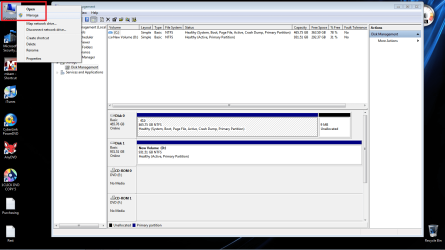
Your issue stems from the fact that the newly installed HDD has not been assigned a letter by your operationg system.
Review the attached image where you will see the newly installed HDD and assign it a drive letter.
 

Attachments

  • disk_mgr.png
    disk_mgr.png
    55.4 KB · Views: 374

My Computer

Computer Manufacturer/Model Number
Custom Build
OS
Windows 7 7600 1 X64
CPU
AMD PHENOM II X 550 PROCESSOR 3.1 ghz
Motherboard
ASUS M4A78-TE
Memory
Corsair 4 gig ddr 3
Graphics Card(s)
ati radeon 3300
Sound Card
ati hd
Monitor(s) Displays
syncmaster 2033sw
Screen Resolution
1600X900 60 hz refresh
Hard Drives
twin_seagates SATA's 1 TB & 500 Gig, hitachi_slimline 160 gig
PSU
antec_550 watt
Case
cooler master GLite
Cooling
stock_heat sink
Internet Speed
20mbs up/ 1.5mbs down
Other Info
favorite child "stewie"
favorite dog "brian"
Thanks everyone for replying back...I actually broke the first rule of troubleshooting.

First thing you always do is check to see if it's plugged in...and it wasn't :o

It's being read by Win 7 now and now I get the fun of backing those files to my external...whoo D:
 

My Computer

Computer type
PC/Desktop
Computer Manufacturer/Model Number
Custom Build
OS
Win7 Pro - 64bit
CPU
Intel i7-3770k
Motherboard
Intel DZ77GAL-70K
Memory
Corsair Vengeance 4x4GB
Graphics Card(s)
Nvidia Geforce GTX 550-ti
Sound Card
Integrated
Hard Drives
180gb Intel SSD
80gb SATA
500gb Samsung SATA
500gb Western Digital SATA
PSU
Corsair GS800
Case
Antec 300
Browser
Chrome
Thanks everyone for replying back...I actually broke the first rule of troubleshooting.

First thing you always do is check to see if it's plugged in...and it wasn't :o

It's being read by Win 7 now and now I get the fun of backing those files to my external...whoo D:
Good show, issue resolved.
 

My Computer

Computer Manufacturer/Model Number
Custom Build
OS
Windows 7 7600 1 X64
CPU
AMD PHENOM II X 550 PROCESSOR 3.1 ghz
Motherboard
ASUS M4A78-TE
Memory
Corsair 4 gig ddr 3
Graphics Card(s)
ati radeon 3300
Sound Card
ati hd
Monitor(s) Displays
syncmaster 2033sw
Screen Resolution
1600X900 60 hz refresh
Hard Drives
twin_seagates SATA's 1 TB & 500 Gig, hitachi_slimline 160 gig
PSU
antec_550 watt
Case
cooler master GLite
Cooling
stock_heat sink
Internet Speed
20mbs up/ 1.5mbs down
Other Info
favorite child "stewie"
favorite dog "brian"
@Adrian

How do I mark this thread as resolved?
 

My Computer

Computer type
PC/Desktop
Computer Manufacturer/Model Number
Custom Build
OS
Win7 Pro - 64bit
CPU
Intel i7-3770k
Motherboard
Intel DZ77GAL-70K
Memory
Corsair Vengeance 4x4GB
Graphics Card(s)
Nvidia Geforce GTX 550-ti
Sound Card
Integrated
Hard Drives
180gb Intel SSD
80gb SATA
500gb Samsung SATA
500gb Western Digital SATA
PSU
Corsair GS800
Case
Antec 300
Browser
Chrome

My Computer

Computer Manufacturer/Model Number
Custom Build
OS
Windows 7 7600 1 X64
CPU
AMD PHENOM II X 550 PROCESSOR 3.1 ghz
Motherboard
ASUS M4A78-TE
Memory
Corsair 4 gig ddr 3
Graphics Card(s)
ati radeon 3300
Sound Card
ati hd
Monitor(s) Displays
syncmaster 2033sw
Screen Resolution
1600X900 60 hz refresh
Hard Drives
twin_seagates SATA's 1 TB & 500 Gig, hitachi_slimline 160 gig
PSU
antec_550 watt
Case
cooler master GLite
Cooling
stock_heat sink
Internet Speed
20mbs up/ 1.5mbs down
Other Info
favorite child "stewie"
favorite dog "brian"
Thanks everyone for replying back...I actually broke the first rule of troubleshooting.

First thing you always do is check to see if it's plugged in...and it wasn't :o

It's being read by Win 7 now and now I get the fun of backing those files to my external...whoo D:
+1 Rep...:geek:
 

My Computer

Computer Manufacturer/Model Number
Custom Build
OS
Windows 7 7600 1 X64
CPU
AMD PHENOM II X 550 PROCESSOR 3.1 ghz
Motherboard
ASUS M4A78-TE
Memory
Corsair 4 gig ddr 3
Graphics Card(s)
ati radeon 3300
Sound Card
ati hd
Monitor(s) Displays
syncmaster 2033sw
Screen Resolution
1600X900 60 hz refresh
Hard Drives
twin_seagates SATA's 1 TB & 500 Gig, hitachi_slimline 160 gig
PSU
antec_550 watt
Case
cooler master GLite
Cooling
stock_heat sink
Internet Speed
20mbs up/ 1.5mbs down
Other Info
favorite child "stewie"
favorite dog "brian"
Thanks everyone for replying back...I actually broke the first rule of troubleshooting.

First thing you always do is check to see if it's plugged in...and it wasn't :o

It's being read by Win 7 now and now I get the fun of backing those files to my external...whoo D:

Been there and done that! :D
 

My Computer

Computer Manufacturer/Model Number
Home built
OS
Windows 7 Ultimate 32 bit
CPU
Intel(R) Pentium(R) 4 CPU 3.00GHz
Motherboard
ASUS P4P800-VM Motherboard Chipset: Intel 865G + ICH5
Memory
2.50 GB RAM
Graphics Card(s)
NVIDIA GeForce 7600 GS
Sound Card
SoundMax Integrated Digital Audio (Chip)
Monitor(s) Displays
ViewSonic VX 1962 wm
Screen Resolution
1680 X 1050
Hard Drives
Seagate Barracuda 7200.10 80 GB
ST380215A ATA Device 18.6 GB
Western Digital "My Book" external hard drive 750 GB
Cooling
Fan based
Keyboard
Microsoft Comfort Curve Keyboard 2000 v10 USB
Mouse
Logitec optic USB
Internet Speed
3.01 Mb/s download 0.64 Mb/s upload
+1 Rep...:geek:

Thanks!!

Been there and done that! :D

Yeah I used to joke with my coworkers at my old helpdesk position that the first thing you always ask the customer is, "Is your computer plugged in?"

Ironic, no? lol

And I'm sure it won't be the last time either
 

My Computer

Computer type
PC/Desktop
Computer Manufacturer/Model Number
Custom Build
OS
Win7 Pro - 64bit
CPU
Intel i7-3770k
Motherboard
Intel DZ77GAL-70K
Memory
Corsair Vengeance 4x4GB
Graphics Card(s)
Nvidia Geforce GTX 550-ti
Sound Card
Integrated
Hard Drives
180gb Intel SSD
80gb SATA
500gb Samsung SATA
500gb Western Digital SATA
PSU
Corsair GS800
Case
Antec 300
Browser
Chrome

My Computer

Computer Manufacturer/Model Number
Custom Build
OS
Windows 7 7600 1 X64
CPU
AMD PHENOM II X 550 PROCESSOR 3.1 ghz
Motherboard
ASUS M4A78-TE
Memory
Corsair 4 gig ddr 3
Graphics Card(s)
ati radeon 3300
Sound Card
ati hd
Monitor(s) Displays
syncmaster 2033sw
Screen Resolution
1600X900 60 hz refresh
Hard Drives
twin_seagates SATA's 1 TB & 500 Gig, hitachi_slimline 160 gig
PSU
antec_550 watt
Case
cooler master GLite
Cooling
stock_heat sink
Internet Speed
20mbs up/ 1.5mbs down
Other Info
favorite child "stewie"
favorite dog "brian"
Back
Top