Word question.

billberry12

New member
Member
VIP
Local time
5:12 PM
Messages
292
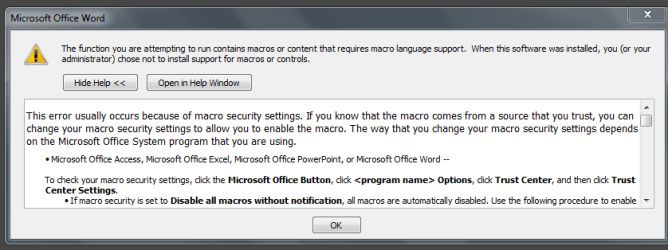
I just installed Office 2007 on my new laptop, then did an easy transfer. Everything worked out great except, when I try to open a word document, I get this Macro settings warning or something. It tells me to go to the trust link in word and reset something, but I don't understand what it's saying. Can anyone look at this and tell me what to do?

Thanks,
Bill
 

Attachments

  • Capture.PNG
    Capture.PNG
    15.2 KB · Views: 13

My Computer

Computer type
Laptop
Computer Manufacturer/Model Number
Dell Vostro 3750
OS
Windows 7 Professional
CPU
Core I5
Memory
8GB
Hard Drives
Seagate 600 240GB SSD
Antivirus
MSE
Browser
Chrome, IE, Firfox
This is a macro security setting.
Follow the directions as you toggle down that screen.
If I remember correctly someone put that document is a secure and trusted place. Was it your document?
 

My Computer

Computer Manufacturer/Model Number
HP M9077c
OS
Windows 7 Home Premium 64bit
CPU
Intel(R)Core(TM)2 quad [email protected] 2.39GHz
Motherboard
ASUSeK
Memory
6GB DDR2 6400
Graphics Card(s)
GeForce 8500/512MB
Sound Card
Realtek High Def Audio
Monitor(s) Displays
HP w2408 LCD 24" widescreen
Screen Resolution
1920x1200
Cooling
6 pack of Bud
Keyboard
MS wireless Inteli
Mouse
MS wireless Inteli
Looks like there were macros in your old office system that you have not replicated in your new system. Now it is looking for them.
 

My Computer

Computer Manufacturer/Model Number
HP, Dell, Gateway, Toshiba - 4 laptops and 2 desktops
OS
Vista, Windows7, Mint Mate, Zorin, Windows 8
CPU
from 1.6GHz Duo to i7
Monitor(s) Displays
2x HP w2207
Hard Drives
5x HDD, 7x SSD, 12x Externals
Keyboard
with trackball - no mices
Mouse
Trackball mice
Internet Speed
DSL 6000
Thanks for your replies. I have no idea what a macro is, nor how to set them or unset them.
 

My Computer

Computer type
Laptop
Computer Manufacturer/Model Number
Dell Vostro 3750
OS
Windows 7 Professional
CPU
Core I5
Memory
8GB
Hard Drives
Seagate 600 240GB SSD
Antivirus
MSE
Browser
Chrome, IE, Firfox

My Computer

Computer Manufacturer/Model Number
HP M9077c
OS
Windows 7 Home Premium 64bit
CPU
Intel(R)Core(TM)2 quad [email protected] 2.39GHz
Motherboard
ASUSeK
Memory
6GB DDR2 6400
Graphics Card(s)
GeForce 8500/512MB
Sound Card
Realtek High Def Audio
Monitor(s) Displays
HP w2408 LCD 24" widescreen
Screen Resolution
1920x1200
Cooling
6 pack of Bud
Keyboard
MS wireless Inteli
Mouse
MS wireless Inteli

My Computer

Computer Manufacturer/Model Number
HP M9077c
OS
Windows 7 Home Premium 64bit
CPU
Intel(R)Core(TM)2 quad [email protected] 2.39GHz
Motherboard
ASUSeK
Memory
6GB DDR2 6400
Graphics Card(s)
GeForce 8500/512MB
Sound Card
Realtek High Def Audio
Monitor(s) Displays
HP w2408 LCD 24" widescreen
Screen Resolution
1920x1200
Cooling
6 pack of Bud
Keyboard
MS wireless Inteli
Mouse
MS wireless Inteli
Thanks for your help. I can not figure this out. It is such a nusance.
 

My Computer

Computer type
Laptop
Computer Manufacturer/Model Number
Dell Vostro 3750
OS
Windows 7 Professional
CPU
Core I5
Memory
8GB
Hard Drives
Seagate 600 240GB SSD
Antivirus
MSE
Browser
Chrome, IE, Firfox
Try logging on to MS Word as administrator!
Right click on MS Word and open as admin. and see if that helps.
Don't give up.
 

My Computer

Computer Manufacturer/Model Number
HP M9077c
OS
Windows 7 Home Premium 64bit
CPU
Intel(R)Core(TM)2 quad [email protected] 2.39GHz
Motherboard
ASUSeK
Memory
6GB DDR2 6400
Graphics Card(s)
GeForce 8500/512MB
Sound Card
Realtek High Def Audio
Monitor(s) Displays
HP w2408 LCD 24" widescreen
Screen Resolution
1920x1200
Cooling
6 pack of Bud
Keyboard
MS wireless Inteli
Mouse
MS wireless Inteli
Did that. Same problem exsists.
Thanks.
 

My Computer

Computer type
Laptop
Computer Manufacturer/Model Number
Dell Vostro 3750
OS
Windows 7 Professional
CPU
Core I5
Memory
8GB
Hard Drives
Seagate 600 240GB SSD
Antivirus
MSE
Browser
Chrome, IE, Firfox
Is it just one document you can't open or is it multiple doc's?
I have seen this with Excel and macro's but not word.
Somebody set it up with macro's in mind.
Don't go away as I will find help.
We don't quit here!
 

My Computer

Computer Manufacturer/Model Number
HP M9077c
OS
Windows 7 Home Premium 64bit
CPU
Intel(R)Core(TM)2 quad [email protected] 2.39GHz
Motherboard
ASUSeK
Memory
6GB DDR2 6400
Graphics Card(s)
GeForce 8500/512MB
Sound Card
Realtek High Def Audio
Monitor(s) Displays
HP w2408 LCD 24" widescreen
Screen Resolution
1920x1200
Cooling
6 pack of Bud
Keyboard
MS wireless Inteli
Mouse
MS wireless Inteli
Thanks. It's when I open Word itself, or any word doc. I have to click on OK, or the red X six times before it finally let's me open anything. At least I can open it after six clicks, but it is annoying. I installed Office myself yesterday on this laptop, and did an easy transfer of the files and settings from my old laptop, which did not have this problem. It is just with Word. All other Office programs work fine.
 

My Computer

Computer type
Laptop
Computer Manufacturer/Model Number
Dell Vostro 3750
OS
Windows 7 Professional
CPU
Core I5
Memory
8GB
Hard Drives
Seagate 600 240GB SSD
Antivirus
MSE
Browser
Chrome, IE, Firfox
Why don't do a diagnostic test on Word.

Word
1.Click the Microsoft Office Button, and then click Word Options.
2.Click Resources.
3.Click Diagnose, click Continue, and then click Start Diagnostics
 

My Computer

Computer Manufacturer/Model Number
HP M9077c
OS
Windows 7 Home Premium 64bit
CPU
Intel(R)Core(TM)2 quad [email protected] 2.39GHz
Motherboard
ASUSeK
Memory
6GB DDR2 6400
Graphics Card(s)
GeForce 8500/512MB
Sound Card
Realtek High Def Audio
Monitor(s) Displays
HP w2408 LCD 24" widescreen
Screen Resolution
1920x1200
Cooling
6 pack of Bud
Keyboard
MS wireless Inteli
Mouse
MS wireless Inteli
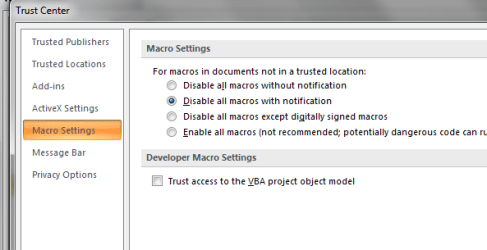
Did that. No change. Can someone tell me what should be checked in the Word Trust Center. I think that is where the problem can be corrected, but I don't know what should be checked or unchecked.
 

My Computer

Computer type
Laptop
Computer Manufacturer/Model Number
Dell Vostro 3750
OS
Windows 7 Professional
CPU
Core I5
Memory
8GB
Hard Drives
Seagate 600 240GB SSD
Antivirus
MSE
Browser
Chrome, IE, Firfox
Here is my snip of trust.
Captureword.PNG
snip your if you still have a problem.
 

My Computer

Computer Manufacturer/Model Number
HP M9077c
OS
Windows 7 Home Premium 64bit
CPU
Intel(R)Core(TM)2 quad [email protected] 2.39GHz
Motherboard
ASUSeK
Memory
6GB DDR2 6400
Graphics Card(s)
GeForce 8500/512MB
Sound Card
Realtek High Def Audio
Monitor(s) Displays
HP w2408 LCD 24" widescreen
Screen Resolution
1920x1200
Cooling
6 pack of Bud
Keyboard
MS wireless Inteli
Mouse
MS wireless Inteli
Thanks for hanging with me here. I went in and had messed with this trust thing, but I changed it to what you have, ok'ed it, restarted etc., but still have this problem.
 

My Computer

Computer type
Laptop
Computer Manufacturer/Model Number
Dell Vostro 3750
OS
Windows 7 Professional
CPU
Core I5
Memory
8GB
Hard Drives
Seagate 600 240GB SSD
Antivirus
MSE
Browser
Chrome, IE, Firfox
Then, if I were you and I am not, I would uninstall MS Office, scan for viruses making sure your system is nice and clean. After that is done I would then install MS Office all over again.
Then go into word and the trust area and make sure it is where I have mine.
Hope I have helped you.
 

My Computer

Computer Manufacturer/Model Number
HP M9077c
OS
Windows 7 Home Premium 64bit
CPU
Intel(R)Core(TM)2 quad [email protected] 2.39GHz
Motherboard
ASUSeK
Memory
6GB DDR2 6400
Graphics Card(s)
GeForce 8500/512MB
Sound Card
Realtek High Def Audio
Monitor(s) Displays
HP w2408 LCD 24" widescreen
Screen Resolution
1920x1200
Cooling
6 pack of Bud
Keyboard
MS wireless Inteli
Mouse
MS wireless Inteli
If I completley uninstall Office, then reinstall, will it pick up all my documents, settings, emails in outlook etc, as they were before?
 

My Computer

Computer type
Laptop
Computer Manufacturer/Model Number
Dell Vostro 3750
OS
Windows 7 Professional
CPU
Core I5
Memory
8GB
Hard Drives
Seagate 600 240GB SSD
Antivirus
MSE
Browser
Chrome, IE, Firfox
If I completley uninstall Office, then reinstall, will it pick up all my documents, settings, emails in outlook etc, as they were before?

They did mine!
But to be safe, put all those on a flash drive or disc if you have one. I put all valuable items on a flash stick anyway.
 

My Computer

Computer Manufacturer/Model Number
HP M9077c
OS
Windows 7 Home Premium 64bit
CPU
Intel(R)Core(TM)2 quad [email protected] 2.39GHz
Motherboard
ASUSeK
Memory
6GB DDR2 6400
Graphics Card(s)
GeForce 8500/512MB
Sound Card
Realtek High Def Audio
Monitor(s) Displays
HP w2408 LCD 24" widescreen
Screen Resolution
1920x1200
Cooling
6 pack of Bud
Keyboard
MS wireless Inteli
Mouse
MS wireless Inteli
This could be a VBA issue. Try this.

Close all open Office apps.
Open the Control Panel, double-click Programs & Features, find and select Office 2007.
Click on the Change button (at the top of the screen) and Office Setup will launch itself.
Chose Add or Remove Features.
From the list, expand Office Shared Features, click on the little arrow attached to Visual Basic for Applications and select the Run from My Computer Option. Click Continue. Setup will then install the VBA code that you need.

Now check whether the issue is resolved.
 

My Computer

Computer Manufacturer/Model Number
Too many to describe...
OS
Windows 7 x64 pro/ Windows 7 x86 Pro/ XP SP3 x86
I uninstalled Office complely. Then reinstalled Visio with Word, Powerpoint, Excel, and Outlook. It works perfectly now. I guess when I left out Visio before, that made a difference. Anyway. Problem solved.
thanks everyone.
 

My Computer

Computer type
Laptop
Computer Manufacturer/Model Number
Dell Vostro 3750
OS
Windows 7 Professional
CPU
Core I5
Memory
8GB
Hard Drives
Seagate 600 240GB SSD
Antivirus
MSE
Browser
Chrome, IE, Firfox
Back
Top