Workgroup

technoFrank

New member
Member
Local time
3:44 PM
Messages
14
Hi All,

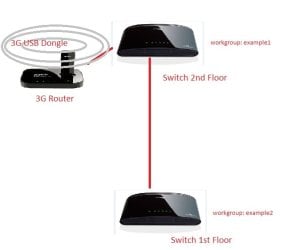
I have a network setup in our home, the internet connection is coming from my 3G USB dongle then connected to my 3G router. From 3G router it is connected to a switch. From switch it is connected to another switch from 1st floor. I want to separate the network from switch located in the 2nd floor and the switch in the 1st floor. I created a workgroup from the 2nd floor (not homegroup) and workgroup from the 1st floor (and also not homegroup). When i go to the network every computer see each other. Is there any possible I can build two groups (workgroup) in one network (192.168.0.xxx 255.255.255.0 range). I know I can separate them using a server creating a domain or a cisco switch or router but it will cost more. Please see my image description of my network.
sevenforums.jpg

Thanks in advance.
 

My Computer

Computer type
PC/Desktop
OS
Windows 7 Professional x64
CPU
Intel Core i5-3340 CPU @3.10 GHz 3.30GHz
Motherboard
Gigabyte Technology Co. LTD. H61M-S2PT
Memory
4 GB DDR3
Graphics Card(s)
Intel HD Graphics
Antivirus
ESET Endpoint Antivirus
Hi All,

I have a network setup in our home, the internet connection is coming from my 3G USB dongle then connected to my 3G router. From 3G router it is connected to a switch. From switch it is connected to another switch from 1st floor. I want to separate the network from switch located in the 2nd floor and the switch in the 1st floor. I created a workgroup from the 2nd floor (not homegroup) and workgroup from the 1st floor (and also not homegroup). When i go to the network every computer see each other. Is there any possible I can build two groups (workgroup) in one network (192.168.0.xxx 255.255.255.0 range). I know I can separate them using a server creating a domain or a cisco switch or router but it will cost more. Please see my image description of my network.

View attachment 322093

Thanks in advance.

Not sure what you are trying to accomplish here?

If you want two different Workgroups then they both would require a different Workgroup names.


If you require the shares to be protected by a password then setting up a Homegroup along side a Workgroup can give you that.
 

My Computer

Computer type
PC/Desktop
Computer Manufacturer/Model Number
Home built
OS
Windows 7 Ult, Windows 8.1 Pro,
CPU
Q9650-4.275GHz, E8600 4.5GHz, E6750-3.8GHz
Motherboard
Evga 780i FTW
Memory
G.Skill PC2 9600 1200Mhz 5 5 5 15 2T
Graphics Card(s)
GTX480
Sound Card
Asus Xonar D2
Monitor(s) Displays
HannsG
Screen Resolution
1680X1050
Hard Drives
GSkill Phoenix Pro 120GB SSD
PSU
ThermalTake Toughpower 1000Watt modular
Case
ThermalTake XaserV
Cooling
Xigmatek S1283
Keyboard
Logitech G15
Mouse
Logitech G9
Internet Speed
T1
What I did is I create two workgroups and yes they have different workgroup names but they can see each other in the network

1.JPG.

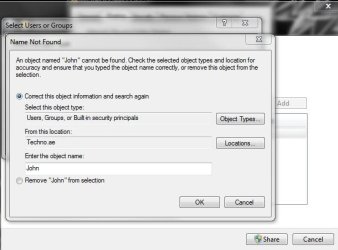
And also that's fine with me that they can see each other even if they are two different workgroup but the problem is I cannot add user in the network, so that being said I cannot set permission in a folder to every user, my only option is everyone.

Capture.JPG

Thanks
 

My Computer

Computer type
PC/Desktop
OS
Windows 7 Professional x64
CPU
Intel Core i5-3340 CPU @3.10 GHz 3.30GHz
Motherboard
Gigabyte Technology Co. LTD. H61M-S2PT
Memory
4 GB DDR3
Graphics Card(s)
Intel HD Graphics
Antivirus
ESET Endpoint Antivirus
Using two different Workgroup names will just prevent them from sharing. You can't fix that with Users or Group sharing.

You haven't explained what you are trying to accomplish here?
 

My Computer

Computer type
PC/Desktop
Computer Manufacturer/Model Number
Home built
OS
Windows 7 Ult, Windows 8.1 Pro,
CPU
Q9650-4.275GHz, E8600 4.5GHz, E6750-3.8GHz
Motherboard
Evga 780i FTW
Memory
G.Skill PC2 9600 1200Mhz 5 5 5 15 2T
Graphics Card(s)
GTX480
Sound Card
Asus Xonar D2
Monitor(s) Displays
HannsG
Screen Resolution
1680X1050
Hard Drives
GSkill Phoenix Pro 120GB SSD
PSU
ThermalTake Toughpower 1000Watt modular
Case
ThermalTake XaserV
Cooling
Xigmatek S1283
Keyboard
Logitech G15
Mouse
Logitech G9
Internet Speed
T1
Hi chev65,

I just want to separate the two workgroups, because even they have different workgroup name they can see each other. And as i have said that's fine with me, what is more important is, I cannot add names when sharing a folder, my only option is "everyone". So if for example I will create a folder then I will share the folder to one person only, I cannot share it because my computer cannot find the computer name even though I can see that computer name in the network. When I am in the office and when I create a folder I can easily add names to whom I can share my folder because we are in the same domain.

Thanks
 

My Computer

Computer type
PC/Desktop
OS
Windows 7 Professional x64
CPU
Intel Core i5-3340 CPU @3.10 GHz 3.30GHz
Motherboard
Gigabyte Technology Co. LTD. H61M-S2PT
Memory
4 GB DDR3
Graphics Card(s)
Intel HD Graphics
Antivirus
ESET Endpoint Antivirus
Hi chev65,

I just want to separate the two workgroups, because even they have different workgroup name they can see each other. And as i have said that's fine with me, what is more important is, I cannot add names when sharing a folder, my only option is "everyone". So if for example I will create a folder then I will share the folder to one person only, I cannot share it because my computer cannot find the computer name even though I can see that computer name in the network. When I am in the office and when I create a folder I can easily add names to whom I can share my folder because we are in the same domain.

Thanks

For this type of NTFS file sharing you would need to add the standard user account to your system in order for the name to show up on the list.

This type of sharing with is best accomplished by following the directions in the following link. It's rather complicated at first so following directions precisely is required.

Share Permissions and NTFS Permissions Folder Access Control & Folder Permissions - AD and Exchange Quantum Singularity
 

My Computer

Computer type
PC/Desktop
Computer Manufacturer/Model Number
Home built
OS
Windows 7 Ult, Windows 8.1 Pro,
CPU
Q9650-4.275GHz, E8600 4.5GHz, E6750-3.8GHz
Motherboard
Evga 780i FTW
Memory
G.Skill PC2 9600 1200Mhz 5 5 5 15 2T
Graphics Card(s)
GTX480
Sound Card
Asus Xonar D2
Monitor(s) Displays
HannsG
Screen Resolution
1680X1050
Hard Drives
GSkill Phoenix Pro 120GB SSD
PSU
ThermalTake Toughpower 1000Watt modular
Case
ThermalTake XaserV
Cooling
Xigmatek S1283
Keyboard
Logitech G15
Mouse
Logitech G9
Internet Speed
T1
Back
Top