
Would Photoshop 7 from 2002 be compatible with Windows 7?

digiday

Banned
Local time
9:17 PM
Messages
99
Location
SF, Caleeforneea
Would Photoshop 7 from 2002 be compatible with Windows 7 ULT?

Hi Windows Seveners,

Would Photoshop 7, released in March 2002, be compatible with Windows 7? I have an old copy of Photoshop 7 and it is almost 9 years old... goes back 5 versions from just before Adobe started calling their software CS... Adobe is now on CS5, so that makes Photoshop 7 five versions back... pretty old.

I don't want to even try to install this older software if it could cause a problem on W7, but I don't want to buy the new version of PS CS5 Extended at about a grand.

Can Photoshop 7 work alright on Windows 7 ULT?

Thanks,

digiday
 

My Computer My Computer

At a glance

Windows 7 ULT 32 bit2 GHZ2 GB
Computer Manufacturer/Model Number
Dell 531
OS
Windows 7 ULT 32 bit
CPU
2 GHZ
Memory
2 GB
Other Info
Also use Macs, but don't tell anyone
Why would you want such an old version?

If it doesnt install, you could always try installing it in XP Mode.
 

My Computer My Computer

At a glance

Windows 7 Professional 64-bitIntel E8400 3GHzKingston PC3-10700H 4GbXFX Radeon HD 5850 BlackEd.
Computer Manufacturer/Model Number
self built
OS
Windows 7 Professional 64-bit
CPU
Intel E8400 3GHz
Motherboard
Intel DX48BT2
Memory
Kingston PC3-10700H 4Gb
Graphics Card(s)
XFX Radeon HD 5850 BlackEd.
Sound Card
Asus Xonar DG
Monitor(s) Displays
2x Samsung SM-T220HD 22"
Screen Resolution
1680x1050 on two monitors
Hard Drives
OCZ Vertex 2 120gb 3.5" (OS)
Seagate Momentus XT 500gb
Samsung F3 1Tb (games)
2x Samsung F1 1Tb
PSU
Thermaltake ToughPower 850w
Case
Thermaltake Armor
Cooling
Scythe Mugen II
Keyboard
Microsoft Comfort Curve USB
Mouse
Razer Diamondback 3G
Internet Speed
8128/443

My Computer My Computer

At a glance

AbacusCPUMemoryGraphic Card
OS
Abacus
CPU
CPU
Motherboard
Motherboard
Memory
Memory
Graphics Card(s)
Graphic Card
Sound Card
Sound Card
Monitor(s) Displays
Monitor
Hard Drives
Hard Drives
PSU
PSU
Case
Case
Cooling
Cooling
Hi swarfega,

As I stated, the new PS CS5 is about a thousand dollars. I have a valid copy of PS 7 that I wouldn't have to pay anything more for if it installs and works.

I have PS CS4 on my Mac at another location, but I'd like some kind of Photoshop on my PC at this location.

What XP mode?... I don't find anything in W7 ULT called XP mode when I do a search.

digiday
 

My Computer My Computer

At a glance

Windows 7 ULT 32 bit2 GHZ2 GB
Computer Manufacturer/Model Number
Dell 531
OS
Windows 7 ULT 32 bit
CPU
2 GHZ
Memory
2 GB
Other Info
Also use Macs, but don't tell anyone
I honestly don't know if it would work - I don't see installing it causing any 'problems' so to speak. The worse that could happen is tha a) it just wouldn't install or b) It wouldn't run.

Instead of Photoshop, have you had a look at Paint.net and GIMP?

Both are free and possibly more feature rich than PS 7

What XP mode?... I don't find anything in W7 ULT called XP mode when I do a search.

It's a virtual machine that integrates with Windows 7 to give you a working XP

http://www.sevenforums.com/tutorials/8247-windows-xp-mode-install-setup.html
 

My Computer My Computer

At a glance

8 Pro x64i7 3770K 4.6GHz16GB G.Skill Trident X 2666mhzx2 EVGA 780 Ti Superclocked SLI
Computer type
PC/Desktop
Computer Manufacturer/Model Number
Systems by SmartEyeball
OS
8 Pro x64
CPU
i7 3770K 4.6GHz
Motherboard
ASUS P8Z77 WS
Memory
16GB G.Skill Trident X 2666mhz
Graphics Card(s)
x2 EVGA 780 Ti Superclocked SLI
Sound Card
SB X-FI Surround 5.1 PRO USB / ATH-AD900 Headphones
Monitor(s) Displays
x3 Dell U2410 / 58" Samsung
Screen Resolution
5760*1200/ 1920*1200
Hard Drives
2x Intel 520 240GB (RAID 0) * 2x WD Caviar Blacks 2TB (RAID 0) * 2TB WD Caviar Black * Sony Optirac DVD
PSU
Silverstone Strider Evolution 1200W
Case
Thermaltake Level 10 GT Snow Edition
Cooling
Noctua NH-D14
Keyboard
Topre Realforce // Ducky Shine MX Black // Filco Ninja TKL
Mouse
Thermaltake Theron (Highly Recommended) + Razer Imperator
Antivirus
MSE
Browser
IE, FF, WaterFox
Other Info
GT Extreme V2 Sim Racing Cockpit + 40" LCD and K/B Mouse stand ▼
Fanatec CSR Elite Wheel + Clubsport V1 Pedals + CSR shifter/7G-H ▼Saitek X52 Pro ▼ TrackIR 5 Pro
Buttkicker v2 Seat Rumbler with Dedicated 5.1 and Sub Woofer attached to frame ▼
=
Bloody Big Grin

My Computer My Computer

At a glance

Windows 10 Pro x64, Arch LinuxIntel Core 2 Quad Q8200 OC'd 3.08GHz8GB DDR2 900MhzMSI GT730 2GB GDDR5 (Kepler)
Computer type
PC/Desktop
Computer Manufacturer/Model Number
Custom Build
OS
Windows 10 Pro x64, Arch Linux
CPU
Intel Core 2 Quad Q8200 OC'd 3.08GHz
Motherboard
Asus Rampage formula LGA775
Memory
8GB DDR2 900Mhz
Graphics Card(s)
MSI GT730 2GB GDDR5 (Kepler)
Sound Card
Supreme FX2
Monitor(s) Displays
Samsung LS22F350 LED
Screen Resolution
1080P
Hard Drives
Kingston SSDNow UV400 120GB, 500GB Hitachi, 2TB Samsung, 500GB Seagate FreeAgent, 640GB Samsung, 160GB Toshiba (Arch)
PSU
AeroCool 500W Bronze
Cooling
Cooler Master V6 + 3X fans
Keyboard
Prolink keyboard
Mouse
Logitech M705
Internet Speed
1MiB/s
Browser
Chrome Beta
Gimp is okay, but a little funky

smarteyeball,

As I was telling swarfega, I have PS CS4 on a Mac at another location, but I would like to use some version of Photoshop on this PC at this location.

Since the basic features of Photoshop have been the same for a decade, Photoshop 7 would be okay just for restoring old photos and much more.

I installed GIMP on this PC already... GIMP is okay, but a little funky... some things don't work correctly, it's layer and masking system is convoluted, and it ate a multi-layer file in the PSD format the other night and created a corrupt file... I was able to open the file in Quicktime and copy and paste it back in to a new file in GIMP to save 2 hours of work, but I still lost 3 mask layers and now I don't completely trust GIMP... it is a weak knock-off of Photoshop.

I use Photoshop professionally in the advertising photo industry and using anything else that lacks and doesn't work correctly, like GIMP, is like a doctor using plastic picnic utensils for surgery.

I'm not sure about Paint.net... I just would like to use the PS 7 software that I have... since Windows has not made an entire system format change since before 2001, I am hoping to be able to use what I have.

Thanks,

digiday
 
Last edited:

My Computer My Computer

At a glance

Windows 7 ULT 32 bit2 GHZ2 GB
Computer Manufacturer/Model Number
Dell 531
OS
Windows 7 ULT 32 bit
CPU
2 GHZ
Memory
2 GB
Other Info
Also use Macs, but don't tell anyone
Simple answer .... :D
Yes it does work, I have just installed it quick to test and it works fine pal ;)
 

My Computer My Computer

At a glance

Windows 7 Ultimate 64bitAMD Phenom Quad core 9950 black edition16Gb2x XFX Radeon 5850
Computer type
PC/Desktop
Computer Manufacturer/Model Number
Self Built
OS
Windows 7 Ultimate 64bit
CPU
AMD Phenom Quad core 9950 black edition
Motherboard
Gigabyte
Memory
16Gb
Graphics Card(s)
2x XFX Radeon 5850
Sound Card
PCI Express X-Fi Titanium / Logitech G35
Monitor(s) Displays
2x HP 2410i
Screen Resolution
1920x1080
Hard Drives
2x 500Gb Seagate
1x 300Gb Seagate
1x 1Tb Seagate
2x 1Tb Hitatchi
PSU
Jean Tech Storm 700W
Case
Cooler Master COSMOS S
Cooling
Akasa Evo Blue Pro
Keyboard
Logitech G15
Mouse
Mad Catz M.M.O. 7
Internet Speed
12mb
PooMan had a copy of PS 7 to test?

PooMan,

You're saying you happened to have an old copy of PS 7 to test this with?... I want to believe this but it sounds too good to be true.

All the stuff that others have written about XP mode, which has a simple 17 step installation and set-up list, or Compatibility Mode that requires changing allot of settings, troubleshoot compatibility, and using registry editor, it also sounds like a risky and troublesome path.

So you are saying you had a copy of PS 7 and installed it on your W7 machine just for this purpose when you hadn't installed it before?... are you sitting in a laboratory somewhere in Microsoft headquarters?

Thanks,

digiday
 

My Computer My Computer

At a glance

Windows 7 ULT 32 bit2 GHZ2 GB
Computer Manufacturer/Model Number
Dell 531
OS
Windows 7 ULT 32 bit
CPU
2 GHZ
Memory
2 GB
Other Info
Also use Macs, but don't tell anyone
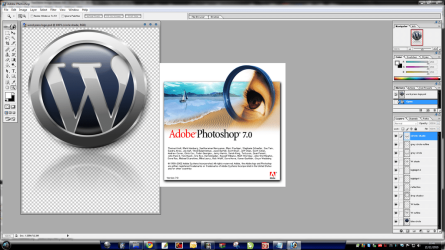
Hiya Digiday

Yes I do happen to have a copy of PS 7 to test this with. I like yourself also do graphics.

And no I'm not sitting in a some MS lab, I'm just sitting at home and trying to help out where I can.

You will notice here at seven forums allot of the members will go out of their way to help others, that's the reason that people come back time and time again.

So for this reason I decided to install it quick and test it out... hope this helps a bit pal. ;)
 

Attachments

  • ps7.png
    ps7.png
    133.3 KB · Views: 83

My Computer My Computer

At a glance

Windows 7 Ultimate 64bitAMD Phenom Quad core 9950 black edition16Gb2x XFX Radeon 5850
Computer type
PC/Desktop
Computer Manufacturer/Model Number
Self Built
OS
Windows 7 Ultimate 64bit
CPU
AMD Phenom Quad core 9950 black edition
Motherboard
Gigabyte
Memory
16Gb
Graphics Card(s)
2x XFX Radeon 5850
Sound Card
PCI Express X-Fi Titanium / Logitech G35
Monitor(s) Displays
2x HP 2410i
Screen Resolution
1920x1080
Hard Drives
2x 500Gb Seagate
1x 300Gb Seagate
1x 1Tb Seagate
2x 1Tb Hitatchi
PSU
Jean Tech Storm 700W
Case
Cooler Master COSMOS S
Cooling
Akasa Evo Blue Pro
Keyboard
Logitech G15
Mouse
Mad Catz M.M.O. 7
Internet Speed
12mb
W7 compatibility website says okay for PS Elements 7

Well, the W7 compatibility website says okay for Photoshop Elements 7, so that is a good sign for the full blown Photoshop 7... the Adobe website doesn't say one way or the other... they want you to drop a grand no matter what.

I would like to hear a little more from PooMan about the installation test if possible.

Thanks

digiday
 

My Computer My Computer

At a glance

Windows 7 ULT 32 bit2 GHZ2 GB
Computer Manufacturer/Model Number
Dell 531
OS
Windows 7 ULT 32 bit
CPU
2 GHZ
Memory
2 GB
Other Info
Also use Macs, but don't tell anyone
Thanks PooMan

Hi PooMan,

Thanks... I just clicked submit on my last post when your response came through... things look pretty good then.

I appreciate your home test lab environment and I'll follow your advice.

Thanks very much,

digiday
 

My Computer My Computer

At a glance

Windows 7 ULT 32 bit2 GHZ2 GB
Computer Manufacturer/Model Number
Dell 531
OS
Windows 7 ULT 32 bit
CPU
2 GHZ
Memory
2 GB
Other Info
Also use Macs, but don't tell anyone
Well I installed it normally (no compatibility mode).
Ran it
Opened up 5 or 6 ps files
Checked that all the layers and effects were intact
Loaded a few pluggins & tested them
Saved a couple of them and then opened them up in CS

Didn't do any extensive tests, but it seemed ok from my end
 

My Computer My Computer

At a glance

Windows 7 Ultimate 64bitAMD Phenom Quad core 9950 black edition16Gb2x XFX Radeon 5850
Computer type
PC/Desktop
Computer Manufacturer/Model Number
Self Built
OS
Windows 7 Ultimate 64bit
CPU
AMD Phenom Quad core 9950 black edition
Motherboard
Gigabyte
Memory
16Gb
Graphics Card(s)
2x XFX Radeon 5850
Sound Card
PCI Express X-Fi Titanium / Logitech G35
Monitor(s) Displays
2x HP 2410i
Screen Resolution
1920x1080
Hard Drives
2x 500Gb Seagate
1x 300Gb Seagate
1x 1Tb Seagate
2x 1Tb Hitatchi
PSU
Jean Tech Storm 700W
Case
Cooler Master COSMOS S
Cooling
Akasa Evo Blue Pro
Keyboard
Logitech G15
Mouse
Mad Catz M.M.O. 7
Internet Speed
12mb
I also used Ps7 alot xp and now w7 both x64
but the only annoying problem in w7 is when adjusting something with sliders when holding LMB for few seconds it acts like alt+Tab and minimizes photoshop (its the only problem with Ps7 in W7x64).
Now iI'm on PsCs5 x64 (it had a few new things) but if U know what ur doing Ps7 is just enough.
Ps 7 was installed in normal mode.
 

My Computer My Computer

At a glance

7 Ultimate x64 sp1Intel i5-4690K16Gb HyperX furyR9-270x 2Gb
Computer type
PC/Desktop
Computer Manufacturer/Model Number
696
OS
7 Ultimate x64 sp1
CPU
Intel i5-4690K
Motherboard
GA Z97X Gaming 5
Memory
16Gb HyperX fury
Graphics Card(s)
R9-270x 2Gb
Sound Card
On Board
Monitor(s) Displays
2443NW
Screen Resolution
1920x1200
Hard Drives
WD5000 -
WD5001 -
WD1002
PSU
Cft-650-14cs
Case
Very Big Case
Cooling
stock
Keyboard
G11
Mouse
Logitech
Internet Speed
Adsl
Browser
FF
Other Info
RWD
It should work just fine, but to the OP, if you really want to know...run the Windows 7 Upgrade Advisor. That will answer all of your questions like this.
 

My Computer My Computer

At a glance

Windows 7 Ultimate x64 SP1Intel Core i7-260012 GB Patriot Extreme DDR3-1333Nvidia GTX 470
OS
Windows 7 Ultimate x64 SP1
CPU
Intel Core i7-2600
Motherboard
Gigabyte GA-P67A-UD3P-B3
Memory
12 GB Patriot Extreme DDR3-1333
Graphics Card(s)
Nvidia GTX 470
Monitor(s) Displays
Dell UltraSharp 2209WA
Hard Drives
OCZ Agility3 240 GB, WD5001AALS, WD7501AALS
PSU
OCZ ModStream 700W
Case
CoolerMaster HAF 912 Advanced
Cooling
CoolerMaster Hyper 212 Plus
Yes it will work.

I personally am using Photoshop 4, which is 13 or 14 years old.

It will NOT install on 64 bit Windows without great difficulty if at all, but it installs and functions completely normally on 32 bit.

If you have a 64 bit version of Windows, I think you need something from the CS series----something newer than Photoshop 7. The CS series uses a 32 bit installer. Photoshop 7 and earlier have a 16 bit installer program that won't even run on 64 bit.
 

My Computer My Computer

At a glance

Windows 7 Home Premium SP1, 64-bitIntel Skylake i5-6600K, not overclocked8 GB HyperX DDR4-2666 (2 x 4 GB)none; graphics are integrated on CPU
Computer type
PC/Desktop
Computer Manufacturer/Model Number
Ignatz Special; 4 speed manual gearbox; factory air conditioning; one of one
OS
Windows 7 Home Premium SP1, 64-bit
CPU
Intel Skylake i5-6600K, not overclocked
Motherboard
AsRock Z170M Extreme 4, micro ATX
Memory
8 GB HyperX DDR4-2666 (2 x 4 GB)
Graphics Card(s)
none; graphics are integrated on CPU
Sound Card
onboard: Realtek ALC1150; external: USB Behringer UF0-202
Monitor(s) Displays
Dell S2340M 23 inch IPS
Screen Resolution
1600 x 900
Hard Drives
System: Crucial MX100 series SSD, 128 GB;
Data: Samsung Spinpoint 103SJ, 1 TB;
Backup: WD Caviar Green WD30EZRX-00D8PB0, 3 TB
PSU
Rosewill SilentNight 500 watt fanless, semi-modular
Case
Antec Solo II
Cooling
Noctua NH-U12S; Noctua F12 intake, Noctua S12A exhaust
Keyboard
Microsoft 200 6JH-00001 USB
Mouse
Dell or Microsoft optical wired; USB
Antivirus
Microsoft Security Essentials and Malwarebytes Premium
Browser
Pale Moon
Other Info
All fans PWM; speeds at idle: CPU circa 500 rpm; intake circa 600 rpm; exhaust circa 600 rpm; CPU temps 27 idle and 47 C load in a warm room (27 C/81 F) when running Intel Extreme Tuning Utility stress test.
Hello everyone.. just joined and looking for a solution in regard to using Photoshop 7 with Windows 7 (Professional) as well.

I don't know if others' Photoshop 7 also installs with ImageReady 7, but mine does. Both "install" fine, but ImageReady works fine and Photoshop doesn't. When I try to open Photoshop 7, I keep getting "the scratch disk is full error".

I just purchased this computer and the "top" priority I "specifically" asked about, is whether I would be able to use all the programs that I am and was currently using with my Windows XP3 Home Edition, more specifically Photoshop '7'. I was told with the "professional" version I would be able to with "no" problem. However, even with the tech support which I also purchased, I am still unable to use Photoshop 7 and so, I have a new computer that is virtually useless to me if I can't use Photoshop 7. After spending over $1700.00, I'm not in a position financially to run out and now re-purchase Photoshop at about yet, another grand.

I'm desperately hoping for some "magic" solution. Help please!? I would sooooo appreciate it! Thank you ever so much!
 

My Computer My Computer

At a glance

OS: Genuine Windows 7 Professional 64 bit2.8GHz8GB DDR3 SDRAM at 1333MHz - 4 DIMMsATI RadionHD 5450 1 GB DDR3
Computer Manufacturer/Model Number
XPS 8300 Intel Core i5-2300 processor(6MB Cache, 2.8GHz)
OS
OS: Genuine Windows 7 Professional 64 bit
CPU
2.8GHz
Motherboard
?
Memory
8GB DDR3 SDRAM at 1333MHz - 4 DIMMs
Graphics Card(s)
ATI RadionHD 5450 1 GB DDR3
Sound Card
?
Monitor(s) Displays
5
Hard Drives
1.5TB - SATA-II, 3Gb/s, 7,200 RPM, 32MB Cache HDD
Optical Drive: 16X CD/DVD Burner with Roxio Creator 2011
PSU
?
Case
?
Cooling
?
Internet Speed
dial-up
Hi Artsieladie,

I'm not sure if this applies to your situation, and I ended up installing an even older version of Photoshop 5.5 on this Windows 7 machine, and the Photoshop works but the ImageReady would not... just the opposite problem from yours with an even older version of Photoshop.

And I get an "Unknown Error" when I try to open the old ImageReady 2 that came with the PS 5.5 installer... but this is how I get it open.

On the application icon in the program folder or on a desktop shortcut icon for your Photoshop 7, right-click and select, "Run as administrator"... that opens up ImageReady for me... not sure if that will work for your PS 7.

There are other options like changing the compatibility mode setting so it can run older apps too... but otherwise others on this forum, namely "PooMan UK" installed PS 7 and it works on his Windows 7 machine.

Microsoft support or others on this forum may be able to advise you better than me on how to do use compatibility mode, but here is a link to this forum's info on that subject.

http://www.sevenforums.com/tutorials/316-compatibility-mode.html

I hope this info is somewhat helpful... let me know if you do or don't have success.

Good luck Artsieladie,

digi
 

My Computer My Computer

At a glance

Windows 7 ULT 32 bit2 GHZ2 GB
Computer Manufacturer/Model Number
Dell 531
OS
Windows 7 ULT 32 bit
CPU
2 GHZ
Memory
2 GB
Other Info
Also use Macs, but don't tell anyone
Thank you kindly, Digi. :) I tried what you just suggested and I followed through with all three options on Compatibility Mode as well, and still no luck. The little window pops up and still says "the scratch disk is full..". :/ What is a "scratch disk"? I've never heard this term before having Windows 7.

*still sad* ;_;
/ Artsieladie
 

My Computer My Computer

At a glance

OS: Genuine Windows 7 Professional 64 bit2.8GHz8GB DDR3 SDRAM at 1333MHz - 4 DIMMsATI RadionHD 5450 1 GB DDR3
Computer Manufacturer/Model Number
XPS 8300 Intel Core i5-2300 processor(6MB Cache, 2.8GHz)
OS
OS: Genuine Windows 7 Professional 64 bit
CPU
2.8GHz
Motherboard
?
Memory
8GB DDR3 SDRAM at 1333MHz - 4 DIMMs
Graphics Card(s)
ATI RadionHD 5450 1 GB DDR3
Sound Card
?
Monitor(s) Displays
5
Hard Drives
1.5TB - SATA-II, 3Gb/s, 7,200 RPM, 32MB Cache HDD
Optical Drive: 16X CD/DVD Burner with Roxio Creator 2011
PSU
?
Case
?
Cooling
?
Internet Speed
dial-up
Hi Artsieladie,

Scratch disk is the amount of hard drive used as temporary memory, sort of like hard drive space used as RAM... I think that is the best way to describe it... that's on any computer, Mac, PC, or any other type.

Windows 7 has a setting for scratch disk that allows it to handle the amount of scratch disk memory automatically under "Control Panel>System>Advanced Tab>Performance>Settings>Advanced Tab (again)>Virtual Memory"... but Windows handles that allocation automatically and I don't like to change those allocations.

Scratch disk is the same thing as "Virtual Memory". Below is a link to an article about setting scratch disk settings within Photoshop, but that is on the premise that one is first able to get Photoshop to open...

Photoshop Scratch Disk - What to do About the Scratch Disk is Full Error Message

I'm figuring that you have enough RAM to run Photoshop, but that might be something to check... if you spent $1700 on that PC, then it probably came with allot of RAM.

The Adobe forum is also a good place where there are allot of PS experts just waiting to answer questions about all kinds of Photoshop problems. There is a guy named Noel who is a real Photoshop expert... here is a link to his public profile on the Adobe forum... he helped me open some broken Photoshop files one time and he is a real ace at everything Photoshop... he may be able to figure it out...
Adobe Forums: Noel Carboni's Profile

I'll write back if I can think of anything else, but Noel may have the solution.

Let me know if you are still having no luck, or if you do have success!

Bye for now,

digi
 

My Computer My Computer

At a glance

Windows 7 ULT 32 bit2 GHZ2 GB
Computer Manufacturer/Model Number
Dell 531
OS
Windows 7 ULT 32 bit
CPU
2 GHZ
Memory
2 GB
Other Info
Also use Macs, but don't tell anyone
Back
Top