Would Photoshop 7 from 2002 be compatible with Windows 7?

Thank you again. :) I followed your first link and wound up here: Memory allocation and usage (Photoshop CS), where Adobe explains that if you have too much available memory, the "memory and image cache" needs to be reduced to 70%. I think this may be my problem, because I have 8GB RAM and hardly any space used. However, I can't now seem to find exactly where I am to make this adjustment to 70%. Hmm... baby steps I seem to be taking here. I find out a little bit more, but then not quite enough to get me all the way to where I need to get to.

At the end of the article, it says quote: "The Adjusted Refresh plug-in, available free on the Adobe website at Adobe - Downloads , reduces tile size as well as Photoshop's initial allocation of RAM and scratch disk. The plug-in may slow performance on systems with more than 1 GB of RAM or that use multiprocessors."

Well, I have 8GB and 4 processors.

There are some more links yet I'm going to go to and read as well. Thank you so much for the leads... and I'm a followin'. ;)
 

My Computer My Computer

At a glance

OS: Genuine Windows 7 Professional 64 bit2.8GHz8GB DDR3 SDRAM at 1333MHz - 4 DIMMsATI RadionHD 5450 1 GB DDR3
Computer Manufacturer/Model Number
XPS 8300 Intel Core i5-2300 processor(6MB Cache, 2.8GHz)
OS
OS: Genuine Windows 7 Professional 64 bit
CPU
2.8GHz
Motherboard
?
Memory
8GB DDR3 SDRAM at 1333MHz - 4 DIMMs
Graphics Card(s)
ATI RadionHD 5450 1 GB DDR3
Sound Card
?
Monitor(s) Displays
5
Hard Drives
1.5TB - SATA-II, 3Gb/s, 7,200 RPM, 32MB Cache HDD
Optical Drive: 16X CD/DVD Burner with Roxio Creator 2011
PSU
?
Case
?
Cooling
?
Internet Speed
dial-up
Hi Artsieladie,

Wow, that's allot of RAM. I didn't know one could have "too much" RAM or hard drive space... I guess anything is possible.

The image cache is set from within Photoshop, which is hard to do if you can't open Photoshop!

I'm glad that you are finding further information from that webpage. If all else fails, try that link to Noel's profile page on the Adobe forum, he knows all kinds of stuff about Photoshop.

PooMan, on this forum, is also an expert, but he had a post or two on this thread, so he would, most likely, be getting notices about your inquiry, and if he isn't posting any responses yet, then he may be incommunicado right now.

Let me know what happens for sure.

Good luck Artsieladie,

digi
 

My Computer My Computer

At a glance

Windows 7 ULT 32 bit2 GHZ2 GB
Computer Manufacturer/Model Number
Dell 531
OS
Windows 7 ULT 32 bit
CPU
2 GHZ
Memory
2 GB
Other Info
Also use Macs, but don't tell anyone
Hiya Artsieladie

From your system spec it looks like your running 1 HDD. (& 5 Displays ... :D you must have a massive desk :D)
PS Prefers to have more than one drive so it can use the second drive as a "scratch disk" (temporary place when it runs out of RAM a bit like a swap file)
You can still run PS on one drive with no problems but sometimes PS doesn't want to play ball.
Photoshop 7 can only use the first 2 GB of RAM on the computer. This limit is based on hardware and operating system limitations. The operating system uses some of this RAM, so the Photoshop Memory Usage preference displays only a maximum of 1.6 or 1.7 GB of total available RAM.
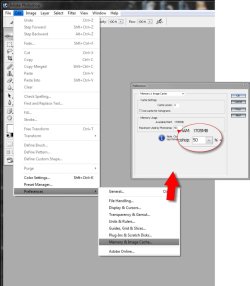
You have 8GB Ram which means you might have to change the setting under "edit" "settings" "memory & cache" to +- 25% (see image) Try adjusting this value and let us know how you get on ;)
 

Attachments

  • ps memory.jpg
    ps memory.jpg
    71.2 KB · Views: 21

My Computer My Computer

At a glance

Windows 7 Ultimate 64bitAMD Phenom Quad core 9950 black edition16Gb2x XFX Radeon 5850
Computer type
PC/Desktop
Computer Manufacturer/Model Number
Self Built
OS
Windows 7 Ultimate 64bit
CPU
AMD Phenom Quad core 9950 black edition
Motherboard
Gigabyte
Memory
16Gb
Graphics Card(s)
2x XFX Radeon 5850
Sound Card
PCI Express X-Fi Titanium / Logitech G35
Monitor(s) Displays
2x HP 2410i
Screen Resolution
1920x1080
Hard Drives
2x 500Gb Seagate
1x 300Gb Seagate
1x 1Tb Seagate
2x 1Tb Hitatchi
PSU
Jean Tech Storm 700W
Case
Cooler Master COSMOS S
Cooling
Akasa Evo Blue Pro
Keyboard
Logitech G15
Mouse
Mad Catz M.M.O. 7
Internet Speed
12mb
Hi PooMan,

Good to see you are out there.

I think AL said she couldn't get Photoshop open at all, not even to change any settings.

digi
 

My Computer My Computer

At a glance

Windows 7 ULT 32 bit2 GHZ2 GB
Computer Manufacturer/Model Number
Dell 531
OS
Windows 7 ULT 32 bit
CPU
2 GHZ
Memory
2 GB
Other Info
Also use Macs, but don't tell anyone
Hello PooMan and Digi :)

Yes, as Digi says, I do need to actually be able to open Photoshop to do what you suggest. I don't suppose there would be a 'back door' kinda' way to be able to make the adjustments? Umm... a way to make adjustments without having to get Photoshop opened first? Probably not... and I'm just grasping at straws right now, me thinks.

Digi: I am looking through the Adobe forums for some info in this regard, but I haven't come across any that is specific with my problem as of yet, although there are threads about the "scratch disk" issue.

Thank you both kindly for your help! :)

/Artsie
 

My Computer My Computer

At a glance

OS: Genuine Windows 7 Professional 64 bit2.8GHz8GB DDR3 SDRAM at 1333MHz - 4 DIMMsATI RadionHD 5450 1 GB DDR3
Computer Manufacturer/Model Number
XPS 8300 Intel Core i5-2300 processor(6MB Cache, 2.8GHz)
OS
OS: Genuine Windows 7 Professional 64 bit
CPU
2.8GHz
Motherboard
?
Memory
8GB DDR3 SDRAM at 1333MHz - 4 DIMMs
Graphics Card(s)
ATI RadionHD 5450 1 GB DDR3
Sound Card
?
Monitor(s) Displays
5
Hard Drives
1.5TB - SATA-II, 3Gb/s, 7,200 RPM, 32MB Cache HDD
Optical Drive: 16X CD/DVD Burner with Roxio Creator 2011
PSU
?
Case
?
Cooling
?
Internet Speed
dial-up
Hi AL,

I'm not sure what else to recommend besides the Adobe forum and the resident expert there, Noel... here is the Adobe Photoshop forum link and the link to Noel's public profile on the Adobe forum...
Adobe Forums: Forum: Adobe Photoshop
Adobe Forums: Noel Carboni's Profile

I'm sure Noel or someone there will know what to do... I sent Noel an email about your dilemma, but he hasn't replied yet.

If he isn't online, I'm sure another expert will be ready with some helpful answers.

Seek and ye shall find (dumb cliche, I know).

digi
 

My Computer My Computer

At a glance

Windows 7 ULT 32 bit2 GHZ2 GB
Computer Manufacturer/Model Number
Dell 531
OS
Windows 7 ULT 32 bit
CPU
2 GHZ
Memory
2 GB
Other Info
Also use Macs, but don't tell anyone
I had zero issues with CS2 in windows 7. It won't hurt to try it out. If it works, let us know :)
 

My Computer My Computer

At a glance

W7 Professional x64AMD Athlon II X3 445 Rana 3.10 GHzPNY XLR DDR3 1600 4x2GBNVIDIA GeForce GTS 450 (fermi) 1GB GDDR5
Computer Manufacturer/Model Number
Pugh Technologies
OS
W7 Professional x64
CPU
AMD Athlon II X3 445 Rana 3.10 GHz
Motherboard
MSI 870A-G54
Memory
PNY XLR DDR3 1600 4x2GB
Graphics Card(s)
NVIDIA GeForce GTS 450 (fermi) 1GB GDDR5
Sound Card
Realtek ALC892 onboard
Monitor(s) Displays
ASUS VE205t, Viewsonic VX2035WM
Screen Resolution
1600x900, 1600x1050
Hard Drives
977GB Hitachi Hitachi HDS721010CLA332
244GB Western Digital WDC WD2500AAJS-65B4A0
488GB Western Digital WDC WD5000AAJS-00A8B0
488GB Western Digital WDC WD5000AAKS-00UU3A0
PSU
Antec EarthWatts EA650 650W
Case
ThermalTake Armor A90 Mid Tower
Cooling
3x 120mm in, 1x 120mm & 200mm out, self built hydro-cooler
Keyboard
Logitec 55
Mouse
Razer Deathadder
Internet Speed
20 Mbps D/L, 9 Mbps U/L
Hey Liq,

I'm not sure if you are reading the material... Artsieladie has Photoshop 7... PS CS2 would be PS 9... PS 7 is before the CSs came out.

She can't open it up... that is the problem... this is not still the origianl question from this thread that started 5 months ago.

Coffee time!

digi
 

My Computer My Computer

At a glance

Windows 7 ULT 32 bit2 GHZ2 GB
Computer Manufacturer/Model Number
Dell 531
OS
Windows 7 ULT 32 bit
CPU
2 GHZ
Memory
2 GB
Other Info
Also use Macs, but don't tell anyone
Hi Artsieladie,

My friend Noel just replied to my email... here's what he had to say...

Photoshop 7 could not handle very large numbers when it came to free disk space. It pre-dated the huge hard drives we have today and simply did not use enough bits.

The workaround for this would be to make a small partition on your hard drive just for Photoshop's scratch disk uses, or even plug in a smaller hard drive just for scratch disk use.

So he is suggesting either reformatting your hard drive and making a smaller partition, like dividing the hard drive in to two or more hard drives when going through the format process... but this would mean blanking out the hard drive to re-format it and partition it and then re-installing Windows 7, then installing Photoshop 7 on the new, smaller partition... or...

Plug in a smaller USB or Firewire hard drive, maybe an inexpensive 30 gig model or something like that, and install Photoshop 7 on that drive, then it should see that smaller hard drive space that it is located on and it would open up correctly.

Does this sound like a good possibility?

digi
 

My Computer My Computer

At a glance

Windows 7 ULT 32 bit2 GHZ2 GB
Computer Manufacturer/Model Number
Dell 531
OS
Windows 7 ULT 32 bit
CPU
2 GHZ
Memory
2 GB
Other Info
Also use Macs, but don't tell anyone
Hi Digi, :)

I did go to Noel's profile, but I didn't know if I should contact him directly and so I didn't look into doing this. Instead, I went on to the forums to see if I could find a thread relating to my specific problem, which I haven't found. With forums I'm leery about starting a new thread that the subject matter may be redundant because many forums frown on this, but I can certainly understand the reasoning for this. So I especially thank you Digi for contacting him. :)

Being tired of having a computer with not enough memory and "umph" to be able to do what I want to, I decided to get mega of both, so a new computer could handle whatever I would want to venture into, mainly graphics, animation, and music. I was told by a friend of mine to ask for a machine that could handle gaming, since gaming requires the incorporating of all three of these aforementioned aspects. I have been told that I have a nice machine, but at the present time, I'm not yet impressed. :P

Since the whole re-formatting and the re-installation of Windows 7 sounds like a bit much for me to be able to do on my own, I think I like the second option better, which if I am understanding correctly, would just involve purchasing a flashdrive kinda' thing that would plug into one of my USB ports? *is feeling so absolutely computer illiterate right about now* :P

When I spoke to a Dell tech, he explained that adding another harddrive to my computer would be complicated, because there is more involved than just putting one in. He also explained a bit about the partitions and that Dell doesn't get into this aspect, but the partitions are for protecting your programs, photos, etc., that you place onto your computer, since anything "behind" these partitions, a virus can't infect, for it can only get at your C:/ drive. But working with or adding partitions would require hiring a computer tech to do this.

This all seems so complicated! I feel like stuff is getting explained to me that I'm not knowledgeable enough to grasp. However, I'm very appreciative all the same. Hopefully I am learning some at least, of what's being offered. :P

/Artsie
 

My Computer My Computer

At a glance

OS: Genuine Windows 7 Professional 64 bit2.8GHz8GB DDR3 SDRAM at 1333MHz - 4 DIMMsATI RadionHD 5450 1 GB DDR3
Computer Manufacturer/Model Number
XPS 8300 Intel Core i5-2300 processor(6MB Cache, 2.8GHz)
OS
OS: Genuine Windows 7 Professional 64 bit
CPU
2.8GHz
Motherboard
?
Memory
8GB DDR3 SDRAM at 1333MHz - 4 DIMMs
Graphics Card(s)
ATI RadionHD 5450 1 GB DDR3
Sound Card
?
Monitor(s) Displays
5
Hard Drives
1.5TB - SATA-II, 3Gb/s, 7,200 RPM, 32MB Cache HDD
Optical Drive: 16X CD/DVD Burner with Roxio Creator 2011
PSU
?
Case
?
Cooling
?
Internet Speed
dial-up
Hi AL,

You have a perfect understanding of what is going on. But the external hard drive that you would want to plug in to your computer should be a normal external hard drive, like a Lacie model or one of a hundred other models out there that plug in via a USB or Firewire cable... NOT a FLASH drive. Sometimes, applications like Photoshop and others can not run from a FLASH drive... especially older apps... they need to run from an normal hard drive with a spinning disk inside... FLASH memory is different and some apps can run from FLASH memory, but most older apps can not.

Installing another internal hard drive is something best left to a technician, but just plugging in an external hard drive and installing your PS 7 on that would be easy.

Now, that being said, after doing a search for new desktop hard drives, I found that most of them are now huge in capacity size... like 1 terabyte, which is like a thousand gigiabytes, up to 3 terabytes is now the norm... where as just a couple of years ago 300 to 500 gigabytes was the norm. I thought you could still get a normal old size, 30 gigabyte external desktop hard drive, but aside from getting one used on ebay or someplace, I'm not seeing smaller size desktop hard drives out there, which is what you need... but there is another cheap alternative.

I did find a few in the 300 gigabyte to 500 gigabyte size range drives, but I'm not even sure if that is small enough for Photoshop 7... but there is a way around that too... by partitioning the new plug-in hard drive, you can make a smaller partition on that, and you wouldn't have to to blank out your current internal hard drive and re-install Windows and everything.

At the bottom, I've included a few links to smaller, 300 to 500 gig hard drives, fairly inexpensive, and also to one page that shows what is now "average" size, 1 terabyte and up size hard drives... all of which can be partitioned with the software that comes with the hard drive... you can make a smaller, 30 gigabyte partition on the new drive and then install Photoshop 7 on that smaller partition.

Partitioning your existing hard drive is not that complicated, but like I said, you'd have to put in the Windows 7 installation disk, choose to format the hard drive and wipe it clean, then there is a partition option, which lets you create any number of smaller hard drives within your big, internal hard drive... then it installs Windows 7... I have done that on a Windows computer and it's not that hard, but the drawback is that you have to blank out and re-install everything... to partition a hard drive, re-formatting it and starting completely fresh is the only way to do it.

But with a new plug-in hard drive (NOT a FLASH drive), it is already blank, so, with Lacie hard drives, for example, they come with software that simply and easily allows you to partition the new hard drive so you can make a smaller partition to run your older apps from.

Below are a few links to smaller, cheaper hard drives, but on the first link to the Lacie hard drive website, the link goes to inexpensive hard drives that still are huge, at 1 terabyte and up... but like I said, that size can easily be partitioned in to smaller little hard drive spaces. Even with a 300 gigabyte or 500 gigabyte hard drive, you'd probably still have to partition it, since Photoshop 7 was created when hard drives were at a maximum of 200 or 300 gigabytes, usually smaller... and the 1 terabyte drives are about the same price as the few 300 or 500 gigabyte drives that are out there... I did find one USB, 500 gig Verbatim hard drive for only $59.95 and the others are between $100 and $200.

LaCie - Desktop External Hard Drives and RAID - USB 2.0, FireWire, FireWire 800 & eSATA

JR.com: Verbatim 500GB USB/FireWire 3.5" HD in Hard Drives

JR.com: Verbatim 500GB USB Portable HDD in Hard Drives

JR.com: Verbatim 320G USB Portable HDD 2.5" Blu in Hard Drives

So remember, don't get a FLASH drive to run PS 7 from... some newer apps can run from FLASH drive to be compatible with new FLASH memory hard drives that are in some of the newer computers, but FLASH drives are no good for running older or even allot of the current applications.

Let me know how it goes,

digi
 

My Computer My Computer

At a glance

Windows 7 ULT 32 bit2 GHZ2 GB
Computer Manufacturer/Model Number
Dell 531
OS
Windows 7 ULT 32 bit
CPU
2 GHZ
Memory
2 GB
Other Info
Also use Macs, but don't tell anyone
As mentioned previously you can install a virtual PC and install XP mode, which will be fine for Photoshop 7, albeit a little slow.

I have tried the version with Windows 7 64-bit though and it worked fine.

If you wanted to go the virtual route, more details here: Windows Virtual PC: Home Page
 

My Computer My Computer

At a glance

Windows 7 Ultimate SP1 64-BitIntel Core i7 870 @ 2.93GHz8Gb Dual-Channel DDR3 @ 664MHznVidia GeForce GTX 460 1024MB dedicated RAM
Computer Manufacturer/Model Number
HP Pavilion Elite 495UK
OS
Windows 7 Ultimate SP1 64-Bit
CPU
Intel Core i7 870 @ 2.93GHz
Motherboard
MSI 2A9C (CPU1)
Memory
8Gb Dual-Channel DDR3 @ 664MHz
Graphics Card(s)
nVidia GeForce GTX 460 1024MB dedicated RAM
Sound Card
Realtek HD Audio
Monitor(s) Displays
HP2310i
Screen Resolution
1920 x 1080
Hard Drives
1x1954GB Hitachi HDS22020ALA 330 (RAID), 1x1954GB Hitachi External for backup and storage
PSU
460W
Case
HP Elite
Cooling
Air cooled
Keyboard
Logitech K750 solar-powered keyboard
Mouse
Logitech Wireless M180 mouse
Internet Speed
2Mb
Other Info
Pure Avanti Flow Internet Radio with iPod Dock, 64Gb iPod, HP USB Speakers, Sony MDR-V500 Headphones, Sony Vaio F-Series Laptop
Supposedly there is a registry hack that might help, but I'm not sure :confused:

Advance down to the following registry key: HKLM\System\CurrentControlSet\Control\Session Manager\Memory Management

In this key double-click on the LargeSystemCache registry value to open a DWORD editor window (default value of 0 = small cache).

Change the Hex (hexadecimal) or Decimal value to 1.

Close the registry editor app, and reboot to implement the change.

But I was just wondering ... if you downloaded the latest free PS trial version from adobe and that launched it and it worked .... then you changed the memory cache settings ... would this effect your full version of PS7 and thus enable you to run it .... I'm really clutching at straws and apologise for not reading your thread reply's properly as I thought that you could launch PS7 but couldn't open a image (which is where you were getting the error) :(

I have a quad core and 8gb ram and both my ps7 and cs work fine so I'm sure that we could figure out how we can help you out pal, just stick with it and lets s what we can come up with ;)
 

My Computer My Computer

At a glance

Windows 7 Ultimate 64bitAMD Phenom Quad core 9950 black edition16Gb2x XFX Radeon 5850
Computer type
PC/Desktop
Computer Manufacturer/Model Number
Self Built
OS
Windows 7 Ultimate 64bit
CPU
AMD Phenom Quad core 9950 black edition
Motherboard
Gigabyte
Memory
16Gb
Graphics Card(s)
2x XFX Radeon 5850
Sound Card
PCI Express X-Fi Titanium / Logitech G35
Monitor(s) Displays
2x HP 2410i
Screen Resolution
1920x1080
Hard Drives
2x 500Gb Seagate
1x 300Gb Seagate
1x 1Tb Seagate
2x 1Tb Hitatchi
PSU
Jean Tech Storm 700W
Case
Cooler Master COSMOS S
Cooling
Akasa Evo Blue Pro
Keyboard
Logitech G15
Mouse
Mad Catz M.M.O. 7
Internet Speed
12mb
Hi Artsie, PooMan and Vixen,

I'm no expert on anything, but isn't trying experimental registry hacks sort of like playing Russian Rulet?... one wrong character and the computer is inoperable.

And if, like the Adobe forum expert has advised, Photoshop 7 isn't opening because it is on a hard drive that is just too big for it to understand, then would running it in a virtual Windows XP environment make it work ?... in other words, was PS 7 able to run somehow on a super large hard drive in XP ?... and if it would, would one also need to have a copy of Windows XP to install after installing Virtual PC ?

PooMan, what is the size of the hard drive or the partition that you are running PS 7 on in Windows 7 now ?

Thanks,

digi
 

My Computer My Computer

At a glance

Windows 7 ULT 32 bit2 GHZ2 GB
Computer Manufacturer/Model Number
Dell 531
OS
Windows 7 ULT 32 bit
CPU
2 GHZ
Memory
2 GB
Other Info
Also use Macs, but don't tell anyone
My PS7 and PS CS are installed on a 1TB drive but I have another 1TB drive set as my scratch disk and I have 8GB RAM. All we are trying to do with the registry hack is change the way that PS opens... but I don't need to use the registry hack as mine works fine but changing it shouldn't make the PC inoperable especially if the registry is backed up first.
I have the same config on one of my other machines which is running XP and I still don't have the problem.
I've just done a test on my XP box using the suggested Registry change and it didn't alter anything (PS opened the same as usual)
seems like PS 7 might have some stability issues with win7 ... but I personally haven't come across them as yet ;)
 

My Computer My Computer

At a glance

Windows 7 Ultimate 64bitAMD Phenom Quad core 9950 black edition16Gb2x XFX Radeon 5850
Computer type
PC/Desktop
Computer Manufacturer/Model Number
Self Built
OS
Windows 7 Ultimate 64bit
CPU
AMD Phenom Quad core 9950 black edition
Motherboard
Gigabyte
Memory
16Gb
Graphics Card(s)
2x XFX Radeon 5850
Sound Card
PCI Express X-Fi Titanium / Logitech G35
Monitor(s) Displays
2x HP 2410i
Screen Resolution
1920x1080
Hard Drives
2x 500Gb Seagate
1x 300Gb Seagate
1x 1Tb Seagate
2x 1Tb Hitatchi
PSU
Jean Tech Storm 700W
Case
Cooler Master COSMOS S
Cooling
Akasa Evo Blue Pro
Keyboard
Logitech G15
Mouse
Mad Catz M.M.O. 7
Internet Speed
12mb
PooMan,
Is your PS 7 installed on a smaller partition on the 1 TB hard drive ?... or is its scratch disk directed at a smaller partition ?

I know even as a savy, but non-expert PC user, I have been instructed not to try registry hacks for fear of what they can do. I know experts have the confidence and knowledge to do registry hacks and they know how to back up the registry and re-impliment it if there is a problem, but I don't have that knowlege or confidence to go there. And I believe that those that don't have the actual knowledge to do registry hacks, but they do it anyway, are just too uninformed to know what they might do if they get it wrong.

If the problem is indeed due to PS 7 not understanding a super big hard drive (or what is today's average size hard drive), as Adobe-Noel has suggested, then a small partition on a new, cheap USB or Firewire hard drive seems like it would be the safest bet.

I'm just thinking of safety, versus expertise, versus expense.

digi
 

My Computer My Computer

At a glance

Windows 7 ULT 32 bit2 GHZ2 GB
Computer Manufacturer/Model Number
Dell 531
OS
Windows 7 ULT 32 bit
CPU
2 GHZ
Memory
2 GB
Other Info
Also use Macs, but don't tell anyone
No pal :) my OS plus PS7 and PS CS is installed on my 1Tb drive (1 single partition) and my scratch disk is on another 1Tb drive (1 partition with +- 700gb freespace)
Remember if you change a memory setting in a program like PS this will change your registry settings automatically (for that key). What we are trying to do is change this setting before PS launches as we can't get it to run. ;)
 

My Computer My Computer

At a glance

Windows 7 Ultimate 64bitAMD Phenom Quad core 9950 black edition16Gb2x XFX Radeon 5850
Computer type
PC/Desktop
Computer Manufacturer/Model Number
Self Built
OS
Windows 7 Ultimate 64bit
CPU
AMD Phenom Quad core 9950 black edition
Motherboard
Gigabyte
Memory
16Gb
Graphics Card(s)
2x XFX Radeon 5850
Sound Card
PCI Express X-Fi Titanium / Logitech G35
Monitor(s) Displays
2x HP 2410i
Screen Resolution
1920x1080
Hard Drives
2x 500Gb Seagate
1x 300Gb Seagate
1x 1Tb Seagate
2x 1Tb Hitatchi
PSU
Jean Tech Storm 700W
Case
Cooler Master COSMOS S
Cooling
Akasa Evo Blue Pro
Keyboard
Logitech G15
Mouse
Mad Catz M.M.O. 7
Internet Speed
12mb
PooMan and Artsie,

Okay, this makes it sound as if installing the trial version of Photoshop CS5 and setting the cache setting there, then opening Photoshop 7 up successfully is the scenario that would work.

How would one want to set the memory cache settings then in PS CS5 ?... would it still be the same way that you showed in your previous post picture of the memory cache settings in Photoshop 7 ?

Also, this is all outside of what Artsieladie feels comfortable doing, but it does seem this trial PS CS5 route would be the safest, cheapest and easiest way of doing it.

PS: PooMan, what app do you use to get the nifty magified detail of the desired area of your screen shots... is that a newer feature within PS CS5 ?

digi
 

My Computer My Computer

At a glance

Windows 7 ULT 32 bit2 GHZ2 GB
Computer Manufacturer/Model Number
Dell 531
OS
Windows 7 ULT 32 bit
CPU
2 GHZ
Memory
2 GB
Other Info
Also use Macs, but don't tell anyone
Soz pal I don't have CS5 ... I did the magnify thingy bob in Corel Draw ;)
 

My Computer My Computer

At a glance

Windows 7 Ultimate 64bitAMD Phenom Quad core 9950 black edition16Gb2x XFX Radeon 5850
Computer type
PC/Desktop
Computer Manufacturer/Model Number
Self Built
OS
Windows 7 Ultimate 64bit
CPU
AMD Phenom Quad core 9950 black edition
Motherboard
Gigabyte
Memory
16Gb
Graphics Card(s)
2x XFX Radeon 5850
Sound Card
PCI Express X-Fi Titanium / Logitech G35
Monitor(s) Displays
2x HP 2410i
Screen Resolution
1920x1080
Hard Drives
2x 500Gb Seagate
1x 300Gb Seagate
1x 1Tb Seagate
2x 1Tb Hitatchi
PSU
Jean Tech Storm 700W
Case
Cooler Master COSMOS S
Cooling
Akasa Evo Blue Pro
Keyboard
Logitech G15
Mouse
Mad Catz M.M.O. 7
Internet Speed
12mb
Zikes! Corel Draw?!... in a world of Photoshop discussions, you're using Corel Draw?

Just kidding, it's good to have as many tools at one's disposal as possible... is that an automatic feature in CD or did you just do it manually?

digi
 

My Computer My Computer

At a glance

Windows 7 ULT 32 bit2 GHZ2 GB
Computer Manufacturer/Model Number
Dell 531
OS
Windows 7 ULT 32 bit
CPU
2 GHZ
Memory
2 GB
Other Info
Also use Macs, but don't tell anyone
Back
Top