Would Photoshop 7 from 2002 be compatible with Windows 7?

Corel is my main prog that I use ... but PS an old pal of mine that I use from time to time as we have been mates back in the day and I still use it sometimes ... but Corel has a nifty tool to allow us to magnify a section of choice ;)
 

My Computer My Computer

At a glance

Windows 7 Ultimate 64bitAMD Phenom Quad core 9950 black edition16Gb2x XFX Radeon 5850
Computer type
PC/Desktop
Computer Manufacturer/Model Number
Self Built
OS
Windows 7 Ultimate 64bit
CPU
AMD Phenom Quad core 9950 black edition
Motherboard
Gigabyte
Memory
16Gb
Graphics Card(s)
2x XFX Radeon 5850
Sound Card
PCI Express X-Fi Titanium / Logitech G35
Monitor(s) Displays
2x HP 2410i
Screen Resolution
1920x1080
Hard Drives
2x 500Gb Seagate
1x 300Gb Seagate
1x 1Tb Seagate
2x 1Tb Hitatchi
PSU
Jean Tech Storm 700W
Case
Cooler Master COSMOS S
Cooling
Akasa Evo Blue Pro
Keyboard
Logitech G15
Mouse
Mad Catz M.M.O. 7
Internet Speed
12mb
And to think that us Photoshop snobs used to scoff at Corel Draw files and those that brought them in to digital pre-press centers where I labored. I guess CD has its place in the world.
 

My Computer My Computer

At a glance

Windows 7 ULT 32 bit2 GHZ2 GB
Computer Manufacturer/Model Number
Dell 531
OS
Windows 7 ULT 32 bit
CPU
2 GHZ
Memory
2 GB
Other Info
Also use Macs, but don't tell anyone
Heheee yeah Corel still has it's flaws (can be a bit unstable at times) but I've yet to find something that was done in PS that I couldn't reproduce using Corel. ....... + it's a dam site cheaper :D
 

My Computer My Computer

At a glance

Windows 7 Ultimate 64bitAMD Phenom Quad core 9950 black edition16Gb2x XFX Radeon 5850
Computer type
PC/Desktop
Computer Manufacturer/Model Number
Self Built
OS
Windows 7 Ultimate 64bit
CPU
AMD Phenom Quad core 9950 black edition
Motherboard
Gigabyte
Memory
16Gb
Graphics Card(s)
2x XFX Radeon 5850
Sound Card
PCI Express X-Fi Titanium / Logitech G35
Monitor(s) Displays
2x HP 2410i
Screen Resolution
1920x1080
Hard Drives
2x 500Gb Seagate
1x 300Gb Seagate
1x 1Tb Seagate
2x 1Tb Hitatchi
PSU
Jean Tech Storm 700W
Case
Cooler Master COSMOS S
Cooling
Akasa Evo Blue Pro
Keyboard
Logitech G15
Mouse
Mad Catz M.M.O. 7
Internet Speed
12mb
Hi Artsie, PooMan and Vixen,

I'm no expert on anything, but isn't trying experimental registry hacks sort of like playing Russian Rulet?... one wrong character and the computer is inoperable.

And if, like the Adobe forum expert has advised, Photoshop 7 isn't opening because it is on a hard drive that is just too big for it to understand, then would running it in a virtual Windows XP environment make it work ?... in other words, was PS 7 able to run somehow on a super large hard drive in XP ?... and if it would, would one also need to have a copy of Windows XP to install after installing Virtual PC ?

PooMan, what is the size of the hard drive or the partition that you are running PS 7 on in Windows 7 now ?

Thanks,

digi

If you check the link I gave you, you can download Virtual PC and XP Mode free of charge so it won't cost you a penny.
 

My Computer My Computer

At a glance

Windows 7 Ultimate SP1 64-BitIntel Core i7 870 @ 2.93GHz8Gb Dual-Channel DDR3 @ 664MHznVidia GeForce GTX 460 1024MB dedicated RAM
Computer Manufacturer/Model Number
HP Pavilion Elite 495UK
OS
Windows 7 Ultimate SP1 64-Bit
CPU
Intel Core i7 870 @ 2.93GHz
Motherboard
MSI 2A9C (CPU1)
Memory
8Gb Dual-Channel DDR3 @ 664MHz
Graphics Card(s)
nVidia GeForce GTX 460 1024MB dedicated RAM
Sound Card
Realtek HD Audio
Monitor(s) Displays
HP2310i
Screen Resolution
1920 x 1080
Hard Drives
1x1954GB Hitachi HDS22020ALA 330 (RAID), 1x1954GB Hitachi External for backup and storage
PSU
460W
Case
HP Elite
Cooling
Air cooled
Keyboard
Logitech K750 solar-powered keyboard
Mouse
Logitech Wireless M180 mouse
Internet Speed
2Mb
Other Info
Pure Avanti Flow Internet Radio with iPod Dock, 64Gb iPod, HP USB Speakers, Sony MDR-V500 Headphones, Sony Vaio F-Series Laptop
Okay, back to the topic at hand.

Artsieladie, this contradicts everything we've been discussing in the last few posts.

Adobe-Noel just replied to my last email to him. He says that the Photoshop CS 5 memory cache setting definately will not affect anything for Photoshop 7.

Vixen, was PS 7 able to run on XP with the huge hard drives that we are discussing ?

Otherwise, this would take us back to the size of the hard drive that PS 7 is installed on and first seeing for its memory cache... Noel says that he beleives that the drive size for PS 7's memory cach needs to be one TB or less... and he didn't know that was the size of hard drive that PooMan said his PS 7 memory cache is directed to... so that would make sense. Perhaps it is a terabyte or less that PS 7 needs to see before it'll open up.

Artsieladie will need to weigh in later to tell us what size her new internal hard drive is... maybe a big 2 or 3 terabyte model ? If this is correct, then that would take us back to the option of getting a new, cheap USB or Firewire hard drive, not FLASH type, but a regular hard drive, of one terabyte or less in size and installing Photoshop 7 on that, as opposed to blanking out and partitioning her big internal hard drive.

Who thought large drives could cause so many problems ?

digi
 

My Computer My Computer

At a glance

Windows 7 ULT 32 bit2 GHZ2 GB
Computer Manufacturer/Model Number
Dell 531
OS
Windows 7 ULT 32 bit
CPU
2 GHZ
Memory
2 GB
Other Info
Also use Macs, but don't tell anyone
While we've been yapping I've just re-installed win 7 64bit on one of my other PC's I haven't even installed the drivers or nothing it's just raw 1Tb SATA hdd 8Gb Ram no other drives etc. Installed PS 7 made no changes what so ever and ran it (not even as administrator) and it ran with no problems. I even opened an old 180Mb 31 layer PS file from my usb pen drive and it opened in PS7 with no probs. So I really don't know why PS7 won't even start up on the ops PC. maybe un-installing then using something like ccleaner to completely remove it might help then try re-installing it agian ... but I've exhausted all the things I can think of 2 night .....

~But I'll give it another bash 2morrow and see what I can figure out ;)
 

My Computer My Computer

At a glance

Windows 7 Ultimate 64bitAMD Phenom Quad core 9950 black edition16Gb2x XFX Radeon 5850
Computer type
PC/Desktop
Computer Manufacturer/Model Number
Self Built
OS
Windows 7 Ultimate 64bit
CPU
AMD Phenom Quad core 9950 black edition
Motherboard
Gigabyte
Memory
16Gb
Graphics Card(s)
2x XFX Radeon 5850
Sound Card
PCI Express X-Fi Titanium / Logitech G35
Monitor(s) Displays
2x HP 2410i
Screen Resolution
1920x1080
Hard Drives
2x 500Gb Seagate
1x 300Gb Seagate
1x 1Tb Seagate
2x 1Tb Hitatchi
PSU
Jean Tech Storm 700W
Case
Cooler Master COSMOS S
Cooling
Akasa Evo Blue Pro
Keyboard
Logitech G15
Mouse
Mad Catz M.M.O. 7
Internet Speed
12mb
Okay, so that would coincide with the figure that Adobe-Noel says that PS 7 needs to see in order to open... 1 terabyte or less.

So if Artsie has a drive that is larger than 1 terabyte, then that is likely the problem.

Let us know after you read this volume of exchanges Artsieladie.

digi
 

My Computer My Computer

At a glance

Windows 7 ULT 32 bit2 GHZ2 GB
Computer Manufacturer/Model Number
Dell 531
OS
Windows 7 ULT 32 bit
CPU
2 GHZ
Memory
2 GB
Other Info
Also use Macs, but don't tell anyone
"Vixen, was PS 7 able to run on XP with the huge hard drives that we are discussing ?"

It ran fine on XP, but my hard drive was only 560GB. I say only, which seems quite incredible when the first computer I bought had a state-of-the-art 1.2Gb hard drive - it was only 14 years ago.
 

My Computer My Computer

At a glance

Windows 7 Ultimate SP1 64-BitIntel Core i7 870 @ 2.93GHz8Gb Dual-Channel DDR3 @ 664MHznVidia GeForce GTX 460 1024MB dedicated RAM
Computer Manufacturer/Model Number
HP Pavilion Elite 495UK
OS
Windows 7 Ultimate SP1 64-Bit
CPU
Intel Core i7 870 @ 2.93GHz
Motherboard
MSI 2A9C (CPU1)
Memory
8Gb Dual-Channel DDR3 @ 664MHz
Graphics Card(s)
nVidia GeForce GTX 460 1024MB dedicated RAM
Sound Card
Realtek HD Audio
Monitor(s) Displays
HP2310i
Screen Resolution
1920 x 1080
Hard Drives
1x1954GB Hitachi HDS22020ALA 330 (RAID), 1x1954GB Hitachi External for backup and storage
PSU
460W
Case
HP Elite
Cooling
Air cooled
Keyboard
Logitech K750 solar-powered keyboard
Mouse
Logitech Wireless M180 mouse
Internet Speed
2Mb
Other Info
Pure Avanti Flow Internet Radio with iPod Dock, 64Gb iPod, HP USB Speakers, Sony MDR-V500 Headphones, Sony Vaio F-Series Laptop
I know Vixen... I was surprised today to find that the average accessory hard drive is 2 terabytes in size... and it was a bit of a challenge to find the links to the smaller 500 gig and 320 gig models. Even 1999 Macs had comparitively tiny 6 gig drives in the least expensive, $1600 models back then... time they are a changin'.

Since PooMan said that PS 7 works on his Windows 7, and I know that an old copy of Photoshop 5.5 still works on my Windows 7 with no problem on a tiny 160 gig hard drive, that would indicate that Artsie will have success by installing her PS 7 on an average 1 terabyte or smaller hard drive... maybe partition it to have a hundred gigs or so for the part that she installs Photoshop 7 on to be safe.

In this case, smaller is better, I guess... something allot of guys would like to hear!

digi
 

My Computer My Computer

At a glance

Windows 7 ULT 32 bit2 GHZ2 GB
Computer Manufacturer/Model Number
Dell 531
OS
Windows 7 ULT 32 bit
CPU
2 GHZ
Memory
2 GB
Other Info
Also use Macs, but don't tell anyone
I guess since Artsieladie hasn't responded in over a month, she was either kidnapped or we (I) scared her away with too much tech talk.

Sorry Artsieladie, I hope you were able to finally open Photoshop 7 on your new machine.

digi
 

My Computer My Computer

At a glance

Windows 7 ULT 32 bit2 GHZ2 GB
Computer Manufacturer/Model Number
Dell 531
OS
Windows 7 ULT 32 bit
CPU
2 GHZ
Memory
2 GB
Other Info
Also use Macs, but don't tell anyone
I would like to revive this thread. I'm having the same issues as the original poster. Major problems. I've tried adding a new partition to the C Drive (making a volume called "P" for photoshop), of 2 GB. That didn't work. I've tried installing PS7 on both a USB flash drive, as well as a standard external drive. None of that seems to work. PLEASE HELP!

PS - my computer is one of these new Dells that has a 2 TB main hard drive, but also uses a smaller SSD drive for the operating system and, according to the sales guy, "most often used programs". Apparently, it moves the most frequently used programs over to the SSD in order to load faster. However, when viewing the system, it just appears as one drive of approx 1.8 GB. It doesn't really show what is on the SSD and what is on the traditional HD).
 

My Computer My Computer

At a glance

7 Home Premium 64-bitCore i7 (3rd Gen Quad Core 3.4 Ghz)12 GB
OS
7 Home Premium 64-bit
CPU
Core i7 (3rd Gen Quad Core 3.4 Ghz)
Memory
12 GB
Hard Drives
2 TB
256 GB SSD For startup/programs
See my post 16 in this thread. That is my personal experience. You may be able to work around it with virtual machines or registry hacks, but ordinarily you are out of luck on 64-bit. I think you need something from the CS series to install on 64-bit. Earlier versions have a 16-bit installer which won't run on 64-bit.
 

My Computer My Computer

At a glance

Windows 7 Home Premium SP1, 64-bitIntel Skylake i5-6600K, not overclocked8 GB HyperX DDR4-2666 (2 x 4 GB)none; graphics are integrated on CPU
Computer type
PC/Desktop
Computer Manufacturer/Model Number
Ignatz Special; 4 speed manual gearbox; factory air conditioning; one of one
OS
Windows 7 Home Premium SP1, 64-bit
CPU
Intel Skylake i5-6600K, not overclocked
Motherboard
AsRock Z170M Extreme 4, micro ATX
Memory
8 GB HyperX DDR4-2666 (2 x 4 GB)
Graphics Card(s)
none; graphics are integrated on CPU
Sound Card
onboard: Realtek ALC1150; external: USB Behringer UF0-202
Monitor(s) Displays
Dell S2340M 23 inch IPS
Screen Resolution
1600 x 900
Hard Drives
System: Crucial MX100 series SSD, 128 GB;
Data: Samsung Spinpoint 103SJ, 1 TB;
Backup: WD Caviar Green WD30EZRX-00D8PB0, 3 TB
PSU
Rosewill SilentNight 500 watt fanless, semi-modular
Case
Antec Solo II
Cooling
Noctua NH-U12S; Noctua F12 intake, Noctua S12A exhaust
Keyboard
Microsoft 200 6JH-00001 USB
Mouse
Dell or Microsoft optical wired; USB
Antivirus
Microsoft Security Essentials and Malwarebytes Premium
Browser
Pale Moon
Other Info
All fans PWM; speeds at idle: CPU circa 500 rpm; intake circa 600 rpm; exhaust circa 600 rpm; CPU temps 27 idle and 47 C load in a warm room (27 C/81 F) when running Intel Extreme Tuning Utility stress test.
Tanya, you'd do better to create a new thread as hijacking an old one lessens your chances of getting help.

Well, according to the Windows 7 Compatibility Center, Photoshop 7 will run on the 32-bit version and the 64-bit version, but I have my doubts about the 64-bit version because of Photoshop 7's 16-bit architecture.

http://www.microsoft.com/Windows/compatibility/windows-7/en-us/Details.aspx?type=Software&p=Adobe%20Photoshop&v=Adobe&uid=7&l=en&pf=0&pi=0&c=Graphics%20%26%20Printing&sc=Image%20Editing&os=64-bit

You're wasting your time trying to install it on a flash drive or external drive, it needs to be installed on your Windows drive.

Right-click the installer.exe file and choose Run As Administrator, consider installing in Compatibility Mode for Windows XP SP3 and install it on your SSD.

We would need to see a screenshot of your disk management layout before we comment on your Dell setup, but chances are you're using a RAID configuration.
 

My Computer My Computer

At a glance

Windows 7 Ultimate SP1 64-BitIntel Core i7 870 @ 2.93GHz8Gb Dual-Channel DDR3 @ 664MHznVidia GeForce GTX 460 1024MB dedicated RAM
Computer Manufacturer/Model Number
HP Pavilion Elite 495UK
OS
Windows 7 Ultimate SP1 64-Bit
CPU
Intel Core i7 870 @ 2.93GHz
Motherboard
MSI 2A9C (CPU1)
Memory
8Gb Dual-Channel DDR3 @ 664MHz
Graphics Card(s)
nVidia GeForce GTX 460 1024MB dedicated RAM
Sound Card
Realtek HD Audio
Monitor(s) Displays
HP2310i
Screen Resolution
1920 x 1080
Hard Drives
1x1954GB Hitachi HDS22020ALA 330 (RAID), 1x1954GB Hitachi External for backup and storage
PSU
460W
Case
HP Elite
Cooling
Air cooled
Keyboard
Logitech K750 solar-powered keyboard
Mouse
Logitech Wireless M180 mouse
Internet Speed
2Mb
Other Info
Pure Avanti Flow Internet Radio with iPod Dock, 64Gb iPod, HP USB Speakers, Sony MDR-V500 Headphones, Sony Vaio F-Series Laptop
See my post 16 in this thread. That is my personal experience. You may be able to work around it with virtual machines or registry hacks, but ordinarily you are out of luck on 64-bit. I think you need something from the CS series to install on 64-bit. Earlier versions have a 16-bit installer which won't run on 64-bit.

I appreciate the feedback. However, I'm not willing to throw in the towel just yet on PS7. I don't really want to go thru an all new learning curve with CS products. I have a workflow down for PS7 and I'd like to stick with it, if possible.

One question for you.... You mention the "installer" being 16-bit.... but the installation isn't the problem. The program seems to have installed properly - it just doesn't want to RUN properly. Or maybe I'm wrong and we're referring to the same issue. When you say installer, I'm thinking of that aqua green screen with the blue status bar that indicates the progress of loading/extracting files. All of that seems to have went through just fine. It's just when launching the program, it won't run, telling me that the scratch disk is full (despite it being pretty much empty as it's a brand new computer...).

My apologies if this is the same thing and I just don't get the "terminology" you're using.
Thank you.
 

My Computer My Computer

At a glance

7 Home Premium 64-bitCore i7 (3rd Gen Quad Core 3.4 Ghz)12 GB
OS
7 Home Premium 64-bit
CPU
Core i7 (3rd Gen Quad Core 3.4 Ghz)
Memory
12 GB
Hard Drives
2 TB
256 GB SSD For startup/programs
Tanya, you'd do better to create a new thread as hijacking an old one lessens your chances of getting help.

Thank you for the advice. I will probably do that, if I'm not able to resolve the issue in this thread in a relatively short order of time.

Well, according to the Windows 7 Compatibility Center, Photoshop 7 will run on the 32-bit version and the 64-bit version, but I have my doubts about the 64-bit version because of Photoshop 7's 16-bit architecture.

Windows 7 Compatibility for Adobe Photoshop version 7.0: Adobe. Drivers, Updates, Downloads

I have no doubt that it WILL work on a 64-bit system. In fact, the computer I'm typing on right now (sitting across the room from the new, problematic one), is a 64-bit Win 7 machine and it has PS7 running on it for the last 1.5 yrs with no problem. The difference is, it has a 1 TB hard drive, whereas this new one has the configuration I was mentioning in my original post. (the 2 TB "regular HD" and a 256 GB (or supposedly somewhere around that much) SSD drive)

You're wasting your time trying to install it on a flash drive or external drive, it needs to be installed on your Windows drive.

OK, I will make that change.

Right-click the installer.exe file and choose Run As Administrator, consider installing in Compatibility Mode for Windows XP SP3 and install it on your SSD.

I'm not sure how to install it on the SSD (as opposed to the "regular" 2 TB hard drive). If I right click on "computer" (from the windows icon startup button), then "manage", it shows the C drive of around 1.9 TB, then a small "recovery" partition of about 12.25 GB, and the "P" partition I made earlier to try and install PS7.

We would need to see a screenshot of your disk management layout before we comment on your Dell setup, but chances are you're using a RAID configuration.

I will try to get you one of those right away.... however, the only way I've known how to do that before is by using PS7.... and obviously that's not happening right now! LOL. Thank you for your help.
 

My Computer My Computer

At a glance

7 Home Premium 64-bitCore i7 (3rd Gen Quad Core 3.4 Ghz)12 GB
OS
7 Home Premium 64-bit
CPU
Core i7 (3rd Gen Quad Core 3.4 Ghz)
Memory
12 GB
Hard Drives
2 TB
256 GB SSD For startup/programs
One question for you.... You mention the "installer" being 16-bit.... but the installation isn't the problem. The program seems to have installed properly - it just doesn't want to RUN properly. Or maybe I'm wrong and we're referring to the same issue. When you say installer, I'm thinking of that aqua green screen with the blue status bar that indicates the progress of loading/extracting files. All of that seems to have went through just fine. It's just when launching the program, it won't run, telling me that the scratch disk is full (despite it being pretty much empty as it's a brand new computer...).

I suspect you have a different problem.

My experience was with Photoshop 4. As I recall, it would not install at all. I researched and found that was because the installer program in Photoshop 4 was a 16 bit program. 16 bit programs will not even run on 64 bit machines.

I then tried to research when Adobe switched to 32-bit installers. I thought that my research led me to believe that the CS series was the first Photoshop that had 32-bit installers.

But my memory of that could be wrong. I eventually got CS3 and have no issues.

Seavixen says he found a web page that says Photoshop 7 is compatible. That may be correct.

But you are having problems, so I can't say for sure.
 

My Computer My Computer

At a glance

Windows 7 Home Premium SP1, 64-bitIntel Skylake i5-6600K, not overclocked8 GB HyperX DDR4-2666 (2 x 4 GB)none; graphics are integrated on CPU
Computer type
PC/Desktop
Computer Manufacturer/Model Number
Ignatz Special; 4 speed manual gearbox; factory air conditioning; one of one
OS
Windows 7 Home Premium SP1, 64-bit
CPU
Intel Skylake i5-6600K, not overclocked
Motherboard
AsRock Z170M Extreme 4, micro ATX
Memory
8 GB HyperX DDR4-2666 (2 x 4 GB)
Graphics Card(s)
none; graphics are integrated on CPU
Sound Card
onboard: Realtek ALC1150; external: USB Behringer UF0-202
Monitor(s) Displays
Dell S2340M 23 inch IPS
Screen Resolution
1600 x 900
Hard Drives
System: Crucial MX100 series SSD, 128 GB;
Data: Samsung Spinpoint 103SJ, 1 TB;
Backup: WD Caviar Green WD30EZRX-00D8PB0, 3 TB
PSU
Rosewill SilentNight 500 watt fanless, semi-modular
Case
Antec Solo II
Cooling
Noctua NH-U12S; Noctua F12 intake, Noctua S12A exhaust
Keyboard
Microsoft 200 6JH-00001 USB
Mouse
Dell or Microsoft optical wired; USB
Antivirus
Microsoft Security Essentials and Malwarebytes Premium
Browser
Pale Moon
Other Info
All fans PWM; speeds at idle: CPU circa 500 rpm; intake circa 600 rpm; exhaust circa 600 rpm; CPU temps 27 idle and 47 C load in a warm room (27 C/81 F) when running Intel Extreme Tuning Utility stress test.
I suspect you have a different problem.

Seavixen says he found a web page that says Photoshop 7 is compatible. That may be correct.

But you are having problems, so I can't say for sure.

Yeah, since my other computer is 64-bit and runs it just fine, I think the problem is this SSD disk, personally. I think that PS7 is viewing it the same way it would a flash drive, perhaps? I'm wondering if there's a way to figure out how to install it on the 2 TB "C drive" as opposed to the drive where the operating system files supposedly are (the SSD?)...... Ughhhh.... and I thought this was going to SAVE me time. :)
 

My Computer My Computer

At a glance

7 Home Premium 64-bitCore i7 (3rd Gen Quad Core 3.4 Ghz)12 GB
OS
7 Home Premium 64-bit
CPU
Core i7 (3rd Gen Quad Core 3.4 Ghz)
Memory
12 GB
Hard Drives
2 TB
256 GB SSD For startup/programs
Screen shot should be attached....

any advice?
 

Attachments

  • Screenshot-Drives.jpg
    Screenshot-Drives.jpg
    132.8 KB · Views: 12

My Computer My Computer

At a glance

7 Home Premium 64-bitCore i7 (3rd Gen Quad Core 3.4 Ghz)12 GB
OS
7 Home Premium 64-bit
CPU
Core i7 (3rd Gen Quad Core 3.4 Ghz)
Memory
12 GB
Hard Drives
2 TB
256 GB SSD For startup/programs
Am I misunderstanding something? I don't see an SSD anywhere in that pic.

Disc 0 appears to be a 2 TB ordinary hard drive.
 

My Computer My Computer

At a glance

Windows 7 Home Premium SP1, 64-bitIntel Skylake i5-6600K, not overclocked8 GB HyperX DDR4-2666 (2 x 4 GB)none; graphics are integrated on CPU
Computer type
PC/Desktop
Computer Manufacturer/Model Number
Ignatz Special; 4 speed manual gearbox; factory air conditioning; one of one
OS
Windows 7 Home Premium SP1, 64-bit
CPU
Intel Skylake i5-6600K, not overclocked
Motherboard
AsRock Z170M Extreme 4, micro ATX
Memory
8 GB HyperX DDR4-2666 (2 x 4 GB)
Graphics Card(s)
none; graphics are integrated on CPU
Sound Card
onboard: Realtek ALC1150; external: USB Behringer UF0-202
Monitor(s) Displays
Dell S2340M 23 inch IPS
Screen Resolution
1600 x 900
Hard Drives
System: Crucial MX100 series SSD, 128 GB;
Data: Samsung Spinpoint 103SJ, 1 TB;
Backup: WD Caviar Green WD30EZRX-00D8PB0, 3 TB
PSU
Rosewill SilentNight 500 watt fanless, semi-modular
Case
Antec Solo II
Cooling
Noctua NH-U12S; Noctua F12 intake, Noctua S12A exhaust
Keyboard
Microsoft 200 6JH-00001 USB
Mouse
Dell or Microsoft optical wired; USB
Antivirus
Microsoft Security Essentials and Malwarebytes Premium
Browser
Pale Moon
Other Info
All fans PWM; speeds at idle: CPU circa 500 rpm; intake circa 600 rpm; exhaust circa 600 rpm; CPU temps 27 idle and 47 C load in a warm room (27 C/81 F) when running Intel Extreme Tuning Utility stress test.
Open disk management and widen the headers by double-clicking the separators at the top of the screen then use this tutorial to show you how to take a screenshot and upload it.

http://www.sevenforums.com/tutorials/9733-screenshots-files-upload-post-seven-forums.html

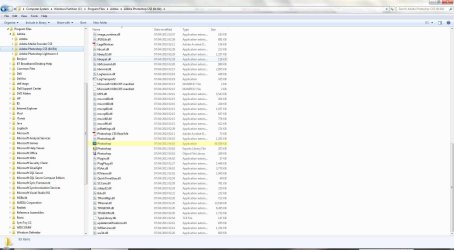
The Photoshop .exe file I mentioned is similar to the one in this screenshot of CS5 and you get to it via Windows Explorer.

PS7.JPG

You posted at the same time as I did. :)

You don't appear to have an SSD, so I don't quite know why you were told you had one.

Just delete the partition you created for PS7, extend the C drive to take up the space, and then install PS7 to your C drive.

Out of interest, can you confirm which Dell model you have along with its specifications?
 

My Computer My Computer

At a glance

Windows 7 Ultimate SP1 64-BitIntel Core i7 870 @ 2.93GHz8Gb Dual-Channel DDR3 @ 664MHznVidia GeForce GTX 460 1024MB dedicated RAM
Computer Manufacturer/Model Number
HP Pavilion Elite 495UK
OS
Windows 7 Ultimate SP1 64-Bit
CPU
Intel Core i7 870 @ 2.93GHz
Motherboard
MSI 2A9C (CPU1)
Memory
8Gb Dual-Channel DDR3 @ 664MHz
Graphics Card(s)
nVidia GeForce GTX 460 1024MB dedicated RAM
Sound Card
Realtek HD Audio
Monitor(s) Displays
HP2310i
Screen Resolution
1920 x 1080
Hard Drives
1x1954GB Hitachi HDS22020ALA 330 (RAID), 1x1954GB Hitachi External for backup and storage
PSU
460W
Case
HP Elite
Cooling
Air cooled
Keyboard
Logitech K750 solar-powered keyboard
Mouse
Logitech Wireless M180 mouse
Internet Speed
2Mb
Other Info
Pure Avanti Flow Internet Radio with iPod Dock, 64Gb iPod, HP USB Speakers, Sony MDR-V500 Headphones, Sony Vaio F-Series Laptop
Back
Top