Would reinstallation of Windows 7 fix software and hardware issues?

NorthernStar

New member
Local time
10:19 AM
Messages
17
According to my antivirus (Avast), I have 8 system registry issues; before I used Avast, I used the default antivirus program (Microsoft Security Essentials) that includes the firewall; however, now, I cannot activate the firewall. I've tried enabling it using the Run program, but the firewall nor Microsoft Security Essentials is listed in the list. I then used command prompt to do a scan over any registry issues on my laptop, and it had found several that it could not fix. If Avast is accurate, then I have 8 system registry issues.

Now I am wondering if a re-installation of Windows 7 would fix both software and hardware issues? Or would it simply only fix one? I'm considering sending my laptop in for several fixes: screen replacement, defective touchpad, and to fix these registry issues. However, since I'm doing these, I figured I might as well get a hardware diagnostic.
 

My Computer My Computer

At a glance

Windows 7 Home Premium, 64 Bit
Computer type
Laptop
Computer Manufacturer/Model Number
HP
OS
Windows 7 Home Premium, 64 Bit
What version of Avast are you using. I'm not familiar with the Registry reporting you mention.

If you mean that there are 8 entries in the registry that are related to viruses, they should probably be, at minimum, quarantined.

Don't do that yet though, I'd like to see what they are first.

If the Avast version you have includes a firewall, that will supersede and replace the Windows firewall.

Go to Control Panel > Action Center
expand the security drop down
What does it tell you about Network firewall (ON, OFF ... Winadows Firewall, Avast firewall?)
 

My Computer My Computer

At a glance

x64 (6.3.9600) Win8.1 Pro & soon dual boot x6...AMD A6-3420M APU with Radeon(tm) HD Graphics6.00 GBAMD Radeon(TM) HD 6520G
Computer type
Laptop
Computer Manufacturer/Model Number
HP Pavilion dv6-6c10us
OS
x64 (6.3.9600) Win8.1 Pro & soon dual boot x64 (6.1.7601) Win7_SP1 HomePrem
CPU
AMD A6-3420M APU with Radeon(tm) HD Graphics
Motherboard
Hewlett-Packard 1805
Memory
6.00 GB
Graphics Card(s)
AMD Radeon(TM) HD 6520G
Sound Card
(1) AMD High Definition Audio Device (2) IDT High Definiti
Monitor(s) Displays
HP W2072a 20" LCD (1600 x 900) @ 60 Hz
Screen Resolution
1366 x 768 x 32 bits (4294967296 colors) @ 60 Hz
Hard Drives
ST640LM0 00 HM641JI SATA Disk Device
Keyboard
Logitech k520 wireless KB
Mouse
Logitech m320 wireless mouse (bundled with KB)
Internet Speed
15/5 | 54 MB Wireless 'n'
Antivirus
Realtime: Defender or Avast | On-demand: Malwarebytes, ESET
Browser
IE 11 on Win8, IE 10 on win 7
Other Info
Media: [Gimp, Audacity, VLC] || Comm: [WEmail 2012, Skype] || Productivity: [OpenOffice,| Textpad] || Utils: [Sysinternals, cCleaner, Speccy, Defraggler]
A clean reinstall will fix software and hardware issues if the hardware isn't defective. You'd get a new registry.

Almost any registry will have "issues". Whether they have any significance or whether it's worth 10 seconds of your time to fix them is another issue. I've had registry issues according to CCleaner for years and don't bother to fix them. They grow over time. If you are obsessive/compulsive and just can't stand to have issues, then "fix" them and live with the consequences. Otherwise, keep on as usual.
 

My Computer My Computer

At a glance

Windows 7 Home Premium SP1, 64-bitIntel Skylake i5-6600K, not overclocked8 GB HyperX DDR4-2666 (2 x 4 GB)none; graphics are integrated on CPU
Computer type
PC/Desktop
Computer Manufacturer/Model Number
Ignatz Special; 4 speed manual gearbox; factory air conditioning; one of one
OS
Windows 7 Home Premium SP1, 64-bit
CPU
Intel Skylake i5-6600K, not overclocked
Motherboard
AsRock Z170M Extreme 4, micro ATX
Memory
8 GB HyperX DDR4-2666 (2 x 4 GB)
Graphics Card(s)
none; graphics are integrated on CPU
Sound Card
onboard: Realtek ALC1150; external: USB Behringer UF0-202
Monitor(s) Displays
Dell S2340M 23 inch IPS
Screen Resolution
1600 x 900
Hard Drives
System: Crucial MX100 series SSD, 128 GB;
Data: Samsung Spinpoint 103SJ, 1 TB;
Backup: WD Caviar Green WD30EZRX-00D8PB0, 3 TB
PSU
Rosewill SilentNight 500 watt fanless, semi-modular
Case
Antec Solo II
Cooling
Noctua NH-U12S; Noctua F12 intake, Noctua S12A exhaust
Keyboard
Microsoft 200 6JH-00001 USB
Mouse
Dell or Microsoft optical wired; USB
Antivirus
Microsoft Security Essentials and Malwarebytes Premium
Browser
Pale Moon
Other Info
All fans PWM; speeds at idle: CPU circa 500 rpm; intake circa 600 rpm; exhaust circa 600 rpm; CPU temps 27 idle and 47 C load in a warm room (27 C/81 F) when running Intel Extreme Tuning Utility stress test.
Slartybart: I used the "Essential: avast! Free Antivirus" download listed at the bottom of the page at this link: AVAST 2014 | Download Free Antivirus Software for Virus Protection

I don't believe that these registry issues are related to viruses since I have scanned it this past week and the results said there were no viruses on my laptop. Here are some attachments of the issues on my laptop:

1 - Avast! Free Antivirus - Computer Summary: http://i1174.photobucket.com/albums/r616/NorthernStar_/IMG_3092_zps3a5153f8.jpg
2 - Action Center Overview: http://i1174.photobucket.com/albums/r616/NorthernStar_/IMG_3095_zpsb1cc4db7.jpg
3 - Action Center Error Message after clicking "Turn On Now" for Windows Security Center Service: http://i1174.photobucket.com/albums/r616/NorthernStar_/IMG_3094_zpsbc3acf58.jpg
4 - Firewall Overview: http://s1174.photobucket.com/user/NorthernStar_/media/IMG_3096_zps3b44c106.jpg.html
5 - Firewall Error Message: http://i1174.photobucket.com/albums/r616/NorthernStar_/IMG_3097_zps5e3af878.jpg

Ignatzatsonic: How may I find out if the hardware is defective? The consequences being that money would be wasted on fixing these registry issues, only to have them again in the future?
 
Last edited:

My Computer My Computer

At a glance

Windows 7 Home Premium, 64 Bit
Computer type
Laptop
Computer Manufacturer/Model Number
HP
OS
Windows 7 Home Premium, 64 Bit
Ignatzatsonic: How may I find out if the hardware is defective? The consequences being that money would be wasted on fixing these registry issues, only to have them again in the future?

First step is an accurate description of the symptoms.

It's unclear to me what your symptoms are other than screen and trackball issues.

Hardware issues are usually sorted out through such things as inference based on the symptoms, trial and error, temporary substitution of known good components, and use of certain testing programs (particularly for RAM and hard drives). Some testing tools such as multi-meters can be useful, but most users don't have access to them.

CPUs very rarely fail, so you're more likely to look at drives, RAM, power supplies, or motherboards.

Components are generally replaced rather than repaired.

I see Avast refers to your issues as "registry tweaks". The use of the term "tweaks" would make me suspect that it's not a serious issue.

Have you done any "tweaking" of this system or used any so called repair or fixit programs?

Have you checked to see what services are running or not running?

Have you recently run malware scans?

Have you run sfc /scannow?

Have you looked at processes in Task Manager?
 

My Computer My Computer

At a glance

Windows 7 Home Premium SP1, 64-bitIntel Skylake i5-6600K, not overclocked8 GB HyperX DDR4-2666 (2 x 4 GB)none; graphics are integrated on CPU
Computer type
PC/Desktop
Computer Manufacturer/Model Number
Ignatz Special; 4 speed manual gearbox; factory air conditioning; one of one
OS
Windows 7 Home Premium SP1, 64-bit
CPU
Intel Skylake i5-6600K, not overclocked
Motherboard
AsRock Z170M Extreme 4, micro ATX
Memory
8 GB HyperX DDR4-2666 (2 x 4 GB)
Graphics Card(s)
none; graphics are integrated on CPU
Sound Card
onboard: Realtek ALC1150; external: USB Behringer UF0-202
Monitor(s) Displays
Dell S2340M 23 inch IPS
Screen Resolution
1600 x 900
Hard Drives
System: Crucial MX100 series SSD, 128 GB;
Data: Samsung Spinpoint 103SJ, 1 TB;
Backup: WD Caviar Green WD30EZRX-00D8PB0, 3 TB
PSU
Rosewill SilentNight 500 watt fanless, semi-modular
Case
Antec Solo II
Cooling
Noctua NH-U12S; Noctua F12 intake, Noctua S12A exhaust
Keyboard
Microsoft 200 6JH-00001 USB
Mouse
Dell or Microsoft optical wired; USB
Antivirus
Microsoft Security Essentials and Malwarebytes Premium
Browser
Pale Moon
Other Info
All fans PWM; speeds at idle: CPU circa 500 rpm; intake circa 600 rpm; exhaust circa 600 rpm; CPU temps 27 idle and 47 C load in a warm room (27 C/81 F) when running Intel Extreme Tuning Utility stress test.
No, I have not done tweaking on the system nor used any repair or fixit programs on it nor looked at processes in the Task Manager. However, I have checked to see which services are running or not running, and I believe it is only the Security Center / Firewall that is not running. I have recently done a malware scan this week, and received no viruses as a result. Recently, I believe I did run sfc in Command Prompt in order to scan for corrupted registry files as prompted by a tutorial.
 
Last edited:

My Computer My Computer

At a glance

Windows 7 Home Premium, 64 Bit
Computer type
Laptop
Computer Manufacturer/Model Number
HP
OS
Windows 7 Home Premium, 64 Bit
No one here any longer recommends Avast since it bloated up awhile back. So this is what to expect.

I would System Restore to before you installed Avast and reinstall MSE with the WIndows Firewall.

If you have a problem getting infected then the solution which works best is to buy Malwarebytes Real Time Protection for $19 for life. It will not let anything bad in. Otherwise just use the MBAM scanner as needed.
 
The system restores listed for use only go back to June 26 of this year, and by then, I had already installed Avast. Any other suggestions?
 

My Computer My Computer

At a glance

Windows 7 Home Premium, 64 Bit
Computer type
Laptop
Computer Manufacturer/Model Number
HP
OS
Windows 7 Home Premium, 64 Bit
If uninstalling Avast and reinstalling MSE with Win7 firewall doesn't help, then try SFC /SCANNOW Command
to check for damaged System files.

But if you still are running the HP factory preinstalled Win7, then that has the worst of all brands load of bloatware and duplicate utilities which interfere with better versions built into Win7. I would strongly consider doing a Clean Reinstall - Factory OEM Windows 7 to finally experience Win7 on that PC.

Be sure to read the Special Note for HP Owners at the end. Many later HP models have a Minimal Recovery option on HP System Recovery that is close to the reinstall and less work. It also shows how to preserve the valuable hardware Diagnostics which can be booted to run from the F12 key.
 
gregrocker: I will try uinstalling those programs, but I have already tried using sfc to search for damaged system files coming up with corrupted files that were not able to be fixed. How will I know if I am running on the preinstalled version of Windows 7?
 

My Computer My Computer

At a glance

Windows 7 Home Premium, 64 Bit
Computer type
Laptop
Computer Manufacturer/Model Number
HP
OS
Windows 7 Home Premium, 64 Bit
Thanks, the registry errors reported by Avast are from their Grime Fighter.
Ignore those for the moment. They aren't errors, they're Avast's idea of an optimized system. They could be anything from a start menu customization to replacing a MS application (Notepad) with a non-MS application (Textpad).

The other images indicate a more serious issue, the last (Windows Firewall cannot change some of your settings:
0x80070424) gives the most details.

See: http://www.sevenforums.com/tutorials/236709-services-restore-default-services-windows-7-a.html
Scroll down to the following registry files, download and merge them
Base Filtering Engine (BFE )
and
Windows Firewall (MpsSvc)

Restart your machine after both services are restored to their defaults.

Follow the Download, Scan, and Clean steps in this tutorial on the author's site: How to use AdwCleaner version 3.x

Post any logs here on SevenForums - not on the General Changelog Team (GCT) site. SevenForums members might ask you to launch other on-demand scanners that are not familiar to GCT.
The Scan log is saved in C:\AdwCleaner\AdwCleaner[R#].txt
The Clean log is saved in C:\AdwCleaner\AdwCleaner[S#].txt

Please attach both to a new post.
See: http://www.sevenforums.com/tutorials/9733-screenshots-files-upload-post-seven-forums.html
:tip:You can also post screen shots directly on SF - it's easier for members reading your thread to see the pictures inline.if members

A TechNet blog suggests that this might be caused by a wide spread malicious program, but that was written in 2011. It's possible that you happened on it 3 years later - won't know until the scan logs are posted (there will be additional scans).

I don't want to distract you from your original question. If you are prepared to re-install - that is certainly the easiest and often quickest way to resolve any issue.


I'd like to see if restoring BFE and the firewall service solve the larger issues.
I'd also like to see if AdwCleaner finds and repairs anything.

Thanks

Bill
.
 

My Computer My Computer

At a glance

x64 (6.3.9600) Win8.1 Pro & soon dual boot x6...AMD A6-3420M APU with Radeon(tm) HD Graphics6.00 GBAMD Radeon(TM) HD 6520G
Computer type
Laptop
Computer Manufacturer/Model Number
HP Pavilion dv6-6c10us
OS
x64 (6.3.9600) Win8.1 Pro & soon dual boot x64 (6.1.7601) Win7_SP1 HomePrem
CPU
AMD A6-3420M APU with Radeon(tm) HD Graphics
Motherboard
Hewlett-Packard 1805
Memory
6.00 GB
Graphics Card(s)
AMD Radeon(TM) HD 6520G
Sound Card
(1) AMD High Definition Audio Device (2) IDT High Definiti
Monitor(s) Displays
HP W2072a 20" LCD (1600 x 900) @ 60 Hz
Screen Resolution
1366 x 768 x 32 bits (4294967296 colors) @ 60 Hz
Hard Drives
ST640LM0 00 HM641JI SATA Disk Device
Keyboard
Logitech k520 wireless KB
Mouse
Logitech m320 wireless mouse (bundled with KB)
Internet Speed
15/5 | 54 MB Wireless 'n'
Antivirus
Realtime: Defender or Avast | On-demand: Malwarebytes, ESET
Browser
IE 11 on Win8, IE 10 on win 7
Other Info
Media: [Gimp, Audacity, VLC] || Comm: [WEmail 2012, Skype] || Productivity: [OpenOffice,| Textpad] || Utils: [Sysinternals, cCleaner, Speccy, Defraggler]
gregrocker: I will try uinstalling those programs, but I have already tried using sfc to search for damaged system files coming up with corrupted files that were not able to be fixed. How will I know if I am running on the preinstalled version of Windows 7?

If you have SFC errors, the tide turns a bit in favor of a re-install.

If you have never done a Clean re-install (using the HP recovery methods doesn't count as a Clean re-install), then you're probably running Windows as HP delivered the machine (Windows preinstalled by HP).

Bill
.
 

My Computer My Computer

At a glance

x64 (6.3.9600) Win8.1 Pro & soon dual boot x6...AMD A6-3420M APU with Radeon(tm) HD Graphics6.00 GBAMD Radeon(TM) HD 6520G
Computer type
Laptop
Computer Manufacturer/Model Number
HP Pavilion dv6-6c10us
OS
x64 (6.3.9600) Win8.1 Pro & soon dual boot x64 (6.1.7601) Win7_SP1 HomePrem
CPU
AMD A6-3420M APU with Radeon(tm) HD Graphics
Motherboard
Hewlett-Packard 1805
Memory
6.00 GB
Graphics Card(s)
AMD Radeon(TM) HD 6520G
Sound Card
(1) AMD High Definition Audio Device (2) IDT High Definiti
Monitor(s) Displays
HP W2072a 20" LCD (1600 x 900) @ 60 Hz
Screen Resolution
1366 x 768 x 32 bits (4294967296 colors) @ 60 Hz
Hard Drives
ST640LM0 00 HM641JI SATA Disk Device
Keyboard
Logitech k520 wireless KB
Mouse
Logitech m320 wireless mouse (bundled with KB)
Internet Speed
15/5 | 54 MB Wireless 'n'
Antivirus
Realtime: Defender or Avast | On-demand: Malwarebytes, ESET
Browser
IE 11 on Win8, IE 10 on win 7
Other Info
Media: [Gimp, Audacity, VLC] || Comm: [WEmail 2012, Skype] || Productivity: [OpenOffice,| Textpad] || Utils: [Sysinternals, cCleaner, Speccy, Defraggler]
It`s a shame you did not create a disk image of windows when it was in perfect working order.

http://www.sevenforums.com/tutorials/663-backup-complete-computer-create-image-backup.html

Macrium Reflect FREE Edition - Information and download

If you decide to re install windows, let us know and we`ll gladly help you with that.

http://www.sevenforums.com/tutorials/1649-clean-install-windows-7-a.html

Microsoft Security Essentials and Malwarebytes are all you need. Both are free :)

http://windows.microsoft.com/en-us/windows/security-essentials-download

http://www.malwarebytes.org/lp/lp4_r/?gclid=CLTgv6vcs78CFc9j7Aody1cApQ
 

My Computer My Computer

At a glance

Windows 10 Pro x64Intel Core i7 6700KGSkill TridentZ RGB 16GB 3600 16-16-16-36EVGA GTX 980 Ti SC x2
Computer type
PC/Desktop
Computer Manufacturer/Model Number
Skylake Special #666
OS
Windows 10 Pro x64
CPU
Intel Core i7 6700K
Motherboard
Asus Sabertooth Z170 Mark 1
Memory
GSkill TridentZ RGB 16GB 3600 16-16-16-36
Graphics Card(s)
EVGA GTX 980 Ti SC x2
Sound Card
Realtek High Definition
Monitor(s) Displays
AOC G2460PG
Screen Resolution
1920 x 1080 144Hz
Hard Drives
Samsung 860 Pro 256GB, Seagate Barracuda 4TB x2
PSU
EVGA 1000 P2, EVGA White Custom Braided Cables
Case
Corsair Vengeance C70 Gunmetal Black
Cooling
Corsair H100i v2, Corsair ML120 x2, Thermal Grizzly Kryonaut
Keyboard
Logitech G910 Orion Spectrum
Mouse
Logitech G700s
Internet Speed
Verizon Fios Quantum Gateway 75/75
Antivirus
Windows Defender, Malwarebytes Free 3.8.3
Browser
Chrome
Other Info
Corsair SP120 x4, LG Blu-ray Drive, Durabrand HT-395 100 Watt Dolby Digital Amp, Corsair H2100 Wireless 7.1 Headset
gregrocker: I will try uinstalling those programs, but I have already tried using sfc to search for damaged system files coming up with corrupted files that were not able to be fixed. How will I know if I am running on the preinstalled version of Windows 7?

Are there a bunch of HP programs in All Programs list? Turn off them and everything else besides MSE after replacing Avast, In msconfig>Startup and >Services (after hiding all MS Services). This will preview the kind of performance you'll be having with the Clean Reinstall.
 
Slartybart: Does it matter whether or not the files are saved to the desktop? I tried dragging them to the desktop after downloading, and it wouldn't move due to my defective touchpad.

As for replacing the .reg files, I followed the instructions, and the settings have stayed the same. This would be fixed with a clean reinstall, correct?

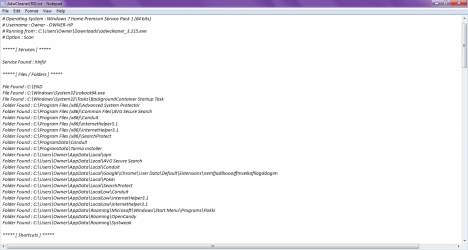
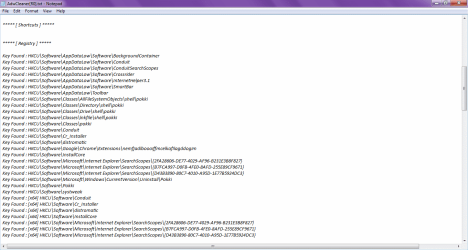
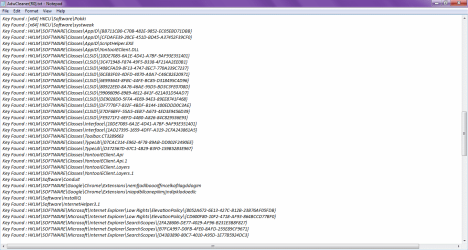
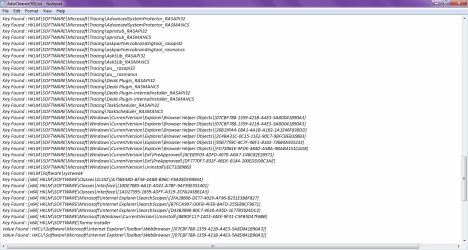
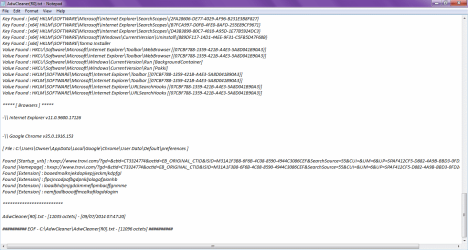
Below is the report I received from the cleaner. Does this log disclose any personal information about my laptop in any way? Also, I am currently running on the Windows preinstalled by HP.

AddRam: Thank you for the links!

Gregrocker: I'll check those out, thank you very much. :)

I have two questions about doing a Clean re-install of Windows 7; I currently have Microsoft Office 2010 that I had paid for previously when my family first bought this laptop, while I have a game that takes a few days to download and install due to slow internet connection. Is there anyway to burn these or save them, so I can input them onto the hard drive after a clean re-install?
 

Attachments

  • Report1.png
    Report1.png
    27.6 KB · Views: 2
  • Report2.png
    Report2.png
    27.8 KB · Views: 3
  • Report3.png
    Report3.png
    36.1 KB · Views: 2
  • Report4.png
    Report4.png
    35 KB · Views: 2
  • Report5.png
    Report5.png
    35.2 KB · Views: 2

My Computer My Computer

At a glance

Windows 7 Home Premium, 64 Bit
Computer type
Laptop
Computer Manufacturer/Model Number
HP
OS
Windows 7 Home Premium, 64 Bit
Did you save the Office Key and installation media?

If not retrieving the key is covered in Clean Reinstall - Factory OEM Windows 7. You can download the installation ISO to burn to CD and reinstall with key from Office 2010 Direct Download Links.

If you plan to reinstall, please study carefully the steps to prepare and do a perfect Clean Reinstall - Factory OEM Windows 7 then set it up and maintain it perfectly. The tutorial compiles everything that's worked best in tens of thousands of installs we've directly helped with here since beta.
 
Slartybart: Does it matter whether or not the files are saved to the desktop? I tried dragging them to the desktop after downloading, and it wouldn't move due to my defective touchpad.

As for replacing the .reg files, I followed the instructions, and the settings have stayed the same. This would be fixed with a clean reinstall, correct?

Below is the report I received from the cleaner. Does this log disclose any personal information about my laptop in any way? Also, I am currently running on the Windows preinstalled by HP.
.....
I have two questions about doing a Clean re-install of Windows 7; I currently have Microsoft Office 2010 that I had paid for previously when my family first bought this laptop, while I have a game that takes a few days to download and install due to slow internet connection. Is there anyway to burn these or save them, so I can input them onto the hard drive after a clean re-install?

No, it doesn't have to be the Desktop. Those instructions just make it easier to find and launch the program for some people.

Too bad the reg files didn't resolve the issue.
Yes, a Clean reinstall will fix just about any computer issue except for hardware.

SevenForums is very mindful of your privacy. Almost every utility suggested by members presents information necessary to troubleshoot issues on a machine. No personal information is disclosed.
Some people think that their user ID or network information should be veiled. But a userID of Bob isn't very private, and a network address of 192.168.1.27 isn't a security issue because the 192.168 address is not addressable out side of your local network (it can only be access on your computer or router)

The only real personal information that should never be posted are things such as your home address, phone#, eMail address, SS#, medical information - you know the standard don't tell people these things.

As far as Windows goes, never publish your License key. That could be used by an unscrupulous person to activate Windows and possibly cause you, the license owner, difficulties with Microsoft Genuine Advantage.

If, on the rare occasion a member does post information that should not be made public, SF admins scrub it if they see it. If a member does not follow the prescribed method for posting information, I will ask them to remove the image or data and replace it with a non-sensitive version. The two most common posting 'errors' I come across are screen shots for eMail configuration (eMail is exposed when it should have been blacked out) and Speccy reports (a local snapshot exposes the license key, a PUBLISHED snapshot does not)

Purchased software:
you need to be sure that you have the
  • license key so you can reinstall the program after a Clean reinstall of Windows.
  • you have the install media (discs or download location)

Greg already posted good information on this subject - please follow his instructions with regards to purchased software.

Bill
.
 

My Computer My Computer

At a glance

x64 (6.3.9600) Win8.1 Pro & soon dual boot x6...AMD A6-3420M APU with Radeon(tm) HD Graphics6.00 GBAMD Radeon(TM) HD 6520G
Computer type
Laptop
Computer Manufacturer/Model Number
HP Pavilion dv6-6c10us
OS
x64 (6.3.9600) Win8.1 Pro & soon dual boot x64 (6.1.7601) Win7_SP1 HomePrem
CPU
AMD A6-3420M APU with Radeon(tm) HD Graphics
Motherboard
Hewlett-Packard 1805
Memory
6.00 GB
Graphics Card(s)
AMD Radeon(TM) HD 6520G
Sound Card
(1) AMD High Definition Audio Device (2) IDT High Definiti
Monitor(s) Displays
HP W2072a 20" LCD (1600 x 900) @ 60 Hz
Screen Resolution
1366 x 768 x 32 bits (4294967296 colors) @ 60 Hz
Hard Drives
ST640LM0 00 HM641JI SATA Disk Device
Keyboard
Logitech k520 wireless KB
Mouse
Logitech m320 wireless mouse (bundled with KB)
Internet Speed
15/5 | 54 MB Wireless 'n'
Antivirus
Realtime: Defender or Avast | On-demand: Malwarebytes, ESET
Browser
IE 11 on Win8, IE 10 on win 7
Other Info
Media: [Gimp, Audacity, VLC] || Comm: [WEmail 2012, Skype] || Productivity: [OpenOffice,| Textpad] || Utils: [Sysinternals, cCleaner, Speccy, Defraggler]
If you are going to do a Clean re-install, we can forget about cleaning the malware found by AdwCleaner.

I think you'll find that your machine runs much better in the long run with a Clean reinstall.

Greg has already posted the tutorial for that - read and prepare, then read again. Ask any questions before proceeding, it's always easier to provide an answer to a question than to recover from missing a step.

Bill
.
 

My Computer My Computer

At a glance

x64 (6.3.9600) Win8.1 Pro & soon dual boot x6...AMD A6-3420M APU with Radeon(tm) HD Graphics6.00 GBAMD Radeon(TM) HD 6520G
Computer type
Laptop
Computer Manufacturer/Model Number
HP Pavilion dv6-6c10us
OS
x64 (6.3.9600) Win8.1 Pro & soon dual boot x64 (6.1.7601) Win7_SP1 HomePrem
CPU
AMD A6-3420M APU with Radeon(tm) HD Graphics
Motherboard
Hewlett-Packard 1805
Memory
6.00 GB
Graphics Card(s)
AMD Radeon(TM) HD 6520G
Sound Card
(1) AMD High Definition Audio Device (2) IDT High Definiti
Monitor(s) Displays
HP W2072a 20" LCD (1600 x 900) @ 60 Hz
Screen Resolution
1366 x 768 x 32 bits (4294967296 colors) @ 60 Hz
Hard Drives
ST640LM0 00 HM641JI SATA Disk Device
Keyboard
Logitech k520 wireless KB
Mouse
Logitech m320 wireless mouse (bundled with KB)
Internet Speed
15/5 | 54 MB Wireless 'n'
Antivirus
Realtime: Defender or Avast | On-demand: Malwarebytes, ESET
Browser
IE 11 on Win8, IE 10 on win 7
Other Info
Media: [Gimp, Audacity, VLC] || Comm: [WEmail 2012, Skype] || Productivity: [OpenOffice,| Textpad] || Utils: [Sysinternals, cCleaner, Speccy, Defraggler]
No, I do not believe I did, but I'll look around to make sure. Thank you so much for your help! I appreciate it. I just have one last question if you don't mind answering it -- is there a way to look at the actual inside of the laptop to clean it? I would love to get this laptop cleaned really well like new. I hope you guys didn't mind all these questions; I'm a very curious person. :o
 

My Computer My Computer

At a glance

Windows 7 Home Premium, 64 Bit
Computer type
Laptop
Computer Manufacturer/Model Number
HP
OS
Windows 7 Home Premium, 64 Bit

My Computer My Computer

At a glance

x64 (6.3.9600) Win8.1 Pro & soon dual boot x6...AMD A6-3420M APU with Radeon(tm) HD Graphics6.00 GBAMD Radeon(TM) HD 6520G
Computer type
Laptop
Computer Manufacturer/Model Number
HP Pavilion dv6-6c10us
OS
x64 (6.3.9600) Win8.1 Pro & soon dual boot x64 (6.1.7601) Win7_SP1 HomePrem
CPU
AMD A6-3420M APU with Radeon(tm) HD Graphics
Motherboard
Hewlett-Packard 1805
Memory
6.00 GB
Graphics Card(s)
AMD Radeon(TM) HD 6520G
Sound Card
(1) AMD High Definition Audio Device (2) IDT High Definiti
Monitor(s) Displays
HP W2072a 20" LCD (1600 x 900) @ 60 Hz
Screen Resolution
1366 x 768 x 32 bits (4294967296 colors) @ 60 Hz
Hard Drives
ST640LM0 00 HM641JI SATA Disk Device
Keyboard
Logitech k520 wireless KB
Mouse
Logitech m320 wireless mouse (bundled with KB)
Internet Speed
15/5 | 54 MB Wireless 'n'
Antivirus
Realtime: Defender or Avast | On-demand: Malwarebytes, ESET
Browser
IE 11 on Win8, IE 10 on win 7
Other Info
Media: [Gimp, Audacity, VLC] || Comm: [WEmail 2012, Skype] || Productivity: [OpenOffice,| Textpad] || Utils: [Sysinternals, cCleaner, Speccy, Defraggler]
Back
Top